შესავალი
This manual provides detailed instructions for the installation, operation, and maintenance of the Hanwha Techwin HCV-6070R 2MP Outdoor Vandal-Resistant Dome Camera. This camera is designed for outdoor security surveillance, offering 2-megapixel resolution, a 2.8-12mm manual varifocal lens, and night vision capabilities with a BNC connection.
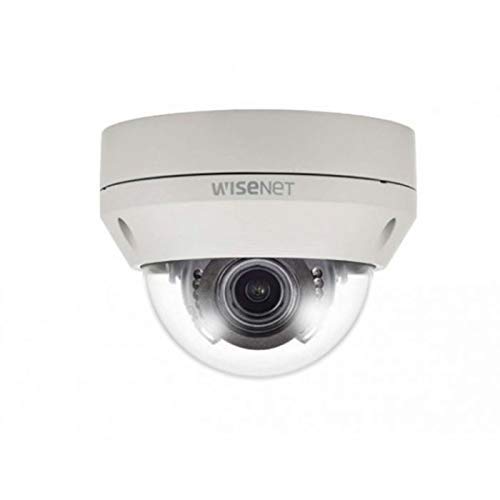
Figure 1: Hanwha Techwin HCV-6070R 2MP Outdoor Vandal-Resistant Dome Camera.
უსაფრთხოების ინფორმაცია
Please read all safety instructions carefully before installing or operating the camera. Keep this manual for future reference.
- Ensure the power supply matches the camera's requirements to prevent electrical shock or fire.
- არ დაუშვათ კამერა ექსტრემალურ ტემპერატურაზე, ტენიანობაზე ან კოროზიულ გარემოში.
- მონტაჟი უნდა განხორციელდეს კვალიფიციური პერსონალის მიერ ადგილობრივი ელექტრო კოდების შესაბამისად.
- Avoid direct exposure of the lens to strong light sources for extended periods.
- არ სცადოთ კამერის დაშლა ან მოდიფიცირება. ეს გააუქმებს გარანტიას.
პაკეტის შიგთავსი
დარწმუნდით, რომ შეფუთვაში ყველა ნივთია:
- Hanwha Techwin HCV-6070R Dome Camera (1 unit)
- სამონტაჟო ხრახნები და წამყვანები
- ინსტალაციის შაბლონი
- სწრაფი დაწყების სახელმძღვანელო
- Waterproof Cap (if applicable)
დაყენება
1. კამერის დამონტაჟება
The HCV-6070R is designed for wall mounting. Choose a suitable outdoor location that provides the desired surveillance coverage and is protected from direct impact.
- Use the provided installation template to mark the drilling holes on the wall.
- Drill holes according to the template and insert the wall anchors.
- Secure the camera base to the wall using the mounting screws.
- კამერის რეგულირება viewing angle as needed before tightening all screws.
2. გაყვანილობა და კავშირები
The camera utilizes a BNC connection for video output and requires a separate power supply. Ensure all connections are secure and weatherproof for outdoor use.
- ვიდეო კავშირი: Connect a BNC cable from the camera's BNC port to the video input of your DVR (Digital Video Recorder).
- დენის კავშირი: Connect a 12V DC power adapter (not included) to the camera's power input. The camera operates at 8 watts.
- უსადენო კავშირი: The camera supports Wi-Fi for remote control and monitoring. Refer to the operating section for initial Wi-Fi setup.

სურათი 2: მაგample of a BNC coaxial cable for video connection. Ensure a secure connection to the camera and DVR.
3. საწყისი კონფიგურაცია
After physical installation and power-up, access the camera settings via your connected DVR or a compatible mobile application (Android controller type specified).
- დააყენეთ თარიღი და დრო.
- Configure network settings for Wi-Fi connectivity.
- Adjust video quality and recording preferences.
კამერის მართვა
1. ვიდეო მონიტორინგი და ჩაწერა
The camera provides 2MP effective video resolution, capturing video at 1080p and a frame rate of 30 fps. Video is typically recorded in MPEG-4 format.
- პირდაპირ ეთერში წვდომა view და ჩაწერილი საკვებიtage through your connected DVR or the remote control application.
- Ensure your DVR is configured to record from the correct channel.
2. Adjusting Focus and Zoom
The HCV-6070R features a 2.8-12mm manual varifocal lens with optical zoom. Adjustments are made manually on the camera body.
- Loosen the focus and zoom locking screws on the camera lens assembly.
- Adjust the zoom ring to achieve the desired field of view.
- Adjust the focus ring until the image is clear and sharp.
- Tighten the locking screws to secure the settings.
3. Night Vision and Low Light Performance
Equipped with night vision and "Night Color" low light technology, the camera automatically switches to infrared mode in low light conditions to provide clear surveillance footage. The light source type is LED.
- Ensure no obstructions block the infrared LEDs on the camera.
- The camera will automatically activate its infrared illuminators when ambient light levels drop.
4. მოძრაობის გამოვლენა
The camera supports motion-only alerts. Configure motion detection zones and sensitivity settings through your DVR or the remote control application.
- კამერის შიგნით კონკრეტული ზონების განსაზღვრა view მოძრაობის გამოვლენისთვის.
- Set the sensitivity level to minimize false alarms.
- Configure alert notifications (e.g., email, push notifications) via your DVR or application.
5. დისტანციური მართვა
The camera can be controlled remotely using a compatible Android application. Ensure the camera is connected to your Wi-Fi network.
- Download and install the Hanwha Techwin mobile application on your Android device.
- Follow the in-app instructions to add and connect to your HCV-6070R camera.
- აპლიკაციის საშუალებით შეგიძლიათ view იცოცხლეtage, access recordings, and adjust certain camera settings.
მოვლა
რეგულარული მოვლა უზრუნველყოფს თქვენი კამერის ოპტიმალურ მუშაობას და გამძლეობას.
- ლინზების გაწმენდა: Gently wipe the camera lens with a soft, clean, lint-free cloth. For stubborn dirt, use a lens cleaning solution specifically designed for optical surfaces.
- სახლის დასუფთავება: კამერის გარე კორპუსი რეკლამით გაწმინდეთamp ქსოვილი. არ გამოიყენოთ უხეში ქიმიკატები ან აბრაზიული საწმენდები.
- საკაბელო შემოწმება: Periodically check all cables and connections for signs of wear, damage, or corrosion, especially for outdoor installations.
- Firmware განახლებები: Check the Hanwha Techwin website for any available firmware updates to ensure your camera has the latest features and security patches.
პრობლემების მოგვარება
| პრობლემა | შესაძლო მიზეზი | გამოსავალი |
|---|---|---|
| ვიდეო გამომავალი არ არის | No power; Loose BNC connection; Incorrect DVR input selected. | Check power supply; Secure BNC cable; Select correct channel on DVR. |
| ბუნდოვანი ან ბუნდოვანი სურათი | Lens out of focus; Dirty lens. | Manually adjust focus (refer to Operating section); Clean the lens. |
| ღამის ხედვა არ მუშაობს | IR LEDs blocked; Insufficient power; Camera stuck in day mode. | Clear obstructions; Verify power supply; Restart camera. |
| მოძრაობის ამოცნობა არ აქტიურდება | Incorrect sensitivity settings; Motion detection zone not configured. | Adjust sensitivity; Configure motion detection zones in DVR/app. |
| Cannot connect via Wi-Fi | Incorrect Wi-Fi password; Camera out of range; Network issues. | Verify Wi-Fi credentials; Move camera closer to router; Check network status. |
სპეციფიკაციები
| მოდელი | HCV-6070R |
| ბრენდი | HANWHA Techwin |
| ეფექტური ვიდეო რეზოლუცია | 2 მეგაპიქსელი (1080p) |
| კადრების სიხშირე | 30 fps |
| ლინზის ტიპი | 2.8-12mm Manual Varifocal Lens |
| ფოკუსის ტიპი | მექანიკური ფოკუსი |
| მასშტაბირების ტიპი | ოპტიკური ზუმი |
| დაკავშირების ტექნოლოგია | Wireless (Wi-Fi), BNC Connection |
| დენის წყარო | Manual (requires external 12V DC power adapter) |
| ვატtage | 8 ვატი |
| შიდა/გარე გამოყენება | გარე |
| სპეციალური ფუნქცია | Night Vision (Night Color low light technology) |
| ფორმის ფაქტორი | გუმბათი |
| სამონტაჟო ტიპი | კედლის სამაგრი |
| თავსებადი მოწყობილობები | DVR |
| კონტროლის მეთოდი | Remote (Android Controller Type) |
| დაცვის საერთაშორისო რეიტინგი | IP54 |
| ფოტო სენსორის ტექნოლოგია | CMOS |
| ვიდეო გადაღების ფორმატი | MPEG-4 |
| გაფრთხილების ტიპი | მოძრაობა მხოლოდ |
გარანტია და მხარდაჭერა
For warranty information and technical support, please refer to the official Hanwha Techwin webსაიტზე ან პირდაპირ დაუკავშირდით მათ მომხმარებელთა მომსახურების სამსახურს. შეინახეთ თქვენი შესყიდვის ქვითარი, როგორც შეძენის დამადასტურებელი საბუთი გარანტიის მოთხოვნის შემთხვევაში.
მწარმოებელი: ჰანვა
პირველი ხელმისაწვდომი თარიღი: 19 წლის 2019 თებერვალი


