1. შესავალი
This manual provides essential information for the safe and efficient operation, setup, maintenance, and troubleshooting of the Keba KeTop T50-xxx/67641/06 industrial control panel. The KeTop T50-xxx/67641/06 is designed for robust performance in industrial environments, serving as a human-machine interface (HMI) for various control applications.
მოწყობილობის გამოყენებამდე ყურადღებით წაიკითხეთ ეს ინსტრუქცია, რათა უზრუნველყოთ მისი სათანადო გამოყენება და თავიდან აიცილოთ დაზიანება ან ტრავმა.
2. უსაფრთხოების ინფორმაცია
ყოველთვის დაიცავით შემდეგი უსაფრთხოების ზომები პირადი დაზიანების ან აღჭურვილობის დაზიანების თავიდან ასაცილებლად:
- კვალიფიციური პერსონალი: Installation, operation, and maintenance should only be performed by qualified and authorized personnel.
- დენის გათიშვა: Always disconnect power before performing any installation, maintenance, or repair work.
- გარემო პირობები: Operate the device within specified environmental limits (temperature, humidity, etc.).
- გადაუდებელი გაჩერება: Familiarize yourself with the location and operation of the emergency stop button on the device and the connected system.
- საკაბელო მენეჯმენტი: დარწმუნდით, რომ ყველა კაბელი სწორად არის გაყვანილი და დამაგრებული, რათა თავიდან აიცილოთ დაბრკოლების ან დაზიანების საშიშროება.
3. პროდუქტი დასრულდაview
The Keba KeTop T50-xxx/67641/06 is a robust handheld control panel designed for industrial applications. It features a display screen, various control buttons, and an emergency stop button, all integrated into an ergonomic housing.

სურათი 1: წინა view of the KeTop T50-xxx/67641/06 control panel, showing the display, control buttons, and the attached red connection cable.
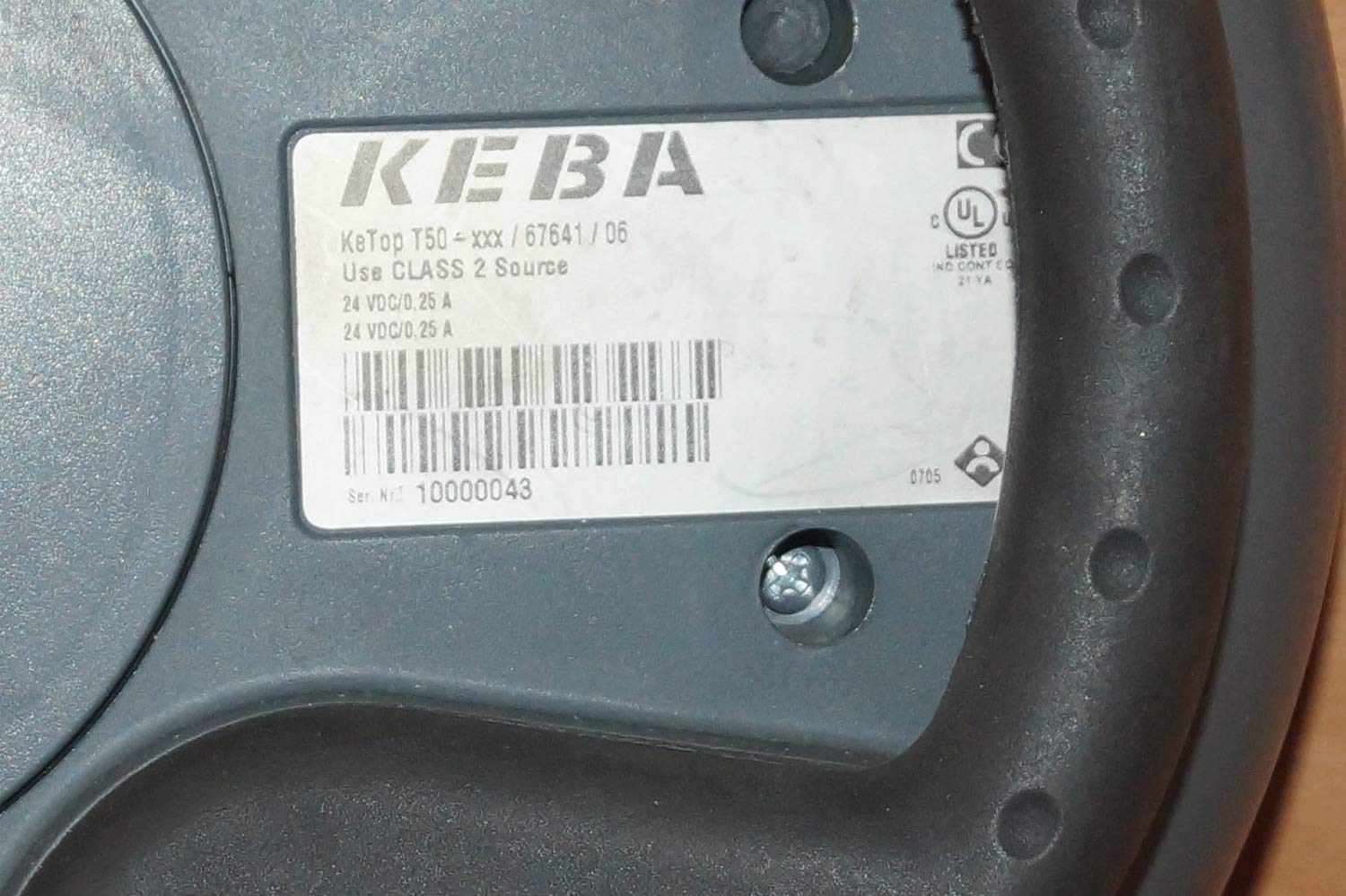
Figure 2: Rear label of the KeTop T50-xxx/67641/06, indicating model details and power requirements.
4. დაყენება და ინსტალაცია
Before connecting the KeTop T50-xxx/67641/06, ensure the host system is powered off and secured.
- შეამოწმეთ მოწყობილობა: Unpack the control panel and inspect it for any visible damage during transit.
- შეაერთეთ კაბელი: Connect the red multi-pin cable from the KeTop T50-xxx/67641/06 to the corresponding port on your industrial control system. Ensure the connection is secure and properly seated.
- ელექტრომომარაგება: Verify that the power supply for the control system meets the specifications required by the KeTop T50-xxx/67641/06 (24 VDC/0.25 A).
- მონტაჟი (სურვილისამებრ): If applicable, use the integrated mounting points to secure the panel in a convenient location, or ensure it is placed on a stable surface when not handheld.
- საწყისი ჩართვა: Once all connections are secure, power on the host system. The KeTop T50-xxx/67641/06 display should illuminate, indicating successful power-up.
5. საოპერაციო ინსტრუქციები
The KeTop T50-xxx/67641/06 serves as an interface for controlling industrial machinery. Specific operations will depend on the programming of the connected system.
- ეკრანის ნავიგაცია: Use the directional buttons (if present) or touch screen (if applicable) to navigate through menus and display information.
- ფუნქციის ღილაკები: The various buttons around the display are typically assigned specific functions by the system integrator. Refer to your system's documentation for button assignments.
- გადაუდებელი გაჩერება: In case of an emergency, press the large red emergency stop button immediately. This will typically halt all connected machine operations. Ensure the button is reset before resuming operations.
- მონაცემთა შეყვანა: Use the integrated keypad or on-screen keyboard for data entry as required by the application.
- გამოხმაურება: Pay attention to visual cues on the display and any audible signals from the device or connected system.
6. მოვლა
Regular maintenance ensures the longevity and reliable operation of your KeTop T50-xxx/67641/06.
- დასუფთავება:
- გაწმენდის წინ გამორთეთ დენი.
- გაწმინდეთ გარე ზედაპირები რბილი, დamp ქსოვილი.
- არ გამოიყენოთ აბრაზიული საწმენდები, გამხსნელები ან ზედმეტი ტენიანობა.
- დარწმუნდით, რომ სითხე არ მოხვდება მოწყობილობაში.
- საკაბელო შემოწმება: Periodically inspect the connection cable for signs of wear, cuts, or damage. Replace damaged cables immediately.
- ღილაკის ფუნქციონირება: Regularly test all buttons, including the emergency stop, to ensure they respond correctly.
- შენახვა: When not in use, store the device in a clean, dry environment, away from extreme temperatures and direct sunlight.
7. Დიაგნოსტიკა
This section provides solutions to common issues. For more complex problems, contact qualified service personnel.
| პრობლემა | შესაძლო მიზეზი | გამოსავალი |
|---|---|---|
| მოწყობილობა არ ჩაირთვება. | No power from host system; loose cable connection; faulty power supply. | Check host system power; ensure cable is securely connected; verify power supply output. |
| ეკრანი ცარიელია ან ციმციმებს. | Insufficient power; cable issue; internal fault. | Verify power supply; check cable integrity; if problem persists, contact support. |
| ღილაკები არ რეაგირებს. | Software issue on host system; physical button damage. | Restart the host system; inspect buttons for physical damage. |
| Emergency Stop button is stuck. | Button mechanism issue. | Do not force. Contact qualified service personnel immediately. |
8. სპეციფიკაციები
| ფუნქცია | დეტალი |
|---|---|
| მოდელი | KeTop T50-xxx/67641/06 |
| ბრენდი | Keba |
| დენის შეყვანა | 24 VDC / 0.25 A (as per device label) |
| ASIN | B07NSF65HM |
| მწარმოებლის მითითება | 2186 |
| პირველი ხელმისაწვდომი თარიღი | 10 წლის 2019 მაისი |
| სათადარიგო ნაწილების ხელმისაწვდომობა | ინფორმაცია მიუწვდომელია |
9. გარანტია და მხარდაჭერა
Information regarding specific warranty terms and conditions for the Keba KeTop T50-xxx/67641/06 is not provided in the product details. Please refer to the original purchase documentation or contact your supplier for warranty details.
For technical support or service inquiries, please contact the manufacturer, Keba, or your authorized distributor. Ensure you have the model number (KeTop T50-xxx/67641/06) and serial number (if applicable) ready when contacting support.


