შესავალი
This manual provides essential information for the safe and efficient operation of your HH Electronics Tessen TNP-1201 Speaker Cabinet. Please read this manual thoroughly before using the product to ensure proper setup, operation, and maintenance. Retain this manual for future reference.

სურათი 1: წინა view of the HH Electronics Tessen TNP-1201 Speaker Cabinet, showcasing the protective grille and HH logo.
უსაფრთხოების მნიშვნელოვანი ინსტრუქციები
- წაიკითხეთ ინსტრუქციები: წაიკითხეთ და გაიგეთ უსაფრთხოებისა და ექსპლუატაციის ყველა ინსტრუქცია ამ პროდუქტის გამოყენებამდე.
- შეინახეთ ინსტრუქციები: შეინახეთ ეს ინსტრუქციები მომავალი მითითებისთვის.
- გაითვალისწინეთ გაფრთხილებები: დაიცავით ყველა გაფრთხილება პროდუქტზე და საოპერაციო ინსტრუქციებში.
- მიჰყევით ინსტრუქციას: დაიცავით ყველა საოპერაციო და გამოყენების ინსტრუქცია.
- წყალი და ტენიანობა: არ გამოიყენოთ ეს მოწყობილობა წყალთან ახლოს.
- დასუფთავება: გაწმინდეთ მხოლოდ მშრალი ქსოვილით.
- ვენტილაცია: არ დაბლოკოთ ვენტილაციის ღიობები. დაამონტაჟეთ მწარმოებლის ინსტრუქციის შესაბამისად.
- სითბო: არ დააინსტალიროთ სითბოს წყაროსთან ახლოს, როგორიცაა რადიატორები, სითბოს რეგისტრები, ღუმელები ან სხვა მოწყობილობა (მათ შორის ampგამხსნელები), რომლებიც წარმოქმნიან სითბოს.
- დენის კაბელის დაცვა: დაიცავით დენის კაბელი სიარულისგან ან დაჭიმვისგან, განსაკუთრებით შტეფსელებთან, მოსახერხებელ კონტეინერებთან და იმ ადგილას, სადაც ისინი გამოდიან აპარატიდან.
- დანართები: გამოიყენეთ მხოლოდ მწარმოებლის მიერ მითითებული დანართები/აქსესუარები.
- მონტაჟი: გამოიყენეთ მხოლოდ მწარმოებლის მიერ მითითებულ ეტლთან, სადგამთან, სამფეხთან, სამაგრთან ან მაგიდასთან ერთად, ან გაიყიდება აპარატთან ერთად. ეტლის გამოყენებისას სიფრთხილე გამოიჩინეთ ეტლის/აპარატის კომბინაციის გადაადგილებისას, რათა თავიდან აიცილოთ დაზიანებები გადაბრუნებისგან.
- გამორთეთ: გამორთეთ ეს მოწყობილობა ელვისებური ქარიშხლის დროს ან დიდი ხნის განმავლობაში გამოუყენებლობისას.
- მომსახურება: მიმართეთ ყველა მომსახურება კვალიფიციურ მომსახურე პერსონალს. სერვისი საჭიროა, როდესაც აპარატი რაიმე ფორმით დაზიანებულია, მაგალითად, დაზიანებულია კვების კაბელი ან შტეფსელი, დაიღვარა სითხე ან ჩავარდა მოწყობილობაში საგნები, აპარატი წვიმს ან ტენიანობას ექვემდებარება, ნორმალურად არ მუშაობს. , ან ჩამოაგდეს.
პროდუქტი დასრულდაview
The HH Electronics Tessen TNP-1201 is a high-performance speaker cabinet designed for live sound and stage applications. It features robust construction and advanced audio components to deliver clear and powerful sound reproduction.
ძირითადი მახასიათებლები:
- 1 x 12” Precision engineered high efficiency HH woofer with Kevlar fiber reinforced cones, highly detailed mid range for vocal clarity.
- Italian designed LaVoce 1” throat compression drivers, high open area steel grille with acoustic foam backing for maximum protection of drivers without compromising sound.
- High power handling without compression for dynamic performance, High quality, High power passive x-overs, with bi-amp bypass switch.
- 35 mm pole mount, 35° monitor angle, asymmetric profile to prevent standing wave distortion.
- High open area steel grille with acoustic foam backing for maximum protection of drivers without compromising sound.
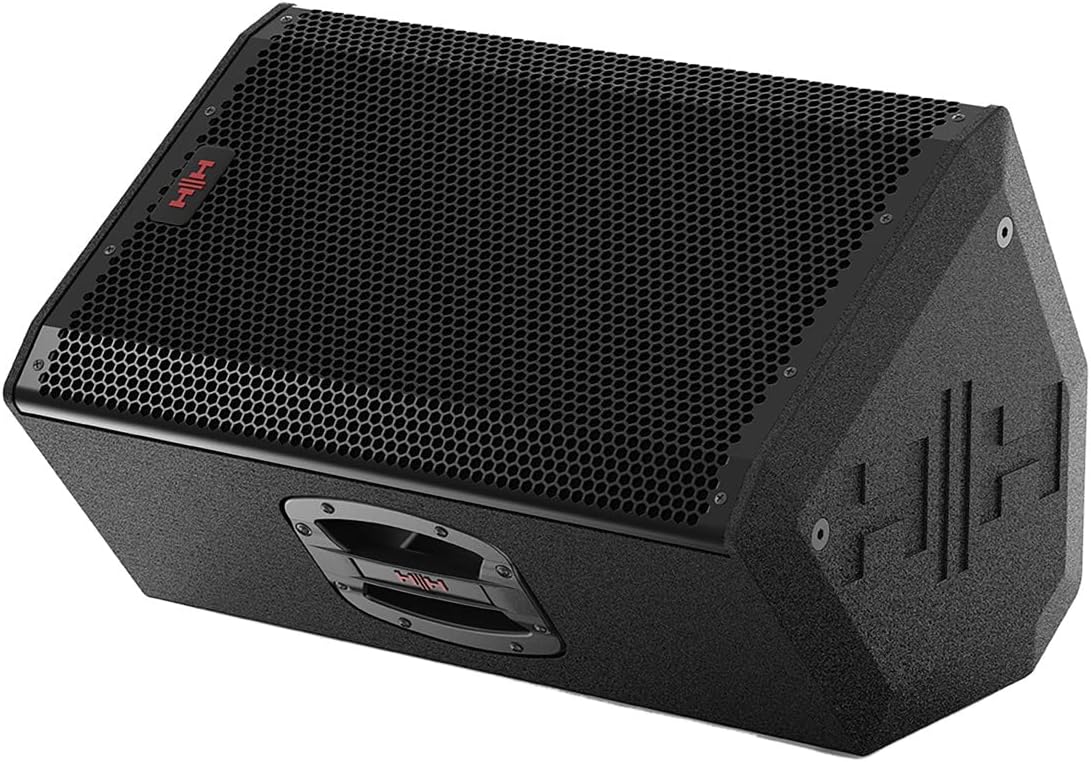
სურათი 2: დახრილი წინა მხარე view of the Tessen TNP-1201 speaker, highlighting its robust grille and cabinet design.
დაყენება და კავშირები
Follow these steps to properly set up your Tessen TNP-1201 speaker cabinet:
- განთავსება: Position the speaker on a stable, flat surface or mount it using a compatible 35mm pole mount. Ensure adequate ventilation around the unit. The asymmetric profile allows for a 35° monitor angle when placed on its side.
- დენის კავშირი: Connect the power cord to the AC inlet on the rear panel of the speaker and then to a suitable power outlet. Ensure the power switch is in the OFF position before connecting.
- აუდიო შეყვანა: Connect your audio source (e.g., mixer, instrument) to the input connectors on the rear panel. The TNP-1201 typically uses standard XLR or 1/4" TRS connectors for audio input.
- Output (if applicable): If linking multiple speakers, use the output connectors to send the audio signal to another speaker.
- საწყისი ჩართვა: Once all connections are secure, switch the power ON. Start with volume levels at minimum and gradually increase to the desired level.

სურათი 3: უკანა view of the Tessen TNP-1201, detailing the input/output panel, power connection, and integrated handles.
ოპერაციული ინსტრუქციები
The Tessen TNP-1201 is designed for straightforward operation. Familiarize yourself with the controls on the rear panel:
- შეყვანის დონის კონტროლი: Adjusts the overall input sensitivity of the speaker. Start low and increase gradually to avoid distortion.
- EQ Controls (if present): Some models may include basic EQ adjustments (e.g., Bass, Treble) to fine-tune the sound to your environment.
- ბი-Amp შემოვლითი გადამრთველი: This speaker features a high-quality passive crossover with a bi-amp bypass switch. Consult advanced audio guides if you intend to use bi-amplification. For standard operation, ensure it is set correctly for passive mode.
- დენის ინდიკატორი: An LED indicator typically illuminates when the unit is powered on.
- Clip/Limit Indicator: This LED illuminates when the input signal is too high, indicating potential distortion. Reduce the input level if this light frequently activates.
Always ensure that the input signal is clean and not overdriven from your source device to achieve optimal sound quality and prevent damage to the speaker.
მოვლა და მოვლა
Proper maintenance ensures the longevity and performance of your Tessen TNP-1201 speaker cabinet.
- დასუფთავება: Clean the exterior of the cabinet with a soft, dry cloth. Do not use abrasive cleaners, solvents, or waxes. Avoid spraying liquids directly onto the speaker.
- გრილის მოვლა: The steel grille with acoustic foam backing protects the drivers. Ensure it remains free of dust and debris. Do not attempt to remove the grille unless necessary for servicing by qualified personnel.
- შენახვა: When not in use for extended periods, store the speaker in a dry, temperature-controlled environment, away from direct sunlight and extreme temperatures.
- ინსპექტირება: Periodically inspect the power cord and all cables for any signs of damage. Replace damaged cables immediately.

სურათი 4: გვერდი view of the Tessen TNP-1201, illustrating its asymmetric cabinet profile designed to prevent standing wave distortion and allow for monitor use.
პრობლემების მოგვარება
If you encounter issues with your Tessen TNP-1201, refer to the following common problems and solutions:
| პრობლემა | შესაძლო მიზეზი | გამოსავალი |
|---|---|---|
| ხმა არ არის |
|
|
| დამახინჯებული ხმა |
|
|
| Hum ან Buzz |
|
|
If the problem persists after attempting these solutions, please contact HH Electronics customer support or a qualified service technician.
სპეციფიკაციები
Detailed technical specifications for the HH Electronics Tessen TNP-1201 Speaker Cabinet:
| ფუნქცია | დეტალი |
|---|---|
| ბრენდი | HH Electronics |
| მოდელის სახელი | TNP-1201 |
| სპიკერის ტიპი | ვუფერი |
| სპიკერის ზომა | 12 ინჩი |
| სპიკერი Ampლიფიკაციის ტიპი | Passive (with bi-amp bypass switch) |
| გამომავალი ვატიtage | 800 Watts (Power Handling) |
| დენის წყარო | კაბელიანი ელექტრო |
| სამონტაჟო ტიპი | Floor Standing, 35 mm Pole Mount |
| ნივთის წონა | 33 ფუნტი |
| პაკეტის ზომები | 23 x 15 x 14 ინჩი |
| მწარმოებელი | HH Electronics |
| ASIN | B07RTSFYG4 |
| პირველი ხელმისაწვდომი თარიღი | 12 წლის 2019 მაისი |
| არის წყალგაუმტარი | ცრუ |
საგარანტიო ინფორმაცია
HH Electronics products are manufactured to high standards and are warranted against manufacturing defects. Specific warranty terms and conditions may vary by region and retailer. Please retain your proof of purchase. For detailed warranty information, please refer to the official HH Electronics webსაიტზე ან დაუკავშირდით თქვენს უფლებამოსილ დილერს.
მომხმარებელთა მხარდაჭერა
For technical assistance, service inquiries, or further information regarding your HH Electronics Tessen TNP-1201 Speaker Cabinet, please visit the official HH Electronics website or contact their customer support department. Contact details can typically be found on the manufacturer's webადგილზე ან პროდუქტის შეფუთვაში.


