შესავალი
Thank you for choosing the NEDIS Wi-Fi Smart Fan Heater. This manual provides essential information for the safe and efficient operation of your new device. Please read these instructions carefully before use and retain them for future reference. Proper use and maintenance will ensure optimal performance and longevity of the product.
უსაფრთხოების ინსტრუქციები
ხანძრის, ელექტროშოკის ან დაზიანების რისკის შესამცირებლად, ყოველთვის დაიცავით შემდეგი ძირითადი უსაფრთხოების ზომები:
- ამ გამათბობლის გამოყენებამდე წაიკითხეთ ყველა ინსტრუქცია.
- არ გამოიყენოთ ეს გამათბობელი აბაზანის, შხაპის ან საცურაო აუზის მახლობლად.
- არ დააფაროთ გამათბობელს. გამათბობლის დაფარვამ შეიძლება გამოიწვიოს გადახურება და ხანძარი.
- Keep combustible materials such as furniture, pillows, bedding, papers, clothes, and curtains at least 1 meter (3 feet) from the front of the heater and keep them away from the sides and rear.
- ყოველთვის გამორთეთ გამათბობელი, როდესაც არ იყენებთ.
- არ იმუშაოთ ნებისმიერი გამათბობელი დაზიანებული კაბელით ან დანამატით ან გამათბობლის გაუმართაობის, ჩაშვების ან დაზიანების შემდეგ.
- არ გაატაროთ კაბელი ხალიჩის ქვეშ. არ დაფაროთ კაბელი საყრდენი ხალიჩებით, მორბენალით ან მსგავსი საფარით. დაალაგეთ კაბელი სატრანსპორტო ზონიდან მოშორებით და იქ, სადაც ის არ გადაიჭრება.
- განსაკუთრებული სიფრთხილეა საჭირო, როდესაც რომელიმე გამათბობელს იყენებენ ბავშვები ან ინვალიდები ან მათ მახლობლად, და როდესაც გამათბობელი რჩება მომუშავე და უყურადღებოდ.
- This heater is equipped with a tip-over protection switch that automatically shuts off the heater if it is accidentally knocked over.
- დარწმუნდით, რომ გამათბობელი მოთავსებულია სტაბილურ, თანაბარ ზედაპირზე.
- მხოლოდ შიდა გამოყენებისთვის.
პროდუქტი დასრულდაview
Familiarize yourself with the main components of your NEDIS Wi-Fi Smart Fan Heater.
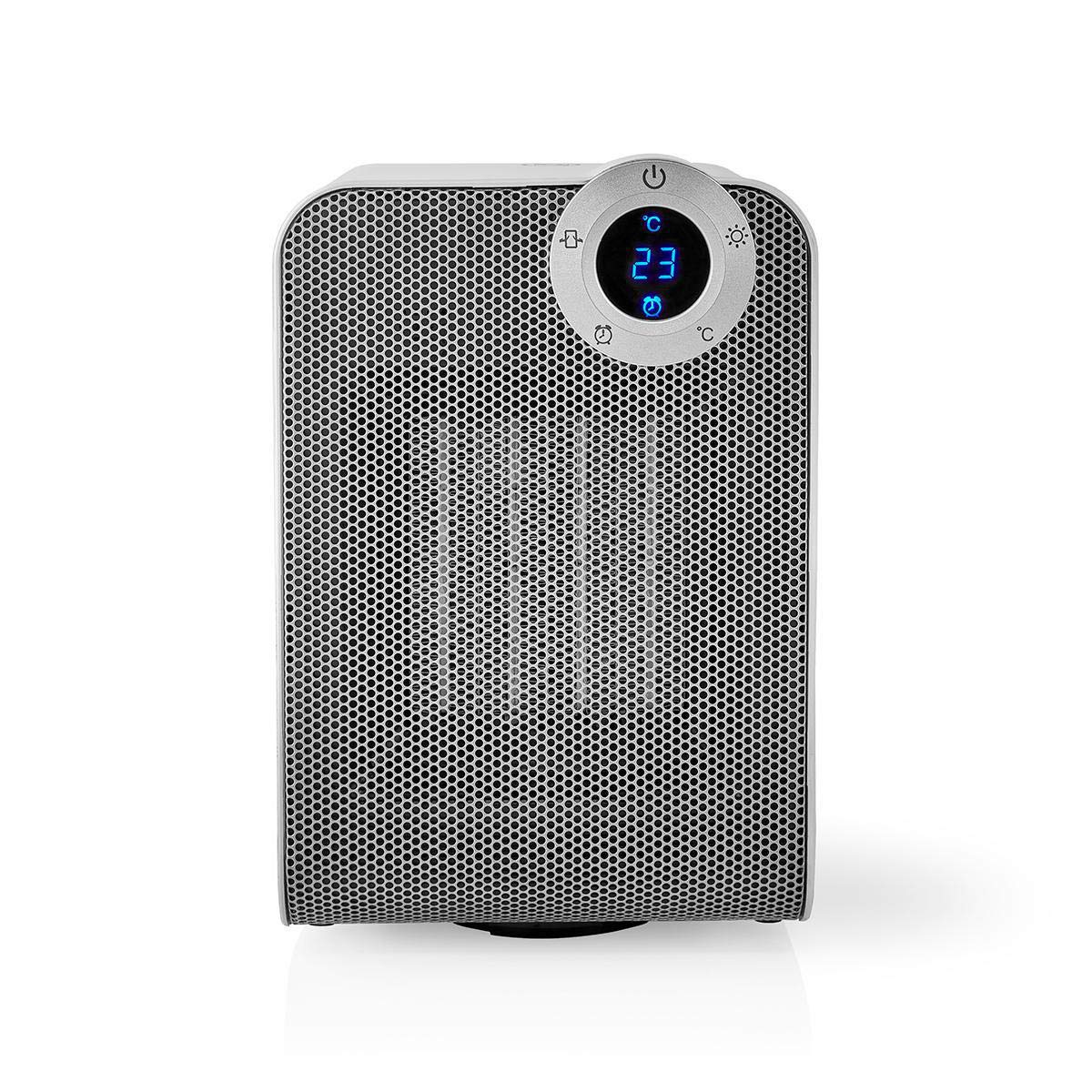
The front panel features a digital display that shows the current temperature and settings. Surrounding the display are touch-sensitive buttons for power, mode selection, oscillation, and timer functions.

The rear of the heater includes the main power switch (often a rocker switch) and the air intake grille. Ensure this area is not obstructed for proper airflow.

The compact design of the heater allows for easy placement in various indoor settings.
დაყენება
ამოფუთვა
- ფრთხილად ამოიღეთ გამათბობელი შეფუთვიდან.
- ტრანსპორტირების დროს შეამოწმეთ დაზიანება. დაზიანების შემთხვევაში, არ გამოიყენოთ და დაუკავშირდით მომხმარებელთა მხარდაჭერის სამსახურს.
- შეინახეთ შეფუთვა მომავალი შენახვის ან ტრანსპორტირებისთვის.
განთავსება
- დადეთ გამათბობელი მყარ, თანაბარ ზედაპირზე.
- Ensure there is at least 1 meter (3 feet) of clear space around the heater to allow for proper air circulation and to prevent fire hazards.
- Do not place the heater near curtains, drapes, or other loose fabrics that could block the air intake or outlet.
- დარწმუნდით, რომ კვების კაბელი არ არის მოჭერილი ან მძიმე საგნების ქვეშ არ არის მოთავსებული.
საწყისი ჩართვა
- Plug the heater into a suitable electrical outlet (220-240V AC, 50/60Hz).
- Flip the main power switch on the back of the unit to the 'ON' position.
- The digital display on the front will illuminate, indicating the heater is in standby mode.
Wi-Fi Connection & App Setup
The NEDIS Wi-Fi Smart Fan Heater can be controlled via the Nedis SmartLife app, offering advanced features and remote control.
- ჩამოტვირთეთ Nedis SmartLife აპლიკაცია App Store-დან (iOS) ან Google Play Store-დან (Android).
- დარეგისტრირდით ახალ ანგარიშზე ან შედით სისტემაში, თუ უკვე გაქვთ ერთი.
- დარწმუნდით, რომ თქვენი სმარტფონი დაკავშირებულია 2.4 GHz Wi-Fi ქსელთან.
- აპლიკაციაში, ახალი მოწყობილობის დასამატებლად შეეხეთ „+“ ხატულას.
- Follow the on-screen instructions in the app to connect your heater to your Wi-Fi network. This usually involves putting the heater into pairing mode (refer to the app for specific instructions, often by pressing and holding a button on the heater).
- Once connected, you can control the heater from anywhere using the app.
ოპერაციული ინსტრუქციები
მექანიკური კონტროლი
The heater can be operated directly using the touch buttons on the front panel:
- დენის ღილაკი: გამათბობლის ჩასართავად ან გამოსართავად დააჭირეთ ღილაკს.
- რეჟიმის ღილაკი: Cycle through heating modes (e.g., High Heat 1800W, Low Heat 900W, Fan Only).
- ტემპერატურის რეგულირება: Use the '+' and '-' buttons (or similar) to set the desired temperature. The heater will operate at 1800W for rapid heating and automatically switch to 900W once the set temperature is approached.
- რხევის ღილაკი: Press to activate or deactivate the horizontal oscillation feature, distributing heat across a wider area.
- ტაიმერის ღილაკი: Set a timer for the heater to automatically turn off after a specified duration.
SmartLife App Control
Once connected to the Nedis SmartLife app, you can access advanced control features:
- დისტანციური ჩართვა/გამორთვა: Control the heater from anywhere.
- ტემპერატურის რეგულირება: Precisely set and monitor the room temperature.
- რეჟიმის შერჩევა: Choose between different heating levels or fan-only mode.
- რხევის კონტროლი: ჩართეთ ან გამორთეთ რხევის ფუნქცია.
- განრიგი: Create custom heating schedules for different times of the day or week.
- ტაიმერის ფუნქცია: Set a countdown timer for automatic shutdown.
ხმის კონტროლი
The heater supports voice control through popular smart assistants. To enable this, link your Nedis SmartLife account with your preferred voice assistant (Google Home or Amazon Alexa) via their respective apps. Once linked, you can use voice commands such as:
- "Hey Google, turn on the heater."
- "Alexa, set the heater to 22 degrees."
- "Hey Google, turn off the heater."
მოვლა
დასუფთავება
რეგულარული გაწმენდა ხელს უწყობს გამათბობლის ეფექტურობის შენარჩუნებას და მისი სიცოცხლის ხანგრძლივობას ახანგრძლივებს.
- გამათბობელი ყოველთვის გამორთეთ დენიდან და გაწმენდის წინ მიეცით საშუალება, რომ მთლიანად გაგრილდეს.
- გაწმინდეთ გარე ზედაპირები რბილი, დamp ქსოვილი. არ გამოიყენოთ აბრაზიული გამწმენდები ან გამხსნელები.
- ჰაერის შემშვები და გამოსასვლელი გისოსებიდან მტვრის მოსაშორებლად გამოიყენეთ ჯაგრისიანი მტვერსასრუტი.
- დარწმუნდით, რომ წყალი არ შედის გამათბობლის შიდა ნაწილში.
შენახვა
როდესაც არ გამოიყენება დიდი ხნის განმავლობაში:
- Unplug the heater and clean it as described above.
- Store the heater in its original packaging or a suitable box to protect it from dust and damage.
- შეინახეთ გრილ, მშრალ ადგილას, მოარიდეთ მზის პირდაპირ სხივებს და ტენიანობას.
პრობლემების მოგვარება
თუ თქვენს გამათბობელთან დაკავშირებით პრობლემები შეგექმნათ, იხილეთ შემდეგი გავრცელებული პრობლემები და მათი გადაჭრის გზები:
| პრობლემა | შესაძლო მიზეზი | გამოსავალი |
|---|---|---|
| გამათბობელი არ ირთვება. | No power, main switch off, tip-over switch activated. | Check power outlet, ensure main switch is ON, place heater upright on a stable surface. |
| არ არის სითბოს გამომუშავება. | არასწორი რეჟიმი, თერმოსტატის პარამეტრი ძალიან დაბალია. | Select a heating mode (High/Low), increase the thermostat setting above the current room temperature. |
| Wi-Fi კავშირი ვერ ხერხდება. | არასწორი Wi-Fi პაროლი, 5 გჰც ქსელი, როუტერიდან დაშორება. | Verify Wi-Fi password, ensure you are on a 2.4GHz network, move heater closer to the router, try re-pairing. |
| გამათბობელი მოულოდნელად ითიშება. | Overheating protection, tip-over protection, timer activated. | Ensure heater is not covered, clear obstructions, place upright, check timer settings. Allow to cool before restarting. |
სპეციფიკაციები
| ფუნქცია | სპეციფიკაცია |
|---|---|
| მოდელის ნომერი | WIFIFNH20CWT |
| დენის წყარო | კაბელიანი ელექტრო |
| დენის გამომავალი | 1800 W (მაღალი), 900 W (დაბალი) |
| გათბობის მეთოდი | კონვექცია |
| ზომები (L x W x H) | 16.5 x 14.5 x 25 სმ |
| ნივთის წონა | 1.8 კგ |
| ფერი | თეთრი / ვერცხლისფერი |
| განსაკუთრებული თვისებები | On/Off Timer, Oscillation, Tip-over Protection, Thermostat, Wi-Fi, App Control, Voice Control (Alexa, Google Home) |
| ინსტალაციის ტიპი | იატაკის მთა |
| რეკომენდებული გამოყენება | Indoor, Home, Study Room |
| საჭიროა ბატარეები | არა |
გარანტია და მხარდაჭერა
Your NEDIS Wi-Fi Smart Fan Heater is covered by a manufacturer's warranty. Please refer to the warranty card included with your purchase for specific terms and conditions, including the warranty period and coverage details.
For technical support, troubleshooting assistance, or warranty claims, please contact NEDIS customer service. Contact information can typically be found on the product packaging, the NEDIS webსაიტი ან თქვენი შესყიდვის ქვითარი.


