1. შესავალი
This manual provides detailed instructions for the installation, operation, and maintenance of your ESX VN715-E39-DAB In-Car Navigation and Multimedia System. Please read this manual thoroughly before using the device to ensure proper functionality and to prevent damage. Keep this manual for future reference.
2. პროდუქტი დასრულდაview და მახასიათებლები
The ESX VN715-E39-DAB is an advanced in-car multimedia system designed to enhance your driving experience with navigation, entertainment, and connectivity features. It integrates seamlessly into compatible BMW vehicles.
ძირითადი მახასიათებლები:
- High-Resolution 8-inch Touchscreen: Provides clear visuals and intuitive control.
- Advanced Android i15 Operating System: Offers a familiar and customizable user interface.
- Google Maps Navigation: Supports both online and offline navigation for reliable route guidance.
- Mobile Internet Connectivity: Connects via Wi-Fi hotspot for online services.
- DAB+ ციფრული რადიო: Includes a DAB antenna for high-quality digital radio reception with station logos.
- AM/FM Radio with RDS: Standard analog radio reception with Radio Data System functionality.
- Multi-format DVD Player: Supports DVD, DVD-R/RW, DVD+R/RW, VCD, CD, CD Text, CD-R/RW, and MP3 formats.
- Bluetooth Hands-Free Kit: Enables safe phone calls and audio streaming with an internal microphone and optional external microphone connection.
- სმარტფონის ინტეგრაცია: Connect iPhone or Android smartphones via USB for various functions.
- ხმის კონტროლი: Utilize voice commands through a connected smartphone.
- აუდიო შედეგები: წინასწარიamplifier outputs for front, rear, subwoofer, and center channels.
- კამერის შეყვანა: One adjustable camera input for reverse cameras.
- დამხმარე შეყვანები/გამოყვანები: One AUX video input, two audio/video outputs, and one AUX audio input.
- USB პორტები: Two USB ports for media and connectivity.
- მიკრო SD ბარათის სლოტი: Dedicated slot for navigation data and media files.
- მორგება: Personalize with customizable logos and wallpapers.
- Authenticity Certificate: Included with the product.
3. დაყენება და ინსტალაცია
Installation of the ESX VN715-E39-DAB system requires technical knowledge and should ideally be performed by a qualified professional. Incorrect installation can lead to damage to the device or vehicle electrical system.
თავსებადობა:
This unit is compatible with specific BMW models and connector types:
- BMW 5 Series E39 (1996-2001) with 17-pin system connector.
- BMW 5 Series E39 (2002-2003) with 40-pin system connector.
- BMW X5 E53 (2000-2001) with 17-pin system connector.
- BMW X5 E53 (2002-2007) with 40-pin system connector.
- BMW M5 (1996-2003) with 17/40-pin system connector.
ინსტალაციის ზოგადი ეტაპები (რეკომენდებულია პროფესიონალური ინსტალაცია):
- გათიშეთ ბატარეა: Always disconnect the vehicle's battery before starting any electrical work.
- არსებული ერთეულის წაშლა: Carefully remove the factory radio or navigation system from the dashboard.
- შეაერთეთ გაყვანილობა: Connect the appropriate wiring harness (17-pin or 40-pin) to the vehicle's electrical system and the ESX unit. Ensure all connections are secure.
- ანტენების დაკავშირება: Connect the GPS antenna, DAB antenna, and radio antenna to their respective ports on the unit. Position the antennas for optimal reception.
- პერიფერიული მოწყობილობების დაკავშირება: Connect any optional accessories such as a reverse camera, external microphone, USB devices, or auxiliary inputs/outputs.
- ერთეულის დამონტაჟება: Securely mount the ESX unit into the dashboard opening.
- ხელახლა შეაერთეთ ბატარეა: ხელახლა შეაერთეთ ავტომობილის აკუმულატორი და შეამოწმეთ სისტემა.

4. საოპერაციო ინსტრუქციები
Familiarize yourself with the touchscreen interface and physical buttons for optimal use.
4.1 ძირითადი ოპერაცია
- ჩართვა/გამორთვა: Press and hold the power button (usually the VOL knob) to turn the unit on or off. A short press typically mutes or unmutes the audio.
- ხმის კონტროლი: Rotate the VOL knob to adjust the audio volume.
- სენსორული ეკრანის ინტერფეისი: მენიუებსა და აპლიკაციებში ნავიგაცია 8 დიუმიან სენსორულ ეკრანზე შეხებით, გადაფურცვლითა და თითებით გადაფურცვლით შეგიძლიათ.

4.2 ნავიგაცია
Access the navigation application (e.g., Google Maps) from the home screen. Input your destination, and the system will provide turn-by-turn directions. Ensure GPS antenna is properly connected for accurate positioning.

4.3 Radio (DAB+/AM/FM)
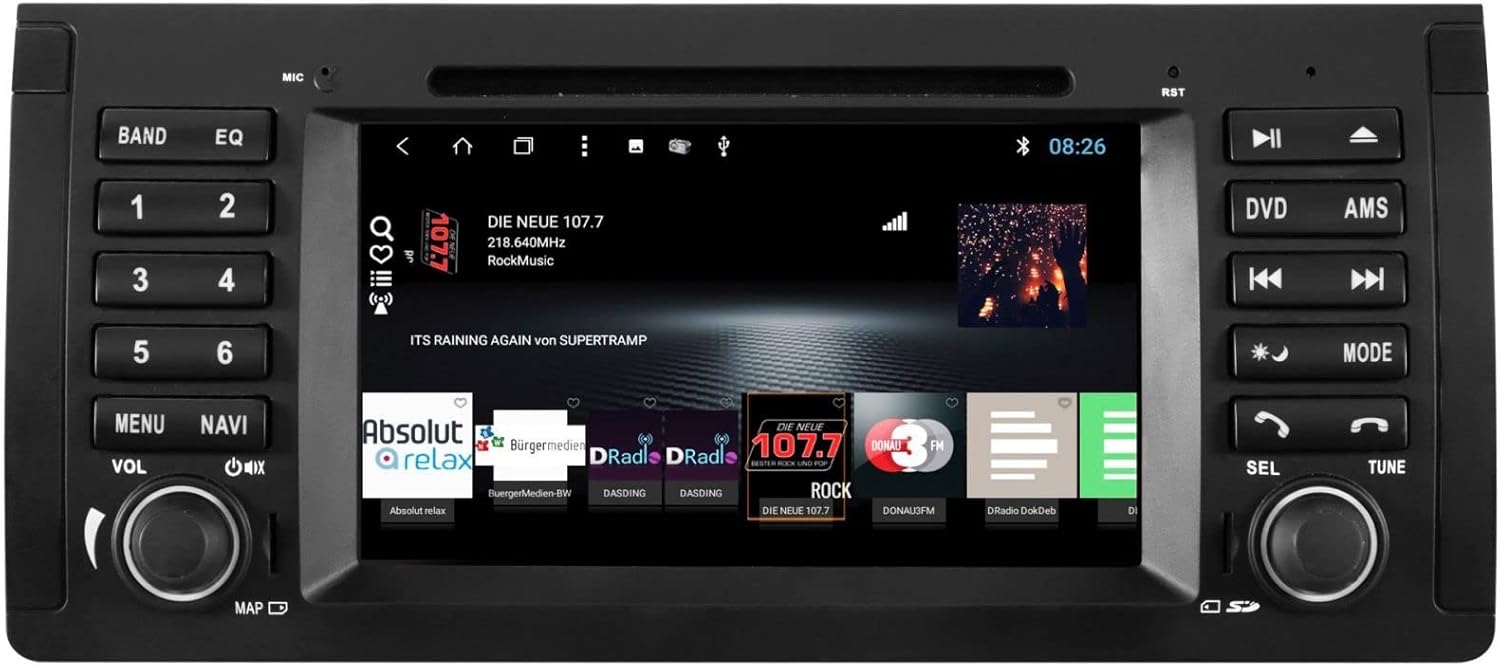
- აირჩიეთ რეჟიმი: Tap the 'Radio' or 'DAB+' icon on the home screen or press the 'BAND' button.
- სკანირების სადგურები: Use the 'AMS' (Auto Memory Store) button or on-screen controls to scan and save available stations.
- მორგება: Manually tune using the 'TUNE' knob or on-screen frequency controls.
- წინასწარ დაყენებები: Save your favorite stations to preset buttons (1-6) for quick access.

4.4 Bluetooth კავშირი
- დაწყვილება: Go to the Bluetooth settings on the unit and your smartphone. ძიება available devices and select 'ESX VN715-E39-DAB'. Enter the PIN if prompted (usually '0000' or '1234').
- ზარი უფასოდ: Once paired, you can make and receive calls directly through the unit.
- აუდიო ნაკადი: Play music from your smartphone via Bluetooth A2DP.
4.5 Media Playback (DVD/USB/SD)
- DVD: Insert a DVD into the disc slot. The system will automatically switch to DVD mode or prompt you to select it.
- USB/SD: Insert a USB drive into a USB port or an SD card into the Micro SD slot. Access media files through the 'Media' or 'File Explorer' application.
5. მოვლა
Regular maintenance ensures the longevity and optimal performance of your ESX VN715-E39-DAB system.
- ეკრანის გაწმენდა: სენსორული ეკრანის ნაზად გასაწმენდად გამოიყენეთ რბილი, უბუშტო ქსოვილი. ჯიუტი ლაქების შემთხვევაში, ოდნავ გაწმინდეთ.ampგაწმინდეთ ქსოვილი წყლით ან ეკრანისთვის უსაფრთხო საწმენდი საშუალებით. მოერიდეთ უხეში ქიმიკატების გამოყენებას.
- პროგრამული განახლებები: Periodically check for software updates from the manufacturer's official website or through the unit's system settings (if available) to ensure you have the latest features and bug fixes.
- Disc Drive Care: Keep the DVD slot free of dust and debris. Avoid inserting damaged or non-standard discs.
6. Დიაგნოსტიკა
If you encounter issues with your unit, refer to the following common troubleshooting steps:
| პრობლემა | შესაძლო მიზეზი | გამოსავალი |
|---|---|---|
| არ არის ძალა | დენის შეერთების გაფუჭება, დამტვრეული დამცველი, ავტომობილის აკუმულატორის პრობლემა. | Check power cables and fuse. Ensure vehicle battery is charged. Consult a professional if issues persist. |
| ხმა არ არის | Volume muted, speaker wires disconnected, incorrect audio source. | Check volume level and mute status. Verify speaker connections. Select the correct audio source. |
| GPS სიგნალი დაიკარგა | GPS antenna improperly connected or obstructed, unit in an area with poor satellite reception. | დარწმუნდით, რომ GPS ანტენა საიმედოდ არის დაკავშირებული და აქვს მკაფიო view ცის. გადადით ღია ადგილას. |
| Bluetooth-ის დაწყვილების შეცდომა | Bluetooth not enabled on device, incorrect PIN, device out of range. | Ensure Bluetooth is active on both devices. Re-enter PIN. Bring devices closer. Restart both devices. |
| სენსორული ეკრანი არ რეაგირებს | System freeze, dirt on screen. | Perform a soft reset (refer to device settings or power cycle). Clean the screen. |
If these steps do not resolve the issue, please contact customer support or a qualified service technician.
7. სპეციფიკაციები
Detailed technical specifications for the ESX VN715-E39-DAB unit:
- ბრენდი: ESX
- მოდელი: VN715-E39-DAB
- ეკრანის ზომა: 8 ინჩი
- ჩვენების ტიპი: LCD
- ოპერაციული სისტემა: Android i15
- კავშირის ტექნოლოგია: Bluetooth, USB, Wi-Fi (via hotspot)
- მედიის ტიპი: DVD, DVD-R/RW, DVD+R/RW, VCD, CD, CD Text, CD-R/RW, MP3, USB, Micro SD
- რადიო ტიუნერი: DAB+, AM/FM with RDS
- ნავიგაცია: Google Maps (online/offline)
- თავსებადობა: BMW 5 Series E39 (1996-2003), BMW X5 E53 (2000-2007), BMW M5 (1996-2003)
- წარმოშობა: ჩინეთი
8. გარანტია და მხარდაჭერა
For warranty information, please refer to the documentation provided with your purchase or contact your retailer. For technical support, please visit the official ESX website or contact their customer service department. Ensure you have your model number (VN715-E39-DAB) and proof of purchase available when seeking support.


