1. შესავალი
This manual provides detailed instructions for the Amazon Basics Aluminum Type-C Docking Station. This device expands the connectivity of your USB-C enabled laptop or tablet, offering a wide range of ports for various peripherals and external displays. Please read this manual thoroughly before use to ensure proper operation and to maximize the product's functionality.
2. პროდუქტის მახასიათებლები
- 11-1-ში მრავალპორტიანი დიზაინი: Integrates Mini DisplayPort, HDMI, VGA, 3 USB-A ports, Ethernet, SD/TF card reader, 3.5mm audio jack, and a Type-C charging port (PD 100W).
- მაღალი გარჩევადობის ვიდეო გამომავალი: Supports Ultra HD 4K output via Mini DisplayPort/HDMI and Full HD 1080P via VGA, allowing for mirroring or extending your display to HDTVs, monitors, or projectors. Note: 4K resolution is supported at 30Hz refresh rate.
- მონაცემთა სწრაფი გადაცემა: Three USB 3.0 A ports provide data transfer speeds up to 5Gbps, backward compatible with USB 2.0/1.0.
- სტაბილური ქსელური კავშირი: 1000Mbps RJ45 Ethernet port ensures a fast and reliable wired network connection.
- Universal Card Reader: Integrated SD and TF slots allow simultaneous reading of universal SD and Micro SD memory cards.
- დენის მიწოდება: Type-C charging port supports Power Delivery (PD) up to 100 watts for charging your host device.
- აუდიო დაკავშირება: 3.5mm audio jack for headphones or speakers.
- გამძლე კონსტრუქცია: Features an aluminum pedestal-style housing for enhanced durability and heat dissipation.
3. პაკეტის შიგთავსი
- Amazon Basics Aluminum Type-C Docking Station
- მომხმარებლის სახელმძღვანელო
4. პროდუქტი დასრულდაview and Port Layout
Familiarize yourself with the various ports and their functions on your docking station.

სურათი: ახლო ხედი view of the Amazon Basics Type-C Docking Station's ports, including Ethernet, Mini DisplayPort, HDMI, VGA, and USB-C.
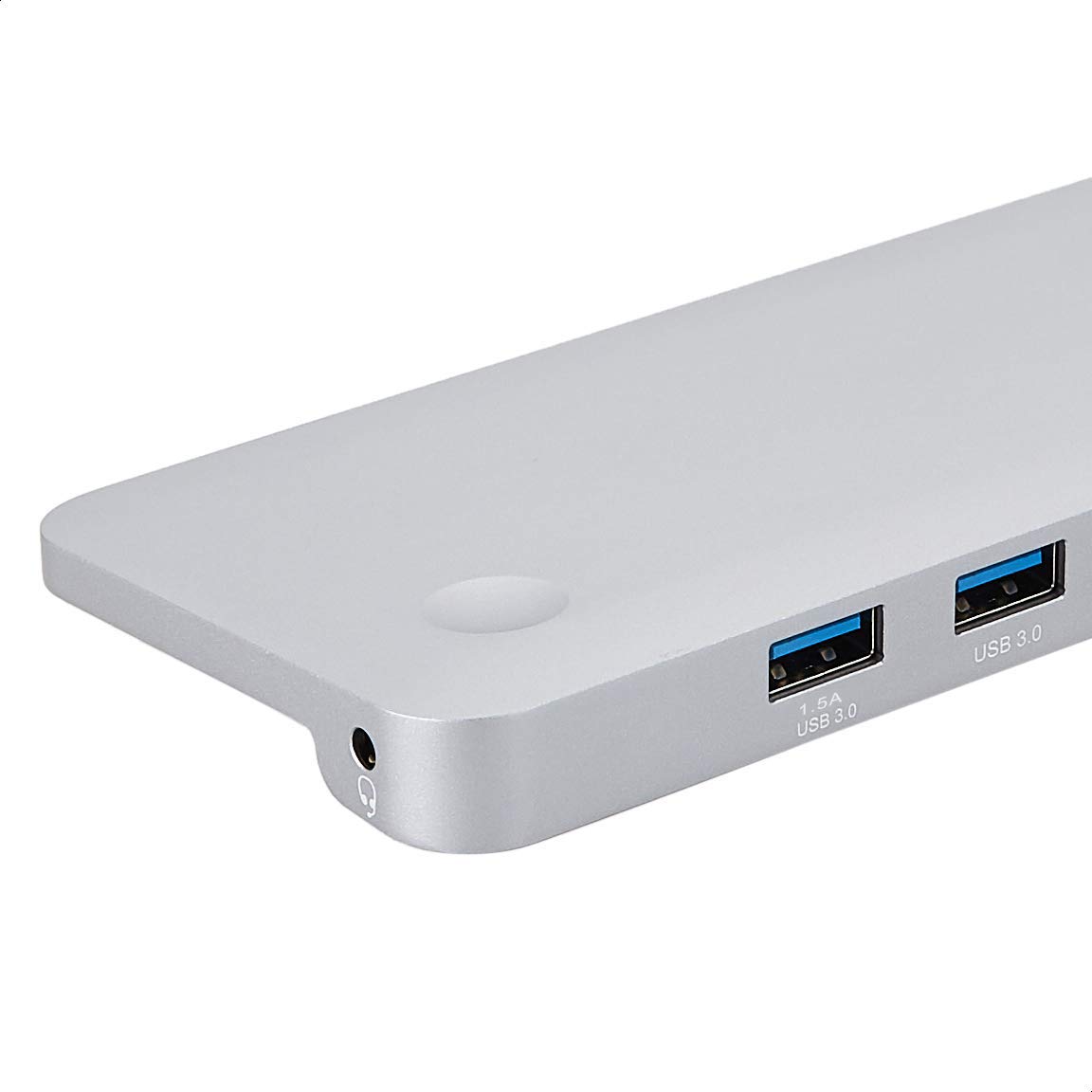
სურათი: დეტალური view of the USB 3.0 ports and 3.5mm audio jack on the Amazon Basics Type-C Docking Station.
- USB-C მასპინძელი კონექტორი: Connects to your laptop or tablet's USB-C port.
- USB 3.0 პორტები (x3): For connecting USB devices such as external hard drives, keyboards, mice, or USB flash drives.
- SD ბარათის სლოტი: For reading standard SD memory cards.
- TF ბარათის სლოტი (მიკრო SD): For reading Micro SD memory cards.
- RJ45 Ethernet პორტი: სადენიანი ქსელის დასაკავშირებლად.
- მინი DisplayPort: გარე ეკრანთან დასაკავშირებლად.
- HDMI პორტი: გარე ეკრანთან დასაკავშირებლად.
- VGA პორტი: გარე ეკრანთან დასაკავშირებლად.
- 3.5 მმ აუდიო ჯეკი: ყურსასმენების ან დინამიკების შესაერთებლად.
- USB-C PD დატენვის პორტი: For connecting a USB-C power adapter to charge your host device and power the docking station.
5. დაყენების ინსტრუქციები
Follow these steps to set up your docking station:
- მასპინძელ მოწყობილობასთან დაკავშირება: Plug the integrated USB-C host connector cable from the docking station into an available USB-C port on your laptop or tablet. Ensure your host device's USB-C port supports DisplayPort Alt Mode (DP Alt Mode) for video output functionality.
- კვების წყაროსთან შეერთება (არასავალდებულო, მაგრამ რეკომენდებული): If your host device requires charging or if you are connecting power-intensive peripherals, connect your USB-C power adapter (up to 100W) to the USB-C PD Charging Port on the docking station. This will charge your host device and provide stable power to the docking station and connected peripherals.
- პერიფერიული მოწყობილობების დაკავშირება: Connect your desired peripherals (e.g., external monitors, USB devices, Ethernet cable, SD/TF cards, audio devices) to the corresponding ports on the docking station.

Image: Amazon Basics Type-C Docking Station connected to a laptop, with multiple peripherals like a USB drive and external display cables plugged in.
6. საოპერაციო ინსტრუქციები
6.1. ვიდეო გამომავალი
- Connect your monitor or projector to the HDMI, Mini DisplayPort, or VGA port.
- Your operating system should automatically detect the external display. You may need to adjust display settings (e.g., extend, duplicate) in your computer's display preferences.
- The docking station supports 4K resolution at 30Hz refresh rate via HDMI and Mini DisplayPort. For optimal performance, ensure your display and cables support the desired resolution and refresh rate.
- Dual video display is supported, allowing you to mirror or expand your screen across multiple monitors.
6.2. USB მონაცემთა გადაცემა
- Plug your USB devices into the USB 3.0 ports.
- პორტები მხარს უჭერენ მონაცემთა გადაცემის სიჩქარეს 5 გბიტ/წმ-მდე.
6.3. Ethernet კავშირი
- Connect an Ethernet cable from your router or modem to the RJ45 Ethernet port on the docking station.
- Your computer should automatically establish a wired network connection.
6.4. SD/TF Card Reader
- Insert your SD or TF (Micro SD) card into the corresponding slot.
- The cards will appear as removable drives on your computer, allowing you to access and transfer files. Both slots can be used simultaneously.
6.5. აუდიო გამომავალი
- Connect your headphones or speakers to the 3.5mm audio jack.
- You may need to select the docking station as the default audio output device in your computer's sound settings.
6.6. სიმძლავრის მიწოდება (PD)
- Connect your laptop's USB-C power adapter to the USB-C PD Charging Port on the docking station.
- This port supports up to 100W power delivery to charge your host device while using the docking station.
7. თავსებადობა
This docking station is compatible with a wide range of USB-C enabled devices, including but not limited to:
- MacBook Pro 2018/2017/2016
- iPad Pro 2018
- Mac mini 2018
- MacBook Air
- iMac 2017
- Samsung Note9
- HUAWEI MateBook X
- Dell XPS 13
- ThinkPad
- Chromebook
მნიშვნელოვანია: This product functions only with computers that support DisplayPort Alt Mode (DP Alt Mode) via their USB-C port. Please verify your computer's specifications for compatibility before use.
8. Დიაგნოსტიკა
- ეკრანის გამომავალი არ არის:
- დარწმუნდით, რომ თქვენი მასპინძელი მოწყობილობის USB-C პორტი მხარს უჭერს DisplayPort Alt რეჟიმს.
- Check all cable connections (USB-C to host, video cable to monitor).
- Verify the external monitor is powered on and set to the correct input source.
- სცადეთ თქვენი კომპიუტერის გადატვირთვა.
- 4K Resolution Not Working at 60Hz:
- This docking station supports 4K resolution at a maximum refresh rate of 30Hz. If your monitor is set to 4K@60Hz, it will not display correctly. Adjust your display settings to 4K@30Hz or a lower resolution with a higher refresh rate if desired.
- USB Devices Not Recognized or Disconnecting:
- Ensure the docking station is receiving sufficient power. Connect a USB-C power adapter to the PD port if you are using multiple power-intensive USB devices.
- Try connecting the USB device directly to your computer to confirm it is functional.
- Reconnect the docking station to your computer.
- No Network Connection via Ethernet:
- შეამოწმეთ Ethernet კაბელის კავშირი როგორც დოკ-სადგურთან, ასევე თქვენს როუტერთან/მოდემთან.
- Verify your network settings on your computer.
- დარწმუნდით, რომ თქვენი როუტერი/მოდემი სწორად მუშაობს.
- აუდიო გამომავალი არ არის:
- Ensure your headphones or speakers are properly connected to the 3.5mm audio jack.
- Check your computer's sound settings and select the docking station as the default audio output device.
- მასპინძელი მოწყობილობა არ იტენება:
- Ensure a compatible USB-C power adapter is connected to the docking station's USB-C PD Charging Port.
- დარწმუნდით, რომ თქვენი მასპინძელი მოწყობილობა მხარს უჭერს USB-C კვების მიწოდებას.
- შეამოწმეთ კვების ადაპტერი და კაბელი დაზიანებისთვის.
9. სპეციფიკაციები
| ფუნქცია | სპეციფიკაცია |
|---|---|
| ბრენდი | ამაზონის საფუძვლები |
| მოდელის ნომერი | UTC-DOCK01-PRO |
| ფერი | რუხი |
| ზომები (LxWxH) | 28 x 7.5 x 1.4 სანტიმეტრი (11.02 x 2.95 x 0.55 ინჩი) |
| ნივთის წონა | 317 გ (0.32 კილოგრამი) |
| პორტების ჯამი | 11 |
| USB პორტები | 3 x USB 3.0 Type-A |
| ვიდეო გამომავალი პორტები | 1 x HDMI, 1 x Mini DisplayPort, 1 x VGA |
| HDMI გარჩევადობა | 4K@30Hz-მდე |
| Mini DisplayPort Resolution | 4K@30Hz-მდე |
| Ethernet პორტი | RJ45 Gigabit Ethernet (10/100/1000Mbps) |
| ბარათის წამკითხველი | SD and TF (Micro SD) slots, simultaneous read |
| აუდიო პორტი | 3.5mm აუდიო ჯეკი |
| USB-C PD დატენვის პორტი | 100 ვატამდე |
| აპარატურა ინტერფეისი | Ethernet, HDMI, Mini DisplayPort, VGA, USB-A, USB-C, SD/TF, Audio |
10. მოვლა
- დასუფთავება: Use a soft, dry cloth to clean the docking station. Avoid using liquid cleaners or aerosols.
- შენახვა: შეინახეთ მოწყობილობა გრილ, მშრალ ადგილას, მოარიდეთ მზის პირდაპირ სხივებს და ექსტრემალურ ტემპერატურას.
- დამუშავება: Avoid dropping or subjecting the device to strong impacts. Do not attempt to disassemble or modify the docking station.
11. უსაფრთხოების ინფორმაცია
- Keep the device away from water, fire, and high humidity environments.
- არ დაუშვათ მოწყობილობა ექსტრემალურ ტემპერატურაზე.
- გამოიყენეთ მხოლოდ თავსებადი კვების ადაპტერები და კაბელები.
- შეინახეთ ბავშვებისთვის მიუწვდომელ ადგილას.
- თუ მოწყობილობა დაზიანებულია ან გაუმართავია, დაუყოვნებლივ შეწყვიტეთ მისი გამოყენება და დაუკავშირდით მომხმარებელთა მხარდაჭერის სამსახურს.
12. გარანტია და მხარდაჭერა
This Amazon Basics product comes with a 1 წლიანი შეზღუდული გარანტია შეძენის დღიდან. ეს გარანტია ფარავს წარმოების დეფექტებს და დამუშავებას ნორმალური გამოყენების პირობებში. ის არ ფარავს არასწორი გამოყენებით, უბედური შემთხვევით, მოდიფიკაციით ან არაავტორიზებული შეკეთებით გამოწვეულ ზიანს.
For warranty claims, technical support, or further assistance, please contact Amazon Basics customer service through your Amazon purchase history or the official Amazon Basics support channels.


