შესავალი
The Hyperkin Armor3 NuWave Controller is designed to provide accurate and fluid motion control for your Nintendo Wii U and Wii consoles. Featuring built-in Nu+ technology, this controller enhances your gaming experience by offering a wider range of motion in compatible titles. This manual provides essential information on setting up, operating, maintaining, and troubleshooting your NuWave Controller.
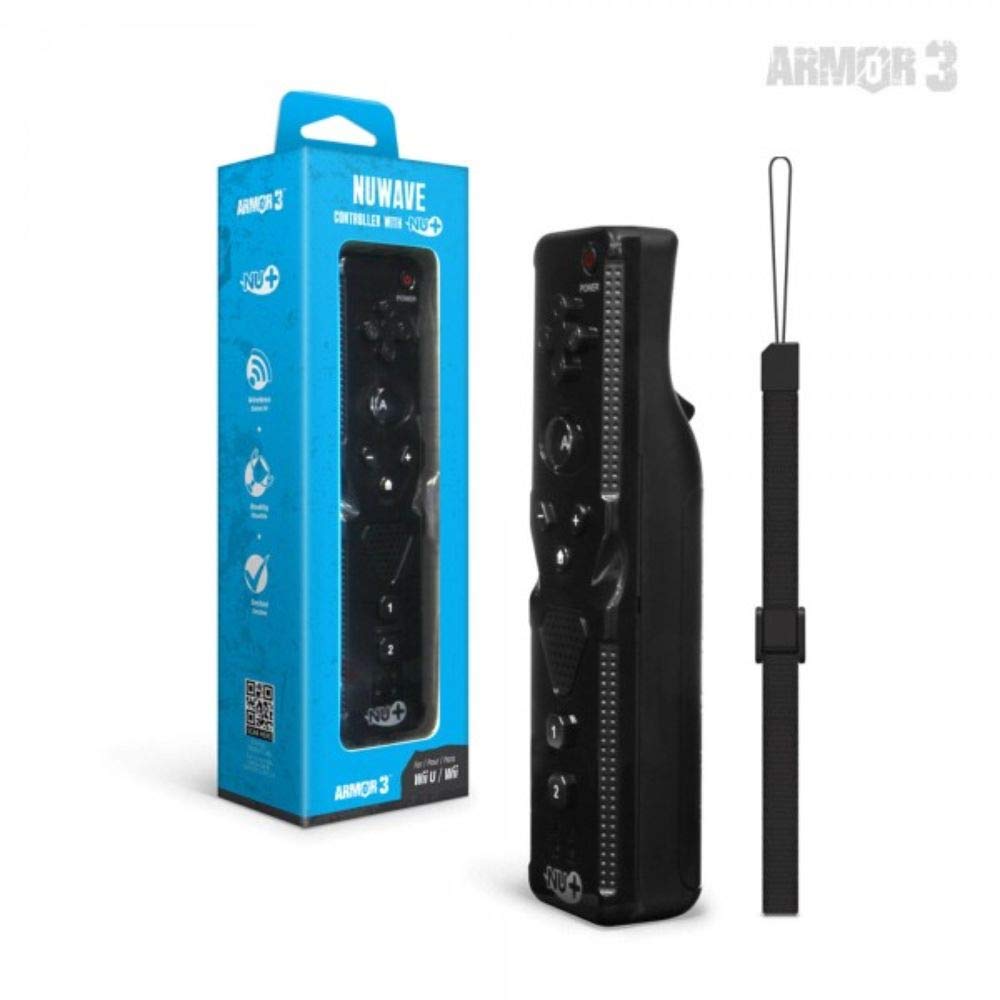
სურათი 1: Hyperkin Armor3 NuWave Controller and its packaging. The controller is black with a wrist strap, and the packaging highlights its Nu+ technology and compatibility with Wii U and Wii.
პროდუქტი დასრულდაview
The Armor3 NuWave Controller is a motion-sensing controller compatible with both Wii U and Wii systems. It integrates advanced Nu+ technology for enhanced motion detection and precision in supported games.
ძირითადი მახასიათებლები:
- თავსებადობა: Fully compatible with Nintendo Wii U and Nintendo Wii consoles.
- Nu+ Technology: Built-in technology for a wider range of motion and improved accuracy in compatible titles.
- ერგონომიული დიზაინი: Designed for comfortable grip and extended gameplay sessions.
- დენის წყარო: საჭიროებს 2 AA ბატარეას (არ შედის).
დაყენება
1. ბატარეის მონტაჟი
- იპოვეთ ბატარეის განყოფილება კონტროლერის უკანა მხარეს.
- გასახსნელად, ბატარეის საფარი ქვემოთ გადაწიეთ.
- ჩადეთ ორი (2) AA ტიპის ელემენტი, დარწმუნდით, რომ სწორი პოლარობა (+/-) არის მითითებული განყოფილებაში.
- Replace the battery cover by sliding it upwards until it clicks into place.
2. Connecting to Your Console
To connect the NuWave Controller to your Wii U or Wii console, follow these steps:
- Ensure your console is powered on.
- On your Wii U or Wii console, press the SYNC button (usually located near the SD card slot or battery compartment).
- On the NuWave Controller, open the battery cover and locate the small red SYNC button inside the battery compartment.
- Press and release the SYNC button on the controller.
- The player indicator lights on the bottom of the controller will flash. Once a single light remains lit, the controller is successfully connected.
- If connection fails, repeat steps 2-5. Ensure the controller is within range of the console.
ოპერაციული ინსტრუქციები
ძირითადი კონტროლი:
- მიმართულების ზოლი (D-Pad): Used for menu navigation and character movement.
- Ღილი: Primary action button, often used for selection or interaction.
- B Button (Trigger): Located on the underside, typically used for grabbing or firing.
- 1 & 2 Buttons: Auxiliary action buttons, functions vary by game.
- Სახლის ღილაკი: Returns to the console's Home Menu.
- Plus (+) & Minus (-) Buttons: Often used for zooming, adjusting settings, or specific in-game actions.
- დენის ღილაკი: რთავს/გამორთავს კონტროლერს.
Motion Sensing with Nu+ Technology:
The built-in Nu+ technology provides enhanced motion tracking. For games that support it, you will experience more precise and responsive movements. Hold the controller firmly and ensure clear line of sight to the sensor bar for optimal performance.
- კალიბრაცია: Some games may require initial calibration. Follow on-screen prompts.
- Სამაჯური: Always use the included wrist strap to prevent accidental drops during active gameplay.
მოვლა
დასუფთავება:
- გაწმინდეთ კონტროლერი რბილი, მშრალი ქსოვილით.
- ჯიუტი ჭუჭყისთვის, ოდნავampქსოვილი წყლით დაასველეთ. არ გამოიყენოთ უხეში ქიმიკატები ან აბრაზიული საწმენდები.
- დარწმუნდით, რომ სითხე არ მოხვდება კონტროლერის ღიობებში.
შენახვა:
- შეინახეთ კონტროლერი გრილ, მშრალ ადგილას, მოარიდეთ მზის პირდაპირ სხივებს და ექსტრემალურ ტემპერატურას.
- დიდი ხნის განმავლობაში შენახვის შემთხვევაში, გაჟონვის თავიდან ასაცილებლად, ამოიღეთ ბატარეები.
ბატარეის მოვლა:
- Always use new, high-quality AA batteries.
- არ აურიოთ ძველი და ახალი ბატარეები, ან სხვადასხვა ტიპის ბატარეები.
- გადაყარეთ გამოყენებული ბატარეები პასუხისმგებლობით ადგილობრივი წესების შესაბამისად.
პრობლემების მოგვარება
| პრობლემა | შესაძლო მიზეზი | გამოსავალი |
|---|---|---|
| კონტროლერი არ ირთვება. | მკვდარი ან არასწორად ჩასმული ბატარეები. | შეცვალეთ ელემენტები ახალი AA ტიპის ელემენტებით, დარწმუნდით, რომ სწორი პოლარობაა. |
| Controller does not sync with console. | Incorrect syncing procedure; out of range; console interference. | Ensure console is on. Repeat syncing steps (press SYNC on console, then on controller). Move closer to console. Check for other wireless device interference. |
| Buttons are unresponsive or delayed. | Low battery; connection issue; physical obstruction. | Replace batteries. Re-sync the controller. Ensure buttons are not stuck. |
| Motion control is inaccurate. | Sensor bar obstruction; improper calibration; environmental factors. | Ensure clear line of sight to the sensor bar. Re-calibrate in-game if prompted. Avoid strong light sources directly facing the sensor bar. |
სპეციფიკაციები
- მოდელი: M07399-bk
- ბრენდი: ჰიპერკინი
- თავსებადობა: Nintendo Wii U, Nintendo Wii
- დენის წყარო: 2 x AA ბატარეები (არ შედის)
- ზომები: 2.8 x 1.8 x 8 ინჩი (დაახლოებით)
- წონა: 3.88 უნცია (დაახლოებით, ელემენტების გარეშე)
- ტექნოლოგია: Built-in Nu+ motion technology
- ფერი: შავი
გარანტია და მხარდაჭერა
For specific warranty information and terms, please refer to the documentation included with your purchase or visit the official Hyperkin website. Hyperkin provides customer support for their products.
ონლაინ დახმარება: Visit the official Hyperkin webსაიტი ხშირად დასმული კითხვებისთვის, პრობლემების მოგვარების სახელმძღვანელოებისთვის და საკონტაქტო ინფორმაციისთვის. www.hyperkin.com
კონტაქტი: Refer to the Hyperkin website for the most current customer service contact methods (phone, email, etc.).


