
GLIDiC TW-5000s
GLIDiC Sound Air TW-5000s True Wireless ყურსასმენების ინსტრუქციის სახელმძღვანელო
Model: TW-5000s
1. შესავალი
მადლობა შენაძენისთვისasing the GLIDiC Sound Air TW-5000s True Wireless Earbuds. This manual provides essential information for the safe and effective use of your device. Please read it thoroughly before use and retain it for future reference.
2. უსაფრთხოების ინფორმაცია
- ყურსასმენები ან დამტენი ქეისი არ დააზიანოთ ექსტრემალური ტემპერატურის, მზის პირდაპირი სხივების ან მაღალი ტენიანობის ზემოქმედების ქვეშ.
- Avoid dropping, impacting, or disassembling the device. This may cause damage and void the warranty.
- Keep the device away from water and liquids. While sweatproof, immersion can cause damage.
- გამოიყენეთ მხოლოდ მოწოდებული დამტენი კაბელი ან მისი სერტიფიცირებული ეკვივალენტი.
- მაღალი ხმის დონით ხანგრძლივმა მოსმენამ შეიძლება სმენის დაზიანება გამოიწვიოს. ხმის დონე უსაფრთხო დონეზე დაარეგულირეთ.
- Be aware of your surroundings when using earbuds, especially in traffic or hazardous environments.
3. პაკეტის შიგთავსი
დარწმუნდით, რომ თქვენს პაკეტში ყველა ნივთია:
- GLIDiC Sound Air TW-5000s True Wireless Earbuds (Left and Right)
- დამუხტვის ქეისი
- USB Charging Cable (Type-A to Micro-USB)
- ყურის წვერების მრავალი ზომა (S, M, L)
- ინსტრუქციის სახელმძღვანელო (ეს დოკუმენტი)
4. პროდუქტი დასრულდაview
Familiarize yourself with the components of your GLIDiC Sound Air TW-5000s earbuds and charging case.

Figure 4.1: GLIDiC Sound Air TW-5000s Earbuds and Charging Case. The image displays the black charging case with the GLIDiC logo on top, positioned next to the two black earbuds.
ყურსასმენის კომპონენტები
- მრავალფუნქციური ღილაკი: Located on the outer surface of each earbud, used for playback control, call management, and voice assistant activation.
- LED ინდიკატორი: Provides status information (pairing, charging, power).
- მიკროფონი: ხმოვანი ზარებისა და ხმოვანი ასისტენტის ბრძანებებისთვის.
- დატენვის კონტაქტები: Located on the underside of each earbud, for charging within the case.
- ყურის წვერი: Silicone tip for in-ear comfort and sound isolation.
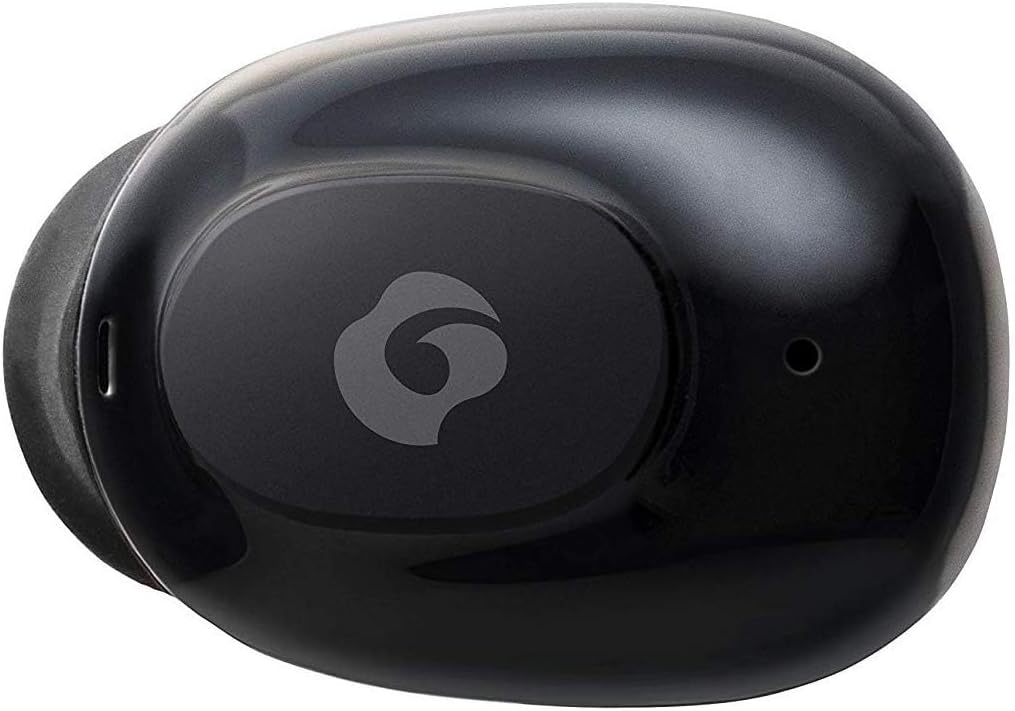
სურათი 4.2: ახლოდან view of a single GLIDiC earbud, highlighting the multifunction button with the GLIDiC logo and the microphone opening.
დამტენი ქეისის კომპონენტები
- დატენვის პორტები: Internal contacts for earbuds, external port for case charging.
- კორპუსის LED ინდიკატორი: აჩვენებს ქეისის დატენვის სტატუსს.
- სახურავი: Protects earbuds and secures them during charging.
5. დაყენება
5.1 საწყისი დატენვა
- Place both earbuds into the charging case. Ensure they are correctly seated, and the LED indicators on the earbuds illuminate.
- USB დამტენი კაბელი შეაერთეთ კორპუსზე არსებულ დამტენ პორტთან და მეორე ბოლო შეაერთეთ USB კვების წყაროსთან (მაგ., კომპიუტერი, კედლის ადაპტერი).
- The case LED indicator will show charging status. Allow approximately 2 hours for a full charge of both earbuds and the case.
- Once fully charged, disconnect the charging cable. The earbuds offer up to 60 days of standby time when stored in the fully charged case.
5.2 Bluetooth მოწყობილობასთან დაწყვილება
- დარწმუნდით, რომ ყურსასმენები დატენულია.
- გახსენით დამტენი ქეისი. ყურსასმენები ავტომატურად გადავა დაწყვილების რეჟიმში და მათი LED ინდიკატორები აციმციმდება.
- თქვენს Bluetooth-თან დაკავშირებულ მოწყობილობაზე (სმარტფონი, პლანშეტი და ა.შ.) გადადით Bluetooth-ის პარამეტრებში.
- ძიება available devices. Select "GLIDiC TW-5000s" from the list.
- Once connected, the earbud LED indicators will stop flashing and may show a solid light or turn off, depending on the model. A voice prompt may also confirm the connection.
- თუ დაწყვილება ვერ მოხერხდა, ყურსასმენები ისევ ქეისში მოათავსეთ, დახურეთ სახურავი, დაელოდეთ რამდენიმე წამი და შემდეგ გაიმეორეთ ნაბიჯები.
6. საოპერაციო ინსტრუქციები
6.1 ჩართვა/გამორთვა
- ჩართვა: Open the charging case, or press and hold the multifunction button on each earbud for approximately 3 seconds.
- Გამორთვა: Place the earbuds back into the charging case and close the lid, or press and hold the multifunction button on each earbud for approximately 5 seconds.
6.2 მუსიკის დაკვრა
- დაკვრა/პაუზა: Press the multifunction button once on either earbud.
- შემდეგი სიმღერა: Double-press the multifunction button on the right earbud.
- წინა ჩანაწერი: Double-press the multifunction button on the left earbud.
- მოცულობა: Triple-press the multifunction button on the right earbud.
- Ხმის დაწევა: Triple-press the multifunction button on the left earbud.
6.3 ზარების მართვა
- ზარის პასუხი/დასრულება: Press the multifunction button once on either earbud.
- ზარის უარყოფა: Press and hold the multifunction button on either earbud for approximately 2 seconds.
6.4 ხმის ასისტენტი
- ხმოვანი ასისტენტის გააქტიურება: Press and hold the multifunction button on either earbud for approximately 2 seconds (when not on a call).
6.5 Multi-Communication Mode
The GLIDiC Sound Air TW-5000s features a multi-communication mode that allows select ambient sounds to be heard without compromising audio quality. This enhances user awareness and safety.
- Activate/Deactivate Multi-Communication Mode: Consult the specific instructions provided with your device, as activation methods can vary. Typically, this involves a specific press sequence on the multifunction button or an option within a companion app if available.
7. მოვლა
7.1 დასუფთავება
- ყურსასმენები და დამტენი ქეისი გაწმინდეთ რბილი, მშრალი, ბუსუსების გარეშე ქსოვილით.
- არ გამოიყენოთ აბრაზიული საწმენდები, სპირტი ან ქიმიური გამხსნელები.
- Gently remove ear tips and clean them with mild soap and water if necessary. Ensure they are completely dry before reattaching.
- ყურსასმენებისა და ქეისის დამტენი კონტაქტების ფრთხილად გასაწმენდად გამოიყენეთ მშრალი ბამბის ტამპონი.
7.2 შენახვა
- როდესაც ყურსასმენები არ იყენებთ, შეინახეთ დამტენ ქეისში, რათა დაიცვათ ისინი და დატენილი იყოს.
- შეინახეთ მოწყობილობა გრილ, მშრალ ადგილას, მოარიდეთ მზის პირდაპირ სხივებს და ექსტრემალურ ტემპერატურას.
8. Დიაგნოსტიკა
If you encounter issues with your GLIDiC Sound Air TW-5000s, refer to the following common problems and solutions:
| პრობლემა | შესაძლო გამოსავალი |
|---|---|
| ყურსასმენები არ ირთვება. | Ensure earbuds are charged. Place them in the charging case and connect the case to a power source. |
| ყურსასმენები მოწყობილობასთან არ წყვილდება. |
|
| მხოლოდ ერთ ყურსასმენს აქვს ხმა. |
|
| დამტენი ქეისი არ იტენება. |
|
| ხმის ხარისხი ცუდია ან წყვეტილი. |
|
9. სპეციფიკაციები
| ფუნქცია | დეტალი |
|---|---|
| მოდელის სახელი | TW-5000s |
| დაკავშირების ტექნოლოგია | უსადენო (Bluetooth) |
| Bluetooth დიაპაზონი | 10 მეტრი |
| სიხშირის დიაპაზონი | 20 ჰც - 20,000 ჰც |
| Battery Life (Carrying Case Standby) | 60 დღემდე |
| წყლის წინააღმდეგობის დონე | წყალგამძლე (ოფლისადმი მდგრადი) |
| კონტროლის ტიპი | მედიის კონტროლი, შეხება, ხმა |
| განსაკუთრებული თვისებები | Microphone Included, Noise Cancellation, Multi-communication mode |
| მასალა | Plastic, TPE, and Silicone |
| ზომები (ყურსასმენი) | 0.98 x 0.67 x 0.91 ინჩი (დაახლოებით) |
| ნივთის წონა | 9.6 უნცია (საერთო შეფუთვის წონა) |
| UPC | 811559030024 |
10. გარანტია და მხარდაჭერა
GLIDiC products are designed for reliability and performance. For specific warranty details, please refer to the warranty card included with your purchase or visit the official GLIDiC website. If you require technical support or have questions not covered in this manual, please contact GLIDiC customer service through their official channels.
გთხოვთ, შეინახოთ თქვენი შეძენის მტკიცებულება გარანტიის პრეტენზიებისთვის.
Ask a question about this manual
Ask about setup, troubleshooting, compatibility, parts, safety, or missing instructions. Manuals+ will review the question and use this page’s manual context to help answer it.