1. დასრულდაview
The Belkin BoostCharge USB-C to USB-C Fast Charging Cable is designed for efficient power delivery and data transfer between compatible USB-C devices. This 6.6ft (2M) cable supports fast charging up to 60W and data transfer speeds up to 480 Mbps, ensuring reliable performance for a wide range of electronics.
2. პროდუქტის მახასიათებლები
- უნივერსალური თავსებადობა: Connects with a broad range of USB-C devices, including iPhone 17/16 Series, Samsung Galaxy S25/S24, Google Pixel 9, Nintendo Switch 2, iPad Pro, MacBook Pro, and more. Supports Apple Carplay and Android Auto.
- სწრაფი დატენვა: Delivers up to 60W Power Delivery, enabling fast charging of compatible USB-C smartphones from 0-50% in approximately 35 minutes when paired with an 18W or higher USB-C PD charger (not included).
- უმაღლესი გამძლეობა: Engineered with a durable braided material, tested to withstand over 8,000 bends and 10,000 plugs, offering enhanced longevity compared to standard cables.
- მონაცემთა გადაცემა: Supports data transfer speeds up to 480 Mbps (USB 2.0 standard) for syncing music, photos, and other data.
- USB-IF სერტიფიცირებული: Ensures adherence to strict electrical, mechanical, and environmental standards for a safe and reliable user experience.
Image: Illustration of 60W fast charging capability.
Image: USB-IF certification for 60W power delivery.
Image: Durability testing results for bends and plugs.
3. პაკეტის შიგთავსი
პაკეტში შედის:
- 1 x Belkin USB-C to USB-C Cable (2M/6.6ft)
4. დაყენება
To set up your Belkin BoostCharge USB-C to USB-C cable:
- Ensure your charging adapter and device are compatible with USB-C and support the desired power delivery (e.g., 60W for fast charging).
- Connect one end of the Belkin USB-C cable to the USB-C port on your power adapter.
- Connect the other end of the Belkin USB-C cable to the USB-C port on your device (e.g., smartphone, tablet, laptop).
- შეაერთეთ დენის ადაპტერი კედლის განყოფილებაში.

Image: A Belkin USB-C to USB-C cable connected to a device.
5. საოპერაციო ინსტრუქციები
5.1 თქვენი მოწყობილობის დამუხტვა
Once connected as described in the Setup section, your device should begin charging automatically. The cable supports fast charging for devices that are compatible with USB Power Delivery (PD) and are paired with an appropriate power adapter.
5.2 მონაცემთა გადაცემა
To transfer data between two USB-C compatible devices (e.g., a smartphone and a laptop):
- Connect one end of the Belkin USB-C cable to the USB-C port on the source device.
- Connect the other end of the Belkin USB-C cable to the USB-C port on the destination device.
- Follow the on-screen prompts on your devices to initiate data transfer. The cable supports USB 2.0 data transfer speeds up to 480 Mbps.
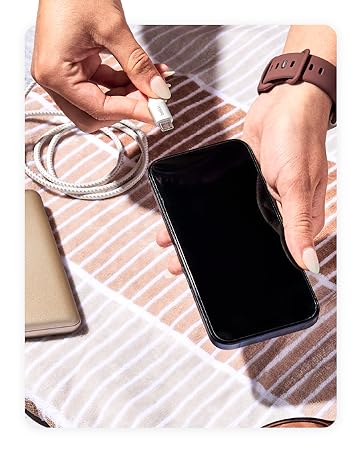
Image: Wide compatibility with various USB-C devices.
6. მოვლა
To ensure the longevity and optimal performance of your Belkin BoostCharge USB-C to USB-C cable:
- შენახვა: შეინახეთ კაბელი გრილ, მშრალ ადგილას, მოარიდეთ მზის პირდაპირ სხივებს და ექსტრემალურ ტემპერატურას. მოერიდეთ კაბელის მჭიდროდ დახვევას ან ბასრი კუთხით მოხრას, რათა თავიდან აიცილოთ შიდა დაზიანება.
- დასუფთავება: Use a soft, dry cloth to gently wipe the cable and connectors. Do not use liquid cleaners or abrasive materials.
- დამუშავება: კაბელის შეერთების ან გამორთვისას ყოველთვის დაიჭირეთ კონექტორის თავი და არა თავად კაბელის გამოქაჩვა.
- ინსპექტირება: პერიოდულად შეამოწმეთ კაბელი ცვეთის, გაცვეთის ან კონექტორების დაზიანების ნიშნების აღმოსაჩენად. შეწყვიტეთ გამოყენება, თუ რაიმე დაზიანებას შეამჩნევთ.
7. Დიაგნოსტიკა
7.1 მოწყობილობა არ იტენება
- შეამოწმეთ კავშირები: Ensure both ends of the cable are securely plugged into the device and the power adapter.
- დენის წყარო: Verify that the power adapter is plugged into a working wall outlet. Try a different outlet if necessary.
- ადაპტერის თავსებადობა: Confirm that your power adapter provides sufficient wattage for your device and supports USB Power Delivery (PD) for fast charging.
- კაბელის მდგომარეობა: Inspect the cable for any visible damage. A damaged cable may not function correctly.
- მოწყობილობის პრობლემა: Test the cable with another compatible device or try a different cable with your device to isolate the problem.
7.2 ნელი დატენვის სიჩქარე
- დენის ადაპტერი: Ensure you are using an 18W or higher USB-C PD charger for optimal fast charging speeds.
- მოწყობილობის მხარდაჭერა: Confirm that your device supports fast charging via USB-C PD.
- ფონური აპლიკაციები: დახურეთ თქვენს მოწყობილობაზე ფონურ რეჟიმში გაშვებული ყველა ენერგომოხმარების მქონე აპლიკაცია.
- კაბელის სიგრძე: While this cable is 2M, longer cables can sometimes result in slightly slower charging. Ensure the cable is not excessively long for your needs.
7.3 მონაცემთა გადაცემის პრობლემები
- კავშირი: Re-seat both ends of the cable to ensure a stable connection.
- მოწყობილობის პარამეტრები: Check your device's settings to ensure data transfer is enabled (e.g., USB preferences on Android devices).
- მძღოლის პრობლემები: Ensure necessary drivers are installed on your computer for the connected device.
8. სპეციფიკაციები
| ფუნქცია | აღწერა |
|---|---|
| მოდელის სახელი | BoostCharge USB-C to USB-C Cable |
| მოდელის ნომერი | CAB003bt2M |
| კაბელის სიგრძე | 2 მ (6.6 ფუტი) |
| კონექტორის ტიპი | USB ტიპი C (მამრობითი-მამრობითი) |
| დენის მიწოდება | 60 ვტ-მდე |
| მონაცემთა გადაცემის სიჩქარე | 480 Mbps-მდე (USB 2.0) |
| გამძლეობა | Tested to 8,000+ bends, 10,000+ plugs |
| სერტიფიცირება | USB-IF სერთიფიცირებული |
| ფერი | შავი |
| მასალა | Durable braided material |
| პროდუქტის ზომები | 1 x 4 x 5.21 ინჩი |
| ნივთის წონა | 0.07 კილოგრამი (2.39 უნცია) |
Image: Internal engineering for safety and performance.
9. გარანტია და მხარდაჭერა
Belkin provides a 2-წლიანი დაფარვა for this BoostCharge USB-C to USB-C cable. For technical support, warranty claims, or further assistance, please visit the official Belkin support webსაიტზე ან დაუკავშირდით მათ მომხმარებელთა მომსახურებას.

Image: Belkin 2-Year Coverage and quality assurance.
10. პროდუქტის ოფიციალური ვიდეო
Video: Belkin Brand Overviewეს ვიდეო ზოგად წარმოდგენას იძლევაview of the Belkin brand and its commitment to quality and innovation.