1. შესავალი
Thank you for choosing the TOZO NC9 Hybrid Active Noise Cancelling Wireless Earbuds. These earbuds are designed to provide an immersive audio experience with advanced noise cancellation, clear call quality, and comfortable all-day wear. This manual will guide you through the setup, operation, and maintenance of your new earbuds.
2. რა არის ყუთში
- TOZO Hybrid Active Noise Cancelling Wireless Earbuds
- დამუხტვის ქეისი
- USB-C (A-დან C-მდე) კაბელი (20 სმ)
- ყურსასმენები (მრავალი ზომის)
- მომხმარებლის სახელმძღვანელო

Figure 2.1: Contents of the TOZO NC9 package.
3. პროდუქტი დასრულდაview
The TOZO NC9 earbuds feature a compact design with advanced audio technology. Key components include:
- ჰიბრიდული აქტიური ხმაურის ჩახშობა: Up to 45dB noise reduction for an immersive listening experience.
- 6-Microphone ENC Clear Call: Enhanced environmental noise cancellation for clear voice transmission during calls.
- გამჭვირვალობის რეჟიმი: საშუალებას გაძლევთ, ყურსასმენების მოხსნის გარეშე გაიგოთ გარშემომყოფების ხმა.
- Stereo Bass Sound: Built-in 10mm drivers with OrigX Acoustic 2.0 technology for rich bass and clear audio.
- ერგონომიული დიზაინი: Comfortable fit with six replaceable ear tip sizes.
- TOZO App Integration: Customize sound with 32 EQ options and noise cancellation modes.
- გახანგრძლივებული სათამაშო დრო: Up to 59 hours total playtime with the charging case (ANC off).
- IPX8 წყალგამძლეობა: Protection against sweat, rain, and splashes.
- Bluetooth 5.3 ტექნოლოგია: Stable connection and low latency.
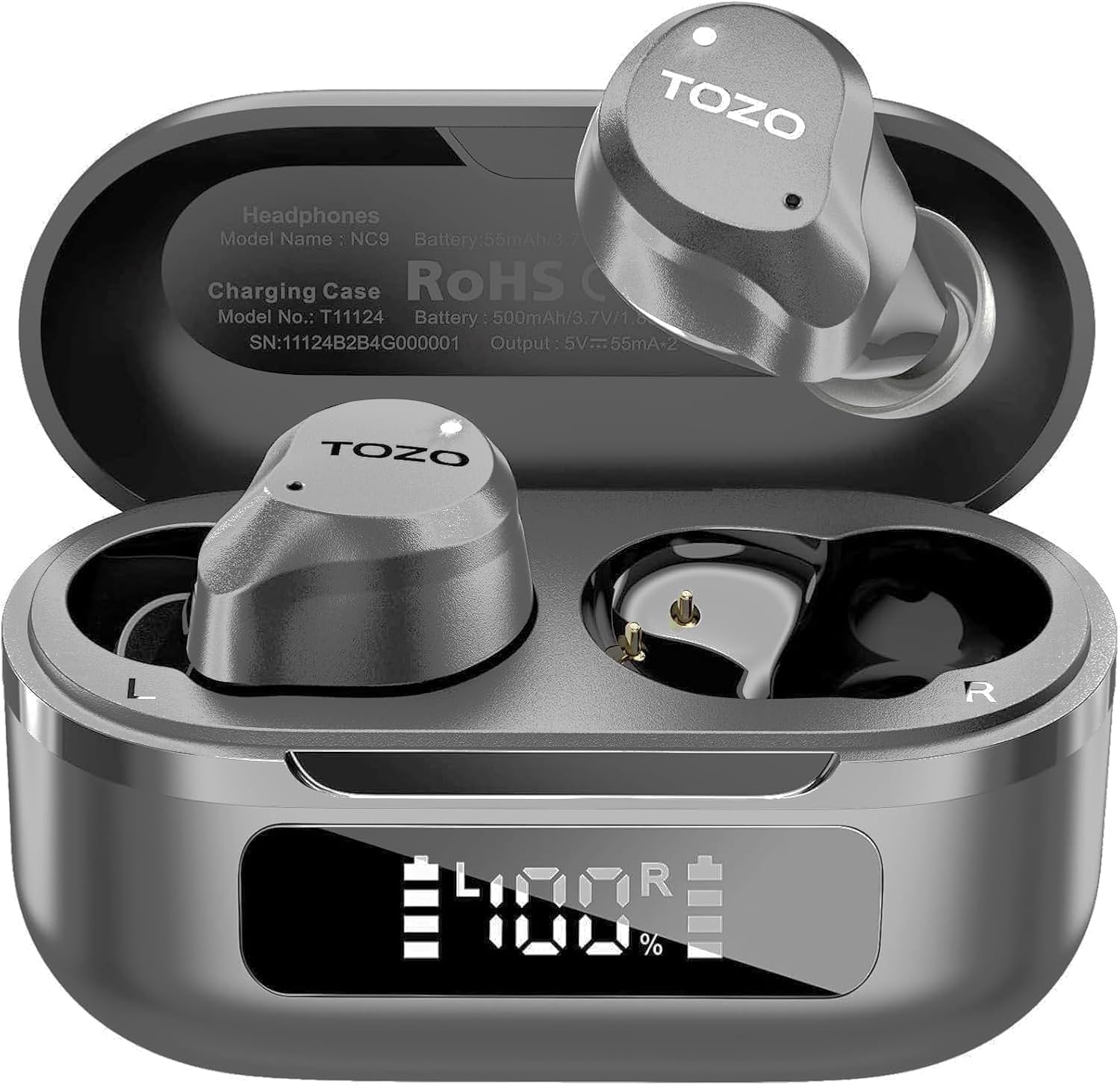
Figure 3.1: TOZO NC9 Earbuds and Charging Case.

Figure 3.2: TOZO OrigX Acoustics Technology for enhanced sound.
4. დაყენება
4.1. საწყისი დაწყვილება
- გახსენით დამტენი ქეისი. ყურსასმენები ავტომატურად გადავა დაწყვილების რეჟიმში.
- თქვენს მოწყობილობაზე (სმარტფონი, პლანშეტი და ა.შ.) ჩართეთ Bluetooth.
- ძიება "TOZO NC9" in the list of available Bluetooth devices and select it to connect.
- დაკავშირების შემდეგ, თქვენ მოისმენთ ხმოვან შეტყობინებას, რომელიც ადასტურებს წარმატებულ დაწყვილებას.
4.2. ყურსასმენების ტარება
ოპტიმალური ხმის ხარისხისა და კომფორტისთვის, უზრუნველყავით სათანადო მორგება:
- Choose the ear tips that best fit your ear canal from the provided sizes.
- Insert the earbuds into your ears with the sound hole pointing downwards.
- Gently rotate the earbuds backward to secure them snugly in your ear.

Figure 4.1: Proper wearing of the TOZO NC9 Earbuds.
5. საოპერაციო ინსტრუქციები
5.1. შეეხეთ Controls
The TOZO NC9 earbuds feature intuitive touch controls on each earbud:
- ერთჯერადი შეხება (მარცხნივ/მარჯვნივ): მუსიკის დაკვრა/პაუზა, ზარის პასუხი/დასრულება.
- ორმაგი შეხება (მარცხნივ): წინა სიმღერა.
- ორმაგი შეხება (მარჯვნივ): შემდეგი სიმღერა.
- Triple Tap (Left): Activate/Deactivate Noise Cancellation or Transparency Mode.
- სამმაგი შეხება (მარჯვნივ): ხმოვანი ასისტენტის გააქტიურება (Siri, Google Assistant).
- Long Press (Left/Right): ზარის უარყოფა.
5.2. აქტიური ხმაურის ჩახშობა (ANC) და გამჭვირვალობის რეჟიმი
The earbuds offer three sound modes:
- აქტიური ხმაურის გაუქმება (ANC): Reduces external noise for an immersive audio experience.
- გამჭვირვალობის რეჟიმი: გარემოს ხმებს საშუალებას აძლევს გაავრცელოს, რაც გარემოს შესახებ ინფორმაციას გაძლევთ.
- ნორმალური რეჟიმი: Standard audio with no active noise processing.
Switch between modes by triple-tapping the left earbud.
Figure 5.1: Active Noise Cancellation in action.
5.3. TOZO App Features
Download the TOZO App to unlock advanced customization options:
- 32 EQ Options: Tailor your audio experience with various preset equalizers or create custom sound profiles.
- ხმაურის ჩახშობის რეჟიმები: Fine-tune ANC and Transparency settings.
- EQ Zone: Share and discover custom EQ settings from other users.

Figure 5.2: TOZO App for sound customization.
6. დატენვა და ბატარეის ხანგრძლივობა
6.1. ქეისისა და ყურსასმენების დატენვა
The charging case can be charged via the included USB-C cable. The earbuds charge automatically when placed inside the case.
- დატენვის დრო: სრული დატენვისთვის დაახლოებით 1.5 საათი.
- ბატარეის ინდიკატორი: The charging case features an LED display to show the remaining battery percentage.

Figure 6.1: Charging case with LED display.
6.2. ბატარეის მუშაობა
- Total Playtime (with charging case): Up to 59 hours (ANC off), 42 hours (ANC on).
- Single Use Playback: Up to 14 hours (ANC off), 10 hours (ANC on).

Figure 6.2: Extended playtime capabilities.
7. მოვლა და მოვლა
7.1. წყალგამძლეობა
The TOZO NC9 earbuds are IPX8 water-resistant, meaning they can withstand sweat, rain, and accidental splashes. However, they are not designed for swimming or prolonged submersion. Ensure earbuds are dry before placing them back in the charging case.
7.2. დასუფთავება
Regularly clean your earbuds and charging case to maintain optimal performance:
- ყურსასმენებისა და დამტენის ქეისის გასაწმენდად გამოიყენეთ რბილი, მშრალი, უბუშტუკო ქსოვილი.
- ამოიღეთ ყურის წვერები და გაწმინდეთ რბილი საპნითა და წყლით, შემდეგ კარგად გაამშრალეთ ხელახლა დამაგრებამდე.
- მოერიდეთ აბრაზიული მასალების ან უხეში ქიმიკატების გამოყენებას.
8. Დიაგნოსტიკა
- ყურსასმენები არ წყვილდება: დარწმუნდით, რომ ორივე ყურსასმენი დამტენ ქეისშია, შემდეგ გახსენით სახურავი დაწყვილების რეჟიმის დასაწყებად. შეამოწმეთ თქვენი მოწყობილობის Bluetooth პარამეტრები.
- მხოლოდ ერთი ყურსასმენი მუშაობს :( Place both earbuds back in the charging case, close the lid, then open it again. Re-pair if necessary.
- ხმის ცუდი ხარისხი: Ensure ear tips provide a secure seal. Clean earbuds to remove any debris. Check audio source quality.
- დატენვის პრობლემები: Ensure the charging cable is securely connected and the charging case is clean. Check the LED display for battery status.
- ყურსასმენების გადაყენება: Refer to the full user manual for specific reset instructions if persistent issues occur.
9. სპეციფიკაციები
| ფუნქცია | სპეციფიკაცია |
|---|---|
| მოდელის სახელი | TOZO NC9 |
| ხმაურის კონტროლი | ჰიბრიდული აქტიური ხმაურის გაუქმება |
| Bluetooth ვერსია | 5.3 |
| Bluetooth დიაპაზონი | 10 მეტრი |
| ელემენტის ხანგრძლივობა (ყურსასმენები) | 14 საათი (ANC გამორთულია), 10 საათი (ANC ჩართულია) |
| თამაშის საერთო დრო (ქეისით) | 59 საათი (ANC გამორთულია), 42 საათი (ANC ჩართულია) |
| დატენვის დრო | 1.5 საათი |
| წყლის წინააღმდეგობის დონე | IPX8 |
| აუდიო დრაივერის ზომა | 10 მილიმეტრი |
| კონტროლის ტიპი | სენსორული კონტროლი / აპლიკაცია |
| მოყვება კომპონენტები | Earbuds, Charging Case, USB-C Cable, Eartips, User Manual |
10. გარანტია და დახმარება
Your TOZO NC9 earbuds come with an 18-Month Extended Warranty. For warranty activation and support, please visit the official TOZO webსაიტი ან დაუკავშირდით მომხმარებელთა მომსახურებას.
დამატებითი დახმარებისთვის, გთხოვთ, ეწვიოთ TOZO მაღაზია Amazon-ზე.
ვიდეო 10.1: ოვერview of the TOZO NC9 earbuds, including unboxing and features.
ვიდეო 10.2: ხელახლაview highlighting the sound quality, fit, and value of the TOZO NC9 earbuds.
Video 10.3: A demonstration of the noise cancelling capabilities of the TOZO NC9 earbuds.


