შესავალი
This manual provides essential information for setting up, operating, maintaining, and troubleshooting your ASUS TUF Gaming A17 Laptop, model TUF706IH-ES75. Please read this guide thoroughly to ensure optimal performance and longevity of your device.

Figure 1: ASUS TUF Gaming A17 Laptop (TUF706IH-ES75) - Front View
რა არის ყუთში
Verify that all items are present upon unboxing your ASUS TUF Gaming A17 Laptop:
- TUF Gaming A17 TUF706 Laptop
- დენის ადაპტერი და კაბელი
- მომხმარებლის სახელმძღვანელო
- საგარანტიო ბარათი
დაყენება
1. პირველადი ჩართვა
- შეაერთეთ კვების ადაპტერი ლეპტოპის კვების პორტთან, შემდეგ კი დენის წყაროსთან.
- Open the laptop lid. The laptop may power on automatically, or you may need to press the power button located above the keyboard.
- Follow the on-screen instructions to complete the Windows 10 Home setup. This includes selecting your region, language, and setting up your user account.
2. პერიფერიული მოწყობილობების დამაკავშირებელი
თქვენს ლეპტოპს აქვს სხვადასხვა პორტი გარე მოწყობილობების დასაკავშირებლად:
- USB პორტები: Connect USB devices such as mice, keyboards, or external storage drives. The laptop includes 1 USB 2.0 port and 3 USB 3.0 ports.
- HDMI პორტი: Connect an external display or TV using an HDMI cable.
- Ethernet პორტი: სადენიანი ქსელის დასაკავშირებლად.
- აუდიო ჯეკი: დააკავშირეთ ყურსასმენები ან გარე დინამიკები.

სურათი 2: მარცხენა მხარის პორტები

Figure 3: Right Side Ports and Vents
3. Software Updates with MyASUS
The MyASUS application helps keep your system updated and optimized. It provides essential updates, system diagnostics, and access to customer support.
Video 1: MyASUS Product Video. This video demonstrates how to use the MyASUS application for system updates, diagnostics, and personalized settings.
ოპერაციული ინსტრუქციები
1. კლავიატურა და სენსორული პანელი
The laptop features a desktop-style keyboard with a dedicated Numpad and customizable Aura RGB backlighting. The touchpad supports multi-touch gestures for navigation.
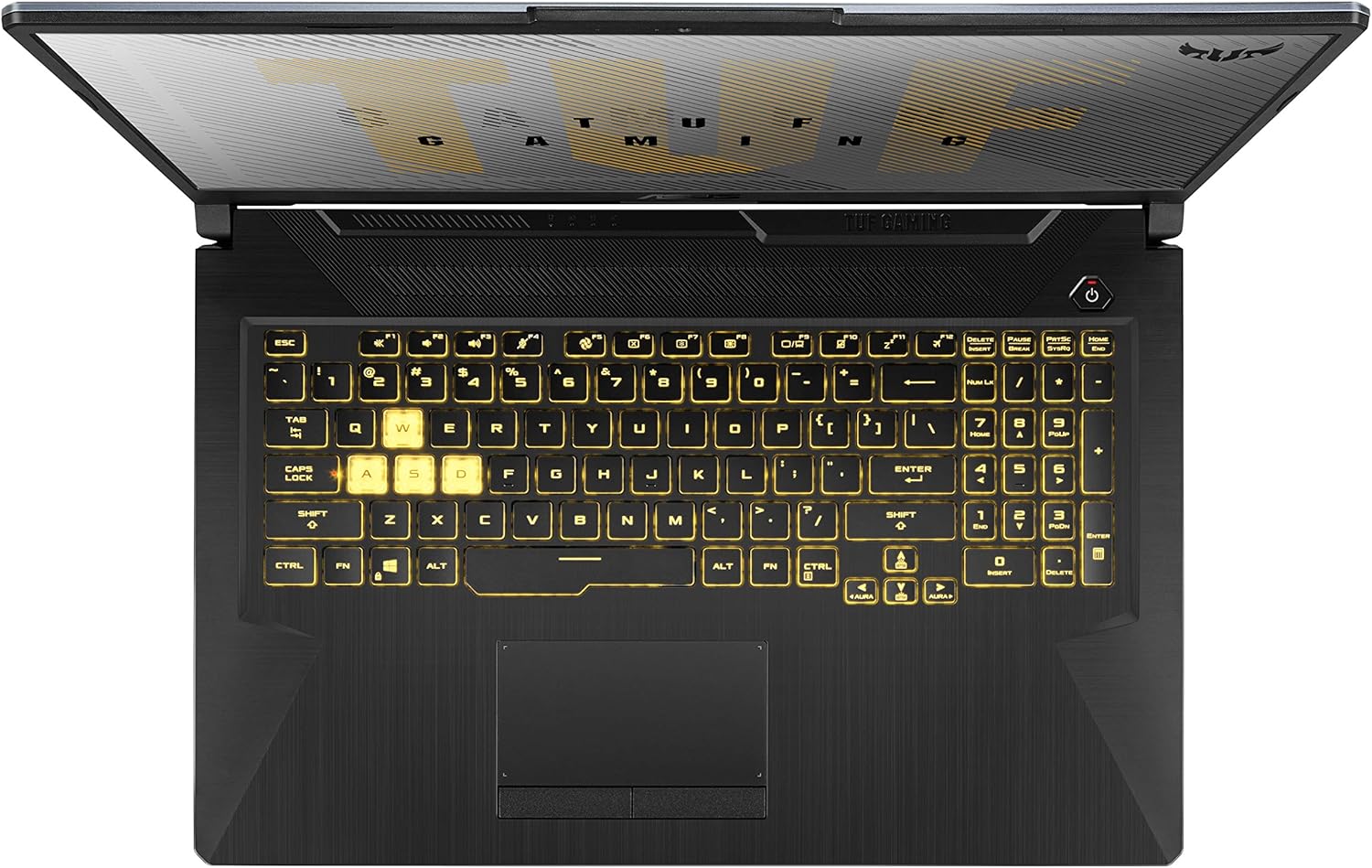
Figure 4: Keyboard Layout
2. ეკრანის მახასიათებლები
The 17.3-inch Full HD (1920x1080) IPS-Type display offers a 120Hz refresh rate for smoother visuals, especially during gaming.
3. შესრულების რეჟიმები
The laptop's cooling system supports various scenario profiles (Silent, Performance, Turbo) to optimize fan speed and performance based on your usage. These can typically be adjusted via the MyASUS application or dedicated function keys.
4. Multi-Monitor Support
Extend your workspace by connecting external monitors using the DisplayPort 1.4 and HDMI 2.0b outputs.
5. აუდიო
Experience enhanced audio with upgraded speakers featuring DTS:X Ultra technology, providing louder sound and deeper bass.
Video 2: TUF Gaming A17 Product Video. This video highlights key features of the ASUS TUF Gaming A17, including its performance, durability, and cooling system.
მოვლა
1. გაგრილების სისტემა
The laptop features an Anti-Dust Cooling (ADC) system with dual self-cleaning fans to maintain stability and prevent dust buildup. Regularly ensure that the cooling vents are not obstructed to allow for optimal airflow.

Figure 5: Rear Cooling Vents
2. ბატარეის მოვლა
The laptop is equipped with a 90Wh battery. To prolong battery lifespan, avoid frequently discharging the battery completely and store the laptop in a cool, dry place when not in use for extended periods. Utilize the battery health management features available in MyASUS.
3. Software Maintenance
Regularly check for and install operating system updates and driver updates through Windows Update and the MyASUS application to ensure system stability and security.
4. დასუფთავება
ეკრანისა და გარე ზედაპირების გასაწმენდად გამოიყენეთ რბილი, უბუშტო ქსოვილი. ჯიუტი ლაქების შემთხვევაში, ოდნავampშეგიძლიათ გამოიყენოთ წყლით ან რბილი, არააბრაზიული საწმენდი საშუალებით დასველებული ქსოვილი. მოერიდეთ სითხეების პირდაპირ ლეპტოპზე შესხურებას.
პრობლემების მოგვარება
If you encounter issues with your laptop, consider the following steps:
- ძალა არ არის: დარწმუნდით, რომ კვების ადაპტერი საიმედოდ არის დაკავშირებული როგორც ლეპტოპთან, ასევე მოქმედ დენის წყაროსთან. თუ შესაძლებელია, სცადეთ სხვა როზეტი.
- ჩვენების პრობლემები: If the screen is blank or flickering, try connecting an external monitor to determine if the issue is with the laptop's internal display or the graphics card.
- შესრულების შენელება: Check for background applications consuming excessive resources. Ensure your operating system and drivers are up to date.
- გადახურება: Ensure cooling vents are clear of obstructions. Consider adjusting performance profiles in MyASUS to a less aggressive setting if not gaming.
- პროგრამული უზრუნველყოფის პრობლემები: Use the 'One-click diagnosis' feature in the MyASUS application to identify and resolve common software-related issues.
უფრო დეტალური ინფორმაციისთვის, თუ როგორ უნდა მოაგვაროთ პრობლემები ან როგორ განვითარდეს ისინი, იხილეთ ASUS-ის მხარდაჭერის სამსახური. webსაიტი ან დაუკავშირდით მომხმარებელთა მომსახურებას.
სპეციფიკაციები
| ფუნქცია | სპეციფიკაცია |
|---|---|
| მოდელი | TUF706IH-ES75 |
| პროცესორი | AMD Ryzen 7 4800H (Quad-core, 4.2 GHz) |
| გრაფიკა | NVIDIA GeForce GTX 1650 4GB GDDR6 |
| ჩვენება | 17.3-inch FHD (1920x1080) 120Hz IPS-Type |
| ოპერატიული მეხსიერება | 16 GB DDR4 3200 MHz |
| შენახვა | 512 გბ PCIe NVMe M.2 SSD + 1 ტბ მყარი დისკი |
| ოპერაციული სისტემა | Windows 10 მთავარი |
| უსადენო კავშირი | გიგაბიტიანი Wi-Fi 5 (802.11ac), Bluetooth |
| პორტები | 1x USB 2.0, 3x USB 3.0, HDMI, Ethernet, Audio Jack |
| ბატარეა | 1 ლითიუმის ლითონის ბატარეა (შედის) |
| ზომები (LxWxH) | 15.7 x 10.6 x 1 ინჩი |
| წონა | 5.7 ფუნტი |
გარანტია და მხარდაჭერა
Your ASUS TUF Gaming A17 Laptop comes with a warranty. Please refer to the included Warranty Card for detailed terms and conditions. For technical support, driver downloads, and further assistance, visit the official ASUS support website or use the MyASUS application.
The laptop is built with durable MIL-STD-810H military standard construction, designed to withstand various environmental conditions.