1. შესავალი
Thank you for choosing the havit KB488L USB Wired Keyboard. This manual provides essential information for setting up, operating, and maintaining your keyboard. Please read it carefully to ensure optimal performance and longevity of your device.
The havit KB488L is designed for both office and gaming use, featuring a quiet typing experience, ergonomic wrist rest, and vibrant rainbow LED backlighting. It offers a 105-key UK layout for comfortable and efficient input.

Image 1.1: The havit KB488L keyboard, highlighting its quiet operation and integrated wrist rest.
2. პროდუქტის მახასიათებლები
- მშვიდი ოპერაცია: Designed for smooth and silent typing, suitable for office and home environments.
- ერგონომიული დიზაინი: Features a 15° tilt capability and an integrated wrist rest to reduce fatigue during extended use.
- ცისარტყელას LED განათება: Enhances visibility in low-light conditions and provides an aesthetic appeal. The backlight can be toggled on/off.
- 12 მულტიმედიური მალსახმობების კლავიში: Provides quick access to common functions for entertainment and productivity.
- გამძლე კონსტრუქცია: Keys tested for 5 million clicks, ensuring long-term reliability.
- სადენიანი კავშირი: საიმედო USB კავშირი თანმიმდევრული მუშაობისთვის.
- ფართო თავსებადობა: Supports Windows 2000/XP/Vista/7/8/10, Mac, and Linux operating systems. (Note: Multimedia keys function only on Windows).

Image 2.1: The integrated wrist rest of the havit KB488L keyboard, designed for ergonomic comfort.
3. პაკეტის შიგთავსი
- havit KB488L USB Wired Keyboard with integrated wrist rest
- მომხმარებლის სახელმძღვანელო (ეს დოკუმენტი)
4. დაყენების ინსტრუქციები
- ამოალაგეთ კლავიატურა: ფრთხილად ამოიღეთ კლავიატურა შეფუთვიდან.
- კომპიუტერთან დაკავშირება: Plug the USB connector of the keyboard into an available USB port on your computer (desktop PC or laptop).
- დრაივერის ინსტალაცია: The keyboard is plug-and-play. Your operating system will automatically detect and install the necessary drivers. No additional software installation is required.
- Adjust Tilt (Optional): Flip out the adjustable feet on the underside of the keyboard to set your preferred typing angle.

Image 4.1: The havit KB488L keyboard set up and connected to a computer.
5. საოპერაციო ინსტრუქციები
5.1 კლავიატურის ძირითადი ფუნქციები
The havit KB488L functions as a standard 105-key UK layout keyboard. All standard alphanumeric keys, function keys (F1-F12), navigation keys, and numeric keypad operate as expected.
5.2 მულტიმედიური მალსახმობების კლავიშები
The keyboard features 12 multimedia shortcut keys accessible by pressing the Fn key in combination with the corresponding F1-F12 keys. These shortcuts are designed to enhance productivity and entertainment. Note: Multimedia keys are ONLY functional on Windows operating systems.
| გასაღების კომბინაცია | ფუნქცია |
|---|---|
| Fn + F1 | მუსიკალური პლეერი |
| Fn + F2 | ხმის დაკლება |
| Fn + F3 | ხმის ამაღლება |
| Fn + F4 | დადუმება |
| Fn + F5 | წინა სიმღერა |
| Fn + F6 | შემდეგი სიმღერა |
| Fn + F7 | დაკვრა/პაუზა |
| Fn + F8 | გაჩერდი |
| Fn + F9 | Web/მთავარი |
| Fn + F10 | ელფოსტა |
| Fn + F11 | ჩემი კომპიუტერი |
| Fn + F12 | რჩეულები |
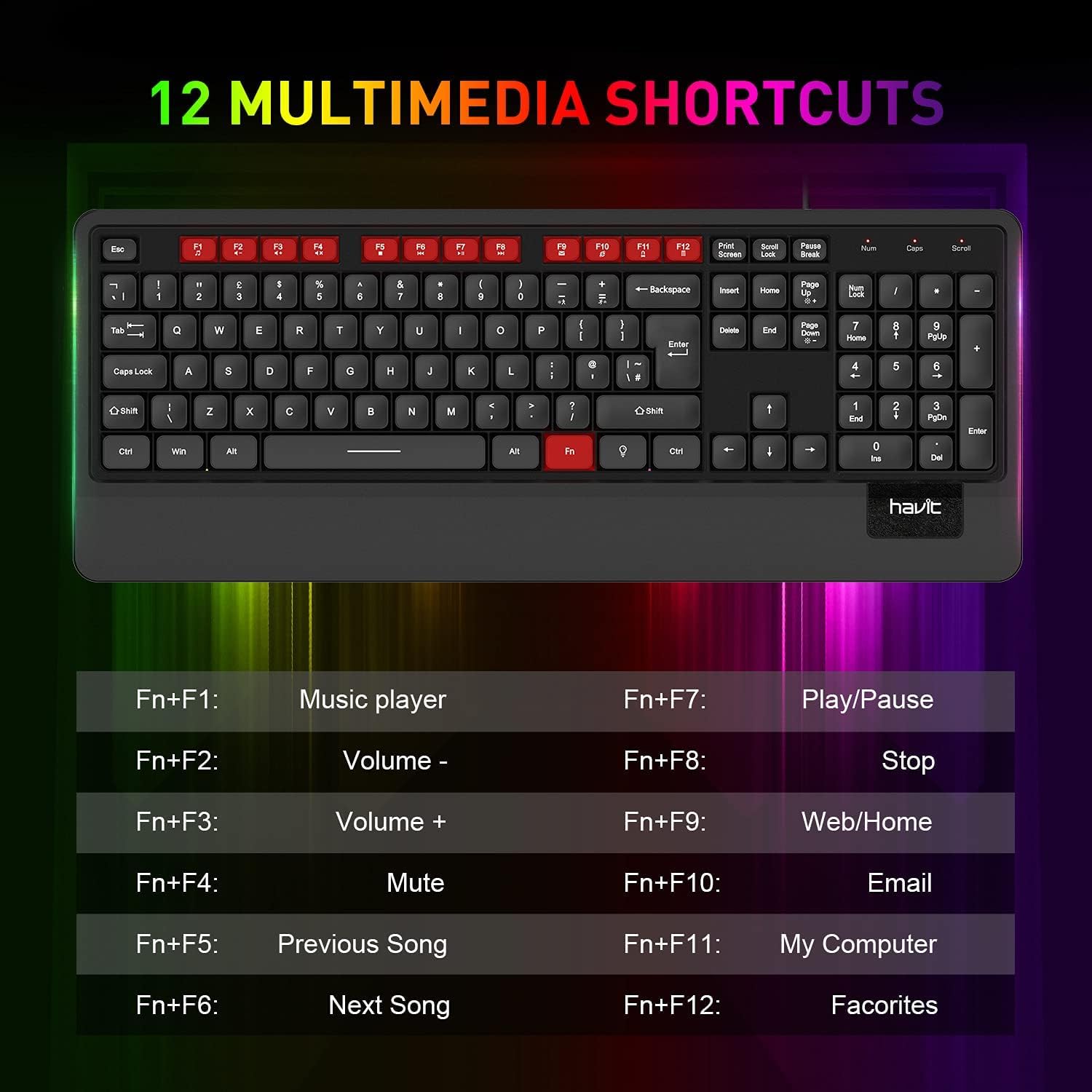
სურათი 5.1: დასრულდაview of the 12 multimedia shortcut keys and their functions.
5.3 განათების კონტროლი
The keyboard features a rainbow LED backlight. To control the backlight:
- ჩართვა/გამორთვა: დააჭირეთ გადახვევის ჩაკეტვა key to toggle the backlight on or off.

Image 5.2: The havit KB488L keyboard with its rainbow LED backlight active, illustrating key visibility in low light.
6. მოვლა
To ensure the longevity and proper functioning of your havit KB488L keyboard, follow these maintenance guidelines:
- დასუფთავება: კლავიატურის ზედაპირის გასაწმენდად გამოიყენეთ რბილი, მშრალი ქსოვილი. ჯიუტი ჭუჭყის შემთხვევაში, ოდნავamp cloth can be used, ensuring no liquid enters the keycaps or internal components. Avoid harsh chemicals or abrasive cleaners.
- მტვრის მოცილება: გასაღებებს შორის მტვრისა და ნარჩენების მოსაშორებლად გამოიყენეთ შეკუმშული ჰაერი.
- მოერიდეთ დაღვრას: Keep liquids away from the keyboard to prevent damage. In case of a spill, immediately disconnect the keyboard from your computer and allow it to dry completely before reconnecting.
- შენახვა: ხანგრძლივი პერიოდის განმავლობაში არ გამოყენების შემთხვევაში, კლავიატურა შეინახეთ სუფთა, მშრალ ადგილას, მზის პირდაპირი სხივებისა და ექსტრემალური ტემპერატურისგან მოშორებით.
7. Დიაგნოსტიკა
If you encounter issues with your havit KB488L keyboard, please refer to the following common solutions:
- კლავიატურა არ რეაგირებს:
- დარწმუნდით, რომ USB კაბელი საიმედოდ არის შეერთებული თქვენი კომპიუტერის მოქმედ USB პორტში.
- სცადეთ კლავიატურის სხვა USB პორტში შეერთება.
- გადატვირთეთ კომპიუტერი.
- შეამოწმეთ კლავიატურა სხვა კომპიუტერზე, რათა დაადგინოთ, პრობლემა კლავიატურაშია თუ კომპიუტერში.
- უკანა განათება არ მუშაობს:
- დააჭირეთ გადახვევის ჩაკეტვა key to ensure the backlight is toggled on.
- დარწმუნდით, რომ კლავიატურა სწორად არის დაკავშირებული და იღებს კვებას.
- მულტიმედიური კლავიშები არ მუშაობს:
- Remember that multimedia keys only work on Windows operating systems.
- დარწმუნდით, რომ დააჭირეთ ღილაკს Fn key simultaneously with the desired function key (F1-F12).
- Keys Sticking or Not Registering:
- დაზიანებული კლავიშები გაწმინდეთ შეკუმშული ჰაერით ნებისმიერი ნამსხვრევების მოსაშორებლად.
- აკრეფის დროს მოერიდეთ ზედმეტ ძალას.
If these steps do not resolve your issue, please contact havit customer support for further assistance.
8. სპეციფიკაციები
| ფუნქცია | დეტალი |
|---|---|
| მოდელის ნომერი | KB488L |
| დაკავშირება | სადენიანი USB |
| გასაღების განლაგება | 105 Keys, UK Layout |
| უკანა განათება | ცისარტყელას LED |
| განსაკუთრებული თვისებები | Backlit, Ergonomic, Integrated Wrist Rest |
| თავსებადი მოწყობილობები | ლეპტოპი, კომპიუტერი |
| ოპერაციული სისტემის თავსებადობა | Windows 2000/XP/Vista/7/8/10, Mac, Linux |
| პროდუქტის ზომები | 1.08 x 17.52 x 6.89 ინჩი (27.5 x 445 x 175 მმ) |
| ნივთის წონა | 1.63 ფუნტი (0.74 კგ) |
| მწარმოებელი | ჰავიტი |

Image 8.1: Detailed dimensions of the havit KB488L keyboard.
9. გარანტია და მხარდაჭერა
havit products come with a standard manufacturer's warranty. For specific warranty details, terms, and conditions, please refer to the warranty card included with your purchase or visit the official havit webსაიტი.
For technical support, troubleshooting assistance, or any inquiries regarding your havit KB488L keyboard, please contact havit customer service through their official webსაიტზე ან თქვენი პროდუქტის შეფუთვაში მოცემულ საკონტაქტო ინფორმაციაზე.


