1. შესავალი
This manual provides detailed instructions for the setup, operation, maintenance, and troubleshooting of your iProda T1045A 10.1 inch Android Tablet. Please read this manual thoroughly before using your device to ensure proper functionality and to maximize your user experience.
The iProda T1045A is a 10.1-inch tablet featuring an HD IPS display with 1280x800 resolution, powered by a 64-bit Quad-core processor running Android 9 Pie. It includes 3GB RAM, 64GB internal storage expandable up to 128GB via TF card, dual-band Wi-Fi, HDMI output, and a 5000mAh battery for extended use.
2. პროდუქტი დასრულდაview
2.1 პაკეტის შიგთავსი
პაკეტის გახსნის შემდეგ, დარწმუნდით, რომ ყველა ნივთი ხელთ არის:
- iProda T1045A 10.1 inch Android Tablet
- USB კაბელი
- დენის ადაპტერი
- მომხმარებლის სახელმძღვანელო (ეს დოკუმენტი)

Image: Contents of the iProda T1045A tablet package.
2.2 მოწყობილობის განლაგება
Familiarize yourself with the physical components and ports of your tablet:
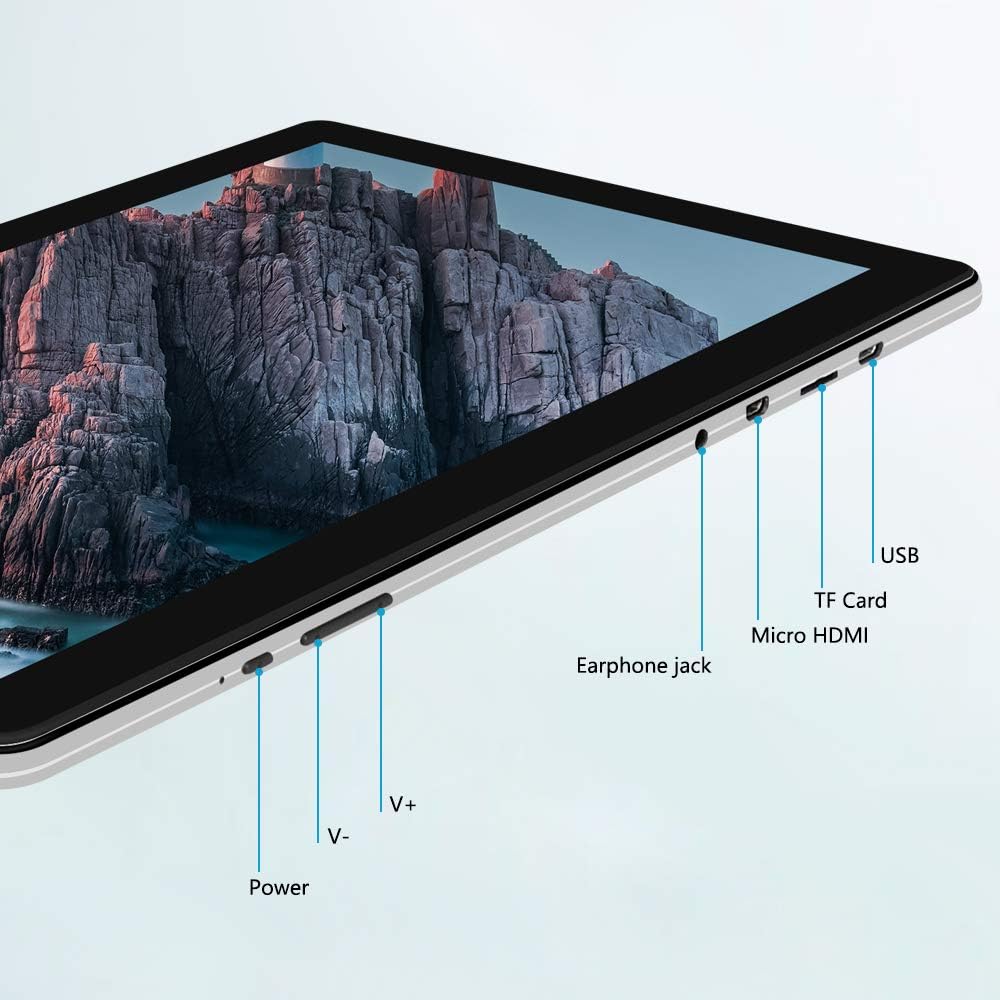
სურათი: გვერდი view of the iProda T1045A tablet highlighting port locations.
- დენის ღილაკი: Press and hold to power on/off or restart the tablet. Short press to turn the screen on/off.
- Volume Buttons (V+, V-): აუდიოს ხმის დარეგულირება.
- ყურსასმენის ჯეკი: შეაერთეთ 3.5 მმ ყურსასმენი.
- TF ბარათის სლოტი: Insert a microSD card for expandable storage (up to 128GB).
- Micro HDMI Port: Connect to an external display using a Micro HDMI to HDMI cable.
- USB პორტი: Connect to a computer for data transfer or for charging the device.
3. დაყენება
3.1 საწყისი დატენვა
Before first use, fully charge the tablet. Connect the provided USB cable to the tablet's USB port and the power adapter, then plug the adapter into a wall outlet. The charging indicator will typically illuminate. A full charge may take several hours.
3.2 ჩართვა/გამორთვა
- ჩართვა: ხანგრძლივად დააჭირეთ დენის ღილაკს, სანამ ეკრანი არ ანათებს.
- გამორთვა: Press and hold the Power button until a power menu appears on the screen. Select "Power off" and confirm.
- გადატვირთვა: ჩართვის მენიუდან აირჩიეთ "გადატვირთვა".
- ეკრანის ჩართვა/გამორთვა: Briefly press the Power button to turn the screen off (sleep mode) or wake it up.
3.3 საწყისი დაყენების ოსტატი
The first time you power on the tablet, you will be guided through an initial setup process. Follow the on-screen prompts to:
- აირჩიეთ თქვენთვის სასურველი ენა.
- დაუკავშირდით Wi-Fi ქსელს.
- დააყენეთ თქვენი Google ანგარიში (არასავალდებულოა, მაგრამ რეკომენდებულია აპლიკაციების ჩამოსატვირთად).
- თარიღისა და დროის პარამეტრების კონფიგურაცია.
3.4 Inserting a TF Card (MicroSD)
To expand the tablet's storage:
- Locate the TF card slot on the side of the tablet.
- Carefully insert a microSD card (up to 128GB) into the slot with the gold contacts facing down until it clicks into place.
- ამოსაღებად, ფრთხილად დააჭირეთ ბარათს შიგნით, სანამ არ ამოვარდება.
4. საოპერაციო ინსტრუქციები
4.1 ძირითადი ნავიგაცია
The iProda T1045A uses a touch-sensitive screen for navigation:
- შეეხეთ: აირჩიეთ ნივთი ან გახსენით აპლიკაცია.
- Დააჭირე და გეჭიროს: კონტექსტურ მენიუებზე წვდომა ან ხატულების გადატანა.
- დარტყმა: გადაახვიეთ სიებში ან გადართეთ მთავარ ეკრანებს შორის.
- Ჩქმეტა: სურათების მასშტაბირება გადიდება ან დაპატარავება და web გვერდები.
4.2 Wi-Fi კავშირი
უკაბელო ქსელთან დასაკავშირებლად:
- გადადით პარამეტრები > ქსელი და ინტერნეტი > Wi-Fi.
- Wi-Fi-ს გადართვა On.
- აირჩიეთ სასურველი ქსელი სიიდან.
- შეიყვანეთ პაროლი, თუ მოგთხოვენ, შემდეგ შეეხეთ დაკავშირება.
The tablet supports both 2.4G and 5G dual-band Wi-Fi for faster and more stable connections.
4.3 Bluetooth დაწყვილება
To pair with Bluetooth devices (e.g., headphones, speakers):
- გადადით პარამეტრები > დაკავშირებული მოწყობილობები > Bluetooth.
- Bluetooth-ის გადართვა On.
- დარწმუნდით, რომ თქვენი Bluetooth მოწყობილობა დაწყვილების რეჟიმშია.
- აირჩიეთ თქვენი მოწყობილობა ხელმისაწვდომი მოწყობილობების სიიდან და მიჰყევით ეკრანზე გამოტანილ ნებისმიერ მითითებას დაწყვილების დასასრულებლად.
4.4 კამერების გამოყენება
პლანშეტი აღჭურვილია 2 მეგაპიქსელიანი წინა და 5 მეგაპიქსელიანი უკანა კამერებით.
- გახსენით კამერა application from the app drawer.
- წინა და უკანა კამერებს შორის გადასართავად შეეხეთ კამერის ხატულას.
- შეეხეთ ჩამკეტის ღილაკს ფოტოების გადასაღებად ან ვიდეოჩანაწერის დასაწყებად/შესაჩერებლად.

Image: Tablet in use, showcasing its camera capabilities.
4.5 Connecting to an External Display (HDMI)
To display your tablet's screen on a larger monitor or TV:
- Connect one end of a Micro HDMI cable to the tablet's Micro HDMI port.
- Connect the other end of the cable to an HDMI input on your external display.
- Select the correct HDMI input source on your external display.
- The tablet's screen content should now be mirrored on the external display.
4.6 აპლიკაციების მართვა
The tablet runs Android 9 Pie and supports applications from the Google Play Store.
- აპლიკაციების ინსტალაცია: გახსენით Play Store აპლიკაცია, მოძებნეთ სასურველი აპლიკაცია და შეეხეთ დააინსტალირეთ.
- აპლიკაციების დეინსტალაცია: Tap and hold an app icon on the home screen or in the app drawer, then drag it to "Uninstall" or select "App info" and choose "Uninstall". Alternatively, go to პარამეტრები > აპები და შეტყობინებები, აირჩიეთ აპლიკაცია და შეეხეთ დეინსტალაცია.
5. მოვლა
5.1 მოწყობილობის გაწმენდა
ტაბლეტის გასაწმენდად:
- გაწმენდის წინ გამორთეთ ტაბლეტი.
- გამოიყენეთ რბილი, ბუსუსების გარეშე ქსოვილი, ოდნავ დასველებულიampened with water or a screen cleaner, to wipe the screen and body.
- მოერიდეთ უხეში ქიმიკატების, აბრაზიული საწმენდების ან ზედმეტი ტენიანობის გამოყენებას.
5.2 პროგრამული უზრუნველყოფის განახლებები
Periodically check for software updates to ensure optimal performance and security:
- გადადით პარამეტრები > სისტემა > გაფართოებული > სისტემის განახლება.
- ხელმისაწვდომი განახლებების ჩამოსატვირთად და დასაინსტალირებლად მიჰყევით ეკრანზე მოცემულ ინსტრუქციებს. განახლების დროს დარწმუნდით, რომ თქვენი ტაბლეტი საკმარისად დატენილია ან მიერთებულია დენის წყაროსთან.
5.3 შენახვის მართვა
To manage internal storage and the TF card:
- გადადით პარამეტრები > შენახვა.
- აქ შეგიძლიათ view storage usage, free up space, and manage files on both internal storage and the inserted TF card.
6. Დიაგნოსტიკა
This section addresses common issues you might encounter with your iProda T1045A tablet.
6.1 მოწყობილობა არ ირთვება
- Ensure the tablet is sufficiently charged. Connect it to the power adapter and allow it to charge for at least 30 minutes before attempting to power on again.
- გადატვირთვა იძულებით სცადეთ ჩართვის ღილაკის 10-15 წამის განმავლობაში დაჭერა.
6.2 Wi-Fi კავშირის პრობლემები
- Verify that Wi-Fi is enabled in პარამეტრები.
- დარწმუნდით, რომ შეიყვანეთ სწორი Wi-Fi პაროლი.
- გადატვირთეთ თქვენი Wi-Fi როუტერი და პლანშეტი.
- Try connecting to a different Wi-Fi network to determine if the issue is with the tablet or the network.
6.3 ნელი შესრულება
- დახურეთ არასაჭირო ფონური აპლიკაციები.
- Clear cached data for apps in პარამეტრები > აპები და შეტყობინებები > [აპლიკაციის სახელი] > მეხსიერება და ქეში > ქეშის გასუფთავება.
- Ensure sufficient free storage space. Uninstall unused apps or move large files TF ბარათზე.
- გადატვირთეთ ტაბლეტი.
6.4 ბატარეის სწრაფი დაცლა
- შეამცირეთ ეკრანის სიკაშკაშე.
- გამორთეთ Wi-Fi, Bluetooth და GPS, როდესაც არ იყენებთ.
- დახურეთ ფონურ რეჟიმში მომუშავე აპლიკაციები, რომლებიც მნიშვნელოვან ენერგიას მოიხმარენ.
- შეამოწმეთ ბატარეის გამოყენება პარამეტრები > ბატარეა ენერგომოხმარების მქონე აპლიკაციების იდენტიფიცირებისთვის.
- Ensure the tablet is not allowed to run below 15% charge frequently, as this can impact battery longevity.
6.5 ქარხნული პარამეტრების გადატვირთვა
თუ პრობლემები მუდმივია, ქარხნულ პარამეტრებზე გადატვირთვამ შეიძლება ისინი მოაგვაროს. გაფრთხილება: ეს თქვენს ტაბლეტზე არსებულ ყველა მონაცემს წაშლის. გაგრძელებამდე შექმენით მნიშვნელოვანი მონაცემების სარეზერვო ასლი.
- გადადით პარამეტრები > სისტემა > გაფართოებული > პარამეტრების გადატვირთვა.
- აირჩიეთ ყველა მონაცემის წაშლა (ქარხნული პარამეტრების გადატვირთვა).
- დაადასტურეთ თქვენი გადაწყვეტილება და მიჰყევით ეკრანზე მითითებებს.
7. სპეციფიკაციები
Below are the technical specifications for the iProda T1045A tablet:
| მოდელის სახელი | T1045A |
| ოპერაციული სისტემა | Android 9 Pie |
| ჩვენების ზომა | 10.1 ინჩი |
| ჩვენების გარჩევადობა | 1280 x 800 პიქსელი (HD IPS) |
| პროცესორი | MediaTek Quad-core 1.5Ghz |
| ოპერატიული მეხსიერება | 3 GB |
| შიდა საცავი | 64 GB SSD |
| გაფართოებადი საცავი | Up to 128 GB via TF Card (MicroSD) |
| გრაფიკული კოპროცესორი | ARM Mali-T720 MP2 |
| უკანა კამერა | 5 დეპუტატი |
| წინა კამერა | 2 დეპუტატი |
| ბატარეის ტევადობა | 5000 mAh ლითიუმის პოლიმერი |
| ბატარეის საშუალო ხანგრძლივობა | 8 საათამდე |
| უსადენო კავშირი | Dual-Band Wi-Fi (802.11a/b/g/n), Bluetooth 4.0 |
| პორტები | 1x USB 2.0, 1x Micro HDMI, 3.5mm Earphone Jack, TF Card Slot |
| ზომები | 34.5 x 19.7 x 5.5 სმ |
| წონა | 550 გ |

Image: Key performance specifications of the tablet.

Image: Tablet portability and battery details.
8. გარანტია და მხარდაჭერა
8.1 პროდუქტის გარანტია
The iProda T1045A tablet comes with a 12 თვიანი გარანტია შეძენის დღიდან. ეს გარანტია ფარავს წარმოების დეფექტებს და გაუმართაობას ნორმალური გამოყენების პირობებში. ის არ ფარავს არასწორი გამოყენებით, უბედური შემთხვევებით, არაავტორიზებული შეკეთებით ან ნორმალური ცვეთის შედეგად გამოწვეულ ზიანს.
8.2 მომხმარებელთა მხარდაჭერა
If you encounter any issues not covered in the troubleshooting section or require further assistance, please contact iProda customer support. Refer to your purchase documentation or the iProda official webსაიტი საკონტაქტო ინფორმაციისთვის.
When contacting support, please have your tablet's model number (T1045A) and purchase details readily available.


