შესავალი
Thank you for choosing the DOOGEE S58 PRO Rugged Smartphone. This manual provides essential information for setting up, operating, maintaining, and troubleshooting your device. Please read it carefully to ensure optimal performance and longevity of your smartphone.
The DOOGEE S58 PRO is designed for durability, featuring IP68/IP69K water and dust resistance, and a robust build to withstand challenging environments.
პაკეტის შიგთავსი
დარწმუნდით, რომ ყველა ნივთი თქვენი პროდუქტის შეფუთვაშია:
- DOOGEE S58 PRO გამძლე სმარტფონი
- Type-C USB კაბელი
- Type-C to 3.5mm Headphone Adapter
- დამტენი
- Anti-explosion Film (Screen Protector)
- Card Slot Opener
- სლინგი
- მომხმარებლის სახელმძღვანელო (ეს დოკუმენტი)
მოწყობილობა დასრულდაview
The DOOGEE S58 PRO is built with a rugged design for enhanced durability. Its construction includes multiple rigid layers and a silicone liner for exceptional shock absorption, similar to materials used in off-road vehicle tires.

სურათი: წინა და უკანა view of the DOOGEE S58 PRO, highlighting its rugged construction and IP68 rating. The design incorporates elements for shock absorption.
დაყენების სახელმძღვანელო
1. ბატარეის დატენვა
Before first use, fully charge the device. Connect the Type-C USB cable to the phone's charging port and the other end to the provided charger. Plug the charger into a power outlet. The 5180mAh battery typically provides 2-3 days of normal use on a full charge.

სურათი: Diagram illustrating the internal 5180mAh battery of the DOOGEE S58 PRO, with indicators for standby, music, video, calling, and gaming durations.
2. Installing SIM Cards and MicroSD Card
Locate the SIM card tray on the side of the phone. Use the provided card slot opener to eject the tray. Insert your Nano-SIM cards and/or a MicroSD card (for expandable storage up to 256GB) into the designated slots. Ensure the cards are correctly oriented. Carefully reinsert the tray until it clicks into place. The SIM card slot is protected by an O-ring for water resistance.
3. ჩართვა/გამორთვა
- ჩართვისთვის: დააჭირეთ და გეჭიროთ ჩართვის ღილაკი, სანამ DOOGEE-ს ლოგო არ გამოჩნდება.
- გამორთვისთვის: დააჭირეთ და გეჭიროთ ჩართვის ღილაკს, შემდეგ ეკრანზე არსებული ვარიანტებიდან აირჩიეთ „გამორთვა“.
4. საწყისი დაყენება
პირველი ჩართვისას, მოწყობილობის დასაყენებლად მიჰყევით ეკრანზე მოცემულ ინსტრუქციებს. ეს მოიცავს ენის არჩევას, Wi-Fi ქსელთან დაკავშირებას, თქვენი Google ანგარიშის დაყენებას და უსაფრთხოების ფუნქციების კონფიგურაციას.
ოპერაციული ინსტრუქციები
1. Android 10 ოპერაციული სისტემა
Your DOOGEE S58 PRO runs on Android 10.0, offering a user-friendly interface and access to a wide range of applications via the Google Play Store. Navigate using gestures or the traditional navigation bar.
2. შესრულება და შენახვა
Equipped with 6GB RAM and 64GB ROM, powered by an efficient MediaTek Helio P22 octa-core CPU, the S58 PRO ensures smooth operation for browsing, video playback, and 3D gaming. The internal storage can be expanded up to 256GB using a MicroSD card.

სურათი: Visual representation of the DOOGEE S58 PRO's 6GB RAM and 64GB ROM, emphasizing its fluid and speedy performance for various applications.
3. კამერის მახასიათებლები
The S58 PRO features a versatile camera system:
- უკანა კამერა: 16MP AI Triple Camera (SONY IMX298 main sensor) with additional 2MP Portrait and 2MP Macro lenses.
- წინა კამერა: 16MP (SAMSUNG sensor).
- წყალქვეშა კამერის რეჟიმი: Utilize this mode for capturing photos and videos in aquatic environments, leveraging the phone's IP68 rating.

სურათი: Depiction of the DOOGEE S58 PRO's camera setup, including the 16MP AI Triple Rear Camera and 16MP Front Camera, along with examples of photos taken with the main, portrait, and macro lenses.
4. ნავიგაცია და დაკავშირებადობა
- გლობალური ნავიგაციის სისტემები: The S58 PRO supports GPS, Galileo, Glonass, and Beidou for precise positioning, ensuring you can find your way anywhere.
- Wireless NFC: For convenient contactless payments and data exchange.
- დაკავშირება: Supports 4G and 3G cellular networks, Wi-Fi, and Bluetooth.

სურათი: A collage showing the DOOGEE S58 PRO's support for four satellite navigation systems (GPS, Galileo, Glonass, Beidou), wireless NFC functionality, and a selection of pre-installed utility tools like Compass, Sound Meter, and Magnifier.
5. Custom Key and Utility Tools
The device includes a customizable physical key for quick access to frequently used apps or functions. Additionally, a suite of outdoor utility tools is pre-installed, including Compass, Sound meter, Pic hanging, Gradienter, Height measure, Magnifier, Protractor, Plumb bob, and Warning.
მოვლა და მოვლა
1. წყლისა და მტვრისადმი მდგრადობა
The DOOGEE S58 PRO is IP68 and IP69K certified, meaning it is resistant to submersion up to 1 meter underwater for 24 hours and can withstand high-pressure, high-temperature water jets. It also meets MIL-STD-810G standards for durability.
- ტელეფონს წყალთან ან მტვერთან შეხებამდე დარწმუნდით, რომ ყველა პორტის საფარი (USB-C, SIM ბარათის უჯრა) საიმედოდ არის დახურული.
- თუ ტელეფონი დასველდება, დატენვამდე ან პორტების გახსნამდე გაამშრალეთ სუფთა ქსოვილით.
- Avoid exposing the phone to extreme temperatures outside its operating range (-55°C to 70°C).
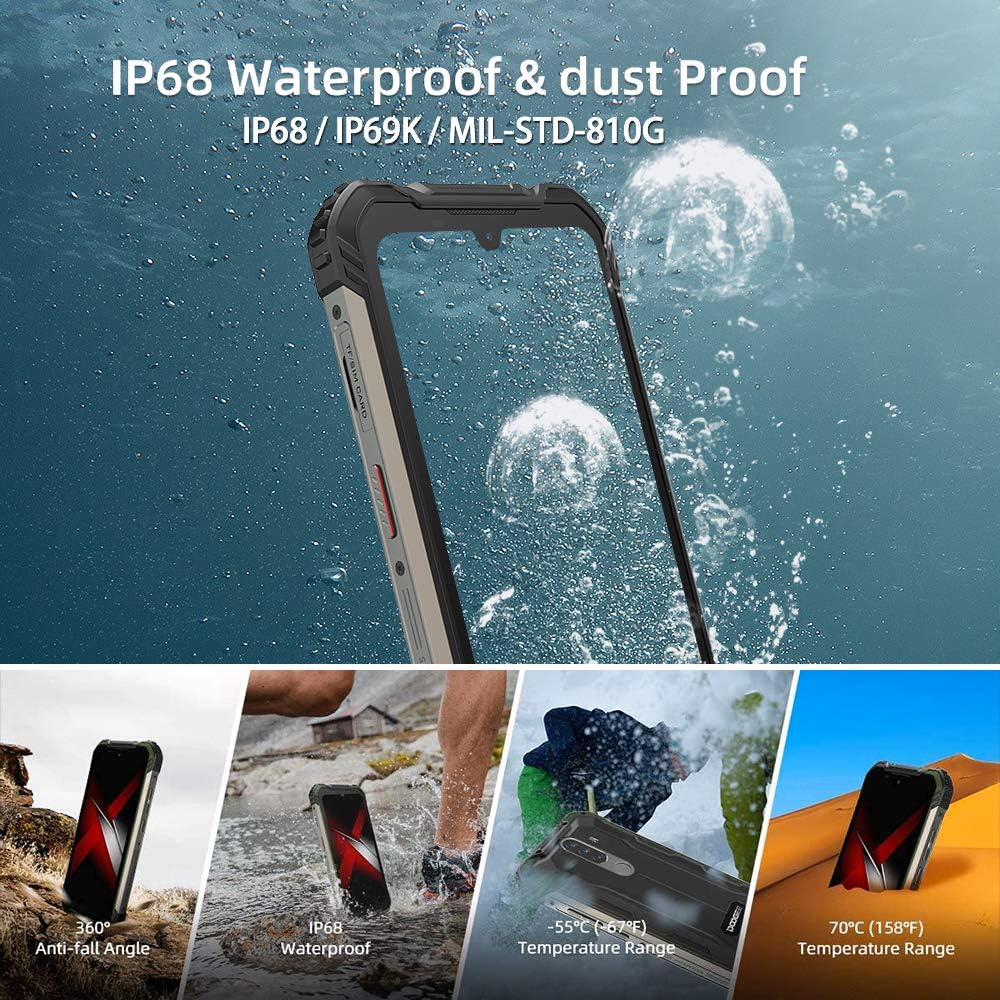
სურათი: Visual demonstration of the DOOGEE S58 PRO's IP68 waterproof and dustproof capabilities, including resistance to drops, water immersion, and extreme temperatures ranging from -55°C to 70°C.
2. დასუფთავება
გაასუფთავეთ მოწყობილობა რბილი, დamp cloth. Avoid using harsh chemicals or abrasive materials, which can damage the phone's protective coatings.
3. ბატარეის მოვლა
To prolong battery life, avoid fully discharging the battery frequently. Charge the phone using only the provided charger and cable. Extreme temperatures can affect battery performance and lifespan.
პრობლემების მოგვარება
If you encounter issues with your DOOGEE S58 PRO, refer to the following common solutions:
- მოწყობილობა არ ჩართულია: დარწმუნდით, რომ აკუმულატორი დატენილია. შეაერთეთ დამტენი და დაელოდეთ რამდენიმე წუთი, სანამ ხელახლა ჩართავთ.
- აპლიკაციების გათიშვა ან გაყინვა: Close the problematic app and reopen it. If the issue persists, restart the phone. Ensure your apps are updated to their latest versions.
- ქსელის სუსტი სიგნალი: შეამოწმეთ, სწორად არის თუ არა ჩასმული თქვენი SIM ბარათი. გადადით უკეთესი ქსელის დაფარვის მქონე ადგილას.
- წყლის ან მტვრის შეღწევა: If you suspect water or dust has entered the device despite its ratings, power off the phone immediately and allow it to dry completely. Do not attempt to charge it while wet.
- ეკრანის პრობლემები: If the screen is unresponsive, try restarting the device. Ensure the anti-explosion film (screen protector) is correctly applied and not interfering with touch sensitivity.
For more complex issues, consider performing a factory reset (back up your data first) or contact customer support.
სპეციფიკაციები
| ფუნქცია | დეტალი |
|---|---|
| ბრენდი | დოოჯი |
| მოდელი | DOOGEE S58 PRO |
| ოპერაციული სისტემა | Android 10.0 |
| პროცესორი | MediaTek Helio P22 Octa-core CPU |
| ოპერატიული მეხსიერება | 6 GB |
| შიდა მეხსიერება (ROM) | 64 GB (Expandable up to 256GB via MicroSD) |
| ჩვენება | 5.71-inch CORNING GORILLA GLASS HD+ Waterdrop, 720 x 1520 Resolution |
| უკანა კამერა | 16MP AI Triple Camera (SONY IMX298) + 2MP + 2MP |
| წინა კამერა | 16MP (SAMSUNG) |
| ბატარეა | 5180 mAh ლითიუმის იონი |
| წყლისა და მტვრის წინააღმდეგობა | IP68, IP69K, MIL-STD-810G |
| ზომები | 16.28 x 8.1 x 1.59 სმ |
| წონა | 284 გ |
| დაკავშირება | 4G, 3G, Wi-Fi, Bluetooth, NFC |
| ნავიგაცია | GPS, Galileo, Glonass, Beidou |
| ოპერაციული ტემპერატურა | -55°C-დან 70°C-მდე |
გარანტია და მხარდაჭერა
გარანტიის შესახებ ინფორმაციისთვის, გთხოვთ, იხილოთ თქვენი პროდუქტის შეფუთვაში მოთავსებული გარანტიის ბარათი ან დაუკავშირდეთ შეძენის პუნქტს. გარანტიის პირობები შეიძლება განსხვავდებოდეს რეგიონისა და გამყიდველის მიხედვით.
If you require technical assistance or have questions not covered in this manual, please contact the seller or DOOGEE customer support through their official webსაიტი.