1. შესავალი
The PeakTech P 8005 is a high-precision Class 2 sound level meter designed for accurate noise measurement and data logging. It is suitable for a wide range of applications including noise projects, quality control, disease prevention, and environmental sound measurements in factories, schools, offices, traffic, and households. This device features a 4-digit 20mm LCD multi-function display with a bargraph and backlight, a USB interface for continuous measurements, and AC/DC outputs for connection to frequency analyzers or X-Y wave recorders. This manual provides detailed instructions for the proper use, maintenance, and troubleshooting of your PeakTech P 8005.
2. უსაფრთხოების ინფორმაცია
Please read all safety instructions carefully before operating the device. Failure to follow these instructions may result in damage to the device or personal injury.
- არ დაუშვათ მოწყობილობა ექსტრემალურ ტემპერატურაზე, ტენიანობაზე ან მზის პირდაპირ შუქზე.
- მოერიდეთ ძლიერ ვიბრაციას ან დარტყმებს.
- არ სცადოთ მოწყობილობის გახსნა ან მოდიფიცირება. შეკეთება მხოლოდ კვალიფიციურმა პერსონალმა უნდა განახორციელოს.
- შეინახეთ მოწყობილობა ძლიერი ელექტრომაგნიტური ველებისგან.
- Ensure proper ventilation when using the AC adapter for extended periods.
- გადაყარეთ ბატარეები ადგილობრივი წესების შესაბამისად.
3. პაკეტის შიგთავსი
დარწმუნდით, რომ ქვემოთ ჩამოთვლილი ყველა ნივთი შედის თქვენს პაკეტში:
- PeakTech P 8005 Sound Level Meter
- ტარების საქმე
- 3m Additional Microphone Cable
- USB ინტერფეისის კაბელი
- Software for Windows (on CD-ROM)
- მინი სამფეხა
- 9 ვოლტიანი ცვლადი დენის ადაპტერი
- 9 ვ ბატარეა
- მომხმარებლის სახელმძღვანელო

4. პროდუქტი დასრულდაview
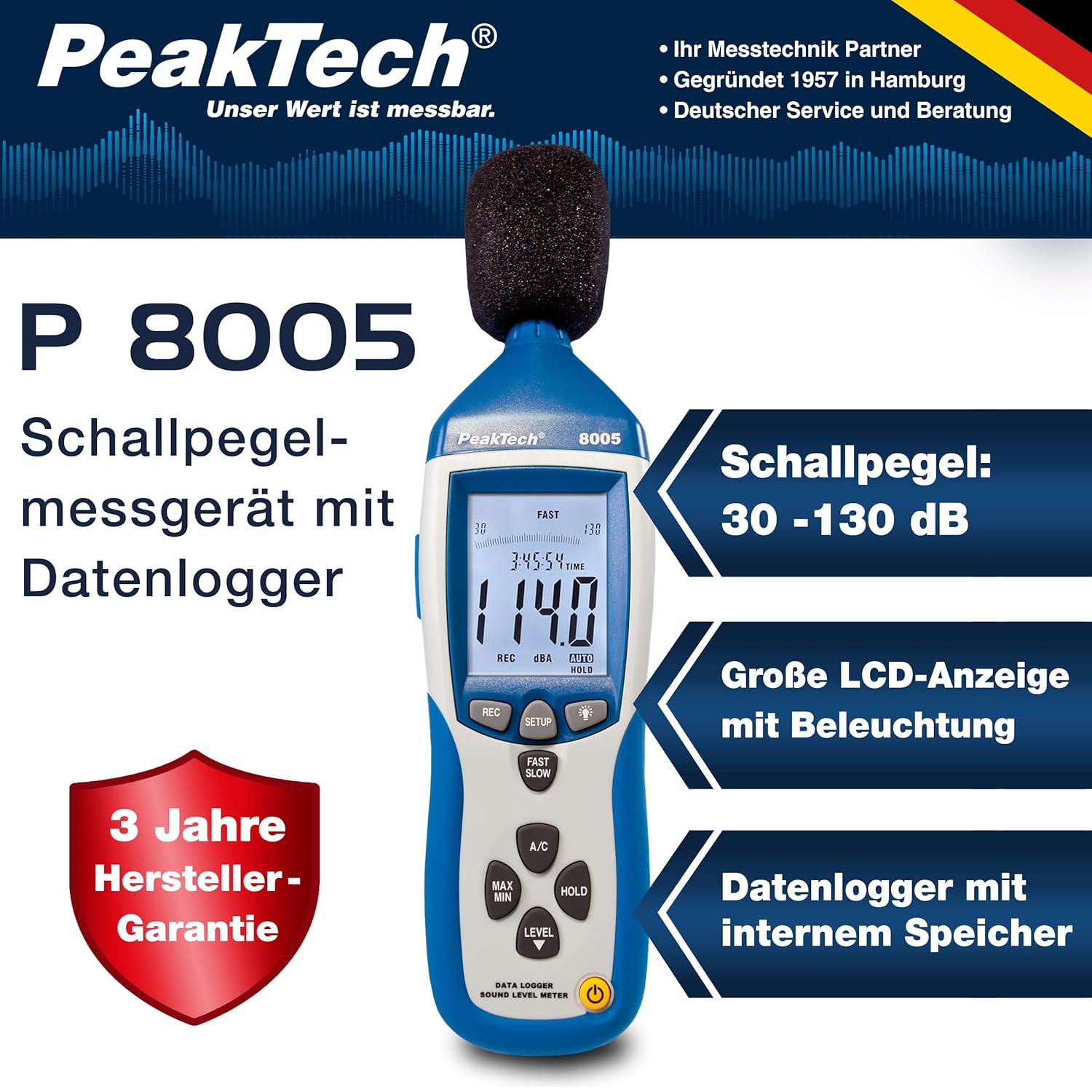
The PeakTech P 8005 is designed for user-friendly operation while providing professional-grade accuracy. Familiarize yourself with the main components and controls.
4.1. ძირითადი მახასიათებლები
- ზუსტი გაზომვა: Class 2 sound level meter (IEC-61672-1 compliant) for accurate readings even in noisy environments.
- ფართო გაზომვის დიაპაზონი: 30 to 130 dB across 4 ranges with 0.1 dB resolution.
- მონაცემთა აღრიცხვა: Internal memory for up to 32,000 readings (1x/sec to 1x/min).
- დაკავშირება: USB 2.0 interface for PC connection and data transfer.
- ანალოგური გამომავალი: AC/DC outputs for connecting to frequency analyzers or X-Y wave recorders.
- ჩვენება: 4-digit 20mm LCD with bargraph and backlight.
- გაზომვის რეჟიმები: Fast (125 ms) and Slow (1 s) response times, A and C weighting.
- დამატებითი ფუნქციები: MIN/MAX measurements, over-range/under-range indication.

5. დაყენება
5.1. ბატარეის მონტაჟი
The PeakTech P 8005 operates on a 9V battery or via the included 9V AC power adapter.
- იპოვნეთ ბატარეის განყოფილება მოწყობილობის უკანა მხარეს.
- გახსენით ბატარეის საფარი.
- ჩადეთ 9 ვოლტიანი აკუმულატორი, დარწმუნდით, რომ სწორი პოლარობაა.
- უსაფრთხოდ დახურეთ ბატარეის საფარი.
5.2. მოწყობილობის ჩართვა
- ჩასართავად დააჭირეთ ღილაკს სიმძლავრე ღილაკი.
- გამორთვა, დააჭირეთ ღილაკს სიმძლავრე ღილაკი სანამ ეკრანი არ გამოირთვება.
- For continuous operation, connect the 9V AC power adapter to the DC 9V input port on the side of the device.
5.3. მიკროფონის შეერთება
The device comes with a built-in microphone. For remote measurements or specific setups, you can use the included 3m additional microphone cable.
- Unscrew the microphone cap from the top of the device.
- Connect the 3m microphone cable to the microphone input.
- Attach the external microphone to the other end of the cable.
- For stable measurements, attach the device to the mini tripod using the threaded mount at the bottom.

ვიდეო 5.1: ოვერview of the PeakTech 8005 Sound Level Meter, demonstrating its features and setup, including the use of the external microphone and power adapter.
6. საოპერაციო ინსტრუქციები
6.1. ძირითადი გაზომვა
After powering on, the device will immediately begin measuring sound levels.
- The current sound level in dB is displayed on the LCD.
- გამოიყენეთ დონე button to cycle through the four measurement ranges (30-80 dB, 50-100 dB, 80-130 dB, Auto 30-130 dB).
- დააჭირეთ ᲩᲥᲐᲠᲐ ᲜᲔᲚᲐ to switch between fast (125 ms) and slow (1 s) response times. Fast is suitable for sudden noise changes, while slow is for average noise levels.
- დააჭირეთ კონდიციონერი to select A-weighting (dBA) or C-weighting (dBC). A-weighting mimics human ear response, C-weighting is for mechanical noise.

6.2. Data Logging and PC Connection
The P 8005 can record up to 32,000 measurement values internally. To access and analyze this data, use the included Windows software.
- Install the software from the provided CD-ROM onto a Windows PC (Windows 95/98/NT/2000/XP/VISTA/7/8/10 supported).
- Connect the sound level meter to your PC using the USB interface cable.
- Open the software. The software allows for real-time data display, data import from the device's internal memory, and export to formats like Excel for further analysis.
- Refer to the software's help documentation for detailed instructions on data logging setup and analysis.

7. მოვლა
7.1. დასუფთავება
Clean the device regularly to ensure optimal performance.
- გაწმინდეთ გარე ნაწილი რბილი, მშრალი ქსოვილით.
- არ გამოიყენოთ აბრაზიული გამწმენდები ან გამხსნელები.
- Keep the microphone free from dust and debris.
7.2. შენახვა
When not in use, store the device in its carrying case in a cool, dry place, away from direct sunlight and extreme temperatures.
7.3. კალიბრაცია
The PeakTech P 8005 is a precision instrument. Regular calibration is recommended to maintain accuracy, especially for professional applications. Refer to the included test report for the last calibration date. Contact PeakTech support for calibration services.
8. Დიაგნოსტიკა
| პრობლემა | შესაძლო მიზეზი | გამოსავალი |
|---|---|---|
| მოწყობილობა არ ჩაირთვება. | Low or dead battery; AC adapter not connected or faulty. | Replace the 9V battery or connect the AC adapter. Ensure the adapter is working. |
| არაზუსტი წაკითხვები. | Incorrect measurement range; microphone obstructed; device needs calibration. | Adjust the measurement range using the დონე button. Clear any obstructions from the microphone. Consider professional calibration. |
| Software not recognizing device. | USB cable faulty; driver issue; software compatibility. | Try a different USB port or cable. Reinstall the software and drivers. Check software compatibility settings (e.g., Windows 98 compatibility mode for older systems). |
| Data logging issues. | Memory full; incorrect logging settings. | Download and clear data from the device. Review data logging settings in the software. |
9. სპეციფიკაციები
| პარამეტრი | ღირებულება |
|---|---|
| გამოყენებული სტანდარტი | IEC-61672-1 Type 2, ANSI S1.4 Type 2 |
| Accuracy (1 kHz Sine; A, C) | 1.4 XNUMX დბ |
| სიზუსტე (სიხშირის დიაპაზონი) | According to EN-61672-1 Class 2, max. ± 5.6 dB |
| სიხშირის დიაპაზონი | 31.5 ჰც - 8 კჰც |
| დინამიური დიაპაზონი | 50 დბ |
| დონის დიაპაზონი | Low: 30 dB ~ 80 dB, Med: 50 dB ~ 100 dB, High: 80 dB ~ 130 dB, Auto: 30 dB ~ 130 dB |
| რეაგირების დრო | Fast: 125 ms / Slow: 1 s |
| მიკროფონი | ½-inch Electret Condenser Microphone |
| რეზოლუცია | 0.1 დბ |
| ჩვენების განახლება | 2 ჯერ / წმ. |
| ანალოგური გამომავალი | AC/DC Outputs, AC: 1 Veff = 10 mV/dB |
| საოპერაციო ტომიtage | 9V Battery or 9V AC Power Adapter |
| ზომები (WxHxD) | 80 x 280 x 50 მმ |
| წონა | 350 გ |
| Data Logger Memory | 32,000 კითხვამდე |
10. გარანტია და მხარდაჭერა
PeakTech products are designed for reliability and performance. For warranty information and technical support, please refer to the documentation included with your product or visit the official PeakTech webსაიტი. შეინახეთ თქვენი შესყიდვის ქვითარი, როგორც შეძენის დამადასტურებელი საბუთი გარანტიის მოთხოვნის შემთხვევაში.
მწარმოებელი: PeakTech
Webსაიტი: PeakTech Official Store


