1. შესავალი
The OttLite Entertain LED Speaker Lamp (Model S83WGW) is a versatile lighting and audio solution designed for various indoor environments. This device integrates an LED lamp with adjustable brightness and color modes, a Bluetooth speaker for wireless audio streaming, and a detachable emergency light feature. This manual provides detailed instructions for the proper setup, operation, and maintenance of your lamp.

Image 1.1: The OttLite Entertain LED Speaker Lamp, შოუasinმისი ინტეგრირებული დიზაინი.
2. პაკეტის შიგთავსი
დარწმუნდით, რომ შეფუთვაში ყველა ნივთია:
- OttLite Entertain LED Speaker Lamp (S83WGW)
- დენის კაბელი
3. დაყენება
- შეფუთვა: ფრთხილად ამოიღეთ ყველა კომპონენტი შეფუთვიდან.
- განთავსება: მოათავსეთ ლamp სტაბილურ, ბრტყელ ზედაპირზე.
- დენის კავშირი: მოწოდებული კვების კაბელი შეაერთეთ l-თანamp's power input port and then plug it into a standard 120V AC wall outlet. The lamp's internal battery will begin charging automatically.
4. საოპერაციო ინსტრუქციები
4.1. განათების ფუნქციები
ლamp features touch-activated controls located on the top of the shade for easy adjustment of light settings.
- ჩართვა/გამორთვა: Lightly touch the metallic button on the top center of the lamp shade to turn the light on or off.
- სიკაშკაშის კორექტირება: With the light on, repeatedly touch the metallic button to cycle through three brightness levels.
- ფერის რეჟიმის შეცვლა: Press and hold the metallic button for approximately 2 seconds to switch between the three color temperature modes: warm white, bright white, and natural daylight. Release the button when the desired mode is active.
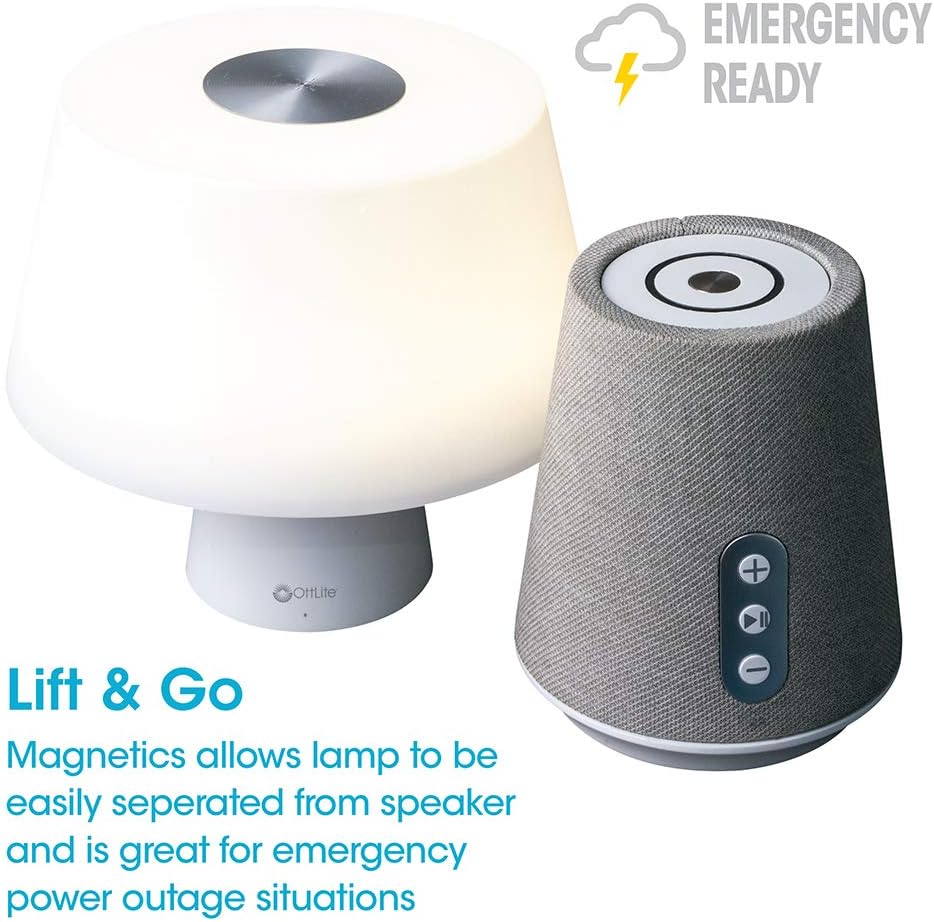
Image 4.1: Activating the lamp's light functions via the touch control on top of the shade.

სურათი 4.2: ლamp offers three distinct color temperature modes for varied lighting needs.
4.2. Bluetooth დინამიკი
The integrated Bluetooth speaker allows for wireless audio playback from compatible devices.
- Power On Speaker: Press the Play/Pause button on the front of the speaker base to turn the speaker on. A tone will indicate it is ready for pairing.
- დაწყვილება: On your audio device (e.g., smartphone, tablet), enable Bluetooth and search for available devices. Select "OttLite Entertain" from the list. A confirmation tone will sound upon successful pairing.
- აუდიო კონტროლი:
- დააჭირეთ + ღილაკი ხმის გაზრდისთვის.
- დააჭირეთ - ღილაკი ხმის შესამცირებლად.
- დააჭირეთ დაკვრა/პაუზა ღილაკი აუდიოს დასაკრავად ან პაუზისთვის.
- Power Off Speaker: Press and hold the Play/Pause button for approximately 3 seconds to turn the speaker off.

Image 4.3: The speaker base with clearly labeled controls for volume and playback.

Image 4.4: The speaker base highlights its Bluetooth connectivity feature.
4.3. Emergency Light Feature (Lift & Go)
ლamp portion can be detached from the speaker base to function as a portable emergency light.
- Detaching the Light: ნაზად აწიეთ ლamp shade portion straight up from the speaker base. It is held in place by magnets.
- Using the Emergency Light: The detached light will operate on its internal rechargeable battery. Use the touch control on top of the shade to turn it on/off and adjust brightness as described in Section 4.1. The light can provide illumination for 5 to 30+ hours depending on the brightness setting.
- გადატვირთვა: To recharge the emergency light, simply place it back onto the speaker base. Ensure it is properly seated for charging to commence.

Image 4.5: The 'Lift & Go' feature allows the lamp to be used as a portable emergency light.
5. მოვლა
To ensure the longevity and optimal performance of your OttLite Entertain LED Speaker Lamp, დაიცავით შემდეგი მოვლის ინსტრუქციები:
- დასუფთავება: გათიშეთ lamp from the power source before cleaning. Use a soft, dry cloth to wipe down the exterior surfaces. Do not use abrasive cleaners, solvents, or harsh chemicals, as these may damage the finish.
- შენახვა: ხანგრძლივი პერიოდის განმავლობაში არ გამოყენების შემთხვევაში, შეინახეთ ლamp გრილ, მშრალ ადგილას მზის პირდაპირი სხივებისა და ექსტრემალური ტემპერატურისგან მოშორებით.
- ბატარეის მოვლა: For the internal rechargeable battery, avoid fully discharging it frequently. Recharge the lamp regularly, even if not in constant use, to maintain battery health.
6. Დიაგნოსტიკა
თუ თქვენს ლ-თან დაკავშირებით პრობლემები შეგექმნათamp, იხილეთ პრობლემების მოგვარების შემდეგი ნაბიჯები:
| პრობლემა | შესაძლო მიზეზი | გამოსავალი |
|---|---|---|
| Lamp შუქი არ ირთვება. | არ არის შეერთებული; დენი გამორთულიაtage; internal battery depleted; faulty connection. | Ensure power cable is securely plugged in. Check power outlet. Recharge the lamp by placing it on the base. |
| Bluetooth speaker does not connect. | Speaker not in pairing mode; device Bluetooth off; already connected to another device. | Ensure speaker is on and in pairing mode. Turn Bluetooth on your device. Disconnect from other devices. |
| Emergency light does not work when detached. | Internal battery depleted. | Place the light back on the speaker base to recharge its internal battery. |
| Poor audio quality from speaker. | Device too far from speaker; interference; low battery. | Move device closer to speaker. Avoid obstacles. Ensure speaker is charged. |
7. სპეციფიკაციები
| ფუნქცია | დეტალი |
|---|---|
| მოდელის ნომერი | S83WGW |
| ბრენდი | OttLite |
| პროდუქტის ზომები | 3.12"D x 3.12"W x 10.87"H |
| ნივთის წონა | 2.6 ფუნტი |
| სინათლის წყაროს ტიპი | LED |
| ვატtage | 3 ვატი |
| სიკაშკაშე | 337 ლუმენი |
| ფერის ტემპერატურა | 5000 კელვინი (დღის სინათლე) |
| კონტროლის მეთოდი | შეეხეთ |
| დენის წყარო | Corded Electric (with rechargeable battery for emergency light) |
| ბატარეები | 1 ლითიუმ იონური ბატარეა (შედის) |
| მასალა | პლასტიკური |
| UPC | 761712019116 |
8. გარანტია და მხარდაჭერა
For warranty information or technical support, please refer to the official OttLite webსაიტზე ან დაუკავშირდით მათ მომხმარებელთა მომსახურების განყოფილებას. შეინახეთ თქვენი შესყიდვის ქვითარი, როგორც შეძენის დამადასტურებელი საბუთი ნებისმიერი გარანტიის მოთხოვნის შემთხვევაში.
საკონტაქტო ინფორმაცია: გთხოვთ ეწვიოთ OttLite's official store page for current support options and contact details.


