შესავალი
This instruction manual provides essential information for the proper setup, operation, and maintenance of your Como Audio Analog Turntable, Model CATA. Please read this manual thoroughly before using the product to ensure optimal performance and longevity.
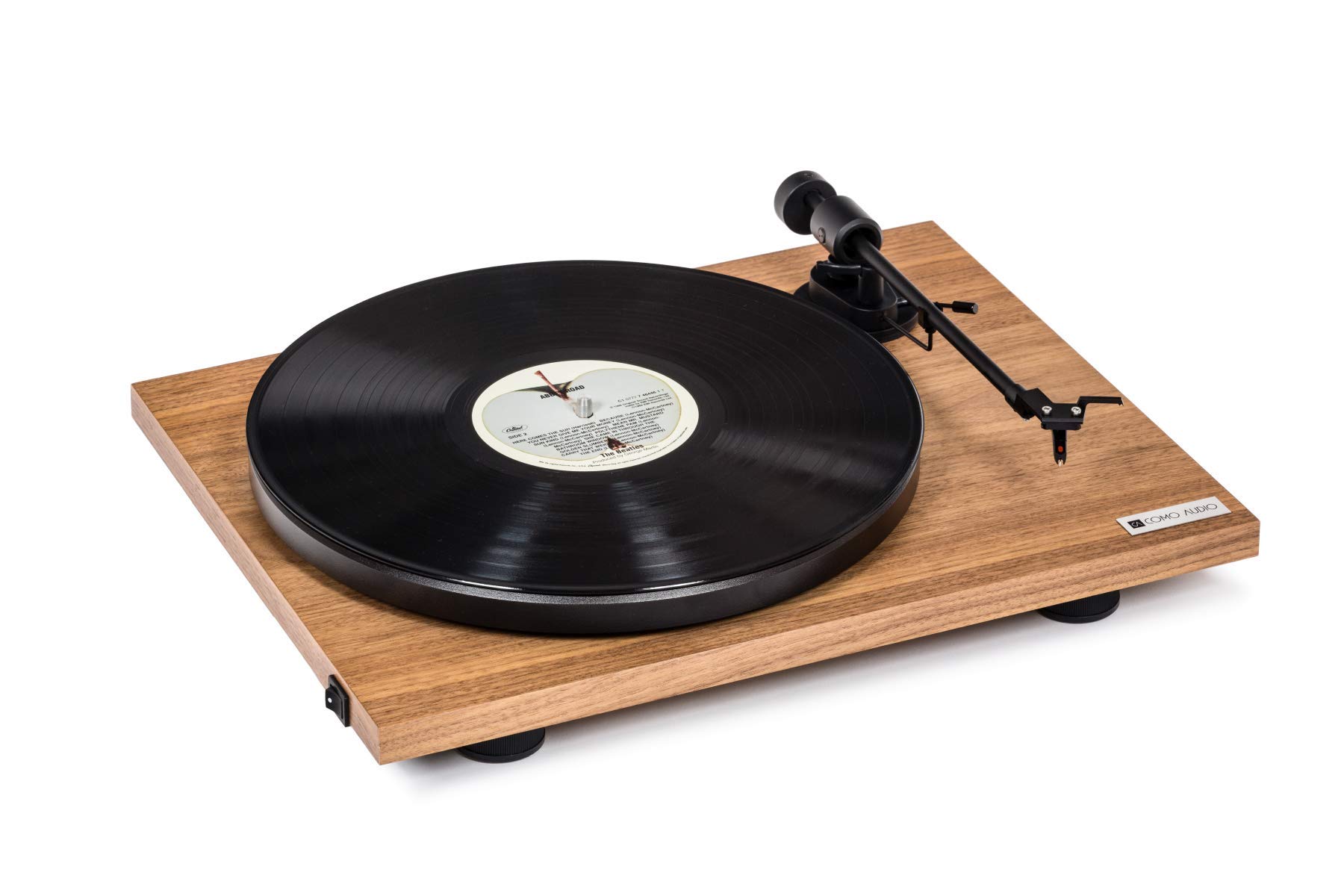
Image: The Como Audio Analog Turntable, featuring a walnut wood plinth, black platter, and tonearm.

სურათი: დეტალური view of the rich walnut finish on the turntable's plinth, showcasing the wood grain.
პაკეტის შიგთავსი
Before proceeding with setup, ensure all components are present and undamaged:
- Como Audio Analog Turntable unit
- Pre-mounted Ortofon cartridge/stylus
- Platter
- Უსაფრთხოების ღვედი
- Removable clear dust cover
- თექის ხალიჩა
- აუდიო კაბელი
- Power supply (15V/0.8A, universal 110V-240V, 50-60Hz)
- ინსტრუქციის სახელმძღვანელო (ეს დოკუმენტი)
დაყენების ინსტრუქციები
1. გახსნა და განთავსება
- ფრთხილად ამოიღეთ ყველა კომპონენტი შეფუთვიდან.
- მოათავსეთ მბრუნავი მაგიდა სტაბილურ, სწორ ზედაპირზე, მზის პირდაპირი სხივებისგან, სითბოს წყაროებისგან და ზედმეტი ვიბრაციისგან მოშორებით.
2. თეფშისა და წამყვანი ქამრის მონტაჟი
- Place the platter onto the spindle located on the turntable plinth.
- Locate the drive belt. Gently stretch the belt around the motor pulley (small metal cylinder) and the inner rim of the platter. Ensure the belt is not twisted.
3. კარტრიჯი და სტილუსი
The Como Audio Analog Turntable comes with a premium Ortofon cartridge and stylus pre-mounted. No adjustment of counterweight or anti-skating is required for initial setup.
4. მტვრისგან დამცავი საფარის მონტაჟი

Image: Detail of the removable clear dust cover, designed to protect the turntable from dust.
- Carefully align the hinges of the clear dust cover with the corresponding slots on the rear of the turntable plinth.
- Gently push down until the dust cover is securely in place. The dust cover is removable for cleaning or when not in use.
5. აუდიო კავშირი
The turntable offers selectable Line output or Phono output. Choose the appropriate connection for your audio system:
- Line Output (Integrated Phono Pre-Amp): Use this option if your amplifier or music system (e.g., Como Audio music system) has an Auxiliary (AUX) input and does not have a dedicated Phono input. Connect the included audio cable from the turntable's Line Out to your system's AUX input.
- ფონოს გამომავალი: Use this option if your amplifier or music system has a dedicated Moving Magnet (MM) Phono input. Connect the included audio cable from the turntable's Phono Out to your system's Phono input. Ensure your amplifier's Phono input is selected.
შენიშვნა: If experiencing a humming noise, ensure proper grounding. Some audio systems may require a separate ground wire connection if available on your ampმაცოცხლებელი.
6. დენის კავშირი
- Connect the power supply cable to the DC input jack on the rear of the turntable.
- შეაერთეთ კვების ადაპტერი შესაფერის კედლის სოკეტში.
ოპერაციული ინსტრუქციები
1. Powering On and Speed Selection
- Locate the integrated power and speed control switch, typically on the bottom left side of the turntable plinth.
- Turn the switch to select either 33 1/3 RPM for LPs or 45 RPM for singles. The platter will begin to spin.
2. ჩანაწერის დაკვრა

Image: The turntable with a record spinning on the platter, and the tonearm positioned over the record.
- მოათავსეთ თექის ხალიჩა ლანგარზე.
- Carefully place a vinyl record onto the felt mat.
- ნაზად ასწიეთ ტონარმი საჩვენებელი ბერკეტის გამოყენებით.
- Position the stylus over the desired starting groove of the record.
- ნელა დაწიეთ სიგნალის მიმღები ბერკეტი, რათა სტილუსმა ფირფიტაზე დაეშვას.
- Adjust the volume on your connected audio system.
3. დაკვრის შეჩერება
- At the end of a record, or when you wish to stop playback, gently lift the tonearm using the cueing lever.
- Return the tonearm to its rest position and secure it with the tonearm clip.
- Turn the power/speed switch to the "Off" position to stop the platter from spinning.
- შენიშვნა: This turntable does not feature an automatic shut-off function. The platter will continue to spin until manually turned off.
მოვლა
1. მბრუნავი დისკის გაწმენდა
- Always power off and unplug the turntable before cleaning.
- Use a soft, dry, lint-free cloth to wipe the plinth and platter. Avoid abrasive cleaners or solvents.
- მტვრისგან დამცავი საფარისთვის, საჭიროების შემთხვევაში, გამოიყენეთ რბილი ქსოვილი და რბილი, არააბრაზიული საწმენდი საშუალება.
2. Stylus Care
- Regularly clean the stylus using a dedicated stylus brush, brushing gently from back to front.
- მოერიდეთ სტილუსს თითებით შეხებას.
- A worn or damaged stylus can harm your records and degrade sound quality. Replace the stylus when necessary (typically after 500-1000 hours of playback, depending on usage and record condition).
3. წამყვანი ქამარი
The drive belt is a wear item. If you notice inconsistent speed or the platter not spinning, the belt may need to be inspected or replaced. Contact Como Audio support for replacement parts.
პრობლემების მოგვარება
| პრობლემა | შესაძლო მიზეზი | გამოსავალი |
|---|---|---|
| ხმა არ არის ან ძალიან დაბალი ხმა აქვს |
|
|
| გუგუნის ხმაური |
|
|
| Inconsistent or incorrect playback speed |
|
|
| გრუნტი არ ტრიალებს |
|
|
სპეციფიკაციები
| ფუნქცია | დეტალი |
|---|---|
| მოდელის ნომერი | კატა |
| პროდუქტის ზომები (L x W x H) | 16.3 x 12.6 x 4.65 ინჩი |
| ნივთის წონა | 11.68 ფუნტი |
| ბრენდი | კომო აუდიო |
| ბრუნვის მაქსიმალური სიჩქარე | 45 RPM |
| მოყვება კომპონენტები | Pre-mounted Ortofon cartridge/stylus, audio cable, power supply, dust cover, felt mat |
| განსაკუთრებული თვისებები | Belt-Drive, Built-In Cartridge, Integrated Phono Pre-Amp, DC Motor with TPE Dampინგ |
| მასალა | Engineered Wood (MDF), Plastic |
| ფერი | კაკალი |
| თავსებადი მოწყობილობები | Speaker, Personal Computer (via appropriate audio input) |
| ძრავის ტიპი | DC ძრავა |
გარანტია და მხარდაჭერა
For warranty information, technical support, or replacement parts, please contact Como Audio directly through their official webსაიტზე ან მომხმარებელთა მომსახურების არხებში. შეინახეთ თქვენი შესყიდვის ქვითარი შეძენის დასადასტურებლად.
Official Como Audio Webსაიტი: www.comoaudio.com


