1. შესავალი
This user manual provides essential information for the safe and effective operation of your ITECH IT6952A Programmable DC Power Supply. Please read this manual thoroughly before using the device to ensure proper functionality and to prevent damage or injury. The IT6952A is a high-performance, programmable DC power supply designed for laboratory and industrial applications, offering precise control over voltage და მიმდინარე გამომავალი.
2. უსაფრთხოების ინფორმაცია
Always observe the following safety precautions to prevent electric shock, injury, or damage to the instrument:
- დარწმუნდით, რომ კვების წყარო დაკავშირებულია დამიწებულ ცვლადი დენის წყაროსთან.
- არ გამოიყენოთ მოწყობილობა სველ ან დamp პირობები.
- არ გახსნათ casinგ; შიგნით მომხმარებლის მიერ შეკეთებადი ნაწილები არ არის. ყველა სახის მომსახურება კვალიფიციურ პერსონალს მიმართეთ.
- შეამოწმეთ, რომ შეყვანის ტtage matches the power supply's rating before connecting to the mains.
- Avoid short-circuiting the output terminals, especially at high power settings.
- უზრუნველყოს სათანადო ვენტილაცია მოწყობილობის გარშემო გადახურების თავიდან ასაცილებლად.
3. პროდუქტი დასრულდაview
The ITECH IT6952A features a clear VFD display and intuitive controls for easy operation.
3.1 წინა პანელის განლაგება

Figure 3.1: Front Panel of IT6952A
The front panel includes the VFD display for voltage and current readings, a rotary knob for precise adjustments, number keys (0-9) and ESC for direct input, function keys (V-SET, I-SET, Save, Recall, Meter, Trigger, Enter, On/Off) for various operations, navigation keys (UP/DOWN/LEFT/RIGHT) for cursor movement, and output terminals for connecting loads. The 'Shift' and 'Local' keys provide additional control options, and the main power switch is integrated.
3.2 უკანა პანელის განლაგება
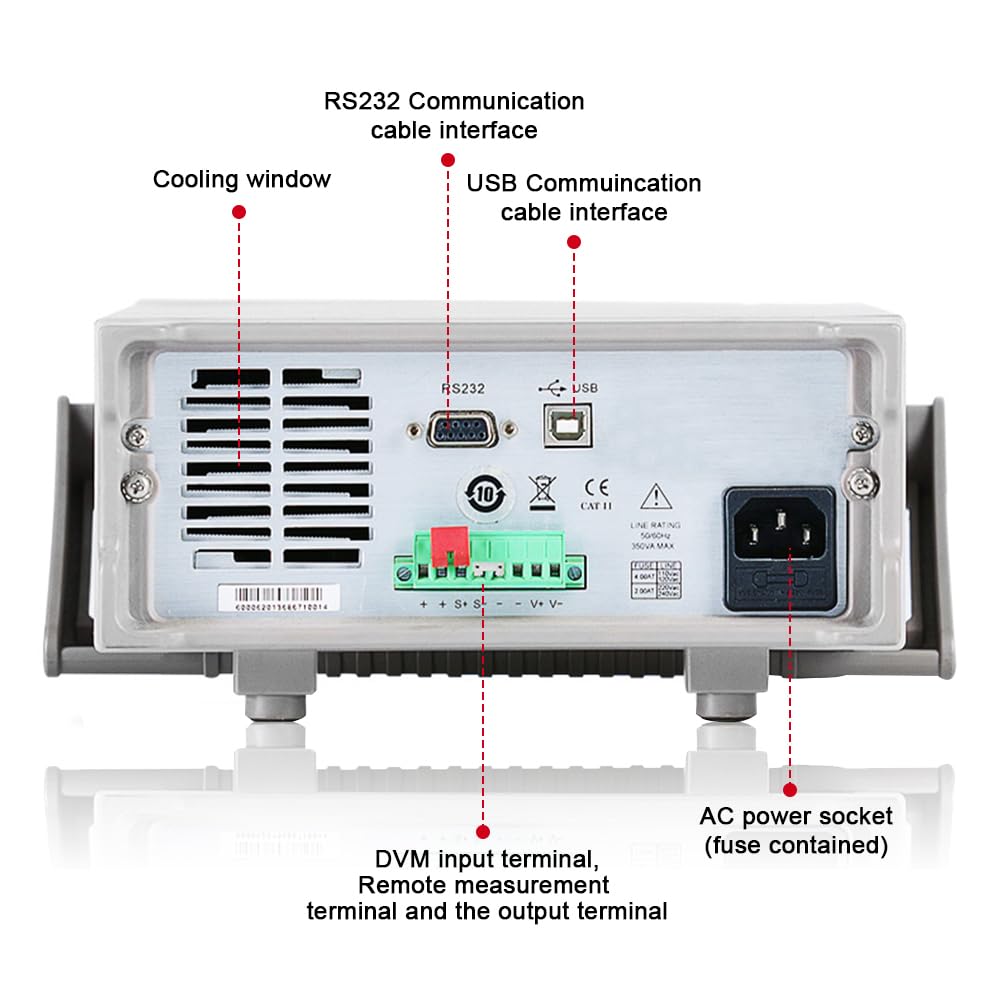
Figure 3.2: Rear Panel of IT6952A
The rear panel features the AC power socket (with integrated fuse), cooling windows for heat dissipation, an RS232 communication cable interface, a USB communication cable interface, and DVM input terminals along with remote measurement terminals and additional output terminals for specific applications.
4. დაყენება
მიჰყევით ამ ნაბიჯებს საწყისი დაყენებისთვის:
- შეფუთვა: Carefully remove the power supply from its packaging. Inspect for any signs of damage during transit.
- განთავსება: Place the unit on a stable, level surface with adequate ventilation around all sides. Do not block the cooling vents on the sides and rear.
- დენის კავშირი: Connect the provided AC power cord to the AC power socket on the rear panel of the IT6952A. Plug the other end into a grounded electrical outlet.
- ჩართვა: Press the main power switch on the front panel to turn on the unit. The VFD display should illuminate.
- გამომავალი კავშირი: Connect your load to the output terminals on the front panel using appropriate test leads. Ensure correct polarity (positive to positive, negative to negative).
5. საოპერაციო ინსტრუქციები
This section covers basic operation of the IT6952A.
5.1 დაყენების მოცულობაtage და მიმდინარე
- Set Voltage: დააჭირეთ V-SET ღილაკი. ტომიtage display will become active. Use the rotary knob to adjust the voltage, or use the number keys for direct input followed by შედი.
- მიმდინარეობის დაყენება: დააჭირეთ I-SET button. The current display will become active. Use the rotary knob to adjust the current limit, or use the number keys for direct input followed by შედი.
- გამოყვანის ჩართვა: სასურველი მოცულობის დაყენების შემდეგtage და მიმდინარე, დააჭირეთ ჩართვა/გამორთვა button to enable the output. The output indicator will illuminate.
- გამომავალი გამორთვა: To disable the output, press the ჩართვა/გამორთვა ისევ ღილაკი.
5.2 Using Memory Functions (Save/Recall)
The IT6952A allows you to save and recall frequently used voltage და მიმდინარე პარამეტრები.
- პარამეტრის შენახვა: დააყენეთ სასურველი მოცულობაtage and current. Press the შენახვა button. Use the navigation keys or number keys to select a memory location (e.g., 0-9) and press შედი to store the settings.
- Recall Setting: დააჭირეთ გავიხსენოთ button. Use the navigation keys or number keys to select the desired memory location and press შედი to load the stored settings.
6. მოვლა
Proper maintenance ensures the longevity and reliability of your power supply.
- დასუფთავება: Disconnect the power supply from the mains before cleaning. Use a soft, dry cloth to wipe the exterior. For stubborn dirt, a slightly damp შეგიძლიათ გამოიყენოთ რბილი სარეცხი საშუალებით დამუშავებული ქსოვილი, რათა დარწმუნდეთ, რომ სითხე მოწყობილობაში არ მოხვდება.
- ვენტილაცია: Regularly check that the cooling vents are free from dust and obstructions. Use compressed air to clear dust if necessary.
- შენახვა: When not in use for extended periods, store the power supply in a cool, dry, and dust-free environment.
7. Დიაგნოსტიკა
If you encounter issues with your IT6952A, refer to the following common problems and solutions:
| პრობლემა | შესაძლო მიზეზი | გამოსავალი |
|---|---|---|
| ჩართვისას არ არის დენი | Power cord not connected; Blown fuse; No power from outlet | Check power cord connection; Replace fuse (refer to specifications for type); Test outlet with another device |
| გამომავალი მოცულობა არ არისtagე/მიმდინარე | Output disabled; Overload protection activated; Incorrect settings | დააჭირეთ ჩართვა/გამორთვა to enable output; Reduce load or increase current limit; Verify voltagელ/მიმდინარე პარამეტრები |
| Display shows 'Error' | Internal fault; Over-temperature | Turn off unit, wait 5 minutes, restart; Ensure proper ventilation, allow unit to cool down. If error persists, contact support. |
| არაზუსტი წაკითხვები | Poor connection; Calibration needed | Check all connections; Contact ITECH support for calibration information. |
8. სპეციფიკაციები
Key technical specifications for the ITECH IT6952A Programmable DC Power Supply:
| სპეციფიკაცია | ღირებულება |
|---|---|
| ბრენდი | ITECH |
| მოდელი | IT6952A |
| გამოყვანის ტომიtage | 60 ვოლტი |
| Ampგაბრაზება | 25 Amps |
| გამომავალი ვატიtage | 600 ვატი |
| ფორმის ფაქტორი | სკამი |
| კონექტორის ტიპი | USB |
| მასალა | მეტალი |
| ფერი | წითელი, შავი |
9. გარანტია და მხარდაჭერა
ITECH products are designed for reliability and performance. For warranty information, technical support, or service inquiries, please refer to the warranty card included with your product or visit the official ITECH webსაიტი. შეინახეთ თქვენი შესყიდვის ქვითარი, როგორც შეძენის დამადასტურებელი საბუთი გარანტიის მოთხოვნის შემთხვევაში.
For further assistance, you may contact ITECH customer service through their official channels. Always provide your product model (IT6952A) and serial number when seeking support.


