1. შესავალი
The Hikvision DS-KIS604-S IP Video Intercom System is a comprehensive solution designed for secure and convenient communication in villas and residential homes. This system allows for one-button communication, providing clear video and audio interaction with visitors. This manual provides essential information for the proper installation, operation, and maintenance of your intercom system.
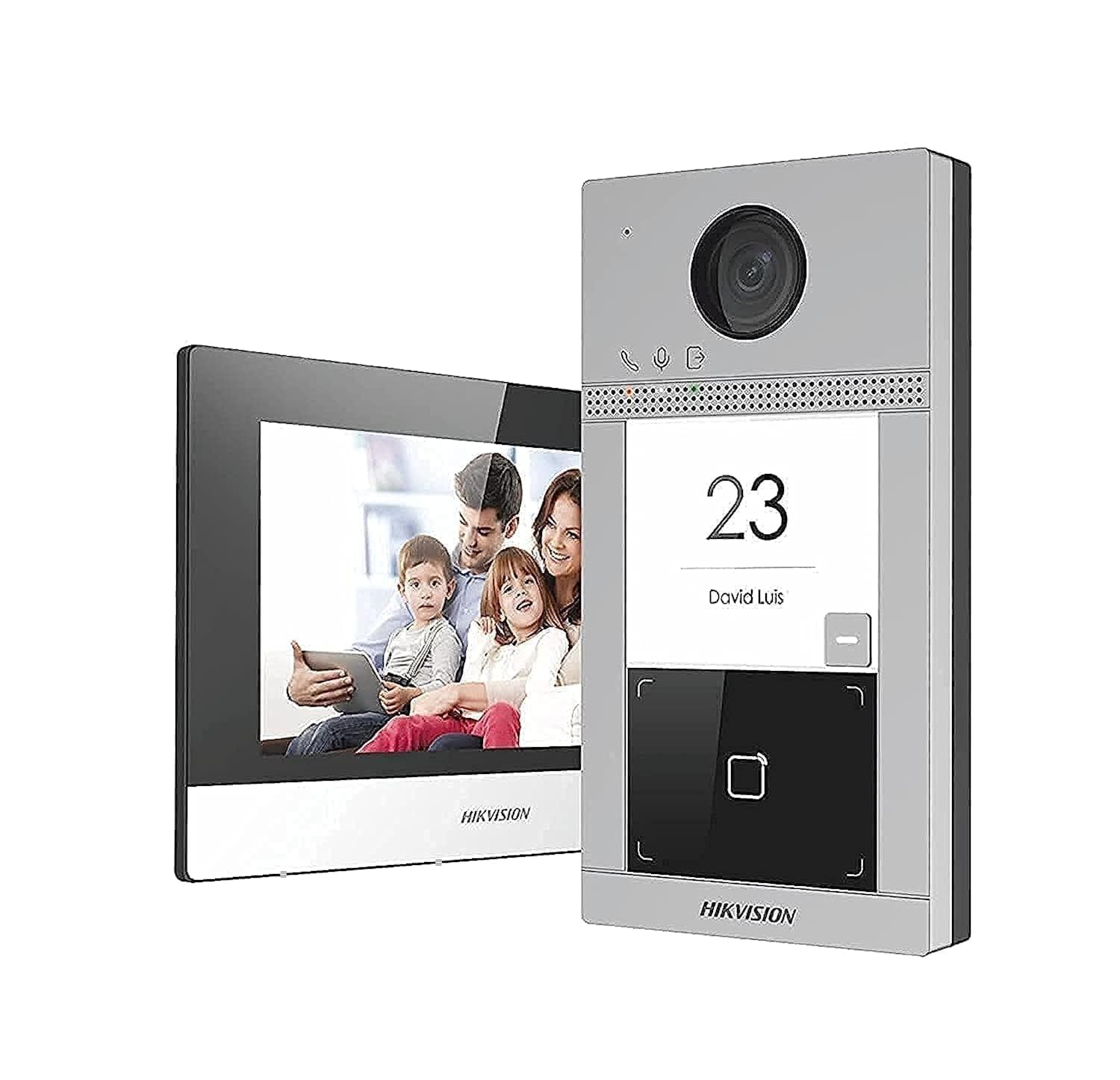
სურათი 1.1: დასრულდაview of the Hikvision DS-KIS604-S IP Video Intercom System components, including the outdoor station, indoor station, and power supplies.
2. უსაფრთხოების ინფორმაცია
გთხოვთ, პროდუქტის გამოყენებამდე ყურადღებით წაიკითხოთ ეს უსაფრთხოების ინსტრუქციები, რათა თავიდან აიცილოთ დაზიანება ან ქონების დაზიანება.
- ინსტალაცია: All installation work must be carried out by qualified personnel and comply with local electrical codes.
- დენის წყარო: Use only the specified power adapters. Incorrect power sources can cause fire, electric shock, or damage.
- გარემო: Do not expose the device to water, moisture, extreme temperatures, or direct sunlight. Ensure proper ventilation.
- დასუფთავება: გაწმენდის წინ გამორთეთ დენის წყარო. გამოიყენეთ რბილი, მშრალი ქსოვილი. არ გამოიყენოთ თხევადი ან აეროზოლური საწმენდები.
- დაშლა: არ სცადოთ მოწყობილობის დაშლა ან მოდიფიცირება. ყველა სახის მომსახურება მიმართეთ კვალიფიციურ პერსონალს.
3. პაკეტის შიგთავსი
დარწმუნდით, რომ შეფუთვაში ყველა ნივთია:
- 1 x DS-KV8113-WME1 Outdoor Station
- 1 x DS-KH6320-WTE1 Indoor Station
- 2 x Power Supply Units (PSU)
- 1 x 16 GB TF ბარათი
- 1 x POE Switch
- სამონტაჟო აქსესუარები (ხრახნები, ანკერები)
- სწრაფი დაწყების სახელმძღვანელო
4. დაყენება და ინსტალაცია
4.1. საიტის მომზადება
- Choose appropriate locations for the outdoor station (near the entrance) and indoor station (convenient indoor location).
- Ensure stable Wi-Fi signal or wired Ethernet access at both locations.
- Prepare necessary tools: drill, screwdriver, network cables, etc.
4.2. Outdoor Station Installation (DS-KV8113-WME1)
- Mount the back box or bracket to the wall at the desired height using screws.
- Connect the network cable (from the POE switch) and power cable (if not using PoE) to the outdoor station.
- Secure the outdoor station to the mounted bracket.
- Ensure the camera lens is clear and unobstructed.
4.3. Indoor Station Installation (DS-KH6320-WTE1)
- Mount the indoor station bracket to an indoor wall.
- Connect the network cable (from the POE switch) and power cable (from one of the PSUs) to the indoor station.
- Attach the indoor station to its bracket.
4.4. POE Switch and Power Supply Setup
- Connect the POE switch to your main network router.
- Connect the outdoor station and indoor station to the POE switch using Ethernet cables. The POE switch will provide power to these devices.
- Connect the remaining PSU to the indoor station if not using PoE for the indoor unit, or as a backup.
- Insert the 16GB TF card into the designated slot on the indoor station for local storage.
5. საოპერაციო ინსტრუქციები
5.1. პირველადი ჩართვა და კონფიგურაცია
- ჩართეთ ყველა დაკავშირებული მოწყობილობა.
- The indoor station will boot up. Follow the on-screen prompts to set up language, date, time, and network settings (Wi-Fi or wired).
- Pair the outdoor station with the indoor station through the indoor station's menu. Refer to the Quick Start Guide for specific pairing steps.
- Download the Hik-Connect app on your smartphone for remote access and notifications.
5.2. ზარზე პასუხის გაცემა
- When a visitor presses the call button on the outdoor station, the indoor station will ring, and a notification will appear on your Hik-Connect app.
- On the indoor station, tap the "Answer" button to establish two-way audio and video communication.
- From the Hik-Connect app, tap the notification to view the live feed and communicate.
5.3. კარის გაღება
If connected to an electronic lock (sold separately), you can unlock the door from the indoor station or the Hik-Connect app during a call.
- During an active call, tap the "Unlock" icon on the indoor station screen or in the Hik-Connect app.
- Confirm the unlock action if prompted.
5.4. მონიტორინგი
შეგიძლია view the live feed from the outdoor station at any time:
- On the indoor station, select the "Monitor" option to view the outdoor camera feed.
- In the Hik-Connect app, select the outdoor station from your device list to view ცოცხალი არხი.
6. მოვლა
- დასუფთავება: Regularly wipe the outdoor station's camera lens and microphone/speaker area with a soft, damp cloth to ensure clear video and audio. Clean the indoor station screen with a microfiber cloth.
- Firmware განახლებები: Check for and install firmware updates periodically through the indoor station settings or Hik-Connect app to ensure optimal performance and security.
- TF ბარათი: The 16GB TF card provides local storage for recordings. Periodically review and manage recordings. Replace the card if it becomes corrupted or full.
- ელექტრომომარაგება: Ensure power cables are securely connected and not damaged.
7. Დიაგნოსტიკა
| პრობლემა | შესაძლო მიზეზი | გამოსავალი |
|---|---|---|
| მოწყობილობას არ აქვს ენერგია | Power cable disconnected; faulty PSU; no PoE from switch. | Check all power connections. Ensure PSU is working. Verify PoE switch is powered and functioning. |
| ზარის დროს ვიდეო/აუდიო არ არის | Network connection issue; camera/microphone fault; device not paired correctly. | Check network cables/Wi-Fi connection. Re-pair devices. Contact support if hardware fault suspected. |
| Cannot unlock door | Electronic lock not connected; incorrect wiring; lock malfunction. | Verify lock wiring and connection to the outdoor station. Test the electronic lock independently. |
| Indoor station offline in app | No internet connection; app not configured correctly; device not registered. | Check home internet connection. Ensure indoor station is connected to Wi-Fi/Ethernet. Re-add device to Hik-Connect app. |
8. სპეციფიკაციები
| ფუნქცია | დეტალი |
|---|---|
| ბრენდი | Hikvision |
| მოდელის ნომერი | DS-KIS604-S |
| დაკავშირების ტექნოლოგია | Ethernet |
| ვიდეო გადაღების გარჩევადობა | 1080p |
| განსაკუთრებული თვისებები | Smooth Function (presumably for video/audio) |
| არხების რაოდენობა | 2 |
| მეხსიერების შენახვის მოცულობა | 16 გბ (TF ბარათი) |
| ფერი | ვერცხლი |
| დენის წყარო | Battery Powered (likely refers to internal backup or general power type, but PSUs are included) |
| ოპერაციული სისტემა | Linux |
| თავსებადი მოწყობილობები | სმარტფონები |
| სამონტაჟო ტიპი | ხრახნიანი |
| ნივთის წონა | 1.94 კგ |
| პაკეტის ზომები | 38.4 x 24.6 x 17.2 სმ |
9. გარანტია და მხარდაჭერა
For warranty information and technical support, please refer to the warranty card included in your package or visit the official Hikvision webსაიტი. შეინახეთ თქვენი შესყიდვის ქვითარი საგარანტიო პრეტენზიებისთვის.
საკონტაქტო ინფორმაცია:
- Webსაიტი: www.hikvision.com
- მომხმარებელთა მომსახურება: Refer to your regional Hikvision support contact details.