შესავალი
This manual provides comprehensive instructions for the operation and maintenance of your YAOHUIMI replacement remote control. This remote is designed to be compatible with various Fujitsu air conditioner models, including AR-NJ1, ASY2U0, ASY25U, ASY35U, ASY25UA, ASY35UA, ASH9LSACW, ASH12LSACW, and ASY12USCCW, among others. Please read this manual carefully to ensure proper use and to maximize the lifespan of your remote control.
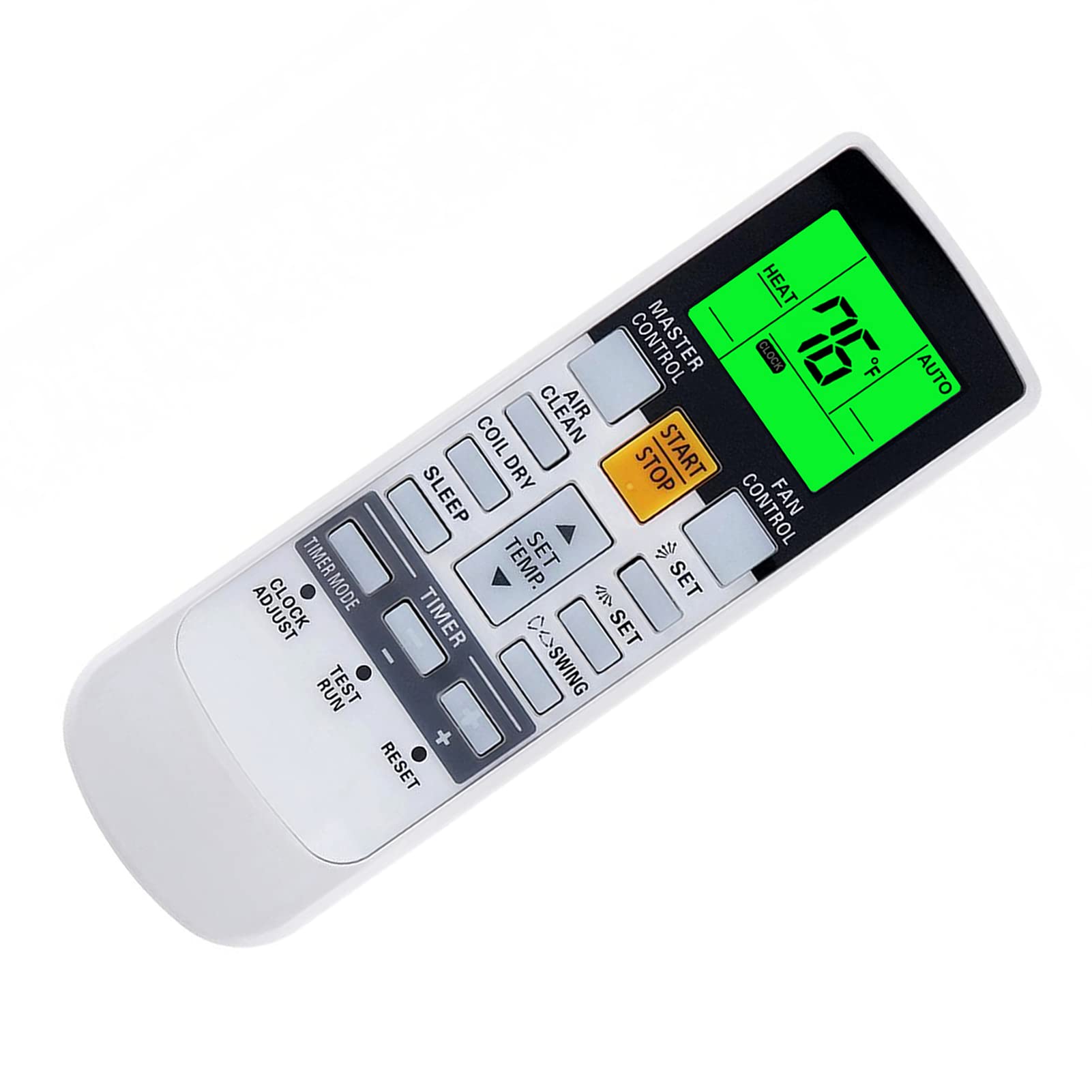
სურათი: წინა მხარე view of the YAOHUIMI Replacement Remote Control.
დაყენება
ბატარეის მონტაჟი
The remote control requires two AAA batteries (not included) for operation. Follow these steps to install the batteries:
- იპოვეთ ბატარეის განყოფილების საფარი დისტანციური მართვის უკანა მხარეს.
- განყოფილების გასახსნელად გადაწიეთ სახურავი ქვემოთ.
- Insert two new AAA batteries, ensuring the positive (+) and negative (-) terminals match the diagrams inside the compartment.
- ბატარეის განყოფილების საფარი უკან, სანამ არ დააწკაპუნებს.

სურათი: წინა და უკანა მხარე view დისტანციური მართვის პულტი, რომელიც ასახავს ბატარეის განყოფილების მდებარეობას.
საწყისი გამოყენება
This replacement remote control is pre-programmed and typically requires no additional setup or pairing. Simply install the batteries and point the remote towards your Fujitsu air conditioner to begin operation.
ოპერაციული ინსტრუქციები
ძირითადი ფუნქციები
- START/STOP ღილაკი: დააჭირეთ კონდიციონერის ჩართვის ან გამორთვისთვის.
- სამაგისტრო კონტროლი: Cycles through operating modes such as Auto, Cool, Dry, Fan, and Heat.
- ვენტილატორის კონტროლი: Adjusts the fan speed (e.g., Auto, Low, Medium, High).
- SET TEMP. Buttons (Up/Down Arrows): არეგულირებს სასურველ ტემპერატურას.
- SWING Buttons: აკონტროლებს ჟალუზების რხევის ფუნქციას ჰაერის განაწილებისთვის.
- TIMER Buttons: Used to set ON/OFF timers for the air conditioner.
Temperature Display (Fahrenheit/Celsius)
The remote control can display temperature in both Fahrenheit (°F) and Celsius (°C). To switch between these units:
- With the remote control powered on, observe the current temperature unit on the display.
- Press the designated button (often a small button near the temperature display or a combination of buttons) to toggle between °F and °C. Refer to the image below for visual guidance.

Image: Remote control display illustrating the Fahrenheit and Celsius temperature units and the green backlight.
Green Backlight Feature
The remote control features a green backlight for improved visibility in low-light conditions. This backlight activates automatically when buttons are pressed, making it easier to operate the air conditioner at night.
Advanced Heat Functions (If Applicable)
Some Fujitsu AC models support advanced heat functions such as "10°C HEAT", "50°F HEAT", "MINI.HEAT", or "ECONOMY". These functions are only available if your original remote control also had these specific buttons or capabilities. To activate these, you may need to press and hold a specific button for approximately 4 seconds. Consult your air conditioner's original manual for specific details on these functions.

Image: Diagram showing how to activate advanced heat functions by pressing and holding a button for 4 seconds.
მოვლა
დისტანციური მართვის გაწმენდა
დისტანციური მართვის პულტის გასაწმენდად გამოიყენეთ რბილი, მშრალი ქსოვილი. არ გამოიყენოთ თხევადი საწმენდი საშუალებები, სპრეი ან აბრაზიული მასალები, რადგან მათ შეუძლიათ დააზიანონ დისტანციური მართვის პულტის ზედაპირი ან შიდა კომპონენტები.
ბატარეის გამოცვლა
Replace the batteries when the remote control's range decreases, or if the display becomes dim or unresponsive. Always replace both batteries at the same time with new AAA batteries. Do not mix old and new batteries, or different types of batteries.
თუ დისტანციური მართვის პულტი დიდი ხნის განმავლობაში არ გამოიყენება, ამოიღეთ ელემენტები გაჟონვისა და შესაძლო დაზიანების თავიდან ასაცილებლად.
პრობლემების მოგვარება
დისტანციური მართვა არ პასუხობს
- შეამოწმეთ ბატარეები: Ensure batteries are inserted correctly with the correct polarity (+/-). Replace with fresh AAA batteries if necessary.
- მხედველობის ხაზი: დარწმუნდით, რომ დისტანციური მართვის პულტსა და კონდიციონერის მიმღებს შორის არანაირი დაბრკოლება არ არის.
- მანძილი: Ensure you are within the effective operating range of the air conditioner's infrared receiver.
- ინფრაწითელი ჩარევა: ძლიერი სინათლის წყაროები (მაგ., მზის პირდაპირი სხივები, ფლუორესცენტური ნათურები) შეიძლება ხელს უშლიდეს ინფრაწითელ სიგნალს. სცადეთ დისტანციური მართვის პულტის გამოყენება სხვა განათების პირობებში.
ჩვენების საკითხები
- ჩაბნელებული ეკრანი: ეს, როგორც წესი, ბატარეის დაბალ დატენვაზე მიუთითებს. შეცვალეთ ბატარეები.
- ჩვენების გარეშე: Check battery installation and ensure batteries are fresh. If the issue persists after replacing batteries, the remote may require service.
Functions Not Working
- თავსებადობა: While this remote is broadly compatible, some advanced functions might not be supported by all Fujitsu AC models, especially if your original remote did not have those specific features.
- AC Unit Status: Ensure your air conditioner unit is powered on and functioning correctly.
სპეციფიკაციები
| ბრენდი | YAOHUIMI |
| მოდელის ნომერი | A420220331-BEIGUANG-87 |
| თავსებადი მოწყობილობები | Fujitsu AC models including AR-NJ1, ASH12LSACW, ASH9LSACW, ASY12USCCW, ASY25U, ASY25UA, ASY2U0, ASY35U, ASY35UA, and others. |
| დაკავშირების ტექნოლოგია | ინფრაწითელი (IR) |
| სპეციალური ფუნქცია | Ergonomic design, Green Backlight, Fahrenheit/Celsius display |
| დენის წყარო | 2 x AAA ბატარეები (არ შედის) |
| მწარმოებელი | HUIMIKEJI |
მხარდაჭერა
For further assistance or inquiries regarding your YAOHUIMI replacement remote control, please refer to the seller's contact information on the platform where the product was purchased. Ensure you have your product model number (A420220331-BEIGUANG-87) available when seeking support.


