1. პროდუქტი დასრულდაview
The Waveshare Industrial USB to RS485 Bidirectional Converter is designed for reliable and stable communication between USB and RS485 interfaces. It features an onboard original CH343G chip and multiple protection circuits, including TVS (Transient Voltage Suppressor), resettable fuse, and protection diodes, ensuring robust performance in industrial environments. This converter supports bidirectional data transmission and is compatible with various operating systems.

სურათი 1.1: წინა view of the Waveshare USB to RS485 (B) converter, showing USB connector, LED indicators (PWR, TXD, RXD), and RS485 screw terminal block.
2. პაკეტის შიგთავსი
გთხოვთ, დარწმუნდეთ, რომ ქვემოთ ჩამოთვლილი ყველა ნივთი შედის თქვენს პაკეტში:
- USB TO RS485 (B) Converter x1
- USB-A მამრობითი-მდედრობითი კაბელი x1
- ხრახნიანი x1

Image 2.1: Contents of the product package, including the USB to RS485 converter, a USB extension cable, and a small screwdriver for terminal connections.
3. ძირითადი მახასიათებლები
The Waveshare USB to RS485 (B) converter offers the following key features:
- Supports USB to RS485 bidirectional conversion.
- Fast, stable, and reliable communication with enhanced compatibility.
- საბორტო ტელევიზორები (გარდამავალი ტtage Suppressor) for effective suppression of surge and transient spike voltages, providing lightning protection and anti-electrostatic capabilities.
- Integrated resettable fuse and protection diodes ensure stable current/voltage outputs, offering over-current/over-voltagელექტრონული დაცვა და გაუმჯობესებული დარტყმაგამძლეობა.
- Three LEDs indicate power (PWR) and transceiver status (TXD, RXD).

Image 3.1: Visual representation of the converter's key features, highlighting its industrial grade design, bidirectional transmission, TVS protection, 600W lightningproof & anti-surge, and 1.2KM transmission distance.
4. სპეციფიკაციები
Detailed technical specifications for the USB to RS485 (B) converter:
| კატეგორია | პარამეტრი | ღირებულება |
|---|---|---|
| პროდუქტის ტიპი | Industrial Grade USB to RS485 converter | |
| მასპინძელი პორტი | USB | |
| მოწყობილობის პორტი | RS485 | |
| ბოდრატი | 300bps ~ 3Mbps | |
| USB | მოქმედი ტომიtage | 5V |
| კონექტორი | USB-A | |
| დაცვა | 200mA self-recovery fuse, ESD protection | |
| გადაცემის მანძილი | დაახლოებით 5 მ | |
| პროდუქტის სპეციფიკური გამოყენება | USB | |
| RS485 | კონექტორი | ხრახნიანი ტერმინალი |
| ქინძისთავები | A+, B-, GND | |
| მიმართულების კონტროლი | აპარატურის ავტომატური კონტროლი | |
| დაცვა | 600W lightningproof and surge-suppress, 15KV ESD protection (onboard 120R balancing resistor) | |
| გადაცემის მანძილი | დაახლოებით 1.2 კმ (დაბალი ტარიფი) | |
| გადაცემის რეჟიმი | Point-to-multipoints (up to 32 nodes, repeaters recommended for >16 devices) | |
| LED ინდიკატორები | PWR | Red power indicator, light up when USB connection and voltage გამოვლენილია |
| TXD | Red TX indicator, light up when the USB port sends data | |
| RXD | Red RX indicator, light up when the device ports send data back | |
| ოპერაციული გარემო | ტემპერატურა | -15°C ~ 70°C |
| ტენიანობა | 5% RH ~ 95% RH | |
| ოპერაციული სისტემა | Mac, Linux, Android, WinCE, Windows 11 / 10 / 8.1 / 8 / 7 | |

Image 4.1: A comprehensive table detailing the technical specifications of the USB to RS485 (B) converter, including port types, baud rate, protection features, and operating conditions.
5. დაყენება და ინსტალაცია
Follow these steps to set up your Waveshare USB to RS485 (B) converter:
- დრაივერის ინსტალაცია: For Windows operating systems, a driver may be required to recognize the CH343G chip and create a virtual COM port. Please refer to the official Waveshare product page or the included online user manual for the latest driver downloads and installation instructions. Linux and Mac systems often have built-in support.
- ჰოსტთან დაკავშირება: Plug the USB-A connector of the converter directly into an available USB port on your computer or host device. You may use the provided USB-A male to female cable for extended reach if necessary.
- Connect to RS485 Device: Use the provided screwdriver to connect your RS485 device's A+, B-, and GND lines to the corresponding screw terminals on the converter. Ensure correct polarity (A+ to A+, B- to B-).
- ჩართვა: Once connected, the PWR LED on the converter should light up, indicating that the device is receiving power.
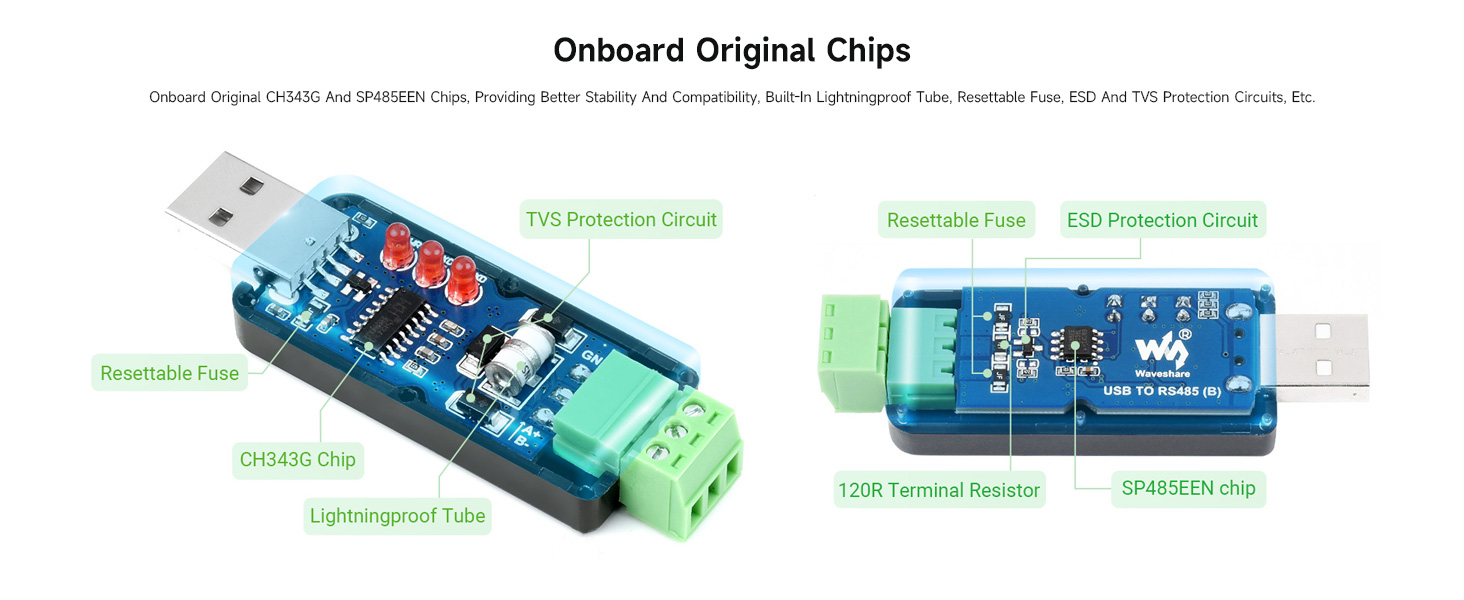
Image 5.1: Diagram illustrating the onboard original CH343G and SP485EEN chips, along with various protection circuits like TVS, resettable fuse, and ESD protection, which contribute to the device's stability and compatibility.
6. ოპერაცია
Once the converter is properly installed and recognized by your operating system, it will appear as a virtual COM port. You can then use any serial communication software (e.g., PuTTY, RealTerm, or custom applications) to interact with your RS485 devices. Configure the software with the correct COM port number, baud rate, data bits, parity, and stop bits to match your RS485 device's settings.
6.1. Working Status Indicators
The converter features three LED indicators to provide real-time status feedback:
- PWR (წითელი): Lights up when the converter is connected to a USB port and receiving power.
- TXD (Red, Blinking): Blinks when the USB port is sending data to the RS485 device.
- RXD (Red, Blinking): Blinks when the RS485 device is sending data back to the USB port.
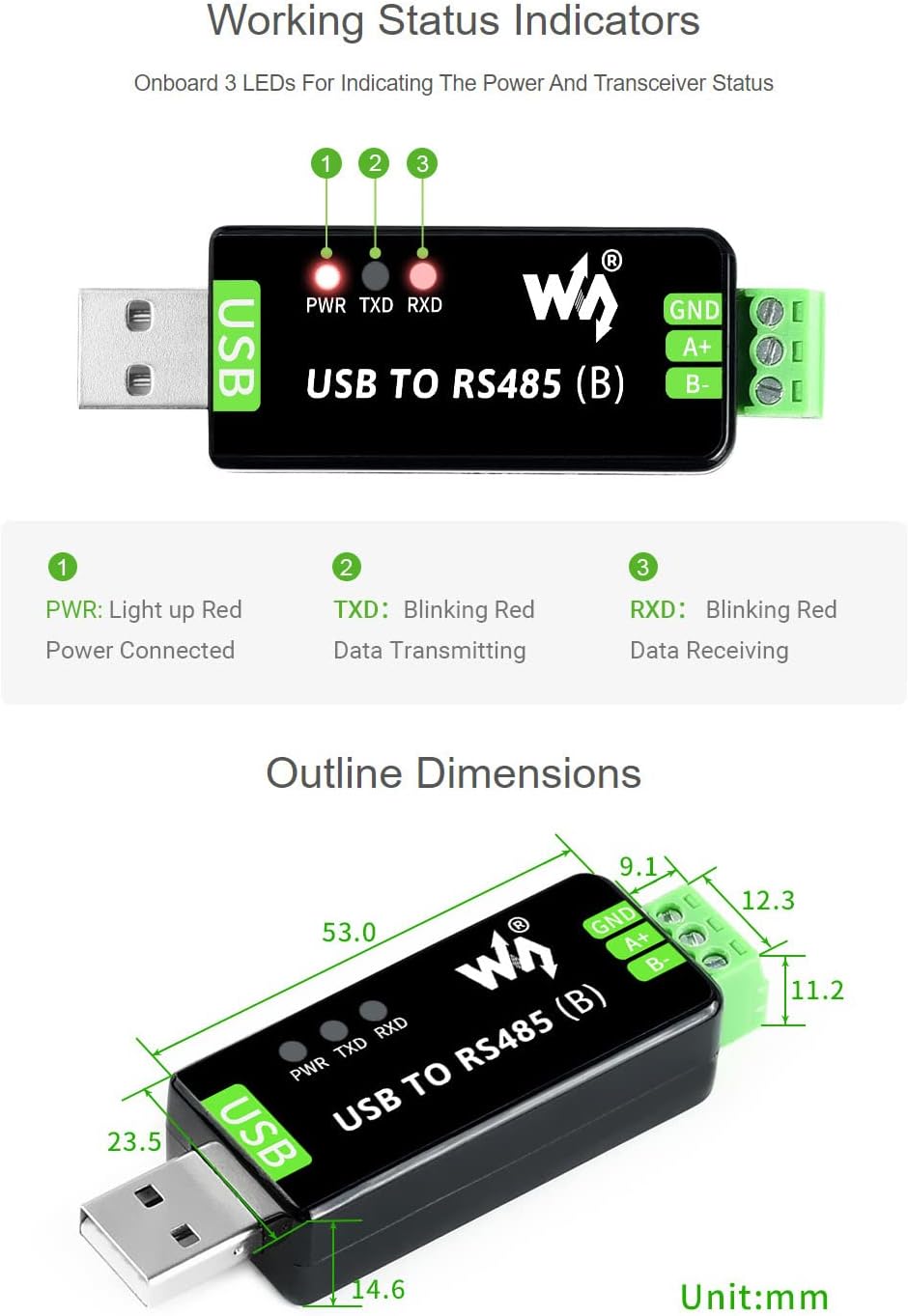
სურათი 6.1: ახლო ხედი view of the three LED indicators (PWR, TXD, RXD) on the converter, with descriptions of their functions during operation.
6.2. გადაცემის მანძილი
The USB signal is converted into a balanced differential RS485 signal, ensuring stable and reliable transmission. The transmission speed ranges from 300bps to 3Mbps. The maximum transmission distance for RS485 is approximately 1.2 kilometers (at low rates), while for USB, it is about 5 meters. The converter supports up to 32 terminal devices in a point-to-multipoint configuration. For systems with more than 16 devices, it is recommended to use RS485 repeaters to maintain signal integrity.

Image 6.2: Diagram illustrating the transmission capabilities, showing a computer connected via USB to the converter, which then connects to multiple RS485 devices over a distance of up to 1.2km.
6.3. Multi-System Support
The Waveshare USB to RS485 (B) converter is designed for broad compatibility across various operating systems, including:
- Windows (11, 10, 8.1, 8, 7)
- Mac OS
- Linux
- Android
- WinCE

Image 6.3: Icons representing the various operating systems supported by the converter, including Windows, Mac OS, Linux, and Android.
7. Დიაგნოსტიკა
If you encounter issues with your converter, consider the following troubleshooting steps:
- მოწყობილობა არ არის აღიარებული: Ensure the USB cable is securely connected. If using Windows, verify that the correct driver for the CH343G chip is installed. Check Device Manager for any unknown devices or COM port errors.
- No Data Transmission (TXD/RXD LEDs not blinking): Double-check the RS485 wiring (A+, B-, GND) for correct polarity and secure connections. Verify that the baud rate and other serial port settings in your software match those of your RS485 device. Ensure the RS485 device is powered on and functioning correctly.
- Inconsistent Data: Check for proper termination resistors on the RS485 bus, especially in long-distance or multi-device setups. Ensure there are no ground loops.
- Android მოწყობილობის თავსებადობა: Note that this converter may not work with all Android devices. Compatibility can vary depending on the Android device's USB host capabilities and kernel support for serial devices.
- Windows 11 Terminal App: Windows 11 does not include a built-in terminal application. You will need to use a third-party serial terminal program for communication.
8. მოვლა
To ensure the longevity and optimal performance of your Waveshare USB to RS485 (B) converter:
- შეინახეთ მოწყობილობა სუფთა, მტვრისა და ნარჩენებისგან თავისუფალი. გასაწმენდად გამოიყენეთ რბილი, მშრალი ქსოვილი.
- მოერიდეთ კონვერტორის ექსტრემალურ ტემპერატურაზე, ტენიანობაზე ან მზის პირდაპირ სხივებზე ზემოქმედებას.
- არ სცადოთ c-ს გახსნაasing or modify the internal circuitry, as this will void any warranty and may damage the device.
- გადამყვანი შეინახეთ გრილ, მშრალ ადგილას, როდესაც არ იყენებთ.
9. გარანტია და მხარდაჭერა
Waveshare products typically come with a standard manufacturer's warranty. For specific warranty terms, technical support, driver downloads, and additional resources, please visit the official Waveshare website or contact their customer service. The online user manual mentioned in the product features is a valuable resource for detailed information.
For further assistance, you may also refer to the product listing on Amazon or contact the seller directly through the Amazon platform.


