1. შესავალი
This manual provides essential information for the proper setup, operation, and maintenance of your Sharp 32FG6EA 32-inch HD Android TV. The Sharp 32FG6EA offers a wide range of connection options and features the Android TV operating system, providing a modern and intuitive television experience. It functions as an all-in-one entertainment hub, integrating Google Assistant for a smarter viewing experience. Users can quickly access entertainment, control smart devices, and obtain on-screen information using voice commands.
2. უსაფრთხოების ინფორმაცია
გთხოვთ, ტელევიზორის გამოყენებამდე ყურადღებით წაიკითხოთ ყველა უსაფრთხოების ინსტრუქცია. შეინახეთ ეს სახელმძღვანელო მომავალი მითითებისთვის.
- ელექტრომომარაგება: დარწმუნდით, რომ ტელევიზორი დაკავშირებულია სწორი სიმძლავრის მქონე კვების წყაროსთანtagე. არ გადატვირთოთ კვების წყაროები.
- ვენტილაცია: არ დაბლოკოთ ვენტილაციის ღიობები. გადახურების თავიდან ასაცილებლად, ტელევიზორის გარშემო საკმარისი ადგილი დატოვეთ ჰაერის ნორმალური ნაკადისთვის.
- წყალი და ტენიანობა: Do not expose the TV to rain, moisture, or excessive humidity. Avoid placing objects filled with liquids on or near the TV.
- დასუფთავება: ტელევიზორის გაწმენდამდე გამორთეთ დენის წყაროდან. გამოიყენეთ რბილი, მშრალი ქსოვილი. არ გამოიყენოთ თხევადი საწმენდი საშუალებები ან აეროზოლური სპრეი.
- განთავსება: Place the TV on a stable, level surface. If wall-mounting, ensure the mount is securely installed and can support the TV's weight.
- მომსახურება: ტელევიზორის დამოუკიდებლად მომსახურებას ნუ ეცდებით. ყველა სახის მომსახურებისთვის მიმართეთ კვალიფიციურ სერვის პერსონალს.
3. პაკეტის შიგთავსი
დარწმუნდით, რომ შეფუთვაში ყველა ნივთია:
- Sharp 32FG6EA 32-inch HD Android TV
- დისტანციური მართვა (2 AAA ელემენტით)
- Stand Type Base
- ინსტრუქციის სახელმძღვანელო
- დენის კაბელი
4. დაყენება
4.1 შეფუთვა
Carefully remove the TV and all accessories from the packaging. Retain the packaging materials for future transport or servicing.
4.2 სადგამის მიმაგრება
If you are not wall-mounting the TV, attach the included stand base:
- დაზიანების თავიდან ასაცილებლად, ტელევიზორის ეკრანი ქვემოთ დადეთ რბილ, ბრტყელ ზედაპირზე.
- სადგამის საფუძველი ტელევიზორის ქვედა მხარეს არსებულ სამონტაჟო ნახვრეტებს გაუსწორეთ.
- დაამაგრეთ სადგამი მოწოდებული ხრახნებით. დარწმუნდით, რომ სადგამი მყარად არის დამაგრებული.
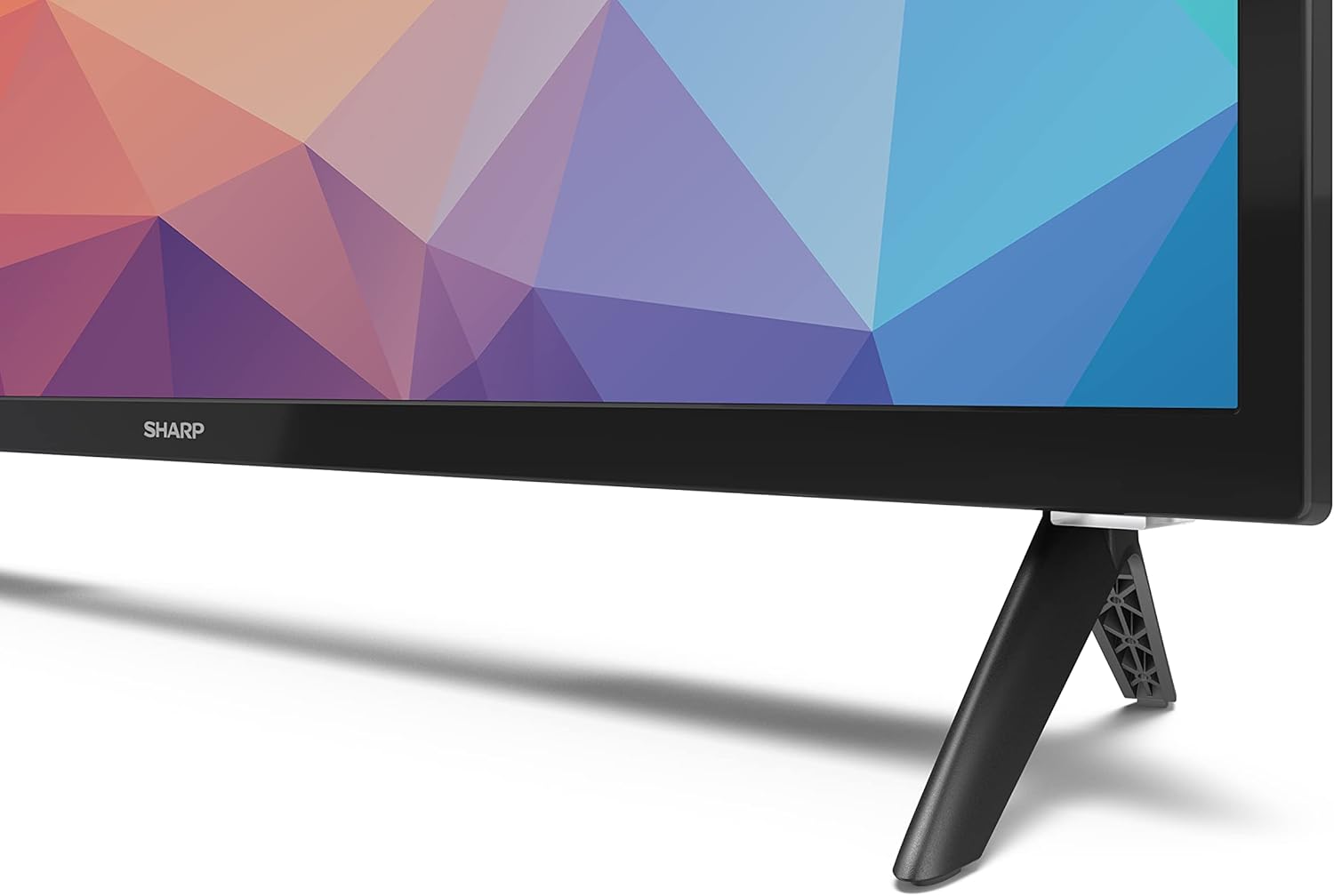
Image: Close-up of the TV stand attachment.
4.3 კედელზე დამაგრება
The Sharp 32FG6EA supports VESA wall mounts with dimensions of 75 x 75 mm. Wall mount hardware is not included. Follow the instructions provided with your wall mount kit.
4.4 გარე მოწყობილობების დაკავშირება
თქვენს ტელევიზორს აქვს რამდენიმე პორტი სხვადასხვა მოწყობილობების დასაკავშირებლად:
- HDMI: Connect Blu-ray players, game consoles, or set-top boxes to the 2 HDMI ports.
- USB: Connect USB storage devices for media playback to the 2 USB ports.
- ანტენა/კაბელი: სამაუწყებლო არხებისთვის შეაერთეთ ანტენა ან საკაბელო ტელევიზიის წყარო.
- Ethernet: სადენიანი ინტერნეტ კავშირისთვის.
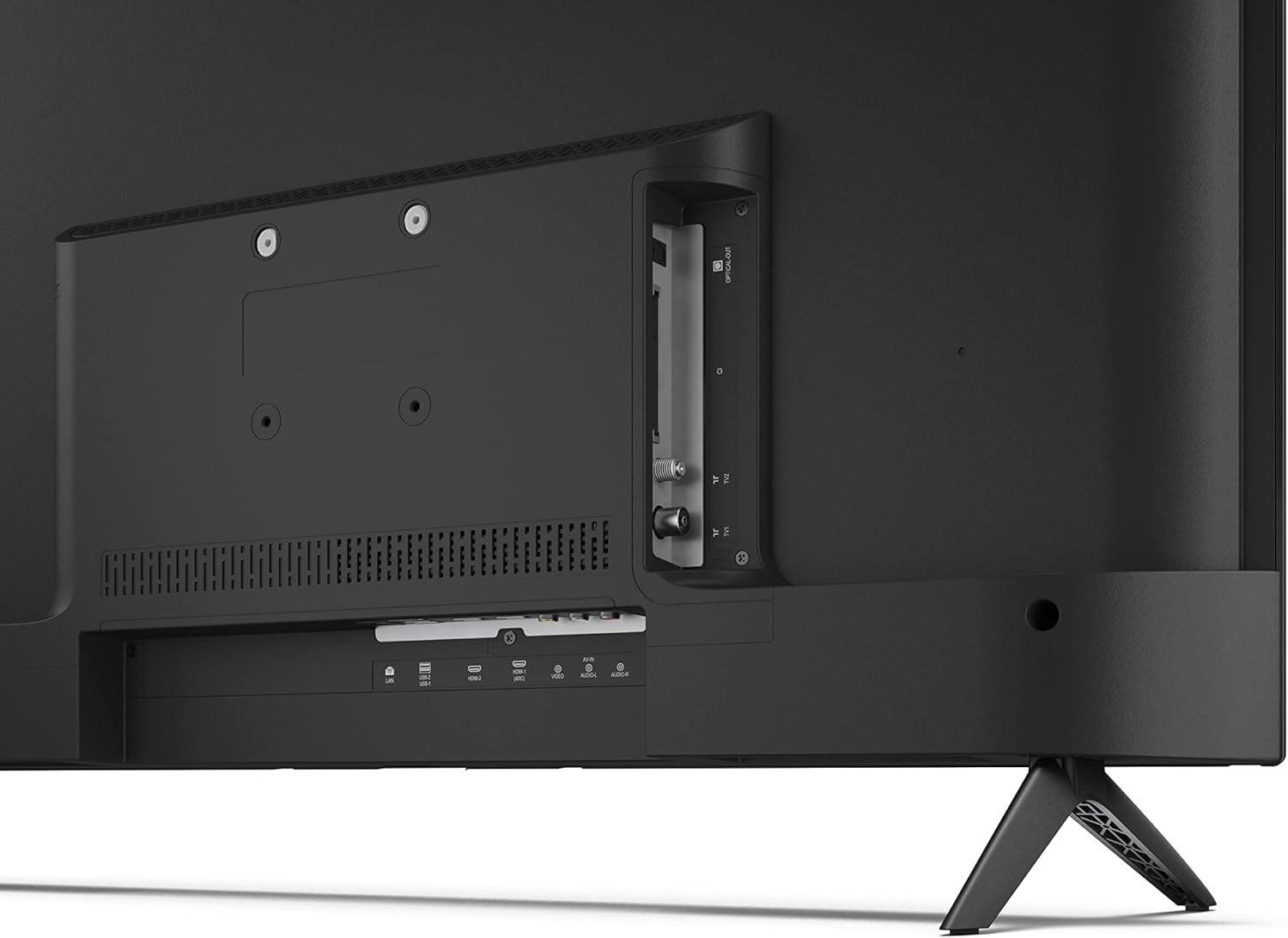
სურათი: უკანა view ტელევიზორის შემაერთებელი პორტებით.
4.5 დენის კავშირი
After connecting all necessary devices, plug the power cable into the TV and then into a wall outlet.
4.6 საწყისი დაყენების ოსტატი
პირველად ჩართვისას, ტელევიზორი დაგეხმარებათ საწყისი დაყენების პროცესში. ეს მოიცავს:
- ენის შერჩევა.
- ქსელური კავშირი (Wi-Fi ან Ethernet).
- Google account sign-in (required for full Android TV features).
- არხის სკანირება.
5. მოქმედებს
5.1 დისტანციური მართვის მეტიview
The included remote control allows you to navigate the TV's features. Insert the 2 AAA batteries into the remote control before use.
- დენის ღილაკი: რთავს ან გამორთავს ტელევიზორს.
- მიმართულების პანელი (D-Pad) და OK ღილაკი: მენიუში ნავიგაცია და არჩევანის დადასტურება.
- უკანა ღილაკი: უბრუნდება წინა ეკრანს.
- Სახლის ღილაკი: წვდომა აქვს Android TV-ის მთავარ ეკრანზე.
- ხმის აწევა/დაკლება: არეგულირებს აუდიო ხმას.
- არხი ზემოთ/ქვემოთ: ტელევიზიის არხებს ცვლის.
- Google ასისტენტის ღილაკი: ააქტიურებს ხმოვან კონტროლს.
- აპლიკაციის მალსახმობების ღილაკები: Dedicated buttons for popular streaming services like Netflix, Prime Video, and YouTube.
5.2 Android TV ინტერფეისის ნავიგაცია
The Android TV home screen provides access to your installed apps, recommended content, and settings. Use the directional pad on your remote to navigate through the interface.
5.3 Google ასისტენტი
დააჭირეთ Google ასისტენტის ღილაკს თქვენს დისტანციურ პულტზე და მიკროფონში თქვით:
- ძიება ფილმები, შოუები ან ინფორმაცია.
- ჭკვიანი სახლის მოწყობილობების მართვა.
- გახსენით აპლიკაციები.
- ტელევიზორის პარამეტრების კორექტირება.
5.4 ჩაშენებული Chromecast
The TV includes Chromecast built-in, allowing you to cast content from compatible apps on your smartphone, tablet, or computer directly to the TV screen.
5.5 Bluetooth კავშირი
Connect Bluetooth devices such as headphones or speakers to your TV for a personalized audio experience. Navigate to the TV's settings menu to pair new Bluetooth devices.
5.6 აუდიო პარამეტრები
The TV supports Dolby Audio with 2 x 6 W RMS speakers. You can adjust audio settings, including sound modes and equalizer, through the TV's settings menu.
6. მოვლა
6.1 ტელევიზორის გაწმენდა
ტელევიზორის ეკრანისა და კორპუსის გასაწმენდად:
- გამორთეთ დენის კაბელი კედლის განყოფილებიდან.
- Use a soft, lint-free cloth to gently wipe the screen and surfaces.
- ჯიუტი ლაქებისთვის, ოდნავ დampგაწმინდეთ ქსოვილი წყლით ან სპეციალური ეკრანის საწმენდი საშუალებით (წაისვით ქსოვილზე და არა პირდაპირ ეკრანზე).
- არ გამოიყენოთ აბრაზიული საწმენდები, ცვილები ან გამხსნელები.
6.2 პროგრამული უზრუნველყოფის განახლებები
Your Android TV may receive periodic software updates to improve performance and add new features. Ensure your TV is connected to the internet to receive these updates. You can check for updates manually in the TV's settings menu.
7. Დიაგნოსტიკა
თუ თქვენს ტელევიზორთან დაკავშირებით პრობლემები შეგექმნათ, იხილეთ შემდეგი გავრცელებული პრობლემები და მათი გადაჭრის გზები:
- ძალა არ არის: დარწმუნდით, რომ კვების კაბელი საიმედოდ არის შეერთებული როგორც ტელევიზორში, ასევე მოქმედ კედლის როზეტში. სცადეთ სხვა როზეტი.
- სურათი/ხმა არ არის: შეამოწმეთ, რომ სწორი შეყვანის წყაროა არჩეული. დარწმუნდით, რომ ყველა კაბელი (HDMI, ანტენა) სწორად არის დაკავშირებული.
- დისტანციური მართვა არ მუშაობს: შეამოწმეთ ელემენტები და დარწმუნდით, რომ ისინი სწორად არის ჩასმული. მიმართეთ პულტი პირდაპირ ტელევიზორის ინფრაწითელი სენსორისკენ.
- ცუდი სურათის ხარისხი: Check antenna/cable connections. Adjust picture settings in the TV menu. For streaming content, ensure a stable internet connection.
- Არ არის ინტერნეტ კავშირი: Verify Wi-Fi password or Ethernet cable connection. Restart your router and the TV.
- Apps Not Working: Ensure the TV's software is up to date. Try clearing the app's cache or reinstalling the app.
If problems persist, consult the Sharp support webსაიტი ან დაუკავშირდით მომხმარებელთა მომსახურებას.
8. სპეციფიკაციები
| ფუნქცია | სპეციფიკაცია |
|---|---|
| მოდელის ნომერი | 32FG6EA |
| ბრენდი | მკვეთრი |
| ეკრანის ზომა | 32 ინჩი (81 სმ დიაგონალი) |
| ჩვენების ტექნოლოგია | LED |
| რეზოლუცია | 720p (1366 x 768 პიქსელი) |
| ასპექტის თანაფარდობა | 16:9 |
| განახლების სიხშირე | 50 ჰც |
| ოპერაციული სისტემა | Android TV 11 |
| განსაკუთრებული თვისებები | Android TV, Google Assistant, Chromecast built-in |
| აუდიო გამომავალი | 2 x 6 W RMS, Dolby Audio |
| HDMI პორტები | 2 |
| USB პორტები | 2 |
| დაკავშირება | Wi-Fi, Bluetooth, Ethernet |
| VESA კედლის სამაგრი | 75 x 75 მმ |
| ზომები სადგამით (W x H x D) | 731 x 486 x 177 მმ |
| ზომები სადგამის გარეშე (W x H x D) | 731 x 433 x 68 მმ |
| პროდუქტის ზომები (D x W x H) | 16 x 73 x 46.4 სმ (დაახლოებით, სადგამით) |
| წონა | 3.9 კგ |
| ენერგოეფექტურობის კლასი | E |

Image: TV dimensions diagram.

Image: Energy Label. For more details, visit EPREL მონაცემთა ბაზა.
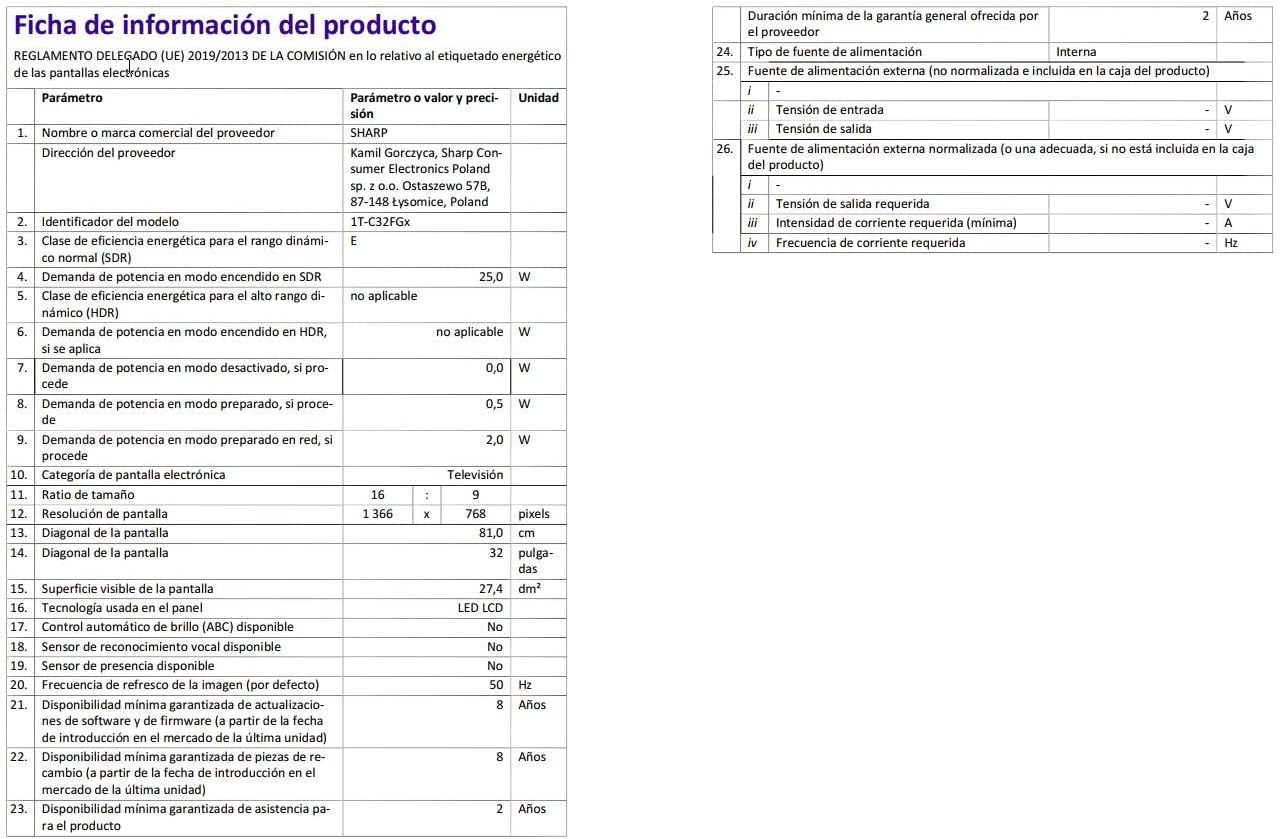
Image: Detailed product information sheet.
9. გარანტია და მხარდაჭერა
The Sharp 32FG6EA television comes with a minimum general warranty duration of 2 years from the provider.
For technical support, warranty claims, or further assistance, please refer to the contact information provided with your purchase documentation or visit the official Sharp support webსაიტი თქვენი რეგიონისთვის.