MOUNTUP MU2005 Gas Spring Single Monitor Wall Mount
ინსტრუქციის სახელმძღვანელო
1. შესავალი
This manual provides instructions for the installation, operation, and maintenance of your MOUNTUP MU2005 Gas Spring Single Monitor Wall Mount. This mount is designed to securely hold computer screens and televisions, offering adjustable positioning for an ergonomic viewing experience. Please read these instructions carefully before installation to ensure safe and correct usage.
2. უსაფრთხოების ინფორმაცია
გაფრთხილება: Improper installation may result in serious personal injury and property damage. If you do not understand these instructions or have doubts about the safety of the installation, please contact a qualified installer.
- არ დაამონტაჟოთ მხოლოდ თაბაშირ-მუყაოს კედელზე. ეს სამაგრი განკუთვნილია ხის სამაგრებზე, მყარ ბეტონის კედლებზე ან აგურის კედლებზე დასამონტაჟებლად.
- დარწმუნდით, რომ სამონტაჟო ზედაპირს შეუძლია უსაფრთხოდ გაუძლოს სამაგრისა და ეკრანის კომბინირებულ წონას.
- არ გადააჭარბოთ მაქსიმალურ დასაშვებ წონას 26.5 ფუნტს (12 კგ).
- Use only the provided hardware. If any parts are missing or defective, contact MOUNTUP customer service.
- ინსტალაციის დროს მოარიდეთ ბავშვები და შინაური ცხოველები.
- პერიოდულად შეამოწმეთ, რომ სამაგრი საიმედოდ არის დამაგრებული და ყველა შესაკრავი მჭიდროდ არის დამაგრებული.
3. პაკეტის შიგთავსი
ინსტალაციის დაწყებამდე დარწმუნდით, რომ ყველა კომპონენტი ადგილზეა და დაუზიანებელია.
- Monitor Wall Mount Arm (MU2005)
- VESA ფირფიტა
- VESA Extension Kit (for larger VESA patterns)
- სამონტაჟო აქსესუარები (ხრახნები, საკინძები, საყელურები)
- Hex Keys for Adjustment
- ინსტრუქციის სახელმძღვანელო

Image: Main components of the MOUNTUP MU2005 monitor wall mount, including the gas spring arm, VESA mounting plate, and VESA extension brackets.
4. სპეციფიკაციები
| ფუნქცია | სპეციფიკაცია |
|---|---|
| მოდელის ნომერი | MU2005 |
| ეკრანის ზომის თავსებადობა | 22-35 ინჩი |
| წონის ტევადობა | 4.4 - 26.5 ფუნტი (2 - 12 კგ) |
| VESA თავსებადობა | 75x75mm, 100x100mm, 100x200mm, 200x100mm, 200x200mm |
| სამონტაჟო ტიპი | Wall Mount (Wood Stud, Concrete Wall, Brick Wall) |
| მოძრაობის ტიპი | Tilt, Rotate, Swivel, Height Adjust, Full Motion |
| დახრის კუთხე | Up 90° / Down 45° |
| მბრუნავი კუთხე | 180° (at wall plate), 360° (at arm joint), 180° (at VESA plate) |
| როტაცია | 360° (პორტრეტი/ლანდშაფტი) |
| სიმაღლის რეგულირება | 11 ინჩამდე |
| მინიმალური მანძილი კედელამდე | 3.9 ინჩი (9.9 სმ) |
| კედლიდან მაქსიმალური გაფართოება | 20.5 ინჩი |
| მასალა | ალუმინი, მეტალი |

Image: Detailed diagram illustrating the mount's dimensions, VESA compatibility (75x75, 100x100, 100x200, 200x100, 200x200), weight capacity (4.4-26.5 lbs), and supported screen sizes (22-35 inches).
5. დაყენება და ინსტალაცია
Before beginning, ensure you have all necessary tools and that your wall type is compatible. This mount is suitable for wood studs, concrete walls, and brick walls. It is NOT for drywall alone.
5.1 თავსებადობის შემოწმება
Confirm your monitor meets the following criteria:
- მონიტორის ზომა: 22-35 ინჩი
- მონიტორის წონა: 4.4-26.5 ფუნტი
- VESA ნიმუში: 75x75mm, 100x100mm, 100x200mm, 200x100mm, 200x200mm
- კედლის ტიპი: Wood Stud, Brick Wall, or Concrete Wall

Image: A visual guide to checking monitor compatibility with the mount, covering screen size, weight, VESA pattern, and suitable wall types.
5.2 ინსტალაციის ეტაპები
- Install the Arm to the Wall: Securely attach the wall plate of the monitor arm to a wood stud, concrete wall, or brick wall using the appropriate hardware. Ensure it is level and firmly anchored.
- Attach VESA Plate to Monitor Back: Fasten the VESA plate to the back of your monitor using the screws that fit your monitor's VESA holes. Use the VESA extension kit if your monitor requires a larger VESA pattern.
- Attach Monitor onto the Arm: Carefully slide the monitor (with the attached VESA plate) onto the arm's mounting head. Ensure it clicks into place securely.
- Adjust Gas Spring to Proper Tension: This is crucial for the arm to hold your monitor at the desired height. Refer to the 'Operating' section for detailed adjustment instructions.

Image: Illustration of mounting the arm's wall plate to the wall.

Image: Illustration of attaching the VESA plate to the monitor's rear.
Image: Illustration of sliding the monitor onto the arm's VESA head.

Image: Illustration of adjusting the gas spring tension on the arm.
5.3 საკაბელო მენეჯმენტი
Route your cables through the integrated cable management channels on the arm to maintain a clean and organized workspace.
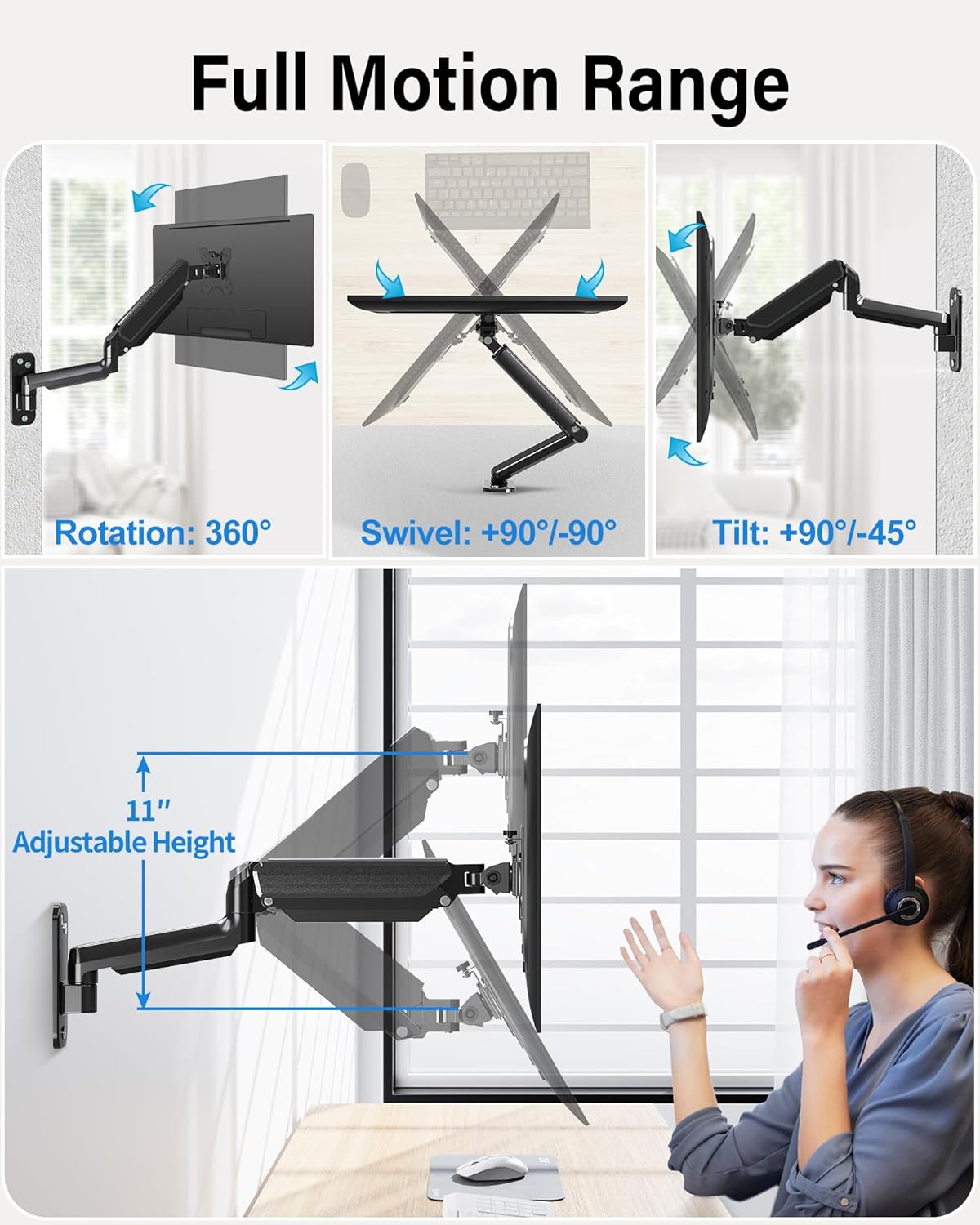
Image: The monitor arm demonstrating its full range of motion, including 360° rotation, 90°/-90° swivel, 90°/-45° tilt, and 11 inches of adjustable height.
6. მონიტორის მკლავის მართვა
The MOUNTUP MU2005 offers extensive adjustability to achieve optimal viewკუთხეები და ერგონომიული განლაგება.
6.1 Gas Spring Adjustment (Monitor Height)
The gas spring allows for effortless height adjustment. If your monitor does not stay at the desired height, adjust the tension:
- Monitor raises up (too light): Turn the screw clockwise ("-" direction) to reduce tension.
- Monitor drops down (too heavy): Turn the screw counter-clockwise ("+" direction) to increase tension.
შენიშვნა: Hold the arm in a horizontal position during adjustment. Refer to the table below for approximate turns based on monitor weight.
| მონიტორის წონა | წრეები (მინიმუმ) |
|---|---|
| 4.4 ფუნტი (2 კგ) | მინ |
| 6.6 ფუნტი (3 კგ) | 2 |
| 11 ფუნტი (5 კგ) | 6 |
| 17.6 ფუნტი (8 კგ) | 10 |
| 19.8 ფუნტი (9 კგ) | 11 |
| 22 ფუნტი (10 კგ) | 12 |
| 26.4 ფუნტი (12 კგ) | მაქს |

Image: Comprehensive guide for adjusting gas spring tension and tilt angle, including a table correlating monitor weight with the number of turns for adjustment.
6.2 Tilt Angle Adjustment
If your monitor faces down or up unintentionally, adjust the tilt tension:
- Loosen the tilting bolt (Turn to "-" direction).
- Adjust the monitor to your desired angle.
- Retighten the tilting bolt (Turn to "+" direction).

Image: Visual instructions for adjusting the gas spring tension and the monitor's tilt angle using a hex key.
6.3 Swivel and Rotation
- The arm can swivel 180° at the wall plate and 360° at the arm joint.
- The VESA plate allows for 180° swivel and 360° rotation, enabling easy switching between portrait and landscape orientations.
Image: The monitor arm demonstrating its full range of motion, including 360° rotation, 90°/-90° swivel, 90°/-45° tilt, and 11 inches of adjustable height.
Video: This video demonstrates the various movements and space-saving capabilities of the MOUNTUP Ultrawide Single Monitor Wall Mount, showcasing its full motion range and how it can optimize your workspace.
7. მოვლა
Regular maintenance ensures the longevity and safe operation of your monitor mount.
- დასუფთავება: გაწმინდეთ სამაგრი რბილი ქსოვილით,amp ქსოვილი. მოერიდეთ აბრაზიულ საწმენდებს.
- შეამოწმეთ კავშირები: Periodically inspect all screws and bolts to ensure they are tight. Retighten if necessary.
- Gas Spring Function: If the gas spring's performance changes over time, re-adjust the tension as described in the 'Operating' section.
8. Დიაგნოსტიკა
If you encounter issues with your MOUNTUP monitor arm, refer to the following common problems and solutions:
8.1 Arm Does Not Stay at Desired Height
- პრობლემა: Monitor arm falls down.
- გამოსავალი: The gas spring tension is too low for the monitor's weight. Increase tension by turning the adjustment screw counter-clockwise ("+" direction).
- პრობლემა: Monitor arm rises up.
- გამოსავალი: The gas spring tension is too high for the monitor's weight. Decrease tension by turning the adjustment screw clockwise ("-" direction).
Refer to the 'Gas Spring Adjustment' section for detailed instructions and the weight-to-turns table.
8.2 Monitor Tilts Down Unintentionally
- პრობლემა: The monitor head cannot maintain its tilt angle.
- გამოსავალი: The tilting bolt is loose. Loosen the tilting bolt, adjust the monitor to the desired angle, and then retighten the tilting bolt firmly.
Video: This video provides troubleshooting steps for common issues with MOUNTUP monitor wall mounts, such as adjusting the gas spring tension if the arm falls or rises, and tightening the tilt mechanism if the monitor sags.
9. გარანტია და მხარდაჭერა
MOUNTUP provides a 3-year support for this product. If you have any questions regarding pre-purchase compatibility, installation, or require assistance with any issues, please do not hesitate to contact MOUNTUP customer service. Our team is available to provide friendly and helpful support.