შესავალი
This manual provides detailed instructions for the safe and proper installation, operation, and maintenance of your MOUNTUP Universal TV Stand MU0031 and Full Motion TV Wall Mount Bundle. Please read this manual thoroughly before beginning installation to ensure correct assembly and to prevent damage or injury. Keep this manual for future reference.

Image: The MOUNTUP Universal TV Stand MU0031 and Full Motion TV Wall Mount Bundle, showing both components.
უსაფრთხოების ინფორმაცია
გაფრთხილება: ყველა ინსტრუქციის წაკითხვისა და დაცვის შეუძლებლობამ შეიძლება გამოიწვიოს პირადი დაზიანება ან ქონების დაზიანება.
- Do not exceed the weight capacity specified for each component.
- Ensure the mounting surface for the wall mount can safely support the combined weight of the mount and the television.
- Use only the hardware provided or specified by MOUNTUP.
- Always use a stud finder to locate wood studs when installing the wall mount. Do not install into drywall alone.
- Two people are recommended for installation, especially when lifting the television.
- ინსტალაციის დროს მოარიდეთ ბავშვები და შინაური ცხოველები.
- პერიოდულად შეამოწმეთ ყველა ხრახნი და შეერთება, რათა დარწმუნდეთ, რომ ისინი საიმედოდ არიან დამაგრებული.
პაკეტის შიგთავსი
Verify that all parts are present and undamaged before assembly. If any parts are missing or defective, contact MOUNTUP customer support.
- 1 x MU0031 Universal TV Stand (Base, Support Column, TV Plate, TV Brackets)
- 1 x MU0008 Full Motion TV Wall Mount (Wall Plate, Articulating Arm, TV Plate)
- Hardware Kit (various screws, washers, spacers, anchors, level)
- ინსტრუქციის სახელმძღვანელო
დაყენება
A. Universal TV Stand (MU0031) Setup
This section details the assembly of the universal TV stand.
Step 1: Assemble the Base and Support Column. Attach the support column to the glass base using the provided screws and Allen wrench. Ensure the column is securely fastened and stable.

სურათი: წინა მხარე view of the assembled MOUNTUP Universal TV Stand, showing the base, column, and TV plate.
ნაბიჯი 2: მიამაგრეთ ტელევიზორის სამაგრები თქვენს ტელევიზორზე. Carefully lay your TV face down on a soft, clean surface. Identify the VESA mounting holes on the back of your TV. Select the appropriate screws, washers, and spacers from the hardware kit that fit your TV's mounting holes. Attach the two vertical TV brackets to the back of your TV. Ensure the hooks on the brackets face upwards.

Image: Diagram illustrating the dimensions of the TV stand and various VESA mounting patterns supported.
Step 3: Hang TV onto the Stand. With assistance, carefully lift the TV and hook the TV brackets onto the TV plate of the stand. Ensure the TV is centered and level. Secure the TV to the plate using the safety screws at the bottom of the brackets.
Step 4: Adjust Height (Optional). The TV stand offers 9 height adjustment options. You can adjust the height by selecting different mounting holes on the TV plate or by adjusting the position of the hooks on the TV brackets. Refer to the diagram for available height settings.

Image: Diagram showing the 9 height adjustment options for the TV stand, achieved by adjusting the TV plate and hook positions.
B. Full Motion TV Wall Mount (MU0008) Setup
This section details the installation of the full motion TV wall mount.
Step 1: Locate Wall Studs. Use a stud finder to locate the center of two adjacent wood studs in your desired mounting location. Mark the stud centers with a pencil. Ensure the chosen location is at the desired viewინგის სიმაღლე.
Step 2: Attach Wall Plate to Wall. Position the wall plate of the mount against the wall, aligning the mounting holes with the marked stud centers. Use the included level to ensure the wall plate is perfectly horizontal. Drill pilot holes into the studs, then secure the wall plate to the wall using the provided lag bolts and washers. Tighten firmly but do not overtighten.
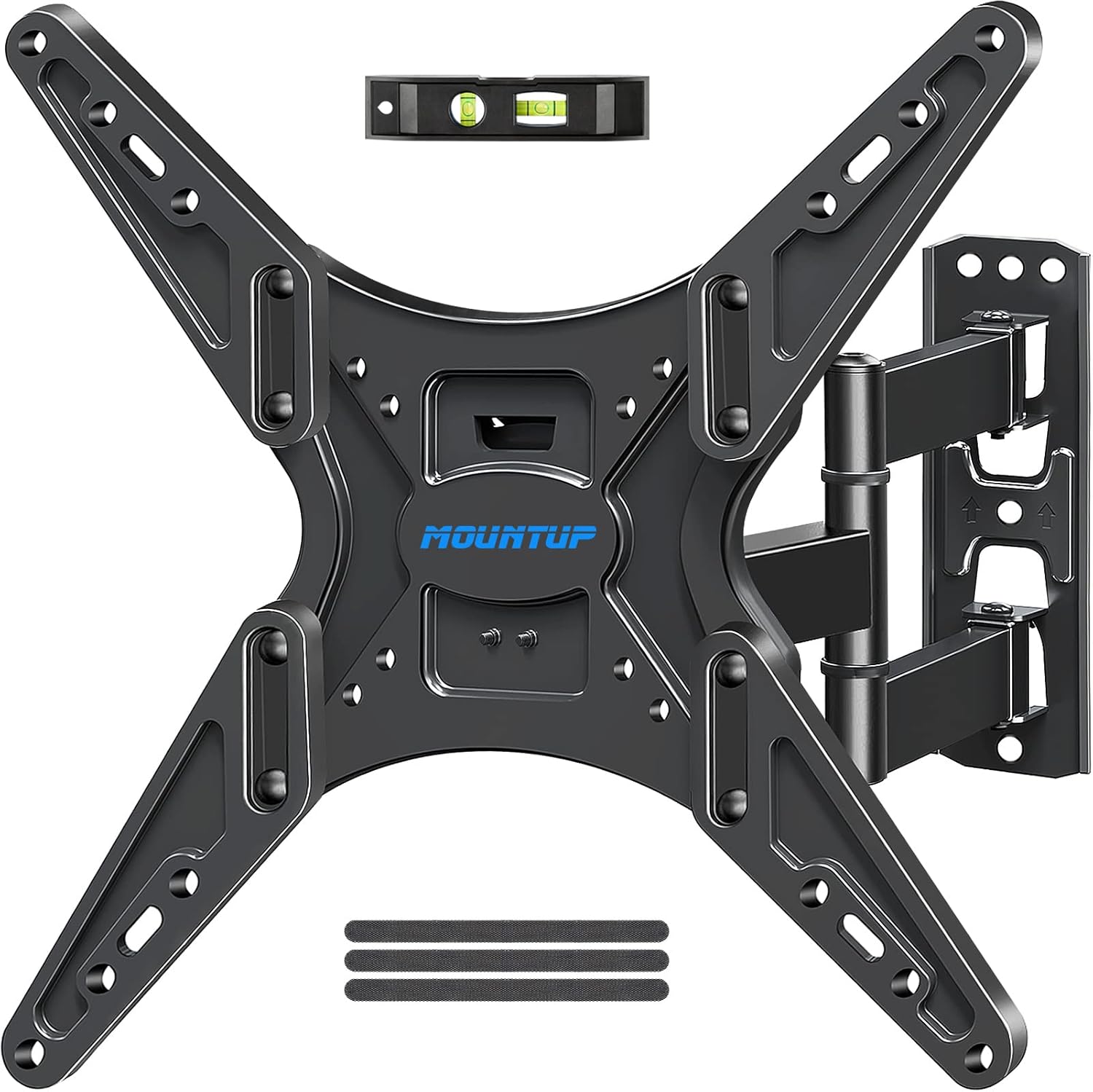
Image: Components of the MOUNTUP Full Motion TV Wall Mount, including the wall plate, articulating arm, and TV plate.
ნაბიჯი 3: მიამაგრეთ ტელევიზორის სამაგრები თქვენს ტელევიზორზე. Carefully lay your TV face down on a soft, clean surface. Identify the VESA mounting holes on the back of your TV. Select the appropriate screws, washers, and spacers from the hardware kit that fit your TV's mounting holes. Attach the two vertical TV brackets to the back of your TV. Ensure the brackets are oriented correctly according to the mount's design.

Image: Diagrams illustrating various VESA mounting patterns compatible with the MOUNTUP Full Motion TV Wall Mount.
Step 4: Hang TV onto the Wall Mount. With assistance, carefully lift the TV and hook the TV brackets onto the TV plate of the wall mount. Ensure the TV is securely seated. Tighten any safety screws or locking mechanisms on the mount to prevent accidental dislodgement.
ოპერაციული
A. Universal TV Stand (MU0031) Operation
სიმაღლის რეგულირება: As described in the setup section, the TV height can be adjusted by repositioning the TV brackets on the TV plate or by changing the hook position on the brackets. Ensure the TV is removed from the stand before making height adjustments.
მბრუნავი ფუნქცია: The TV stand allows for a swivel motion of up to ±25 degrees. Gently push the sides of the TV to achieve the desired viewing angle. Do not force the swivel beyond its limits.

Image: Illustration demonstrating the ±25 degree swivel capability of the MOUNTUP Universal TV Stand.
B. Full Motion TV Wall Mount (MU0008) Operation
გაფართოება და შეკუმშვა: The articulating arm allows the TV to extend up to 18.9 inches from the wall and retract to 2.5 inches. Gently pull or push the TV to adjust the distance from the wall.

Image: Illustration showing the wall mount extending the TV up to 18.9 inches and retracting to 2.5 inches from the wall.
დახრის რეგულირება: The mount allows for a tilt range of +5 degrees (upwards) to -15 degrees (downwards). Loosen the tilt adjustment knobs on the TV plate, adjust the TV to the desired angle, and then securely tighten the knobs.
მბრუნავი რეგულირება: The mount provides a swivel range of up to ±45 degrees, depending on TV size and wall distance. Gently push the sides of the TV to rotate it left or right to achieve the optimal viewing კუთხე

Image: Illustration demonstrating the tilt (+5°/-15°) and swivel (±45°) flexibility of the MOUNTUP Full Motion TV Wall Mount.
მოვლა
- დასუფთავება: Use a soft, dry cloth to wipe down the surfaces of the TV stand and wall mount. Do not use abrasive cleaners or solvents, as they may damage the finish.
- პერიოდული შემოწმება: Regularly check all mounting screws and bolts to ensure they remain tight and secure. Over time, vibrations or adjustments can cause fasteners to loosen.
- შეზეთვა: The articulating joints of the wall mount are designed for smooth operation and typically do not require lubrication. If movement becomes stiff, contact customer support.
პრობლემების მოგვარება
| პრობლემა | შესაძლო მიზეზი | გამოსავალი |
|---|---|---|
| TV is not level on stand/mount. | Improper installation; uneven wall surface. | For stand: Re-adjust TV brackets. For wall mount: Re-check wall plate level and adjust if necessary. Ensure all screws are tightened evenly. |
| Mount/Stand feels unstable. | Loose screws; incorrect hardware used; exceeding weight capacity. | Check all screws and bolts for tightness. Verify correct hardware was used. Ensure TV weight is within specified limits. Re-read safety information. |
| დახრის/მობრუნების რეგულირების სირთულე. | Tilt knobs too tight (wall mount); mechanism stiff. | For wall mount tilt: Loosen tilt adjustment knobs slightly before adjusting, then re-tighten. If mechanism is stiff, contact customer support. |
| დაკარგული ნაწილები. | შეფუთვის შეცდომა. | Contact MOUNTUP customer support immediately with your purchase details. |
სპეციფიკაციები
- პროდუქტის მოდელი: MU0031 (Universal TV Stand) & MU0008 (Full Motion TV Wall Mount)
- ბრენდი: მონტაჟი
- სამონტაჟო ტიპი: Wall Mount (MU0008), Tabletop Stand (MU0031)
- მოძრაობის ტიპი: Articulating, Tilt (MU0008); Swivel, Height Adjustable (MU0031)
- Maximum Compatible TV Size: Up to 65 Inches (for both components, verify individual product limits)
- თავსებადი მოწყობილობები: ტელევიზია
- VESA Compatibility (MU0031 Stand): 150x200, 200x200, 300x200, 400x200, 500x200, 500x300, 300x300, 400x300, 600x200, 600x300, 400x400, 600x400 (Horizontal x Vertical)
- VESA Compatibility (MU0008 Wall Mount): 100x100, 130x130, 200x100, 200x200, 300x200, 400x200, 200x300, 200x400, 400x300, 300x300, 400x400 (Horizontal x Vertical)
- წონის ტევადობა: Refer to individual product specifications for exact weight limits. Do not exceed.
გარანტია და მხარდაჭერა
MOUNTUP products are designed for durability and performance. For specific warranty details, please refer to the warranty card included with your product or visit the official MOUNTUP website. If you have any questions regarding installation, missing parts, or product functionality, please contact MOUNTUP customer support:
- მომხმარებელთა მხარდაჭერა: We are glad to answer your pre-purchase and installation questions about TV mounts.
- ონლაინ დახმარება: ეწვიეთ MOUNTUP Store on Amazon დამატებითი ინფორმაციისა და საკონტაქტო ვარიანტებისთვის.


