1. შესავალი და მეტიview
This manual provides detailed instructions for the installation, operation, and maintenance of your Yansoo 3-Channel Dash Cam. Please read this manual thoroughly before using the device to ensure proper functionality and safety.
პროდუქტის მახასიათებლები:
- 3-არხიანი ჩაწერა: Simultaneously captures video from the front (170° wide-angle), rear (165°), and inside (140°) of your vehicle.
- მაღალი გარჩევადობის ვიდეო: Supports 1080P Front video + AHD-720P Rear video + AHD-720P Inside video.
- გაძლიერებული ღამის ხედვა: Features 4 unique infrared LED fill lights, F1.8 aperture, and WDR technology for optimal performance in low light.
- საგანგებო საკეტი (G-სენსორი): Automatically detects sudden shocks or collisions and locks the current video footage გადაწერის თავიდან ასაცილებლად.
- მარყუჟის ჩაწერა: Continuously records and automatically overwrites the oldest unlocked video fileროდესაც მეხსიერების ბარათი სავსეა.
- პარკინგის მონიტორი: Activates recording when motion or shocking is detected while parked (requires separate hardwire kit for 24/7 monitoring).
- Adjustable Interior Camera: The interior lens can be rotated 60° for flexible positioning.
პაკეტის შიგთავსი:
- Yansoo 3-Channel Dash Cam Unit
- უკანა კამერა კაბელით
- შეწოვის თასის მთა
- მანქანის დამტენი (ტიპი-C)
- USB მონაცემთა კაბელი
- მომხმარებლის სახელმძღვანელო
- Mounting Hardware for Rear Camera
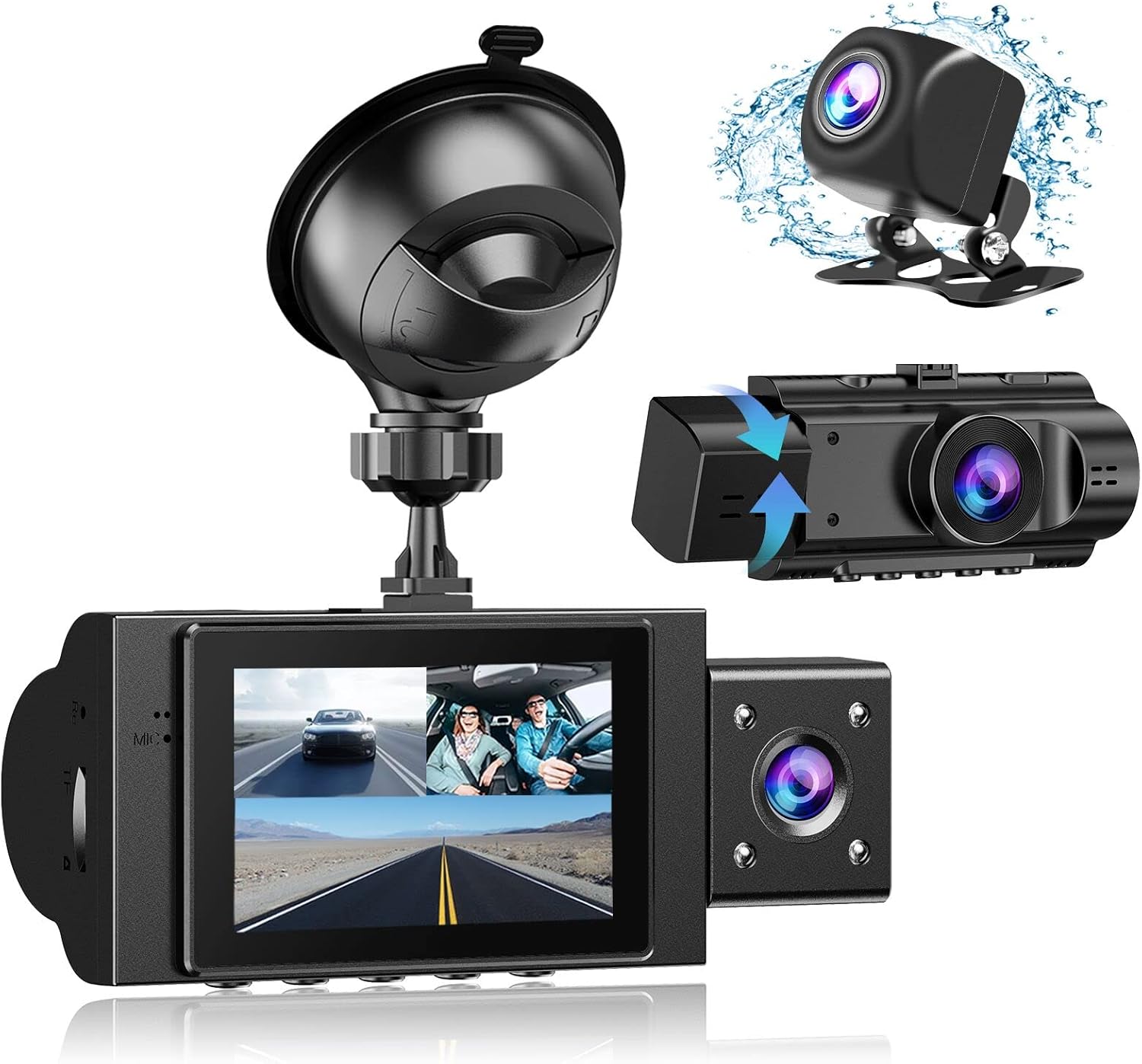
Image: The Yansoo 3-Channel Dash Cam unit with its suction cup mount and the separate rear camera, illustrating the complete package.
2. დაყენება
2.1 მეხსიერების ბარათის ჩასმა
The dash cam supports Micro Memory cards up to 64GB (Class 10 or above recommended, not included). Please format the card in the camera menu before first use.
- Locate the memory card slot on the side of the dash cam.
- Insert the Micro Memory card into the slot until it clicks into place.
- ბარათის ამოსაღებად, ფრთხილად დააჭირეთ მას, სანამ არ ამოვარდება.

Image: A four-panel illustration showing the steps to insert a Micro SD card into the dash cam's slot.
2.2 ვიდეოდაფის კამერის დამონტაჟება
Mount the main dash cam unit to your windshield using the provided suction cup mount. Choose a location that does not obstruct your view მართვის დროს.
- საქარე მინაზე შერჩეული ადგილი საფუძვლიანად გაწმინდეთ.
- დაფის კამერის ბლოკზე მიამაგრეთ შემწოვი ჭიქის სამაგრი.
- მჭიდროდ დააჭირეთ შემწოვი ჭიქა საქარე მინაზე და გადაატრიალეთ ბერკეტი მის დასამაგრებლად.
- დაარეგულირეთ კამერის კუთხე მკაფიო კადრის უზრუნველსაყოფად view წინ გზის.

Image: The Yansoo 3-Channel Dash Cam mounted on a car's windshield, showing its position relative to the driver's view.
2.3 უკანა კამერის დაყენება
The rear camera provides a view of the vehicle's rear. It can be installed inside the rear window or externally above the license plate.
- უკანა კამერის კაბელი დაფის მთავარ კამერის ბლოკს შეაერთეთ.
- Route the cable neatly along the vehicle's interior trim to the rear.
- Mount the rear camera in the desired location, ensuring a clear view.

Image: A diagram illustrating the recommended cable routing path for the dash cam and rear camera within a car's interior.
2.4 დენის კავშირი
Connect the dash cam to your vehicle's cigarette lighter socket using the provided car charger. The camera will automatically power on and begin recording when the vehicle starts.

Image: The Yansoo 3-Channel Dash Cam connected to a power source, indicating its readiness for operation.
3. საოპერაციო ინსტრუქციები
3.1 ძირითადი ოპერაცია
- ჩართვა/გამორთვა: The camera powers on/off automatically with your vehicle's ignition. You can also manually power on/off by pressing and holding the power button.
- ჩაწერის დაწყება/შეწყვეტა: Recording starts automatically when the camera powers on. Press the "OK" button to manually stop or start recording.
- ეკრანის შეცვლა Views: Press the "Up" button to cycle through different display modes (Front, Inside, Rear, Picture-in-Picture combinations).
Video: Demonstration of the Yansoo X88 Dash Cam's recording capabilities, showcasing its ability to capture clear video footage.
Video: Footage from the Yansoo X88 Dash Cam demonstrating its clear day and night recording capabilities.
Video: A demonstration of the Yansoo X88 Dash Cam's 1080P Full HD recording quality.
3.2 მენიუს პარამეტრები
To access the menu settings, stop recording (if active) by pressing the "OK" button, then press the "M" button twice.
- რეზოლუცია: Adjust video resolution for front, inside, and rear cameras.
- მარყუჟის ჩაწერა: Set the duration of video segments (e.g., 1, 3, 5 minutes).
- G- სენსორის მგრძნობელობა: Adjust the sensitivity of the emergency lock feature.
- პარკინგის მონიტორი: Enable or disable the parking monitoring function.
- თარიღი/დრო: დააყენეთ სწორი თარიღი და დრო ზუსტი დროისთვისampს ჩანაწერებზე.
- ენა: Select your preferred language for the menu.
Video: A step-by-step guide on how to set the date and time on the Yansoo Dash Cam.
4. მოვლა
- ჩვეულებრივი ფორმატირება: Format the memory card regularly (e.g., once a month) to prevent data corruption and ensure optimal recording performance.
- ლინზების წმენდა: Keep the camera lenses clean using a soft, lint-free cloth. Avoid abrasive materials that could scratch the lens.
- Firmware განახლებები: Check the official Yansoo website for any available firmware updates to improve performance and add new features.
- ტემპერატურის გათვალისწინება: მოერიდეთ დაფის კამერას ექსტრემალურ ტემპერატურაზე ხანგრძლივი პერიოდის განმავლობაში ყოფნას.
5. Დიაგნოსტიკა
| პრობლემა | შესაძლო მიზეზი | გამოსავალი |
|---|---|---|
| კამერა არ ირთვება. | სიგარეტის სანთებელას დენი არ მიეწოდება; შეერთება სუსტია. | Check car charger connection; ensure vehicle ignition is on. |
| ჩაწერა მოულოდნელად წყდება. | Memory card full or corrupted; G-Sensor triggered. | Format memory card; adjust G-Sensor sensitivity. |
| ვიდეო ფუtage ბუნდოვანია. | Protective film on lens; dirty lens. | Remove protective film; clean lenses with a soft cloth. |
| Date/Time is incorrect. | Date/Time not set or battery low. | Set Date/Time in menu; ensure continuous power supply. |
| Camera freezes or malfunctions. | პროგრამული უზრუნველყოფის გაუმართაობა. | Use a needle to press the "RE" (Reset) button. |
6. სპეციფიკაციები
| ფუნქცია | დეტალი |
|---|---|
| პროდუქტის ზომები | 4.13 x 1.57 x 1.77 ინჩი |
| ნივთის წონა | 1.23 ფუნტი |
| ვიდეო გადაღების გარჩევადობა | 1080p (Front), 720p (Inside & Rear) |
| Სფეროში View | 170° (Front), 140° (Inside), 165° (Rear) |
| დაკავშირების ტექნოლოგია | USB |
| სპეციალური ფუნქცია | G-Sensor, Loop Recording, Parking Monitor, Night Vision |
| სამონტაჟო ტიპი | შეწოვის მთა |
| მწარმოებელი | იანსოო |
7. გარანტია და მხარდაჭერა
Yansoo offers comprehensive after-sales support for your dash cam.
- გარანტია: 1-YEAR warranty from the date of purchase.
- ტექნიკური მომსახურება: 7*24 hours technical service is available.
- კონტაქტი: For any questions or issues, please contact our customer service team via Amazon or the after-sales email provided in the original product packaging.
- მომხმარებლის სახელმძღვანელო (PDF): A digital version of the user manual is available for download აქ.


