უსაფრთხოების მნიშვნელოვანი ინფორმაცია
Please read all instructions carefully before using the Lexibook Paw Patrol Karaoke CD Player. Keep this manual for future reference.
- არ დაუშვათ მოწყობილობა წვიმის ან ტენიანობის ქვეშ.
- არ დაბლოკოთ სავენტილაციო ღიობები.
- გამოიყენეთ მხოლოდ მწარმოებლის მიერ მითითებული დანართები/აქსესუარები.
- Disconnect the apparatus during lightning storms or when unused for long periods.
- Ensure proper battery installation and disposal.
პაკეტის შიგთავსი
დარწმუნდით, რომ შეფუთვაში ყველა ნივთია:
- Lexibook Paw Patrol Karaoke CD Player
- 2 მიკროფონი
- დენის ადაპტერი
- ინსტრუქციის სახელმძღვანელო
პროდუქტი დასრულდაview
The Lexibook Paw Patrol Karaoke CD Player is designed for children to enjoy music and sing along with their favorite characters. It features a front-load CD player, two microphones, an LED display, and a headphone jack for private listening.

სურათი 1: The Lexibook Paw Patrol Karaoke CD Player, featuring a blue and red design with Paw Patrol characters, and two attached red microphones.
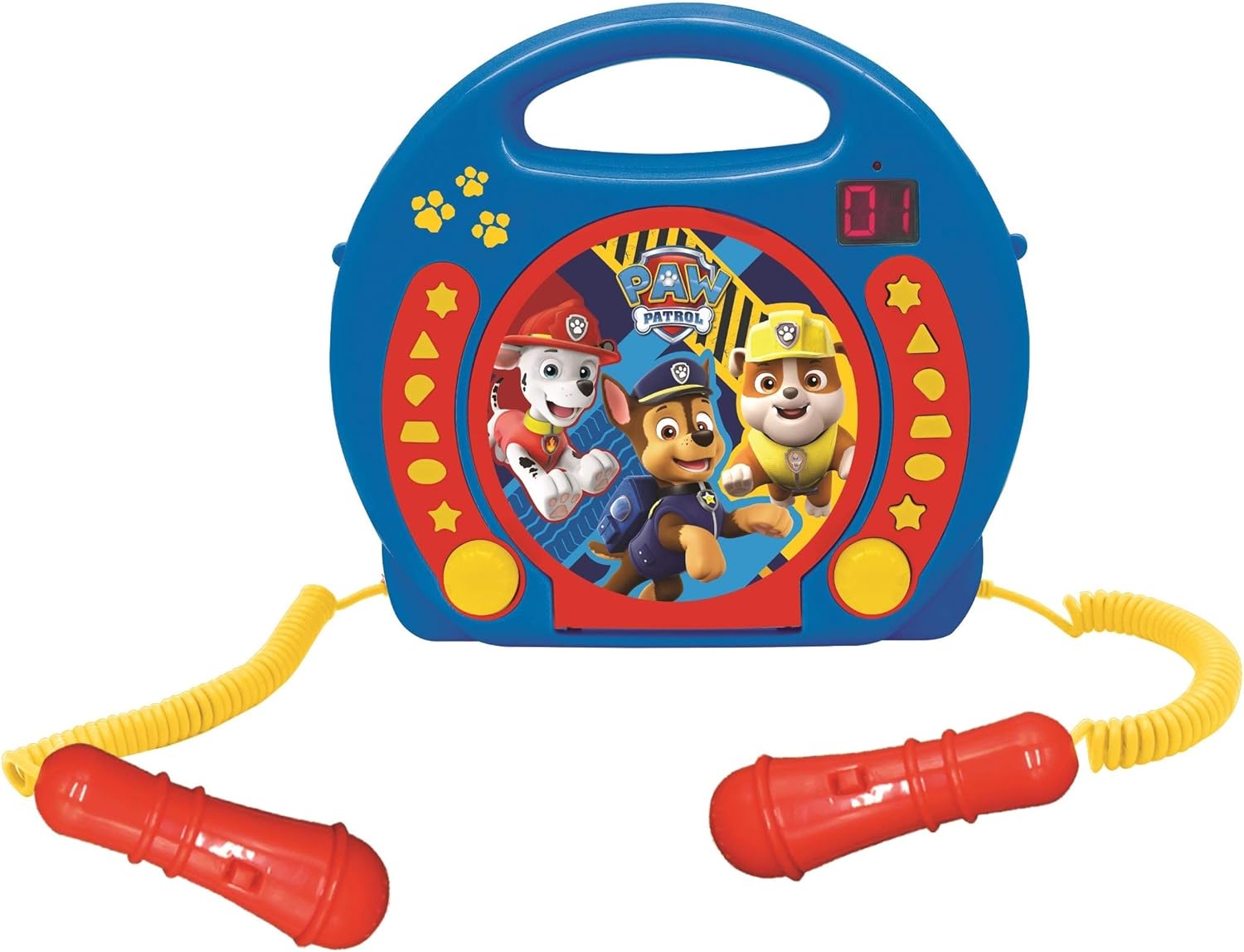
სურათი 2: A top-down perspective of the karaoke CD player, showing the central Paw Patrol shield design, control buttons, and the two microphones.
ვიდეო 1: პროდუქტი დასრულდაview video demonstrating the features and design of the Lexibook Paw Patrol Karaoke CD Player.
დაყენება
კვების წყაროს კავშირი
- Locate the DC IN jack on the back of the unit.
- Insert the small plug of the provided power adapter into the DC IN jack.
- დენის ადაპტერის მეორე ბოლო სტანდარტულ კედლის სოკეტში შეაერთეთ.
ბატარეის მონტაჟი
For portable use, the unit requires 4 'C' batteries (not included).
- იპოვეთ ბატარეის განყოფილება მოწყობილობის ქვედა ნაწილში.
- ხრახნიანი გამოყენებით გახსენით ბატარეის განყოფილების საფარი.
- Insert 4 'C' batteries, ensuring correct polarity (+/-).
- შეცვალეთ ბატარეის განყოფილების საფარი და დაამაგრეთ იგი ხრახნით.
ოპერაციული ინსტრუქციები
CD დაკვრა
- Open the CD compartment cover located on the top of the unit.
- Place a CD onto the spindle with the label side facing up.
- მჭიდროდ დახურეთ CD განყოფილების საფარი.
- Press the 'PLAY/PAUSE' button to start playback.
- Use the 'SKIP' buttons (forward/backward) to navigate between tracks.
- Press the 'STOP' button to end CD playback.
მიკროფონების გამოყენება
- Ensure the microphones are securely plugged into their respective jacks.
- During CD playback, speak or sing into the microphones.
- Adjust the microphone volume using the dedicated volume control (if available) or the main volume control.
პროგრამირების ფუნქცია
The programming function allows you to create a custom playlist of tracks.
- With the CD stopped, press the 'PROGRAM' button.
- Use the 'SKIP' buttons to select the desired track.
- Press 'PROGRAM' again to add the track to the playlist.
- Repeat steps 2 and 3 to add more tracks.
- Press 'PLAY' to start playing your programmed sequence.
ყურსასმენის გამოყენება
- Plug standard 3.5mm headphones (not included) into the headphone jack.
- დაარეგულირეთ ხმა კომფორტული მოსმენის დონეზე.
- Note: Using headphones will mute the main speakers.
მოვლა
- გაწმინდეთ მოწყობილობა რბილი, მშრალი ქსოვილით. არ გამოიყენოთ აბრაზიული საწმენდები ან გამხსნელები.
- CD-ის განყოფილება მტვრისა და ნამსხვრევებისგან თავისუფალი შეინახეთ.
- შეინახეთ მოწყობილობა გრილ, მშრალ ადგილას, როდესაც არ იყენებთ.
პრობლემების მოგვარება
| პრობლემა | გამოსავალი |
|---|---|
| ერთეული არ ჩართულია. | Check power adapter connection or ensure batteries are correctly installed and not depleted. |
| CD არ უკრავს. | Ensure the CD is clean, not scratched, and correctly placed in the compartment. Close the compartment lid completely. |
| Microphones are not working. | Verify microphones are securely plugged in. Check microphone volume levels. |
| ხმა დამახინჯებულია ან ძალიან დაბალია. | Adjust the main volume control. Ensure the CD is not damaged. |
სპეციფიკაციები
| ფუნქცია | დეტალი |
|---|---|
| პროდუქტის ზომები | 10.35 x 3.98 x 8.27 ინჩი |
| ნივთის წონა | 1.63 ფუნტი |
| მწარმოებლის მიერ რეკომენდებული ასაკი | 3 წლის და ზემოთ |
| ბატარეები | საჭიროა 4 C ბატარეა (არ შედის) |
| სპეციალური ფუნქცია | LED დისპლეი |
| ფერი | ლურჯი/წითელი |
| მოყვება კომპონენტები | Power adapter, CD player, handle, 2 microphones |
| გამოშვების თარიღი | 11 წლის 2023 აპრილი |
გარანტია და მხარდაჭერა
ამ პროდუქტს მოყვება ა 2 წლიანი შეზღუდული გარანტია from the manufacturer, Lexibook.
For technical support, warranty claims, or further assistance, please contact Lexibook customer service. Refer to the product packaging or the official Lexibook webსაიტი უახლესი საკონტაქტო ინფორმაციისთვის.


