1. შესავალი
The Taurus Air Fry Digital Grill is a versatile kitchen appliance designed for healthier cooking. It functions as both an oil-free fryer and an oven, utilizing hot air circulation to cook food with little to no added oil. This manual provides essential information for safe operation, setup, maintenance, and troubleshooting to ensure optimal performance and longevity of your appliance.

The Taurus Air Fry Digital Grill, showcasing its spacious interior with three levels for cooking various dishes simultaneously, including vegetables, chicken, and fries.
2. უსაფრთხოების მნიშვნელოვანი ინსტრუქციები
ელექტრო მოწყობილობების გამოყენებისას ყოველთვის უნდა დაიცვან უსაფრთხოების ძირითადი ზომები, რათა შემცირდეს ხანძრის, ელექტროშოკის და ადამიანების დაზიანების რისკი.
- წაიკითხეთ ყველა ინსტრუქცია მოწყობილობის გამოყენებამდე.
- არ შეეხოთ ცხელ ზედაპირებს. გამოიყენეთ სახელურები ან სახელურები.
- ელექტროშოკისგან თავის დასაცავად, არ ჩაყოთ კაბელი, შტეფსელები ან მთავარი მოწყობილობა წყალში ან სხვა სითხეში.
- მჭიდრო მეთვალყურეობა აუცილებელია, როდესაც რომელიმე მოწყობილობას იყენებენ ბავშვები ან მის მახლობლად.
- გამორთეთ განყოფილებიდან, როდესაც არ იყენებთ და გაწმენდის წინ. ნაწილების ჩადებამდე ან ამოღებამდე დატოვეთ გაციება.
- არ გამოიყენოთ მოწყობილობა დაზიანებული სადენით ან შტეფსელით, ან მას შემდეგ, რაც მოწყობილობა გაუმართავია ან რაიმე ფორმით დაზიანებულია.
- მოწყობილობის მწარმოებლის მიერ არ არის რეკომენდებული აქსესუარების გამოყენებამ შეიძლება გამოიწვიოს დაზიანებები.
- არ გამოიყენოთ გარეთ.
- არ დაუშვათ კაბელი ჩამოკიდოთ მაგიდის ან დახლის კიდეზე და არ შეეხოთ ცხელ ზედაპირებს.
- არ მოათავსოთ ცხელ გაზზე ან ელექტრო სანთურზე ან გახურებულ ღუმელში ან ახლოს.
- განსაკუთრებული სიფრთხილე უნდა იქნას გამოყენებული ცხელი ზეთის ან სხვა ცხელი სითხის შემცველი მოწყობილობის გადაადგილებისას.
- ყოველთვის ჯერ შტეფსელი შეაერთეთ მოწყობილობაზე, შემდეგ კი კაბელი შეაერთეთ კედლის სოკეტში. გათიშვისთვის, გადართეთ ნებისმიერი ღილაკი „გამორთულზე“ და შემდეგ ამოიღეთ შტეფსელი კედლის სოკეტიდან.
- არ გამოიყენოთ მოწყობილობა სხვა დანიშნულებისამებრ.
3. პროდუქტი დასრულდაview
Familiarize yourself with the main components and accessories of your Taurus Air Fry Digital Grill.
კომპონენტები და აქსესუარები

Rotisserie Spit: Ideal for evenly cooking a whole chicken or roasts. The image shows the rotisserie accessory and a chicken being cooked inside the grill.

მბრუნავი ბადის კალათა: Perfect for achieving crispy results on items like fries, nuts, or popcorn with continuous tumbling. The image displays the mesh basket accessory.

Mesh Racks and Drip Tray: The appliance includes multiple mesh racks for multi-level cooking and a drip tray to collect excess oil and crumbs, making cleanup easier. The image shows the grill with its dimensions and the included racks and tray.
4. დაყენება და პირველი გამოყენება
Follow these steps before using your Air Fry Digital Grill for the first time.
- გახსენით მოწყობილობა შეფუთვიდან: ფრთხილად ამოიღეთ გრილი და ყველა აქსესუარი შეფუთვიდან.
- ამოიღეთ შესაფუთი მასალები: Ensure all protective films, stickers, and packaging inserts are removed from inside and outside the appliance.
- პირველადი გაწმენდა: Wash all removable parts (mesh racks, drip tray, rotisserie spit, mesh basket) with warm soapy water. Wipe the interior and exterior of the main unit with a damp cloth. Dry all parts thoroughly before reassembling.
- განთავსება: Place the appliance on a stable, level, heat-resistant surface, away from walls or other appliances to allow for proper air circulation. Ensure there is at least 10 cm of free space on all sides.
- დენის კავშირი: შეაერთეთ დენის კაბელი დამიწებულ ელექტრო განყოფილებაში.
- პირველი გამოყენებისას დამწვრობის საწინააღმდეგო საშუალება: It is recommended to run the appliance empty for about 10-15 minutes at 180°C (356°F) during the first use. This helps to burn off any manufacturing residues and odors. A slight odor or smoke may be present, which is normal. Ensure the area is well-ventilated.
5. საოპერაციო ინსტრუქციები
Learn how to operate your Taurus Air Fry Digital Grill for various cooking needs.
მართვის პანელი

დეტალური view of the intuitive touch screen control panel, featuring 8 pre-set cooking programs for various food types.
The digital touch screen allows for easy control of cooking settings. It features a clear display for time and temperature, along with various function icons.
ძირითადი ოპერაცია
- ჩართვა/გამორთვა: Press the power icon to turn the appliance on or off.
- ტემპერატურის დაყენება: Use the temperature control buttons (usually '+' and '-') to adjust the cooking temperature between 40°C and 200°C (104°F and 392°F). The image below shows the temperature range capability.

The appliance set to a temperature, highlighting its wide temperature range from 40°C to 200°C for versatile cooking.
- დაყენების დრო: Use the time control buttons to set the cooking duration, typically from 0 to 60 minutes.
- დაწყება / პაუზა: Press the start/pause button to begin or temporarily stop the cooking process.
წინასწარ დაყენებული პროგრამები
The grill comes with 8 pre-set programs for common dishes, simplifying your cooking experience. Select the desired program icon on the touch screen, and the appliance will automatically set the optimal time and temperature.
| პროგრამა | Typical Food Items | შენიშვნები |
|---|---|---|
| კარტოფილი ფრი | French fries, potato wedges | For crispy results, shake the basket halfway through. |
| ქათამი | Chicken wings, drumsticks, small whole chicken | Use rotisserie for whole chicken. |
| თევზი | Fish fillets, shrimp | მოხარშეთ ფენოვანი მასის მიღებამდე. |
| ხორცი | Steaks, pork chops | დაარეგულირეთ დრო სასურველი მომზადებისთვის. |
| ბოსტნეული | Broccoli, bell peppers, carrots | Toss with a little oil for best results. |
| გამოაცხვეთ | Cakes, muffins, pastries | გამოიყენეთ შესაბამისი საცხობი ჭურჭელი. |
| პიცა | Frozen or fresh pizza | Ensure pizza fits on the rack. |
| დეჰიდრატი | Fruits, vegetables, jerky | Low temperature, long cooking time. |
აქსესუარების გამოყენება
- Rotisserie ფუნქცია: Insert the rotisserie spit through the center of the food (e.g., whole chicken). Secure with forks. Place the spit into the designated slots inside the grill. Select the rotisserie icon on the control panel to activate rotation.
- მბრუნავი ბადის კალათა: Place food inside the mesh basket and secure the lid. Insert the basket into the rotisserie slots. Activate the rotation function for even cooking.
- ბადისებრი თაროები: Use the mesh racks for air frying, baking, or dehydrating. Place food directly on the racks or use oven-safe dishes. The multi-level design allows for cooking different items simultaneously.
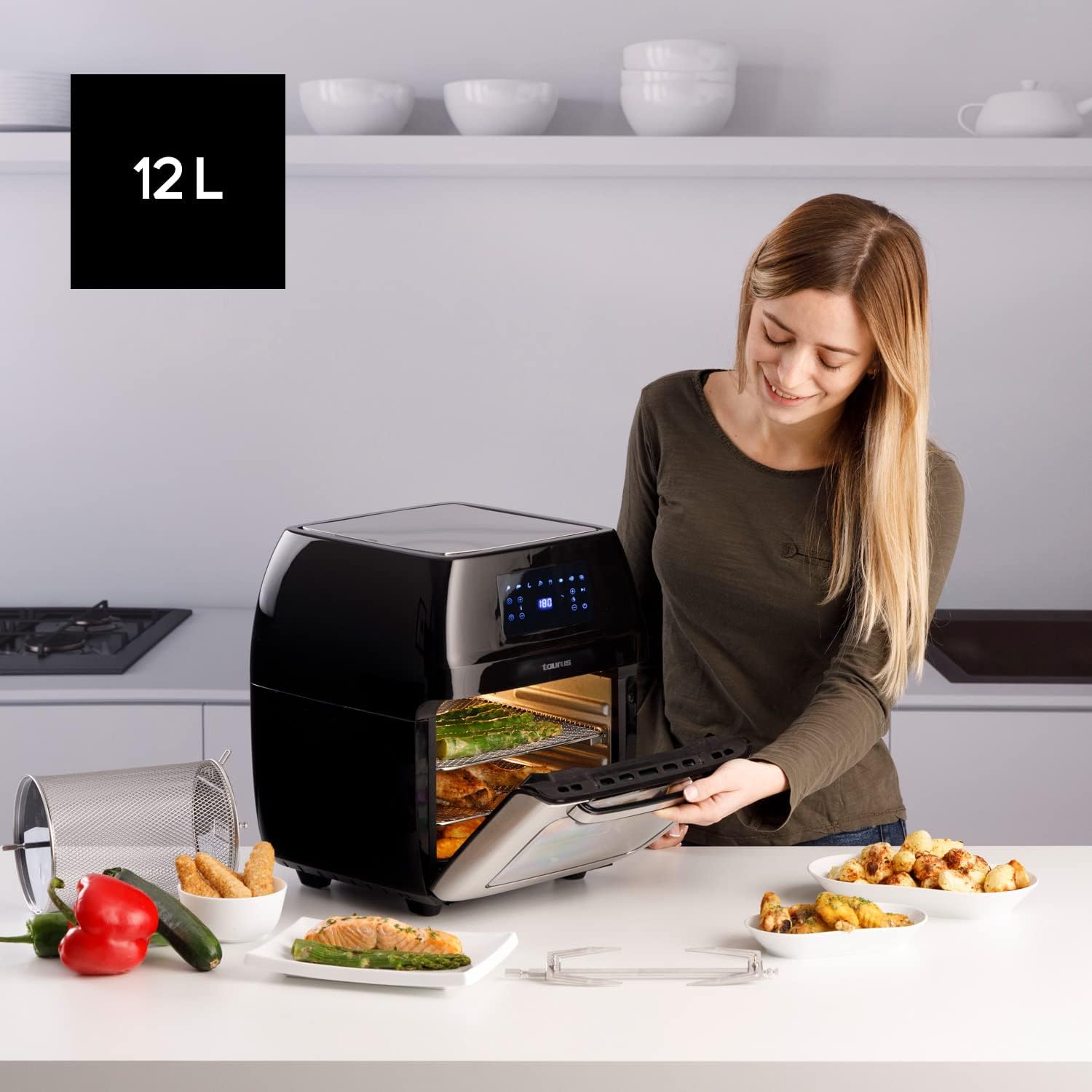
A user opening the 12-liter capacity Air Fry Digital Grill, demonstrating its large interior suitable for family-sized meals, with various cooked dishes around.
6. მოვლა და დასუფთავება
რეგულარული წმენდა უზრუნველყოფს თქვენი მოწყობილობის ხანგრძლივ მუშაობას და ოპტიმალურ მუშაობას.
- გამორთეთ და გაგრილეთ: გაწმენდის წინ ყოველთვის გამორთეთ მოწყობილობა დენის წყაროდან და მიეცით საშუალება, რომ სრულად გაგრილდეს.
- მოსახსნელი ნაწილების გასუფთავება: The mesh racks, drip tray, rotisserie spit, and mesh basket are removable and dishwasher-safe for easy cleaning. For stubborn food residue, soak in warm soapy water before washing.
- სუფთა ინტერიერი: Wipe the interior of the grill with a damp ნაჭერი და რბილი სარეცხი საშუალება. მოერიდეთ აბრაზიული საწმენდი საშუალებების ან საწმენდი ჩხირების გამოყენებას, რომლებმაც შეიძლება დააზიანოს არაწებოვანი საფარი.
- სუფთა ექსტერიერი: გაწმინდეთ გარე ზედაპირი რბილი, დamp ქსოვილი. არ გამოიყენოთ უხეში ქიმიკატები ან აბრაზიული მასალები.
- შენახვა: მოწყობილობის შენახვამდე დარწმუნდით, რომ ყველა ნაწილი სუფთა და მშრალია. შეინახეთ გრილ, მშრალ ადგილას.
7. Დიაგნოსტიკა
გავრცელებული პრობლემებისა და მათი გადაჭრის გზებისთვის იხილეთ ეს განყოფილება.
| პრობლემა | შესაძლო მიზეზი | გამოსავალი |
|---|---|---|
| მოწყობილობა არ ირთვება. | არ არის შეერთებული; დენის წყაროს გაუმართაობა; ტექნიკის გაუმართაობა. | დარწმუნდით, რომ კვების კაბელი საიმედოდ არის შეერთებული მოქმედ სოკეტში. სცადეთ სხვა სოკეტი. თუ პრობლემა კვლავ გაგრძელდა, დაუკავშირდით მომხმარებელთა მხარდაჭერის სამსახურს. |
| საკვები არ იხარშება თანაბრად. | Overcrowding; Incorrect temperature/time; Food not shaken/turned. | Do not overcrowd the basket/racks. Adjust temperature and time as needed. For smaller items, shake or turn food halfway through cooking. |
| აპარატიდან მოდის თეთრი კვამლი. | Grease residue; High fat content food. | Clean the drip tray and interior thoroughly. For high-fat foods, drain excess fat from the drip tray during cooking. |
| საკვები არ არის ხრაშუნა. | Too much moisture; Not enough oil (for certain foods); Overcrowding. | Pat food dry before cooking. A light spray of oil can help. Ensure proper air circulation by not overcrowding. |
8. ტექნიკური მახასიათებლები
| სპეციფიკაცია | დეტალი |
|---|---|
| ბრენდი | კურო |
| მოდელის ნომერი | 973981000 |
| ტევადობა | 12 ლიტრი |
| ძალაუფლება | 1700 ვატი |
| ტtage | 230 ვოლტი |
| მასალა | უჟანგავი ფოლადი |
| ზომები (L x W x H) | 39 x 34.5 x 43 სმ |
| წონა | 7.91 კგ |
| სპეციალური ფუნქცია | პროგრამირებადი |
9. გარანტია და მომხმარებელთა მხარდაჭერა
For warranty information and customer support, please refer to the documentation included with your purchase or visit the official Taurus webსაიტი. შეინახეთ შეძენის დამადასტურებელი საბუთი გარანტიასთან დაკავშირებული ნებისმიერი პრეტენზიისთვის.


