1. უსაფრთხოების მნიშვნელოვანი ინსტრუქციები
გთხოვთ, ამ პროდუქტის გამოყენებამდე წაიკითხოთ და გაიგოთ ყველა უსაფრთხოების ინსტრუქცია. ამ ინსტრუქციების შეუსრულებლობამ შეიძლება გამოიწვიოს ელექტროშოკი, ხანძარი ან სერიოზული დაზიანება.
- არ დაუშვათ მოწყობილობის ექსპრეს ტემპერატურა, მზის პირდაპირი სხივები ან მაღალი ტენიანობა.
- Keep the device away from water and other liquids. If it gets wet, turn it off immediately and allow it to dry completely before reuse.
- არ სცადოთ მოწყობილობის დაშლა, შეკეთება ან მოდიფიცირება. ყველა სახის მომსახურება მიმართეთ კვალიფიციურ პერსონალს.
- Use only specified charging methods (USB-C, solar, hand crank).
- შეინახეთ ბავშვებისთვის მიუწვდომელ ადგილას.
- გადაყარეთ ბატარეები ადგილობრივი წესების შესაბამისად.
2. პროდუქტი დასრულდაview
The FosPower Emergency Weather Radio Model A6 is a versatile device designed for emergency preparedness and outdoor activities. It features multiple power sources, radio reception, lighting, and a power bank function.
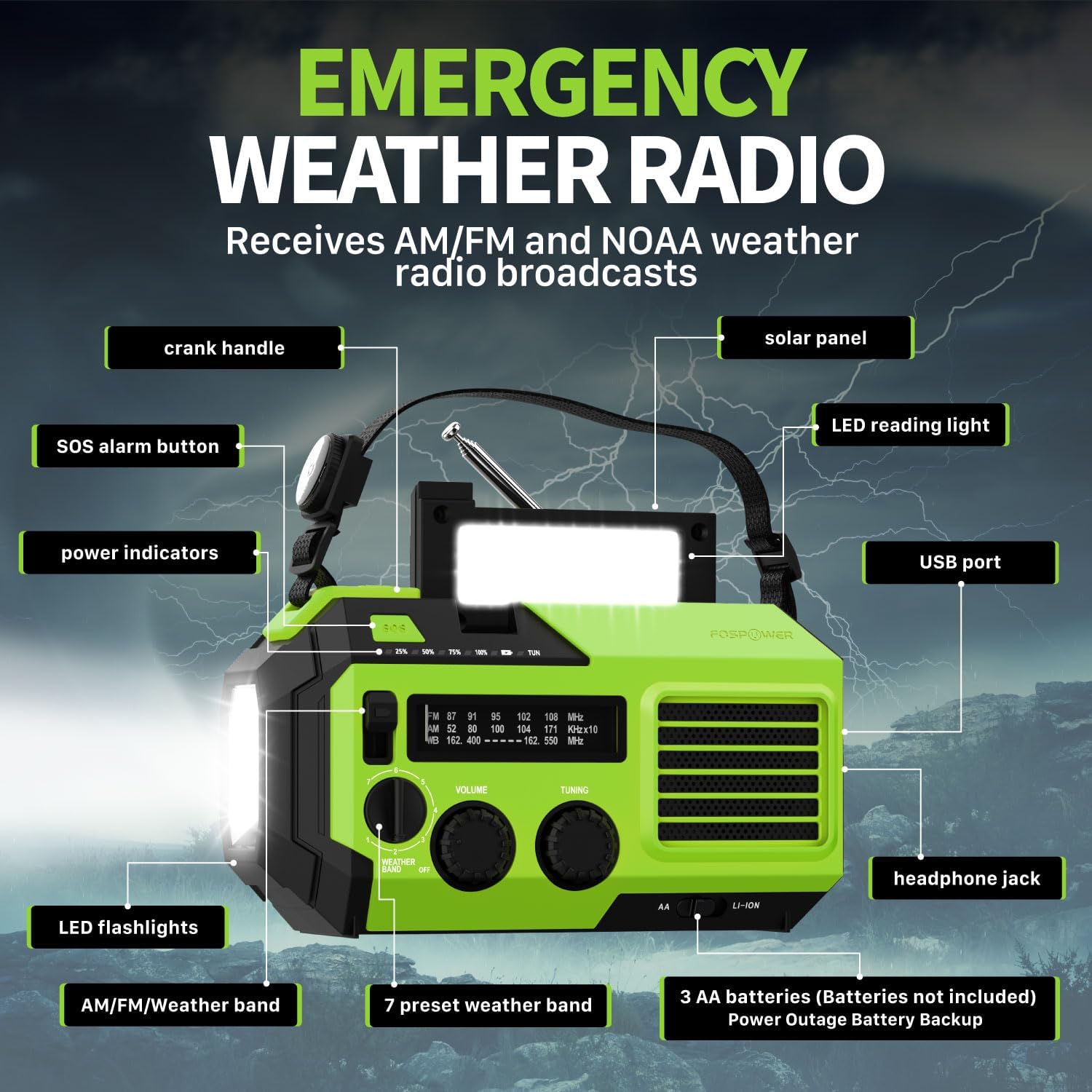
სურათი 2.1: წინა view of the FosPower Emergency Weather Radio with key components labeled, including the crank handle, solar panel, SOS alarm button, power indicators, LED reading light, USB port, LED flashlights, AM/FM/Weather band selector, volume and tuning knobs, and headphone jack.
ძირითადი მახასიათებლები:
- NOAA/AM/FM Radio: Access local weather information and emergency hazard alerts, as well as standard AM/FM broadcasts.
- 19240mWh (5200mAh) Power Bank: Charge USB devices during power outages or in outdoor settings.
- ენერგიის მრავალი წყარო: Recharge via USB-C cable, solar panel, or hand crank. Can also be powered by AA batteries (not included).
- SOS სიგნალიზაცია: საგანგებო სიგნალიზაციისთვის ააქტიურებს ხმამაღალ სირენას და მოციმციმე შუქს.
- ინტეგრირებული განათება: Features a powerful flashlight and a reading light.
- IPX3 წყალგამძლეობა: უზრუნველყოფს დაცვას წყლის შესხურებისგან.
3. დაყენება
3.1 საწყისი დატენვა
Before first use, fully charge the internal battery using the provided USB-C cable. Connect the USB-C cable to the radio's USB-C port and the other end to a USB power adapter (not included) or a computer USB port. The power indicators will illuminate to show charging progress.
3.2 AA Battery Installation (Optional)
The radio can also operate on 3 AA batteries (not included) as a backup power source. Open the battery compartment cover on the back of the radio and insert 3 AA batteries, ensuring correct polarity. Close the cover securely.

სურათი 3.1: უკანა view of the radio highlighting the solar panel, hand-crank, AA battery compartment, and USB charging port, illustrating the multiple power sources.
4. საოპერაციო ინსტრუქციები
4.1 რადიოს ოპერაცია
- ჩართვა/გამორთვა: Rotate the 'VOLUME' knob clockwise to turn the radio on and adjust the volume. Rotate counter-clockwise until it clicks to turn off.
- ჯგუფის არჩევანი: Use the 'WEATHER BAND' switch to select between AM, FM, or WB (Weather Band).
- tuning: Rotate the 'TUNING' knob to scan for radio stations. Extend the telescopic antenna for improved reception, especially for FM and WB.
- NOAA ამინდის ჯგუფი: When WB is selected, the radio will receive NOAA weather alerts. The radio supports 7 preset weather bands.
- ყურსასმენი ჯეკი: For private listening, connect 3.5mm headphones to the headphone jack.
4.2 ფანარი და საკითხავი ნათურა

Image 4.1: The radio demonstrating its high-power flashlight and cool-tone reading lamp თვისებები.
- ფანარი: Press the flashlight button located on the front of the radio to turn the flashlight on or off.
- კითხვის შუქი: Lift the solar panel to reveal the LED reading light. Press the reading light button to turn it on or off.
4.3 SOS სიგნალიზაცია
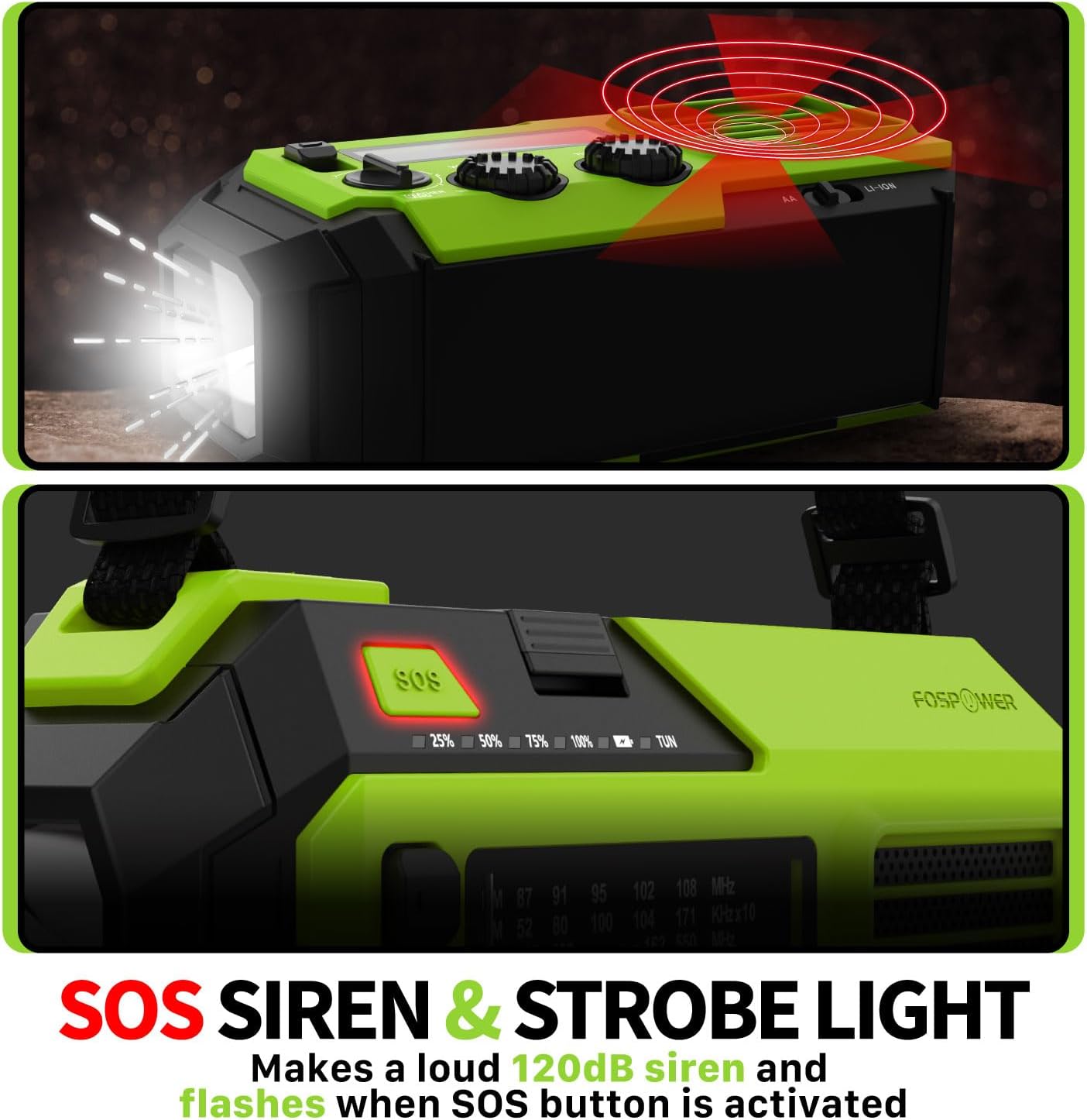
Image 4.2: Close-up of the radio's SOS button and an illustration of the siren and strobe light being activated.
In an emergency, press and hold the 'SOS' button to activate a loud 120dB siren and a flashing strobe light. Press the 'SOS' button again to deactivate.
4.4 გარე მოწყობილობების დატენვა (Power Bank)

Image 4.3: The radio connected via USB to a smartphone, demonstrating its power bank capability for charging small electronics.
Connect your USB-powered device (e.g., smartphone, tablet) to the radio's USB-A output port using your device's charging cable. The radio's internal battery will begin charging your device.
4.5 რადიოს დამუხტვა
- USB-C დატენვა: Connect the provided USB-C cable to the radio's USB-C input port and a USB power source. This is the most efficient charging method.
- მზის დატენვა: Place the radio with the solar panel facing direct sunlight. The solar panel charges the internal battery, primarily for maintaining charge or slow charging in emergencies.
- ხელის ამწე დამუხტვა: Rotate the hand crank clockwise or counter-clockwise at a steady pace (approximately 130-150 RPM) for 3-5 minutes to generate power for short-term use or to initiate charging.
5. მოვლა
- დასუფთავება: გაწმინდეთ რადიო რბილი, მშრალი ქსოვილით. არ გამოიყენოთ აბრაზიული საწმენდები ან გამხსნელები.
- შენახვა: Store the radio in a cool, dry place away from direct sunlight when not in use for extended periods. For optimal battery health, fully charge the internal battery every 3-6 months.
- ბატარეის მოვლა: თუ იყენებთ AA ტიპის ელემენტებს, გაჟონვის თავიდან ასაცილებლად, ამოიღეთ ისინი, თუ რადიოს დიდი ხნის განმავლობაში არ გამოიყენებთ.
6. Დიაგნოსტიკა
| პრობლემა | შესაძლო მიზეზი | გამოსავალი |
|---|---|---|
| რადიო არ ირთვება. | Internal battery is depleted; AA batteries are depleted or incorrectly installed. | Charge the internal battery via USB-C or hand crank. Check and replace AA batteries if used. |
| ცუდი რადიოს მიღება. | ანტენა არ არის გაშლილი; სიგნალის არეალი სუსტია; ჩარევა. | Fully extend the telescopic antenna. Adjust radio position. Try tuning to a stronger station. |
| გარე მოწყობილობა არ იტენება. | Radio's internal battery is low; incorrect cable; device not compatible. | Ensure the radio's internal battery is sufficiently charged. Use a functional USB charging cable. Verify device compatibility. |
| Hand crank is stiff or not generating power. | Mechanism obstruction; improper cranking speed. | Ensure no obstructions. Crank at a steady, moderate pace (130-150 RPM). |
7. სპეციფიკაციები
| ფუნქცია | დეტალი |
|---|---|
| მოდელის ნომერი | FOSPWB-2419 |
| პროდუქტის ზომები | 6.76 x 3.52 x 2.59 ინჩი |
| ნივთის წონა | 1.08 ფუნტი |
| შიდა ბატარეა | 19240mWh (5200mAh) |
| External Battery Support | 3 x AA ბატარეები (არ შედის) |
| რადიო ბენდები | AM, FM, NOAA Weather Band (WB) |
| დატენვის მეთოდები | USB-C, Solar, Hand Crank |
| განსაკუთრებული თვისებები | Built-In Flashlight, Reading Light, SOS Alarm, Power Bank |
| წყლის წინააღმდეგობა | IPX3 |
8. გარანტია და მხარდაჭერა
FosPower provides a limited lifetime warranty for this product. For warranty claims, technical assistance, or customer service inquiries, please contact FosPower's USA-based customer support team. Refer to the official FosPower webსაკონტაქტო ინფორმაციისთვის იხილეთ საიტი ან თქვენი შეძენის დოკუმენტაცია.


