1. შესავალი
The LEKATO AM-718 is a versatile 2-in-1 device combining a digital metronome with a portable Bluetooth speaker. Designed for musicians, it offers precise tempo guidance, vocal counting, and audio playback capabilities, making it suitable for practicing various musical instruments.
2. პროდუქტის მახასიათებლები
- Bluetooth ინტეგრაცია: Connects via Bluetooth 5.0 for beat sounds and music playback with a 10-meter range and low latency.
- მრავალმხრივი ფუნქციონირება: Features vocal counts, powerful sound output, and a clear LED tempo indicator. Includes a 3.5mm earphone jack for private practice.
- Essential Rhythm Tool: Offers a tempo range of 30 to 260 beats per minute, 10 beat options (0-9), and 8 rhythm patterns to support diverse musical genres.
- პორტატული დიზაინი: Compact and durable, allowing for easy transport and use as a portable Bluetooth speaker when the metronome function is disengaged.
- დატენვის ბატარეა: Built-in lithium battery provides approximately 10 hours of playtime on a 2-hour charge. Includes a USB Type-C cable for convenient charging.
3. პაკეტის შიგთავსი
The LEKATO AM-718 package typically includes:
- LEKATO AM-718 Bluetooth Speaker Metronome
- USB Type-C დამტენი კაბელი
- მომხმარებლის სახელმძღვანელო
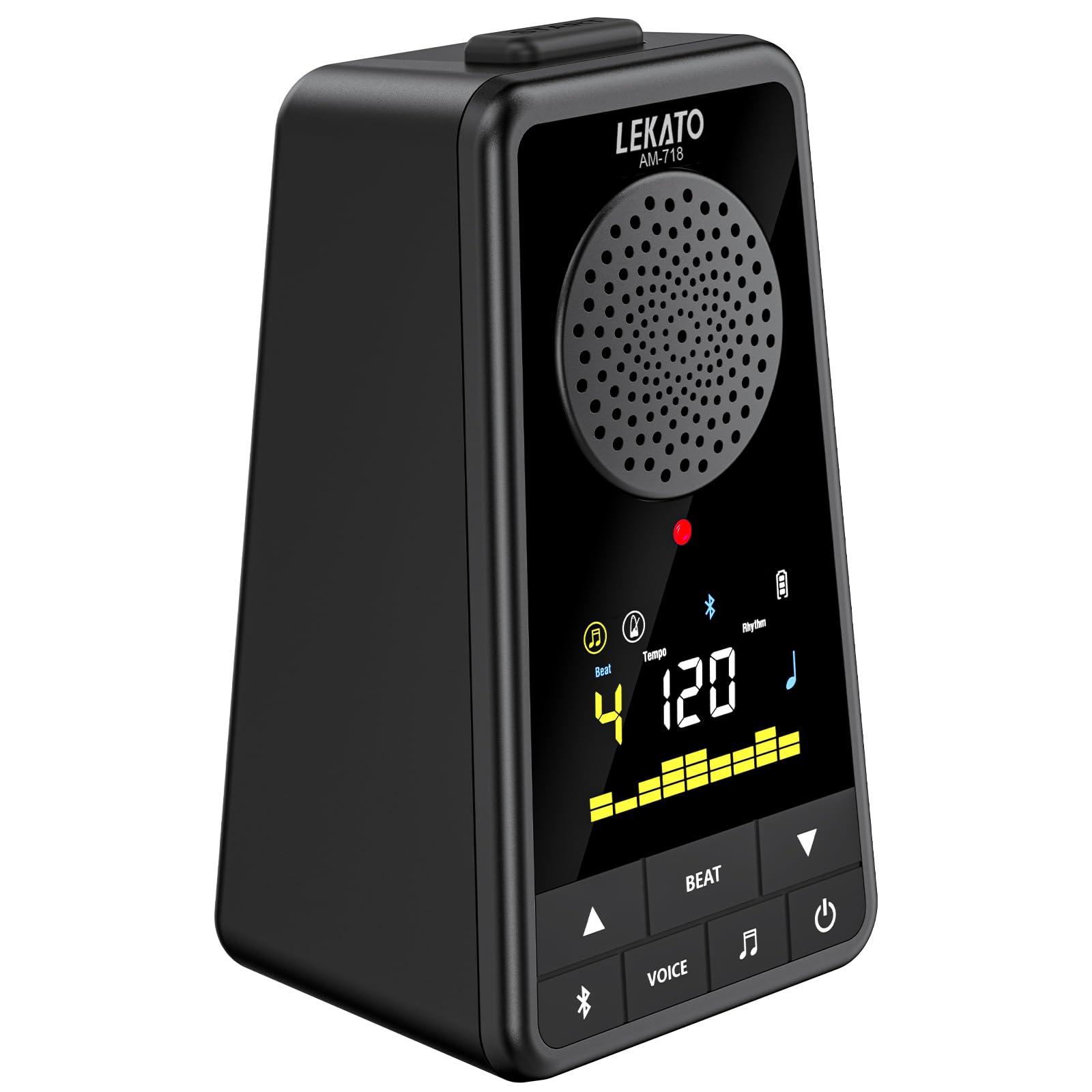
Image: The LEKATO AM-718 device shown with its USB-C charging cable and user manual.
4. მოწყობილობის განლაგება და მართვა

სურათი: წინა და გვერდითი view of the LEKATO AM-718 metronome, highlighting its speaker, display, and control buttons.
- ეკრანის ჩვენება: Shows current beat, tempo, rhythm pattern, and battery status.
- Tempo Knob: Rotates to adjust the beats per minute (BPM).
- BT ღილაკი: ააქტიურებს Bluetooth-ის დაწყვილების რეჟიმს.
- ხმის ღილაკი: Toggles vocal counting on/off.
- BEAT Button: Cycles through different beat counts (0-9).
- RHY Button: Cycles through different rhythm patterns.
- დენის ღილაკი: რთავს/გამორთავს მოწყობილობას.
- მოცულობის სლაიდერი: Adjusts the overall sound output volume.
- ყურსასმენის ჯეკი (3.5 მმ): პირადი მოსმენისთვის.
- USB 5V (Type-C) Port: მოწყობილობის დასატენად.
5. დაყენება
5.1 მოწყობილობის დატენვა
- Connect the provided USB Type-C cable to the USB 5V port on the side of the metronome.
- USB კაბელის მეორე ბოლო შეაერთეთ თავსებად USB კვების ადაპტერში (არ მოყვება) ან კომპიუტერის USB პორტში.
- ეკრანზე ბატარეის ინდიკატორი აჩვენებს დატენვის სტატუსს. სრულად დატენვას, როგორც წესი, 2 საათი სჭირდება.

Image: The LEKATO AM-718 metronome connected to a USB-C cable for charging.
5.2 ჩართვა/გამორთვა
- დააჭირეთ და ხანგრძლივად დააჭირეთ ჩართვის ღილაკს 2 წამის განმავლობაში, რათა ჩართოთ ან გამორთოთ მოწყობილობა.
6. საოპერაციო ინსტრუქციები
6.1 მეტრონომის ფუნქცია
- Adjusting Tempo: Rotate the Tempo knob clockwise to increase BPM or counter-clockwise to decrease BPM (range: 30-260 BPM).
- Changing Beat: Press the BEAT button to cycle through different beat counts (0, 1, 2, 3, 4, 5, 6, 7, 8, 9).
- Selecting Rhythm: Press the RHY button to choose from 8 different rhythm patterns.
- Vocal Counting: Press the VOICE button to toggle vocal counting (e.g., "one, two, three, four") on or off.
- დაწყება / პაუზა: Press the Power button briefly to start or pause the metronome.

Image: The LEKATO AM-718 metronome displaying vocal counts "one two three four" on its screen, indicating the vocal counting feature is active.
6.2 Bluetooth სპიკერის ფუნქცია
- დაწყვილება: Turn on Bluetooth on your phone or instrument. ძიება the device named "AM-718" and pair.
- აუდიო დაკვრა: Once paired, you can play music or backing tracks through the metronome's speaker.
- აუდიოს შერევა: The device can mix metronome beats with Bluetooth audio.
- Standalone Speaker: To use solely as a Bluetooth speaker, turn off the metronome beat sound.

Image: The LEKATO AM-718 metronome functioning as a wireless mobile speaker, showing Bluetooth connectivity range.
6.3 ყურსასმენის გამოყენება
- Plug 3.5mm headphones into the headphone jack for private practice sessions.
7. მოვლა
- შეინახეთ მოწყობილობა მშრალად და მოარიდეთ ექსტრემალურ ტემპერატურას.
- Clean with a soft, dry cloth. Avoid abrasive cleaners.
- Store in a safe place to prevent physical damage.
8. Დიაგნოსტიკა
- ხმა არ არის: Check volume level and ensure headphones are properly connected or Bluetooth is paired correctly.
- მოწყობილობა არ ირთვება: დარწმუნდით, რომ ბატარეა დატენილია. USB-C კაბელის გამოყენებით შეაერთეთ კვების წყაროსთან.
- Bluetooth დაწყვილების პრობლემები: Ensure the device is in pairing mode and within the 10-meter range. Try restarting both the metronome and the Bluetooth source device.
9. სპეციფიკაციები
| ნივთის წონა | 12 უნცია |
| პროდუქტის ზომები | 3.78 x 2.83 x 5.75 ინჩი |
| ბატარეის ტიპი | ლითიუმი (შედის) |
| დაკავშირება | Bluetooth 5.0, USB Type-C |
| ტემპის დიაპაზონი | 30-260 BPM |
| სათამაშო დრო | Up to 10 hours (on 2-hour charge) |
10. ოფიციალური პროდუქტის ვიდეოები
დასრულდაview of Electronic Metronome for Guitar Piano Violin Musical
ვიდეოს აღწერა: ეს ვიდეო ზოგად წარმოდგენას გვიქმნის...view of the electronic metronome, demonstrating its basic functions and how it can be used with various musical instruments like guitar, piano, and violin. It highlights the device's compact design and ease of use.
11. გარანტია და მხარდაჭერა
For warranty information and customer support, please refer to the official LEKATO website or contact their customer service directly. Details can typically be found in the included user manual or on the product packaging.