1. შესავალი
This manual provides detailed instructions for the setup, operation, and maintenance of your Victrola Montauk Vinyl Record Player, Model VM-135-FNT. This belt-driven turntable system offers three playback speeds, integrated Bluetooth connectivity, and includes matching stereo speakers for a complete audio experience. Please read this manual thoroughly before use to ensure proper functionality and longevity of your product.

Figure 1: Victrola Montauk Vinyl Record Player with included stereo speakers.
2. რა არის ყუთში
- Victrola Montauk Turntable Unit
- Stereo Bluetooth Speakers (2 units)
- მოსახსნელი მტვრის საფარი
- დენის ადაპტერი
- RCA Output Cable
- 3.5 მმ Aux-in კაბელი
- ინსტრუქციის სახელმძღვანელო

Figure 2: All components included in the Victrola Montauk package.
3. დაყენების ინსტრუქციები
- ამოალაგე კომპონენტები: ფრთხილად ამოიღეთ ყველა ნივთი შეფუთვიდან. დარწმუნდით, რომ ყველა ჩამოთვლილი კომპონენტი ადგილზეა.
- Place Turntable and Speakers: Position the turntable on a stable, level surface. Place the stereo speakers on either side of the turntable, ensuring they are within reach of the speaker cables.
- Install Drive Belt and Platter: Gently place the sub-platter onto the spindle. Carefully loop the drive belt around the motor pulley and the sub-platter. Then, place the main platter on top of the sub-platter.
- Balance Tone Arm: Install the counterweight onto the rear of the tone arm. Adjust the counterweight by rotating it until the tone arm is balanced and floats horizontally. Refer to the detailed instructions in the included manual for precise balancing.
- Install Dust Cover: Attach the removable dust cover to the hinges at the back of the turntable unit.
- დინამიკების დაკავშირება: Connect the included speaker cables from the turntable's speaker outputs to the input terminals on the back of each stereo speaker. Ensure correct polarity (red to red, black to black).
- დაკავშირება ძალა: Plug the power adapter into the DC IN port on the back of the turntable, then plug the adapter into a wall outlet.
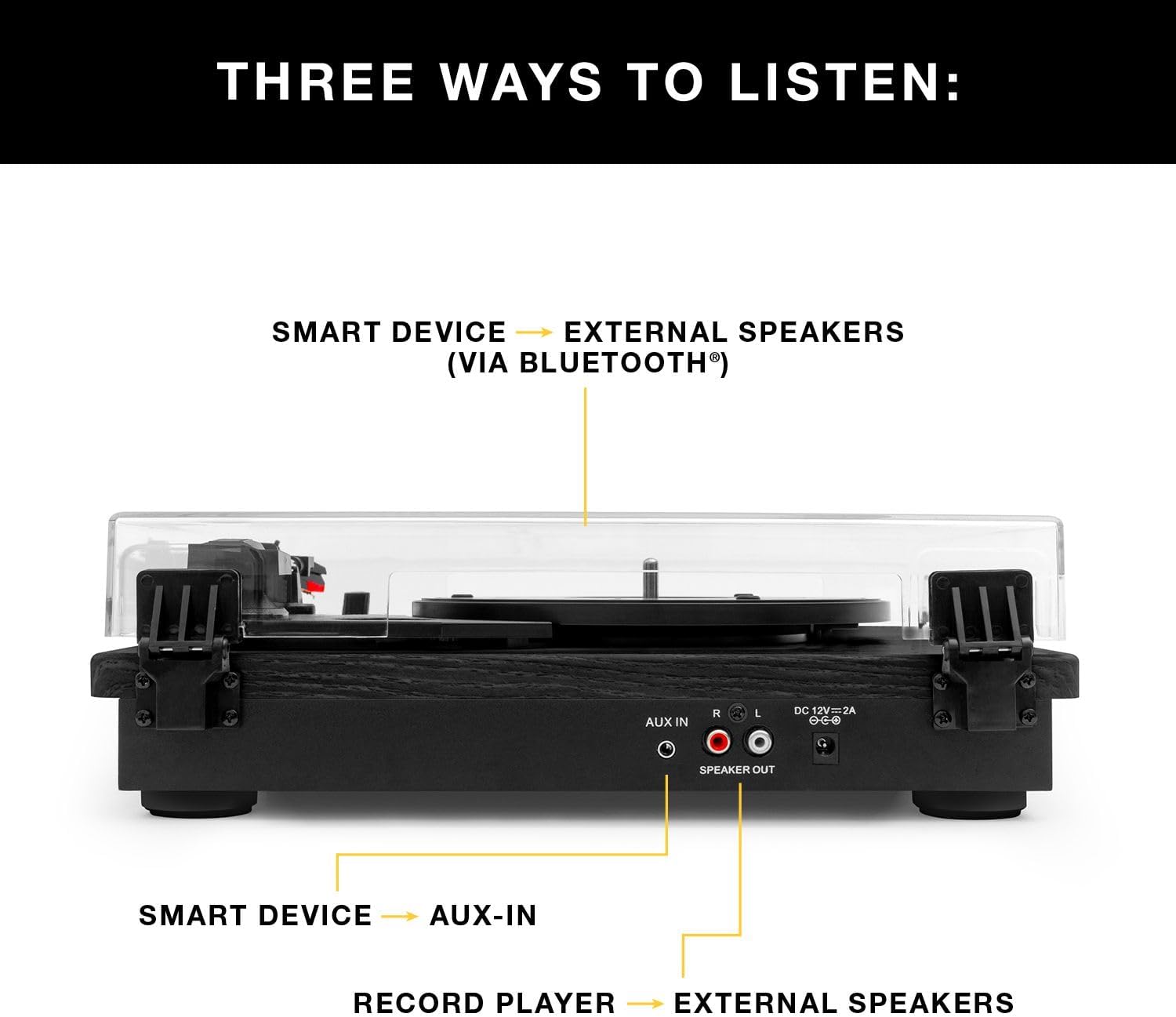
სურათი 3: უკანა view of the turntable showing audio output and power connections.
4. საოპერაციო ინსტრუქციები
4.1 ვინილის ფირფიტების დაკვრა
- ჩართვა: ჩართეთ მბრუნავი მაგიდა დენის გადამრთველის გამოყენებით.
- აირჩიეთ სიჩქარე: Choose the appropriate speed (33 1/3, 45, or 78 RPM) for your record using the speed selector switch.
- ადგილის ჩანაწერი: ფრთხილად მოათავსეთ ვინილის ფირფიტა თეფშზე.
- ტონის მკლავის პოზიცია: Release the tone arm lock. Gently lift the tone arm using the cueing lever and position the stylus over the desired track on the record.
- ქვედა ტონუსის მკლავი: Slowly lower the cueing lever to gently place the stylus onto the record. Playback will begin automatically.
- ხმის დარეგულირება: Use the volume knob on the turntable to adjust the sound level.
- დაკვრის დასრულება: At the end of the record, the tone arm will automatically return to its rest position (if auto-stop is enabled). Alternatively, manually lift the tone arm using the cueing lever and return it to its rest.

Figure 4: Detail of the stylus and record during playback.
4.2 Bluetooth-ის დაკვრა
- Bluetooth-ის გააქტიურება: Switch the turntable to Bluetooth mode. The Bluetooth indicator will flash, indicating it's ready for pairing.
- მოწყობილობის დაწყვილება: On your smart device (phone, tablet, etc.), enable Bluetooth and select
დაკავშირებული დოკუმენტები - VM-135-FNT

Victrola Montauk VM-135 მბრუნავი ფირფიტა: ინსტრუქციის სახელმძღვანელო და გამოყენების სახელმძღვანელო
ყოვლისმომცველი სახელმძღვანელო თქვენი Victrola Montauk VM-135 ფირსაკრავის დაყენების, ექსპლუატაციისა და მოვლა-პატრონობისთვის. გაეცანით Bluetooth კავშირის, სტილუსის შეცვლის, უსაფრთხოებისა და გარანტიის შესახებ.
Victrola VM-135 Montauk-ის მბრუნავი პლატფორმის სისტემა: ინსტრუქციის სახელმძღვანელო
ეს ინსტრუქცია შეიცავს დეტალურ ინფორმაციას Victrola VM-135 Montauk მბრუნავი პლატფორმის სისტემის შესახებ, რომელიც მოიცავს უსაფრთხოების ინსტრუქციებს, დაყენებას, ჩანაწერების მუშაობას, Bluetooth-სა და Aux-in-ს, სპეციფიკაციებს, მბრუნავი პლატფორმის განლაგებას, ნემსის შეცვლას და გარანტიას.
Victrola V50-200 50-იანი წლების რეტრო Bluetooth ფირსაკრავისა და მულტიმედიური ცენტრის მომხმარებლის სახელმძღვანელო
Victrola V50-200 50-იანი წლების რეტრო Bluetooth ფირსაკრავისა და მულტიმედიური ცენტრის ყოვლისმომცველი მომხმარებლის სახელმძღვანელო. გაეცანით მის 3-სიჩქარიან ფირსაკრავს, CD ფლეერს, AM/FM რადიოს, Bluetooth სტრიმინგის და ვინილიდან MP3-ში ჩაწერის ფუნქციებს, ასევე დაყენებისა და უსაფრთხოების ინსტრუქციებს.
Victrola VM-137 Kingfield-ის ფირსაკრავი Bluetooth დინამიკებით - მომხმარებლის სახელმძღვანელო
Victrola VM-137 Kingfield-ის გრამატიკული პლანშეტის ყოვლისმომცველი მომხმარებლის სახელმძღვანელო, დეტალური ინფორმაცია დაყენების, მუშაობის, სტილუსის შეცვლის, Bluetooth-თან და AUX-in-თან დაკავშირების, სპეციფიკაციების, უსაფრთხოების ინსტრუქციების და გარანტიის შესახებ.
Victrola Avery-ის 3-1-ში ტურნიკეტის (VTA-320B) მომხმარებლის სახელმძღვანელო
Victrola Avery 3-in-1 ფირსაკრავის (მოდელი VTA-320B) მომხმარებლის სახელმძღვანელო, რომელშიც დეტალურად არის აღწერილი მრავალმხრივი აუდიო დაკვრის დაყენების, ექსპლუატაციის, ტექნიკური მომსახურების, პრობლემების მოგვარების, სპეციფიკაციების და გარანტიის შესახებ ინფორმაცია.
Victrola VPT-800 ავტომატური მბრუნავი დაფის ინსტრუქციის სახელმძღვანელო
ეს სახელმძღვანელო შეიცავს ყოვლისმომცველ ინსტრუქციებს Victrola VPT-800 ავტომატური გრამატიკული ფირსაკრავის დაყენების, ექსპლუატაციისა და მოვლა-პატრონობის შესახებ. გაეცანით გახსნის, ფირსაკრავის დამონტაჟების, დინამიკებთან Bluetooth-ის ან RCA-ს საშუალებით დაკავშირების, ჩანაწერების დაკვრის, სტილუსის შეცვლის, გავრცელებული პრობლემების მოგვარების და პროდუქტის სპეციფიკაციების შესახებ.