1. შესავალი
This manual provides essential information for the safe and effective operation of your Twotrees TS2-20W Laser Engraver and Cutter. This high-energy laser machine is designed for precision engraving and cutting on various materials such as wood, metal, and glass. Please read this manual thoroughly before initial use and keep it for future reference.
2. უსაფრთხოების ინფორმაცია
Operating a laser engraver involves inherent risks. Adhering to safety guidelines is paramount to prevent injury and damage.
- თვალის დაცვა: Always wear appropriate laser safety goggles (OD6+) when the machine is in operation. The TS2-20W laser head is equipped with a protective cover and a filter blocking 97% of UV light, but additional eye protection is strongly recommended.
- ვენტილაცია: Ensure adequate ventilation in your workspace to dissipate fumes and smoke generated during engraving and cutting.
- ხანძრის საშიშროება: Laser processing can ignite flammable materials. Never leave the machine unattended during operation. Keep a fire extinguisher nearby.
- გადაუდებელი გაჩერება: The machine features an instant stop system that activates in case of involuntary movement or tilt. Familiarize yourself with the location of the emergency stop button.
- მასალის თავსებადობა: Do not engrave or cut unknown materials. Some materials can produce toxic fumes or catch fire easily. Avoid materials containing PVC.
- ბავშვები და შინაური ცხოველები: მოარიდეთ ბავშვები და შინაური ცხოველები საოპერაციო ზონას.
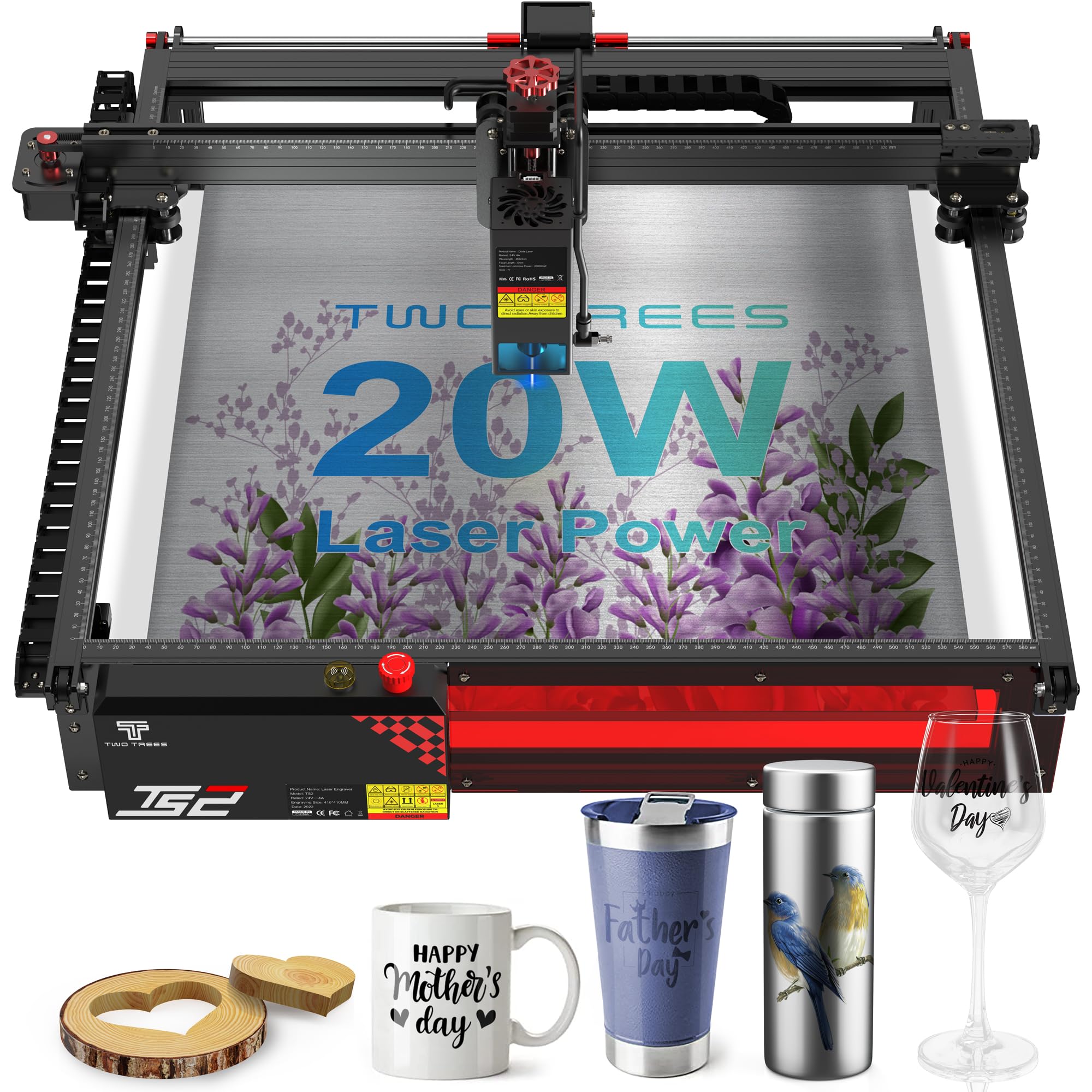
სურათი 2.1: The laser module displays critical safety warnings. Always observe these precautions.
3. პროდუქტი დასრულდაview და მახასიათებლები
The Twotrees TS2-20W is a high-performance laser engraver and cutter designed for precision and versatility.
ძირითადი მახასიათებლები:
- Exceptional Cutting Power: Equipped with a 20W laser, capable of cutting wood up to 15mm thick and opaque acrylic up to 10mm thick.
- High Precision and Speed: Features an ultra-fine focal spot of 0.08 x 0.08 mm and a maximum resolution of 1000 DPI for sharp engravings. Achieves movement precision of 0.01 mm and speeds up to 20,000 mm/min.
- Broad Software Compatibility: Seamlessly integrates with professional engraving software such as LaserGRBL (Windows) and LightBurn (multi-platform). Supports various file formats including NC, BMP, JPG, PNG, DXF, and GCODE.
- Robust and Easy Assembly: Constructed from modular aluminum alloy, allowing for assembly in approximately 40 minutes, resulting in a sturdy and durable structure.

სურათი 3.1: The laser module's focus accuracy and cutting depth on wood and acrylic.

სურათი 3.2: The industrial design of the TS2-20W, emphasizing its structural integrity.

სურათი 3.3: Examples of materials that can be processed by the TS2-20W.
4. დაყენება
The Twotrees TS2-20W is designed for straightforward assembly. Follow these general steps for initial setup:
- შეფუთვა: ფრთხილად ამოიღეთ ყველა კომპონენტი შეფუთვიდან. დარწმუნდით, რომ შეფუთვის სიაში ჩამოთვლილი ყველა ნაწილი ადგილზეა.
- ასამბლეა: Assemble the modular aluminum alloy frame according to the detailed assembly guide provided separately (or refer to the manufacturer's official assembly videos). The process typically takes around 40 minutes. Ensure all connections are secure.
- განთავსება: Place the assembled machine on a stable, level, and heat-resistant surface in a well-ventilated area.
- დენის კავშირი: Connect the power adapter to the machine and then to a suitable power outlet. Do not power on the machine yet.
- პროგრამული უზრუნველყოფის ინსტალაცია: Install the recommended engraving software (LaserGRBL for Windows or LightBurn for multi-platform use) on your computer. Ensure your computer meets the software's system requirements.
- კომპიუტერთან დაკავშირება: შეაერთეთ ლაზერული გრავიორი კომპიუტერთან მოწოდებული USB კაბელის გამოყენებით.
5. საოპერაციო ინსტრუქციები
Once the machine is set up and software is installed, you can begin your engraving or cutting projects.
- ჩართვა: Turn on the laser engraver.
- პროგრამული უზრუნველყოფის გაშვება: Launch your chosen engraving software (LaserGRBL or LightBurn) on your computer.
- მასალის განთავსება: Place the material to be engraved or cut onto the working area of the machine. Ensure it is flat and securely positioned.
- ფოკუსის რეგულირება: The TS2-20W features a fixed focus laser. Adjust the height of the laser module using the designated mechanism to achieve the optimal focal distance for your material. The independent belt tension adjustment and steel guide rail ensure precise movement.
- Design Loading: ჩატვირთეთ თქვენი დიზაინი file (NC, BMP, JPG, PNG, DXF, GCODE, etc.) into the software.
- პარამეტრის პარამეტრები: Adjust engraving/cutting parameters (power, speed, passes) based on the material type and desired outcome. Refer to software documentation or online resources for recommended settings.
- წინასწარიview and Start: გამოიყენეთ პროგრამული უზრუნველყოფის წინასწარიview function to verify the engraving area. Once satisfied, ensure all safety precautions are in place (eye protection, ventilation) and initiate the engraving/cutting process.
- მონიტორინგი: მუშაობის დროს აკონტროლეთ დანადგარი. ნებისმიერი პრობლემის შემთხვევაში, მზად იყავით საგანგებო გაჩერების ფუნქციის გამოსაყენებლად.

სურათი 5.1: Adjusting the fixed focus laser module for optimal performance.

სურათი 5.2: The laser engraver connected to a computer running compatible software.
6. მოვლა
რეგულარული მოვლა უზრუნველყოფს თქვენი ლაზერული გრავიორის ხანგრძლივობას და ოპტიმალურ მუშაობას.
- ლაზერული ლინზის გაწმენდა: Periodically clean the laser lens with a soft, lint-free cloth and lens cleaning solution to maintain laser power and precision.
- Cleaning the Working Area: Remove debris, dust, and material scraps from the working area after each use to prevent interference with machine movement.
- Checking Belts and Rails: Inspect the drive belts for tension and wear. Ensure the guide rails are clean and free of obstructions. Lubricate moving parts as recommended by the manufacturer.
- Firmware განახლებები: შეამოწმეთ მწარმოებლის website for any available firmware updates to ensure your machine operates with the latest features and improvements.
7. Დიაგნოსტიკა
ეს განყოფილება განიხილავს ხშირად წააწყდებო პრობლემებს. უფრო რთული პრობლემებისთვის იხილეთ მხარდაჭერის განყოფილება.
- მანქანა არ ჩართულია: Check the power cable connection and the power outlet. Ensure the power switch is in the 'On' position.
- ლაზერი არ მუშაობს/სუსტი გამომავალი სიგნალი: Verify the laser module connection. Clean the laser lens. Check software power settings.
- გრავირების/ჭრის ცუდი ხარისხი: Adjust focus height. Check material parameters (speed, power). Ensure the material is flat and secure. Clean the lens.
- მოწყობილობა არ უკავშირდება კომპიუტერს: Ensure the USB cable is securely connected. Reinstall software drivers if necessary. Try a different USB port or cable.
- Unexpected Stops: The machine has a safety stop feature for movement or tilt. Check for any physical obstructions or vibrations that might trigger this.
8. სპეციფიკაციები
| ფუნქცია | სპეციფიკაცია |
|---|---|
| მოდელი | TS2-20W |
| ლაზერული სიმძლავრე | 20 W (20000mW) |
| ლაზერის ტალღის სიგრძე | 445 ± 5 ნმ |
| ელექტრო მოთხოვნილება | 24V 4A DC |
| დედაპლატა | 32 ბიტიანი |
| გრავირების სიჩქარე | 20,000 მმ/წთ-მდე |
| გრავირების ფართობი | 410 x 410 მმ |
| ფოკალური წერტილის ზომა | 0.08 x 0.08 მმ |
| მაქსიმალური რეზოლუცია | 1000 DPI |
| Wood Cutting Ability (1 Pass) | 15 მმ-მდე |
| Black Acrylic Cutting Ability (1 Pass) | 10 მმ-მდე |
| პაკეტის ზომები | 73.8 x 30.4 x 23 სმ |
| წონა | 9.66 კგ |
| მოყვება ნაწილები | ლაზერული გრავიორი |

სურათი 8.1: განზომილებიანიview of the Twotrees TS2-20W laser engraver.
9. მხარდაჭერა და გარანტია
For any questions, technical assistance, or support regarding your Twotrees TS2-20W laser engraver, please contact the seller directly through the platform where you made your purchase. The manufacturer commits to responding to inquiries within 24 hours.
საგარანტიო ინფორმაცია: Specific warranty terms and conditions may vary. Please refer to your purchase documentation or contact the seller for detailed warranty information.
ონლაინ რესურსები: Visit the official Twotrees website for the latest drivers, firmware updates, and additional support resources.


