1. შესავალი
Welcome to the user manual for your KLIM Discover Portable CD Player. This device combines classic CD playback with modern features such as Bluetooth connectivity, FM radio, FM transmission, and SD card support. This manual will guide you through the setup, operation, and maintenance of your new portable CD player to ensure an optimal listening experience.

Image 1.1: The KLIM Discover Portable CD Player, showcasing its compact design and included headphones.
2. პაკეტის შიგთავსი
გთხოვთ, დარწმუნდეთ, რომ ქვემოთ ჩამოთვლილი ყველა ნივთი შედის თქვენს პაკეტში:
- KLIM Discover CD Player
- KLIM Fusion Wired Headphones
- Ear Accessories (various sizes)
- USB-C დამტენი კაბელი
- ატარეთ ჩანთა

Image 2.1: All components included with the KLIM Discover Portable CD Player.
3. პროდუქტი დასრულდაview
Familiarize yourself with the buttons and ports on your KLIM Discover CD Player:

Image 3.1: The KLIM Discover Portable CD Player, showing its front panel and connected headphones.
The KLIM Discover features a clear LCD display and intuitive controls on its front panel. Key components include:
- LCD ეკრანი: Shows track information, mode, battery status, and settings.
- დაკვრის კონტროლი: Buttons for Play/Pause, Stop, Next/Fast Forward, and Previous/Rewind.
- რეჟიმის ღილაკები: Buttons for changing playback modes (e.g., Repeat, Random), activating FM Radio, FM Transmitter, and Bluetooth.
- EQ/Record Button: For cycling through equalizer presets and initiating recording.
- DIR/Speed Buttons: For changing directories on MP3 CDs and adjusting playback speed.
- ხმის კონტროლი: A dedicated control for adjusting audio output.
- HOLD გადამრთველი: A physical switch, typically on the side, to lock all buttons.
Additional ports (typically on the side or back):
- USB-C დატენვის პორტი: დამტენის კაბელის შესაერთებლად.
- 3.5mm Audio Output (Headphone Jacks): Two ports for connecting headphones or external speakers, allowing two users to listen simultaneously.
- SD ბარათის სლოტი: For inserting an SD/TF memory card.
4. დაყენება
4.1. მოწყობილობის დატენვა
The KLIM Discover has a built-in rechargeable battery. Before first use, fully charge the device.
- Connect the supplied USB-C charging cable to the USB-C port on the player.
- კაბელის მეორე ბოლო შეაერთეთ USB კვების ადაპტერთან (არ მოყვება) ან კომპიუტერის USB პორტთან.
- The charging indicator on the display will show charging status. A full charge typically provides over 12 hours of playback.

Image 4.1: The KLIM Discover features a long-lasting rechargeable battery.
4.2. ჩართვა/გამორთვა
To power on the device, slide the power switch (usually located on the side) to the "ON" position. To power off, slide it to "OFF".
4.3. Using the HOLD Function
The HOLD switch locks all buttons to prevent accidental operation. Slide the switch to "HOLD" to activate, and slide it back to deactivate.
5. საოპერაციო ინსტრუქციები
5.1. CD დაკვრა
- გახსენით CD განყოფილების საფარი.
- Carefully place a CD (CD, CD-R, CD-RW, HDCD, MP3 CD) onto the spindle, label side up.
- Close the CD compartment cover firmly until it clicks.
- დააჭირეთ დაკვრა/პაუზა ღილაკი დაკვრის დასაწყებად.
- გამოიყენეთ შემდეგი სიმღერა/სწრაფი წინსვლა და წინა სიმღერა/გადახვევა ღილაკები ტრეკების ნავიგაციისთვის.
- დაარეგულირეთ ხმა ხმის კონტროლის გამოყენებით.
დარტყმისგან დაცვა: The KLIM Discover features an anti-shock chip that buffers 100 seconds of audio to prevent interruptions during movement. This also helps protect your CDs from damage.
5.2. Bluetooth კავშირი
The KLIM Discover can connect to Bluetooth headphones or speakers.
- დარწმუნდით, რომ თქვენი Bluetooth ყურსასმენები/დინამიკი დაწყვილების რეჟიმშია.
- დააჭირეთ Bluetooth button on the KLIM Discover. The Bluetooth icon on the display will flash, indicating it's searching for devices.
- Once connected, the Bluetooth icon will become solid.
Note on Car Bluetooth: Bluetooth compatibility varies with car infotainment systems. While the device strives for broad compatibility, some car systems may experience connection issues due to software updates. If you encounter problems, consider using the FM Transmitter or AUX connection options.
5.3. FM რადიო
- დააჭირეთ FM Radio/Speed - ღილაკი FM რადიოს რეჟიმში შესასვლელად.
- გამოიყენეთ MODE/FM (+) და PROG/FM (-) buttons to tune to desired frequencies.
- The included headphones act as the antenna for better reception.
5.4. FM Transmitter (Car Connectivity)
The FM transmitter allows you to play audio from the KLIM Discover through your car's FM radio.
- დააჭირეთ FM გადამცემი button to activate the feature.
- The display will show an FM frequency.
- Tune your car's FM radio to the same frequency displayed on the KLIM Discover.
- Play your CD or SD card audio, and it will transmit wirelessly to your car's speakers.
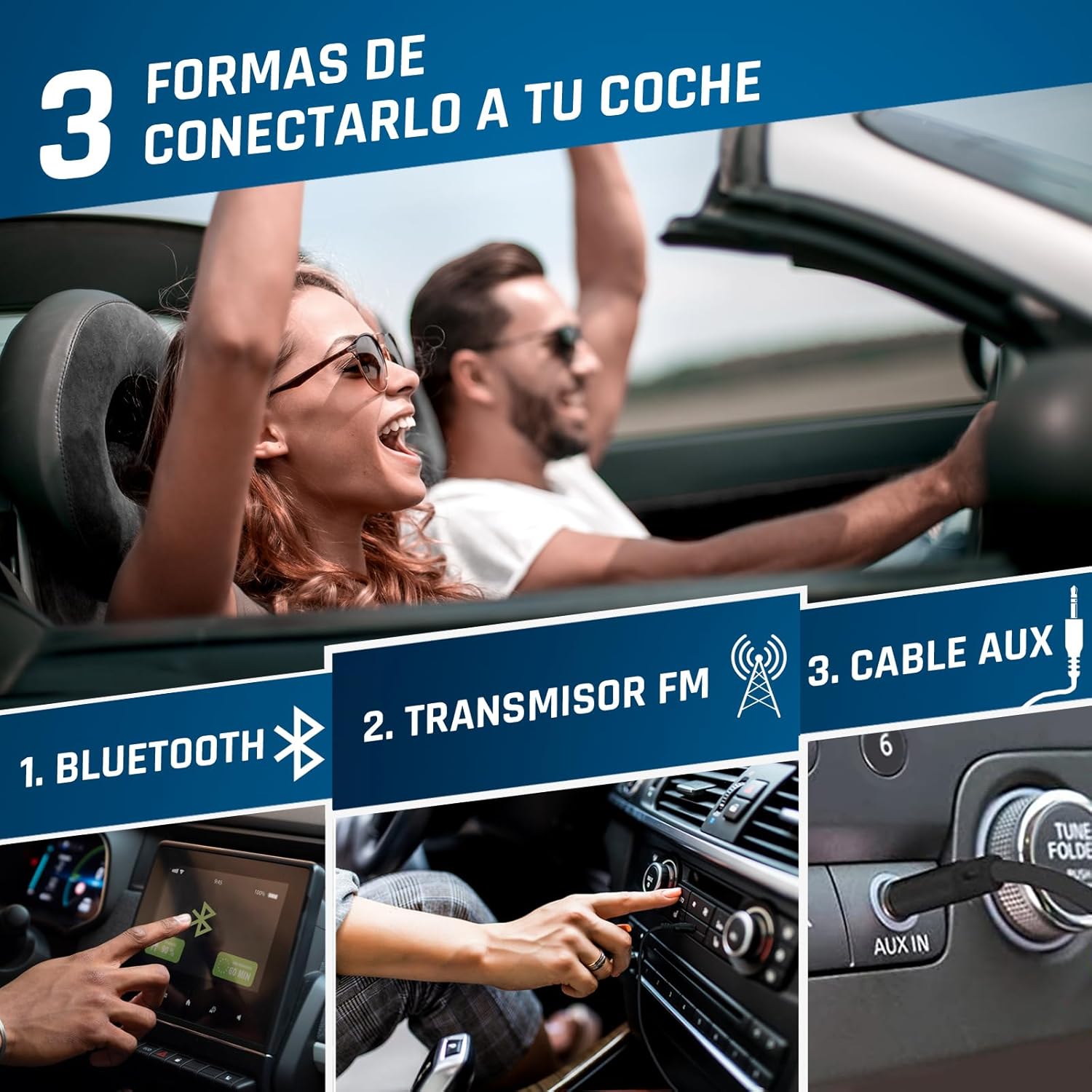
Image 5.1: Connection options for car audio systems: Bluetooth, FM Transmitter, and AUX cable.
Other Car Connection Options:
- AUX კაბელი: If your car has an AUX input, connect the KLIM Discover using a 3.5mm audio cable (not included).
- Car Bluetooth: Attempt to pair the KLIM Discover with your car's Bluetooth system as described in section 5.2.
5.5. SD ბარათიდან დაკვრა
- Insert a formatted SD/TF card (up to 32GB) into the SD card slot.
- The player will automatically switch to SD card mode or you may need to press the MODE ღილაკი მის ასარჩევად.
- Supported audio formats include MP3 and WMA.
- Use the navigation buttons to select and play tracks.
5.6. ჩაწერის ფუნქცია
The KLIM Discover supports recording audio onto an inserted SD card. Refer to the on-screen prompts or specific instructions for initiating recording using the EQ/Record ღილაკი.
5.7. ეკვალაიზერი (ეკვალაიზერი)
დააჭირეთ EQ/Record button repeatedly to cycle through different equalizer presets (e.g., Pop, Jazz, Rock, Classic, Bass, Flat) to customize your audio experience.
5.8. Playback Speed Control
გამოიყენეთ DIR/Speed + და FM Radio/Speed - buttons to adjust the playback speed of your audio.
6. მოვლა
- დასუფთავება: Use a soft, dry cloth to clean the exterior of the player. For the lens inside the CD compartment, use a specialized CD lens cleaner.
- შენახვა: შეინახეთ ფლეიერი გრილ, მშრალ ადგილას, მზის პირდაპირი სხივებისა და ექსტრემალური ტემპერატურისგან მოშორებით.
- ბატარეის მოვლა: ელემენტის ხანგრძლივობის გასახანგრძლივებლად, მოერიდეთ მის ხშირ სრულად დაცლას. რეგულარულად დატენეთ, მაშინაც კი, თუ დიდი ხნის განმავლობაში არ იყენებთ.
- CD Handling: Always handle CDs by their edges. Keep them clean and free of scratches to ensure optimal playback.
7. Დიაგნოსტიკა
| პრობლემა | შესაძლო მიზეზი | გამოსავალი |
|---|---|---|
| მოწყობილობა არ ჩაირთვება. | Low battery; Power switch in OFF position. | Charge the device; Slide power switch to ON. |
| CD არ უკრავს ან ხტუნავს. | CD is dirty, scratched, or inserted incorrectly; CD compartment not closed properly. | Clean the CD; Ensure CD is inserted correctly; Close compartment firmly. |
| ყურსასმენებიდან ხმა არ ისმის. | Headphones not connected; Volume too low; Headphones faulty. | Ensure headphones are fully plugged in; Increase volume; Test with different headphones. |
| Bluetooth კავშირის პრობლემები. | Device not in pairing mode; Target device too far or not in pairing mode; Car infotainment system incompatibility. | Ensure both devices are in pairing mode and close to each other; Refer to car manual; Use FM Transmitter or AUX as alternatives. |
| FM Transmitter not working. | Car radio not tuned to correct frequency; Interference. | Ensure car radio matches player's FM frequency; Try a different, clear frequency. |
| SD ბარათი არ არის ამოცნობილი. | Card inserted incorrectly; Card not formatted or corrupted; Unsupported file ფორმატი. | Reinsert card; Ensure card is formatted correctly (FAT32); Check for MP3/WMA files. |
If you continue to experience issues, please contact KLIM customer service for assistance.
8. სპეციფიკაციები
| ფუნქცია | დეტალი |
|---|---|
| ბრენდი | KLIM |
| მოდელის სახელი | აღმოაჩინეთ |
| მოდელის ნომერი | KLIM Nomad (KLDIS5373) |
| დაკავშირების ტექნოლოგია | Bluetooth |
| განსაკუთრებული თვისებები | Bluetooth, FM radio, FM transmitter, SD card reader, Recorder |
| თავსებადი მედიის ტიპები | CD, SD Card, MP3, WMA |
| მხარდაჭერილი აუდიო ფორმატები | MP3, WMA |
| მეხსიერების შენახვის მოცულობა | Up to 32 GB (SD/TF Card) |
| ტიუნერის ტექნოლოგია | FM |
| ჩვენების ტექნოლოგია | LCD |
| დენის წყაროს ტიპი | Battery Powered (Rechargeable Lithium-Cobalt) |
| ბატარეის საშუალო ხანგრძლივობა | 12+ საათი |
| პროდუქტის ზომები | 14 x 14 x 2.8 სმ |
| ნივთის წონა | 250 გ |
| მოყვება კომპონენტები | KLIM Discover CD Player, KLIM Fusion Wired Headphones, Ear Accessories, USB-C Charging Cable, Carry Pouch |
9. გარანტია და მხარდაჭერა
The KLIM Discover Portable CD Player comes with a 5-year product support from KLIM Technologies. This ensures long-term assistance for any issues you may encounter.
Additionally, you are covered by a 30-დღიანი დაბრუნების ფანჯარა, allowing you to return the product for a full refund if you are not satisfied with your purchase.
For technical support, warranty claims, or any questions, please visit the official KLIM website or contact their customer service directly. Contact details can typically be found on the KLIM webადგილზე ან შესაფუთ მასალებში.


