შესავალი
This manual provides detailed instructions for the setup, operation, and maintenance of your ATTACK SHARK M71 75% TKL Wireless Mechanical Keyboard. Please read this guide thoroughly to ensure proper use and to maximize your keyboard's performance and lifespan.

Image: The ATTACK SHARK M71 keyboard showcasing its 68% layout and key features like aluminum alloy body, three-mode connection, and RGB backlight.
პაკეტის შიგთავსი
დარწმუნდით, რომ შეფუთვაში ყველა ნივთია:
- ATTACK SHARK M71 Wireless Mechanical Keyboard
- Type-C კაბელი
- 2.4G უსადენო მიმღები
- Keycap Puller / Switch Puller (Two-in-one tool)
- Complimentary 61 additional PBT OEM keycaps (different color layout)
- მომხმარებლის სახელმძღვანელო

Image: A visual representation of the items included in the ATTACK SHARK M71 keyboard package, including the keyboard, cables, and extra keycaps.
Video: Unboxing the Blueberry version of the M71 keyboard, showing the package contents and a demonstration of its typing sound.
პროდუქტი დასრულდაview
The ATTACK SHARK M71 is a 75% TKL wireless mechanical keyboard featuring a full aluminum CNC chassis, multi-mode connectivity, hot-swappable switches, and RGB lighting. Its compact design and robust construction are engineered for both gaming and productivity.
ძირითადი მახასიათებლები:
- Full Aluminum CNC Body: Constructed from international standard 6063 aluminum alloy for durability and a premium feel.
- სამრეჟიმიანი დაკავშირებადობა: Supports Bluetooth 5.0/3.0, 2.4G wireless, and wired USB-C connections.
- ცხელი ჩანაცვლებადი ჩამრთველები: Compatible with 3/5-pin switches, allowing for easy customization without soldering.
- შუასადების სამაგრი სტრუქტურა: Incorporates anti-static IPEX switch pads, PORON sound-absorbing cotton, and PET acoustic switch pads to enhance typing feel and reduce noise.
- RGB LED განათება: Features customizable RGB backlighting and a side LED light strip.
- 4600 mAh ბატარეა: Provides extended wireless usage.
- PBT OEM Keycaps: Durable keycaps with GMK-like characters.
კომპონენტები:
Familiarize yourself with the main components of your keyboard:
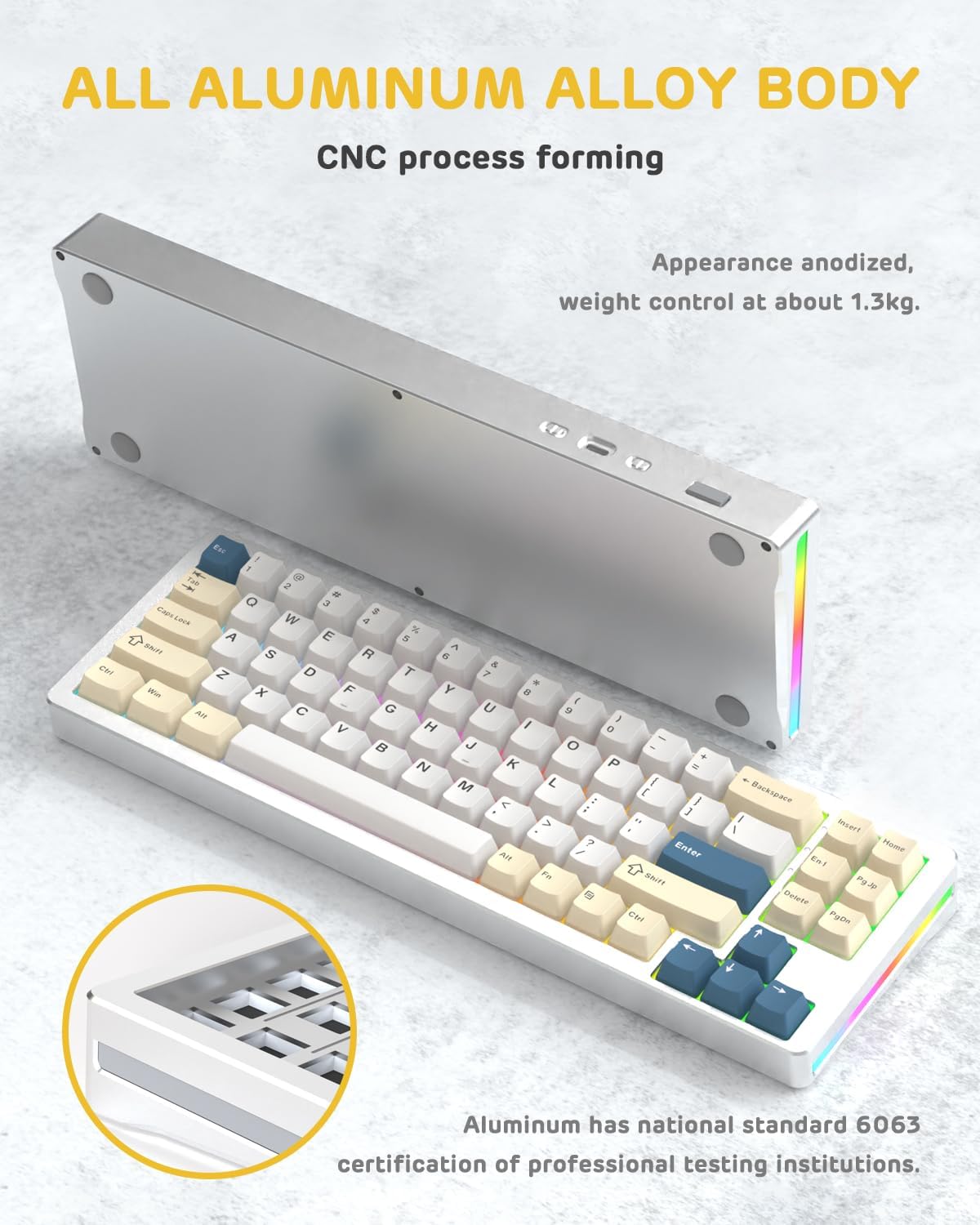
სურათი: გვერდი view of the M71 keyboard highlighting its full aluminum alloy body and CNC process forming.

სურათი: აფეთქებული view illustrating the multi-layered gasket mount structure, including the PBT keycaps, aluminum alloy upper cover, customized switch body, PC positioning board, PORON filled cotton, anti-static IPEX switch underpad, PET singing pad, PCB board, PORON shaft seat cushion, PET sound backing pad, wing light strip, and aluminum alloy base.
დაყენება
1. Connectivity Modes:
The M71 keyboard supports three connection modes: Bluetooth, 2.4G wireless, and wired USB-C.
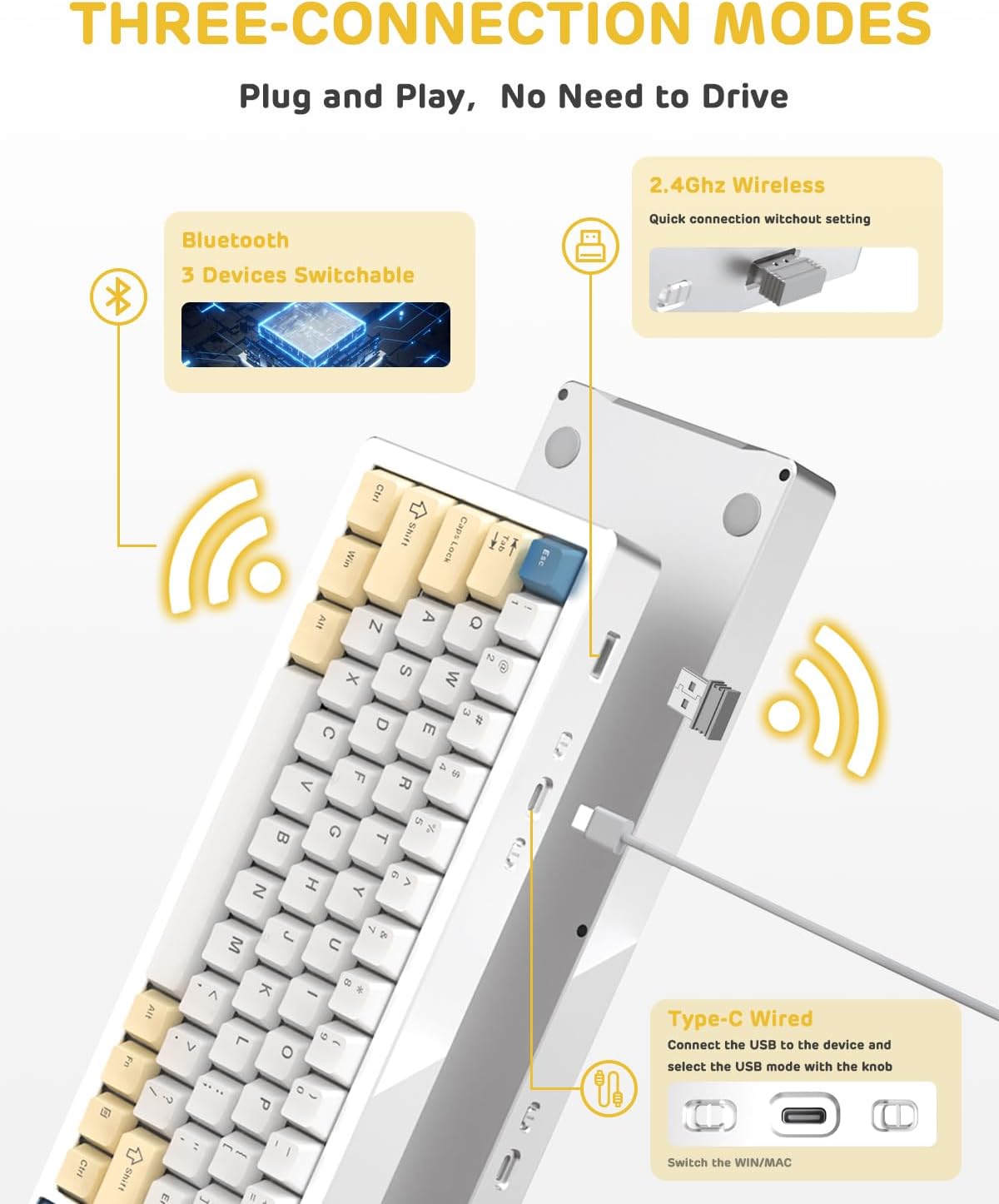
Image: A visual guide to the three connectivity options: Bluetooth for up to 3 devices, 2.4GHz wireless with a receiver, and wired Type-C connection.
სადენიანი კავშირი:
- Connect the provided Type-C cable to the keyboard's USB-C port and to your computer's USB port.
- Ensure the mode switch on the keyboard is set to the wired (USB-C) position.
- კლავიატურას თქვენი სისტემა ავტომატურად ამოიცნობს.
2.4G უსადენო კავშირი:
- Locate the 2.4G wireless receiver (dongle) in the package.
- შეაერთეთ 2.4G მიმღები თქვენი კომპიუტერის თავისუფალ USB პორტში.
- Set the mode switch on the keyboard to the 2.4G wireless position.
- კლავიატურა ავტომატურად უნდა დაუკავშირდეს.
Bluetooth კავშირი:
- Set the mode switch on the keyboard to the Bluetooth position.
- თქვენს კომპიუტერზე ან მოწყობილობაზე გახსენით Bluetooth-ის პარამეტრები და მოძებნეთ ახალი მოწყობილობები.
- The keyboard should appear as "ATTACK SHARK M71" or similar. Select it to pair.
- The keyboard can connect to up to 3 Bluetooth devices. Use Fn + 1/2/3 დაწყვილებულ მოწყობილობებს შორის გადართვა.
2. Battery Charging and Status:
The M71 keyboard is equipped with a 4600mAh battery. To charge, connect the keyboard via the USB-C cable to a power source (e.g., computer USB port, USB wall adapter).

Image: A diagram showing how to check the battery level using Fn+ALT(R) and the visual indicators on the keyboard's side LED strip.
- To check the battery level in wireless mode, press Fn + ALT (Right). The side LED strip will indicate the charge level.
- Battery life is approximately 1-2 weeks with lighting enabled and up to 4 weeks with lighting disabled.
ოპერაციული ინსტრუქციები
1. Multimedia Keys:
The keyboard features 12 multimedia keys accessible via the Fn გასაღების კომბინაციები:
- Fn + F1-F12: Access various multimedia functions (e.g., volume control, play/pause, calculator, email).
- Fn + 1/2: ეკრანის სიკაშკაშის კონტროლი.
2. RGB განათების კონტროლი:
Customize the keyboard's RGB backlight and side LED strip:

Image: The M71 keyboard displaying its RGB backlight and side LED strip, along with a close-up of the PBT keycaps.
- Fn + Ctrl (Right): Switch between different side LED light strip modes.
- Fn + Tab: Toggle white light mode.
- Refer to the full user manual for additional lighting effect controls and customization options via the programmable software.
3. Programmable Software:
The keyboard supports a dedicated driver program for advanced customization. You can download the software from the official ATTACK SHARK website to personalize lighting effects, key assignments, and macros. The keyboard is compatible with Windows 2000/XP/Vista/7/8/10/11, Android, and iOS.
მოვლა
1. დასუფთავება:
- კლავიატურის ზედაპირის გასაწმენდად გამოიყენეთ რბილი, მშრალი ქსოვილი.
- For deeper cleaning, remove keycaps using the provided keycap puller and use compressed air to clear debris from between switches.
- მოერიდეთ უხეში ქიმიკატების ან აბრაზიული მასალების გამოყენებას.
2. Hot-Swapping Switches:
The M71 keyboard features hot-swappable sockets, allowing you to change switches without soldering.

სურათი: ახლო ხედი view of the hot-swappable White Jade linear switches on the M71 keyboard, demonstrating how they can be easily removed and replaced.
- გამორთეთ კლავიატურა ან გათიშეთ ის თქვენი მოწყობილობიდან.
- Use the switch puller tool to carefully grip the switch and pull it straight up.
- Align the pins of the new switch with the holes on the PCB and press down gently until it clicks into place. Ensure pins are not bent.
- The PCB supports both 3-pin and 5-pin switches.
Video: A demonstration of the disassembly process for the M71 keyboard, showing how to remove keycaps and switches, revealing the gasket mount structure.
პრობლემების მოგვარება
| საკითხი | შესაძლო გამოსავალი |
|---|---|
| კლავიატურა არ რეაგირებს უკაბელო რეჟიმში. |
|
| გასაღებები არ რეგისტრირდება ან ორჯერ აკრეფილია. |
|
| RGB განათება არ მუშაობს ან არასწორია. |
|
| Bluetooth-ის დაწყვილების პრობლემები. |
|
სპეციფიკაციები
| ფუნქცია | დეტალი |
|---|---|
| მოდელი | M71 |
| განლაგება | 75% TKL (71 კლავიში) |
| დაკავშირება | Bluetooth 5.0/3.0, 2.4G Wireless, USB-C Wired |
| გადამრთველები | Hot-swappable (3/5-pin compatible), Pre-lubed Linear White Jade Switch |
| კლავიშები | PBT OEM Keycaps |
| სამონტაჟო სტილი | შუასადებები |
| შასის მასალა | Full Aluminum CNC (6063 alloy) |
| ბატარეის ტევადობა | 4600 mAh |
| განათება | RGB Backlight, RGB LED Side Light Strip |
| თავსებადობა | Windows 2000/XP/Vista/7/8/10/11, Android, iOS, Mac |
| პროდუქტის ზომები | 13.78" სიგრძე x 4.53" სიგანე x 1.22" სიმაღლე |
| ნივთის წონა | 2.86 ფუნტი |
გარანტია და მხარდაჭერა
For warranty information and technical support, please refer to the official ATTACK SHARK webსაიტზე ან პირდაპირ დაუკავშირდით მათ მომხმარებელთა მომსახურების სამსახურს. შეინახეთ თქვენი შესყიდვის ქვითარი, როგორც შეძენის დამადასტურებელი საბუთი გარანტიის ნებისმიერი მოთხოვნის შემთხვევაში.
მწარმოებელი: თავდასხმის ზვიგენი
გამყიდველი: Ajazz US
პირველი ხელმისაწვდომი თარიღი: 4 წლის 2023 აგვისტო


