შესავალი
This manual provides detailed instructions for the installation, operation, and maintenance of your TEEHO TE342 Fingerprint Smart Keyless Entry Door Lock. Please read this guide thoroughly before installation and use to ensure proper functionality and security. Keep this manual for future reference.
რა არის ყუთში
ინსტალაციის დაწყებამდე დარწმუნდით, რომ ყველა კომპონენტი ხელმისაწვლელია:
- თითის ანაბეჭდის ჭკვიანი კარის საკეტი
- სამონტაჟო ფირფიტა
- ხრახნები (სხვადასხვა ზომის)
- ჩამკეტი
- გაფიცვა
- 2 სარეზერვო გასაღები
- ინსტრუქციების სახელმძღვანელო
- მომხმარებლის სახელმძღვანელო
დაყენება და ინსტალაცია
1. შეამოწმეთ კარის თავსებადობა
Before installation, ensure your door dimensions are compatible with the TE342 lock. Refer to the diagram below for required measurements.

სურათი: Door compatibility measurements including door thickness (1-3/8" to 2"), backset (2-3/8" or 2-3/4"), door hole diameter (1-1/2" or 2-1/8"), and latch hole (1" deep).
- კარის სისქე: 1-3/8"-დან 2"-მდე (35 მმ-დან 50 მმ-მდე)
- უკანა მხარე: 2-3/8" ან 2-3/4" (60 მმ ან 70 მმ)
- კარის ხვრელის დიამეტრი: 1-1/2" ან 2-1/8" (38 მმ ან 54 მმ)
- საკეტის ხვრელის სიღრმე: Minimum 1" (25mm)
2. ინსტალაციის ვიდეო სახელმძღვანელო
For a visual step-by-step guide, please watch the official installation video:
ვიდეო: TEEHO TE342 Bluetooth Smart Lock Installation Video. This video demonstrates the complete installation process for the smart lock.
3. Step-by-Step Installation Overview
- დააინსტალირეთ ჩამკეტი: Insert the latch into the door edge. Adjust its length (60mm or 70mm backset) if necessary by rotating and pulling the mechanism. Secure it with the provided screws.
- გარე ასამბლეის დამონტაჟება: Pass the cable and spindle through the door hole. Ensure the tailpiece is horizontal. If your door hole is 38mm (1-1/2"), remove the spacer from the exterior assembly before installation.
- დამაგრეთ სამონტაჟო ფირფიტა: Position the mounting plate on the interior side of the door, aligning it with the exterior assembly. Secure it using the mounting plate screws.
- ინტერიერის ასამბლეის შეერთება: Connect the cable from the exterior assembly to the interior assembly. Ensure the thumb turn on the interior assembly is in a vertical position.
- შიდა ასამბლეის დაყენება: Attach the interior assembly to the mounting plate. Secure it with the interior assembly screws.
- ჩადეთ ბატარეები: Load 4 AA alkaline batteries into the battery compartment. Ensure correct polarity.
- საკეტის გადატვირთვა: Press and hold the reset button for 5 seconds until you hear a 'BEEP'. The latch will rotate and extend automatically.
ოპერაციული ინსტრუქციები
1. განბლოკვის მეთოდები
The TEEHO TE342 offers multiple convenient ways to unlock your door:
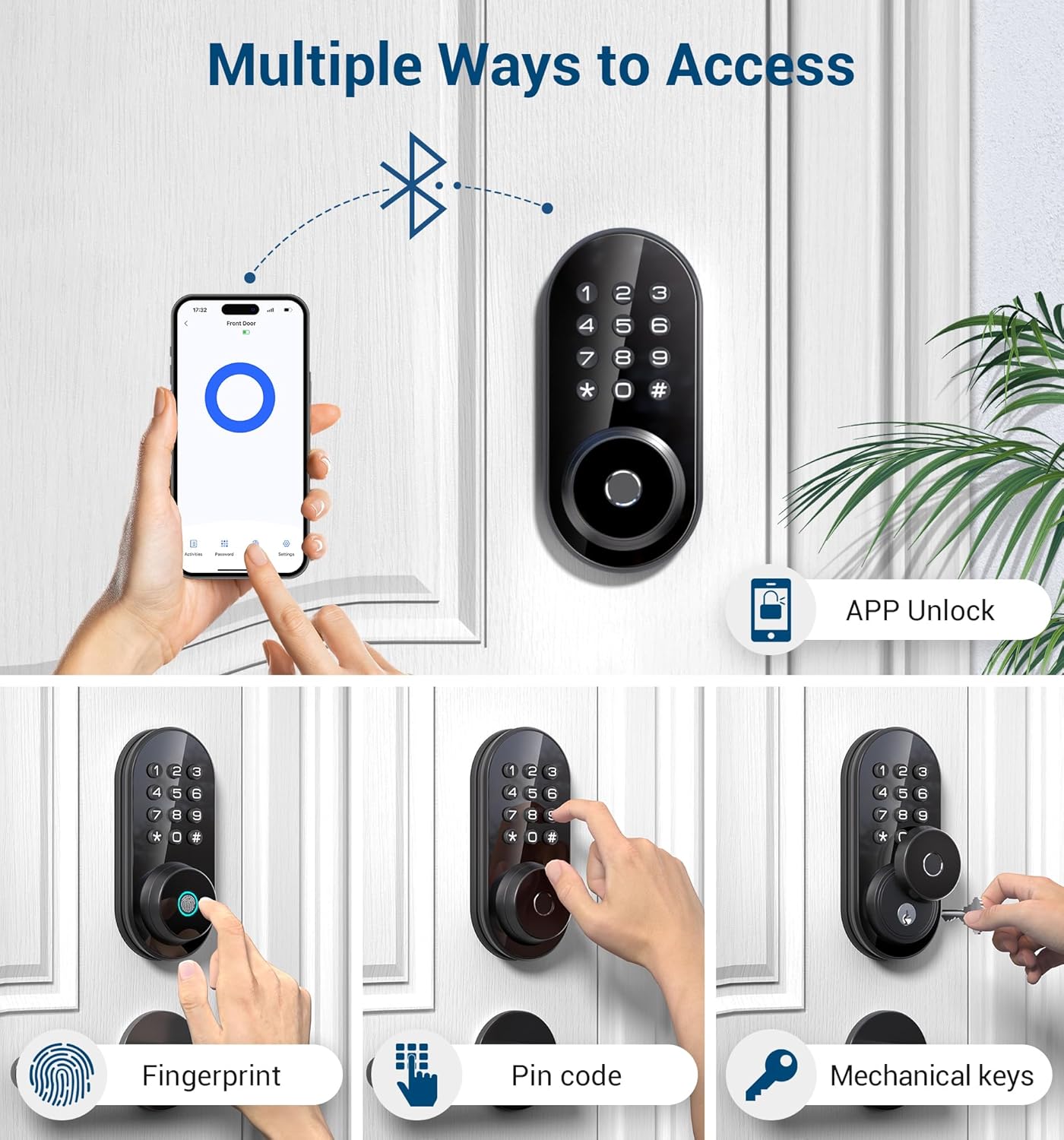
სურათი: Multiple ways to access the TEEHO TE342 smart lock.
- APP Unlocking: Use the KK Home app on your smartphone to unlock the door remotely via Bluetooth.
- თითის ანაბეჭდის განბლოკვა: Register up to 20 fingerprints for quick access. The lock features 0.3-second recognition time with AI self-learning technology.
- პაროლის შეყვანა: Set up to 20 unique passwords for family members or regular visitors.
- ერთჯერადი პაროლები: Generate temporary, single-use passwords for visitors, which are automatically deleted after use.
- მექანიკური გასაღებები: Two spare keys are provided for emergency manual unlocking.
2. აპლიკაციის მართვის ფუნქციები
Manage your lock conveniently through the KK Home app:

სურათი: App Control via Bluetooth for the TEEHO smart lock.
- დისტანციური წვდომა: Grant permanent or temporary unlocking access to family members or remotely generate one-time passwords for visitors.
- Real-time Log Records: Track all lock and unlock activities in real-time, providing better control over your home security.
- მომხმარებლების მართვა: Differentiate between family (full permissions) and guest (limited permissions) access.
- Offline Random Passcode: Generate a random password (valid for 30 minutes) anytime, anywhere, even without an internet connection.
- ანტი-პიპინგის პაროლი: Enter random numbers before or after the correct password to protect your code from being exposed.
For a detailed guide on app operations, please watch the official app operation video:
ვიდეო: TEEHO TE342 Fingerprint Smart Door Lock App Operation Video. This video demonstrates how to use the KK Home app for various lock functions.
3. Auto-Lock and One-Touch Locking
Enhance your security with automatic locking features:
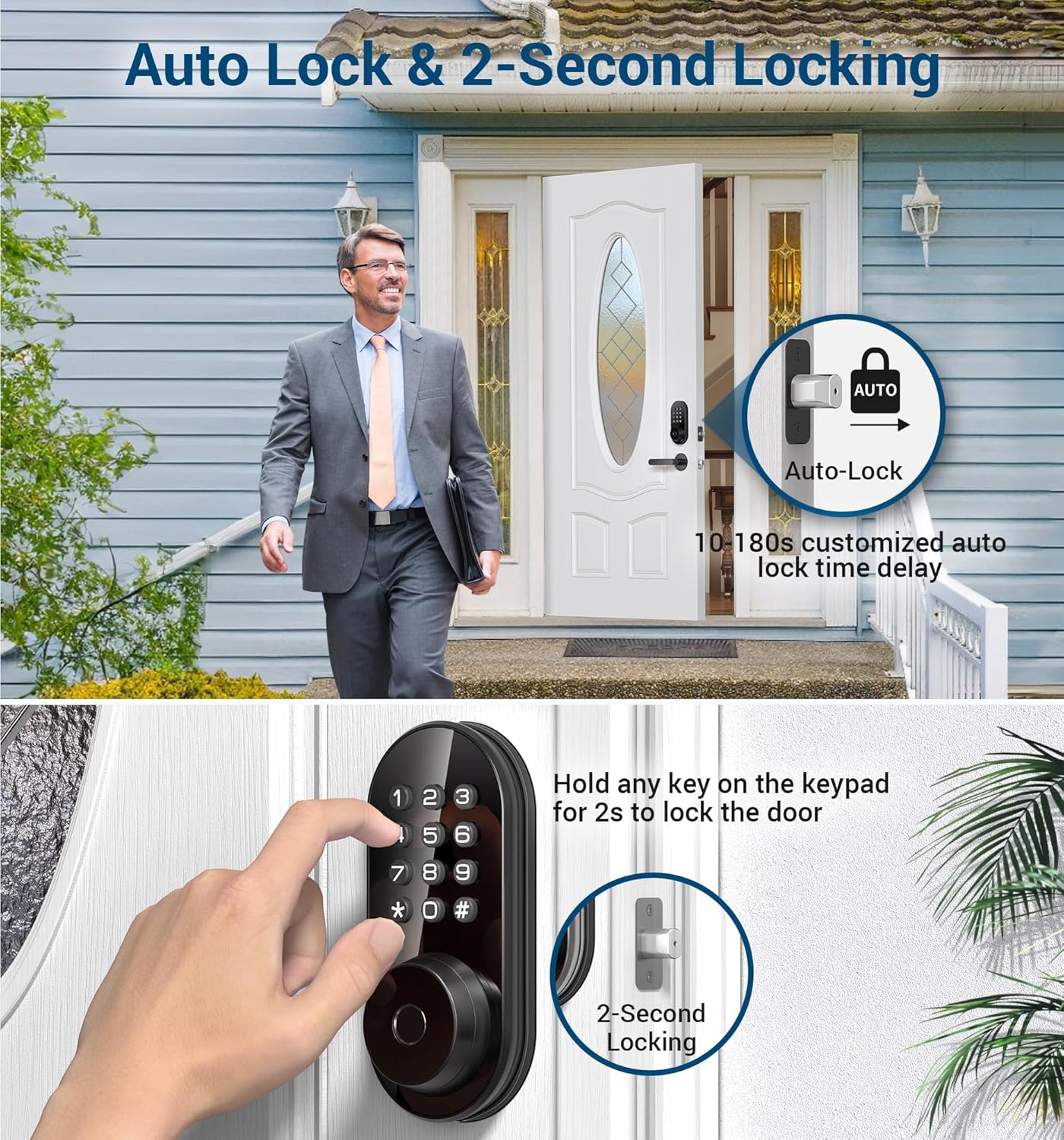
სურათი: Auto Lock & 2-Second Locking features.
- ავტო დაბლოკვა: The door lock automatically engages after a customizable delay of 10-99 seconds. This feature can be configured via the app.
- ერთი შეხებით ჩაკეტვა: From the outside, simply press and hold any key on the keypad for 2 seconds to instantly lock the door.
მოვლა
1. ბატარეის გამოცვლა
The lock requires 4 AA alkaline batteries. Replace all batteries at once with new ones when the low battery reminder is activated (typically below 20%). Avoid mixing different types of batteries.

სურათი: Long Battery Life illustration, showing the battery compartment and a USB-C port for emergency power.
In case of complete battery drain, an emergency Type-C port is available on the exterior assembly for temporary power to unlock the door.
2. გარემო პირობები
The TEEHO TE342 is designed to withstand various weather conditions, with an IP54 rating for dust and water resistance. It operates effectively in temperatures ranging from -31°F to 151°F.
სურათი: Works Well in All Weather, highlighting the lock's durability in extreme temperatures and its IP54 waterproof rating.
პრობლემების მოგვარება
1. Wi-Fi კავშირის პრობლემები
If you encounter Wi-Fi connection issues during setup:
- საკეტის გადატვირთვა: დააჭირეთ გადატვირთვის ღილაკს 5 წამის განმავლობაში.
- Check Bluetooth & Wi-Fi: Ensure Bluetooth is enabled on your phone, your home Wi-Fi (2.4GHz only) is active, the router is functioning, and the lock is within 10 meters of the router.
- აპლიკაციის განახლება: Ensure your KK Home app is updated to the latest version.
- შეამოწმეთ ბატარეა: Confirm the lock's battery is over 20%.
- Verify Cables: Ensure connection cables are properly inserted.
2. ბატარეის სწრაფი დაცლა
If your smart lock's batteries are draining quickly:
- Check for Misalignment: Ensure the lock is correctly aligned and the hole depth of the door frame exceeds 25mm.
- Inspect Connection Wires: Ensure connection wires are correctly installed to prevent power supply issues.
- Verify Screw Installation: Check if the lock is securely installed using the provided screws.
- გამოიყენეთ ტუტე ბატარეები: Confirm you are using recommended 4 alkaline batteries. Replace all at once with new ones when needed.
3. Lock Not Working
If your smart lock is unresponsive:
- საკეტის გადატვირთვა: დააჭირეთ გადატვირთვის ღილაკს 5 წამის განმავლობაში.
- შეამოწმეთ ბატარეის სიმძლავრე: Ensure the lock's battery is over 20%.
- Update App and Firmware: Make sure your smart lock's app and firmware are up to date.
- Inspect Connection Wires: Ensure connection cables are properly inserted. Try to re-install the door lock.
- შეცვალეთ ბატარეები: Confirm you are using recommended 4 alkaline batteries.
If issues persist, kindly provide the following details via email or phone call for further assistance:
- ESN number
- User account name for the KK Home App
- A photo or video of the lock
- Phone model, system version
- KK Home App version
სპეციფიკაციები
| ფუნქცია | დეტალი |
|---|---|
| ბრენდი | ტიჰო |
| მოდელის სახელი | TE342 თითის ანაბეჭდის ჭკვიანი კარის საკეტი |
| საკეტის ტიპი | Biometric, Deadbolt, Combination Lock, Keypad, Smart |
| მასალა | Aluminum alloy assembly, Plastic, Acrylic |
| ფერი | მქრქალი შავი |
| ელემენტის ზომები L x W x H | 9 x 6 x 4 ინჩი |
| ნივთის წონა | 3.01 ფუნტი (1.37 კგ) |
| დაკავშირების პროტოკოლი | Bluetooth |
| კონტროლის მეთოდი | აპლიკაცია |
| კონტროლერის ტიპი | iOS, Android |
| განსაკუთრებული თვისებები | Fingerprint, App control, Real-time app notification, Remotely generate one-time code, Duress Anti-peep Wrong code alert, Away mode, Silent ANSI Grade 3 |
| საჭიროა ბატარეები? | კი (4 AA) |
| ჭკვიანი სახლის თავსებადობა | Smart Home Compatible |
გარანტია და მხარდაჭერა
TEEHO offers a 30-day return and 1-year exchange service for this product. Additionally, lifetime after-sales service is provided to every customer.
- ონლაინ ტელეფონით მხარდაჭერა: Available Monday to Friday, 9 AM to 5 PM EST.
- 24/7 გაყიდვების შემდგომი ელექტრონული ფოსტის სერვისი: For any inquiries or assistance.
Please refer to your product packaging or the official TEEHO webსაიტი უახლესი საკონტაქტო ინფორმაციისთვის.


