1. შესავალი
The ChunHee Elderly Alarm System (Model: Ensemble E) is designed to provide a reliable emergency communication solution for seniors, individuals with disabilities, and those with mobility challenges. This system ensures rapid communication between users and caregivers in emergency situations, offering peace of mind for both parties. This manual provides detailed instructions for the setup, operation, maintenance, and troubleshooting of your device.

Image 1.1: ChunHee WiFi Emergency Call Button for Seniors. Enables rapid communication between seniors and caregivers in emergency situations.
2. პროდუქტის კომპონენტები
The ChunHee Elderly Alarm System (Ensemble E) typically includes the following components:
- SOS Emergency Call Button (Wristband)
- SOS Emergency Call Button (Pendant)
- მიმღების განყოფილება
- მიმღების კვების ადაპტერი
- Lanyard for Pendant Button
- Adhesive for Wall Mounting (for pendant button holder)

სურათი 2.1: დასრულდაview of ChunHee Emergency Call System components and features.
3. დაყენების ინსტრუქციები
Follow these steps to set up your ChunHee Elderly Alarm System:
- Power On the Receiver: Connect the receiver unit to a power outlet using the provided power adapter. Place the receiver near your 2.4GHz Wi-Fi router for optimal signal strength.
- ჩამოტვირთეთ აპლიკაცია: Download the 'Tuya Smart' or 'Smart Life' application from your smartphone's app store (available for both iOS and Android devices).
- რეგისტრაცია/შესვლა: გახსენით აპლიკაცია და დარეგისტრირდით ახალი ანგარიშით ან შედით სისტემაში, თუ უკვე გაქვთ.
- მოწყობილობის დამატება: In the app, follow the instructions to add a new device. Select the appropriate device type (e.g., 'Security & Sensor' -> 'Alarm' or 'SOS Button').
- დაუკავშირდით Wi-Fi-ს: Ensure your smartphone is connected to a 2.4GHz Wi-Fi network. The system only supports 2.4GHz Wi-Fi. Follow the in-app prompts to connect the receiver to your home Wi-Fi network.
- Pair Buttons: Once the receiver is connected, follow the app's instructions to pair the SOS call buttons (wristband and pendant) with the receiver.
- შეტყობინებების კონფიგურაცია: Set up notification preferences within the app. You can share access with multiple family members so they all receive alarm messages simultaneously.

Image 3.1: Tuya APP notification setup and Wi-Fi range information.

Image 3.2: Visual representation of the system's operation flow.
4. საოპერაციო ინსტრუქციები
4.1 Triggering an Emergency Alert
In case of an emergency or if assistance is needed, simply press and hold the SOS button on either the wristband or pendant. The receiver will emit an alarm sound, and a notification will be sent to all connected smartphones via the Tuya Smart or Smart Life app.
4.2 Notification System
- აპლიკაციის შეტყობინებები: Real-time alerts are sent to your smartphone(s) through the Tuya Smart/Smart Life app. These notifications are free of charge.
- SMS/Phone Call Notifications: The system may offer optional paid SMS or phone call notifications. You can choose to activate these services based on your needs. App notifications will function independently of these paid services.
4.3 გაზიარების ფუნქციონალი
The Tuya Smart/Smart Life app allows you to share device access with multiple family members or caregivers. This ensures that when an emergency button is pressed, all designated contacts receive the alarm message, enabling a coordinated response.
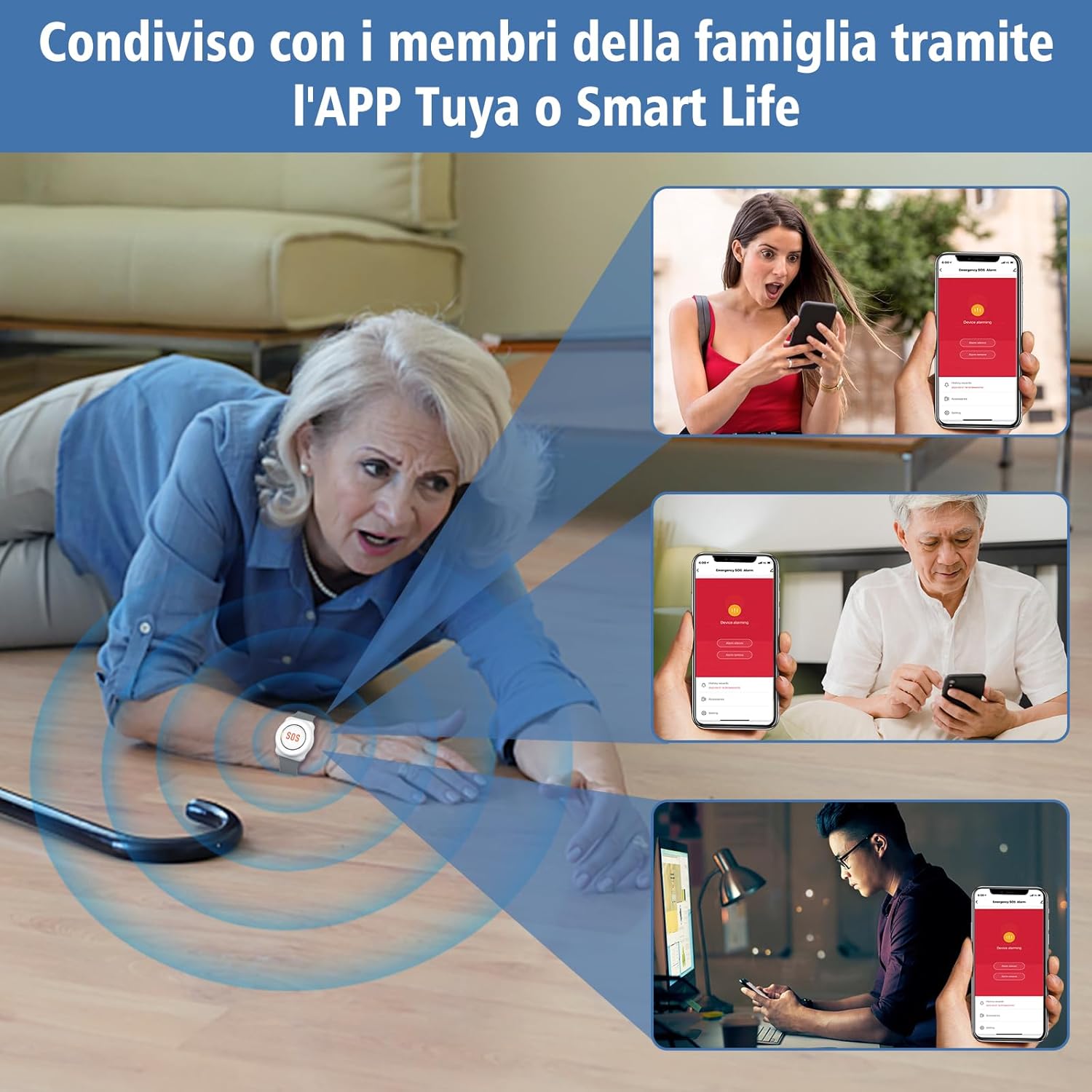
Image 4.1: Family members receiving notifications when an elderly person needs help.
4.4 ტარების ვარიანტები
- Wristband Button: Ideal for bedridden patients or those who prefer to wear the button on their wrist for easy access.
- Pendant Button: Can be worn around the neck with a lanyard or mounted on a wall using the provided adhesive for convenient access in specific areas.

Image 4.2: Caregiver assisting an elderly person, showing wrist and pendant button options.

Image 4.3: Instructions for wearing the pendant button and mounting its holder.
5. მოვლა
5.1 ინფორმაცია ბატარეის შესახებ
- მიმღები: The receiver unit is powered by a rechargeable battery and typically includes a 1 AAA alkaline battery.
- SOS Buttons (Wristband/Pendant): These buttons use 12V 23A/CR2032 batteries.
5.2 დაბალი ბატარეის მაჩვენებელი
The SOS buttons feature a low battery alarm. If the LED on the button flashes continuously 5 times when pressed, it indicates that the battery is low and needs to be replaced.
5.3 დასუფთავება
Wipe the devices with a soft, dry cloth. Do not use abrasive cleaners or immerse the receiver in water. The SOS buttons are IP55 waterproof, meaning they are protected against dust and low-pressure water jets, but not full immersion.
6. Დიაგნოსტიკა
If you encounter issues with your ChunHee Elderly Alarm System, refer to the following common troubleshooting steps:
- მოწყობილობა არ უკავშირდება Wi-Fi-ს:
- დარწმუნდით, რომ თქვენი Wi-Fi ქსელი 2.4 გჰც-ია. სისტემა არ უჭერს მხარს 5 გჰც ქსელებს.
- Place the receiver closer to your Wi-Fi router during the setup process.
- შეამოწმეთ თქვენი Wi-Fi პაროლის სიზუსტე.
- Restart your router and the receiver, then attempt pairing again.
- No Notifications on Smartphone:
- Verify that the receiver is connected to Wi-Fi and the SOS buttons are paired.
- Check your smartphone's notification settings for the Tuya Smart/Smart Life app. Ensure notifications are enabled and not silenced.
- Confirm that the app is running in the background or has appropriate permissions.
- Ensure all shared family members have correctly configured their app settings.
- SOS Button Not Responding:
- Check the battery level of the SOS button. If the LED flashes 5 times, replace the battery.
- Ensure the button is within range of the receiver (up to 100 meters in open areas).
- Re-pair the button with the receiver through the app if necessary.
- Receiver Alarm Not Sounding:
- Check if the receiver is powered on and connected.
- Adjust the volume level of the receiver through the app.
7. სპეციფიკაციები
| ფუნქცია | სპეციფიკაცია |
|---|---|
| ბრენდი | ჩუნჰეი |
| მოდელი | Ensemble E |
| კონტროლის მეთოდი | შეეხეთ |
| ხმის დონე | 30 დეციბელი |
| სამონტაჟო ტიპი | Table Mount (Receiver) |
| მაქსიმალური დიაპაზონი | 100 მეტრი (დაახლოებით 328 ფუტი) |
| სენსორის ტექნოლოგია | უკაბელო ტექნოლოგია |
| პროდუქტის ზომები (L x W x H) | 8 x 8 x 3 სმ (დაახლოებით 3.15 x 3.15 x 1.18 ინჩი) |
| პროდუქტის წონა | 280 გრამი (დაახლოებით 0.62 ფუნტი) |
| მიმღების ბატარეის ტიპი | Rechargeable, 1 AAA (included) |
| SOS Button Battery Type | 12V 23A / CR2032 |
| დენის წყარო | იკვებება ბატარეით |
| თავსებადი მოწყობილობები | სმარტფონი, პლანშეტი |
| Wi-Fi სიხშირე | მხოლოდ 2.4 GHz |
| Waterproof Rating (Buttons) | IP55 |
8. გარანტია და მხარდაჭერა
8.1 ინფორმაცია გარანტიის შესახებ
ChunHee offers a 30-day refund service for this product. Please refer to the retailer's return policy for specific details regarding returns and exchanges.
8.2 მომხმარებელთა მხარდაჭერა
For any questions, technical assistance, or after-sales support, please contact us via the Amazon email system. Our customer service team is dedicated to providing satisfactory support for your product.


