შესავალი
This manual provides detailed instructions for the safe and proper installation, operation, and maintenance of your SANUS Preferred SLF428-B1 Full-Motion TV Mount. Please read all instructions carefully before beginning installation. If you have any questions, contact SANUS customer support.
This mount is designed to fit most 37-inch to 90-inch flat-panel TVs weighing up to 135 lbs (61.2 kg).
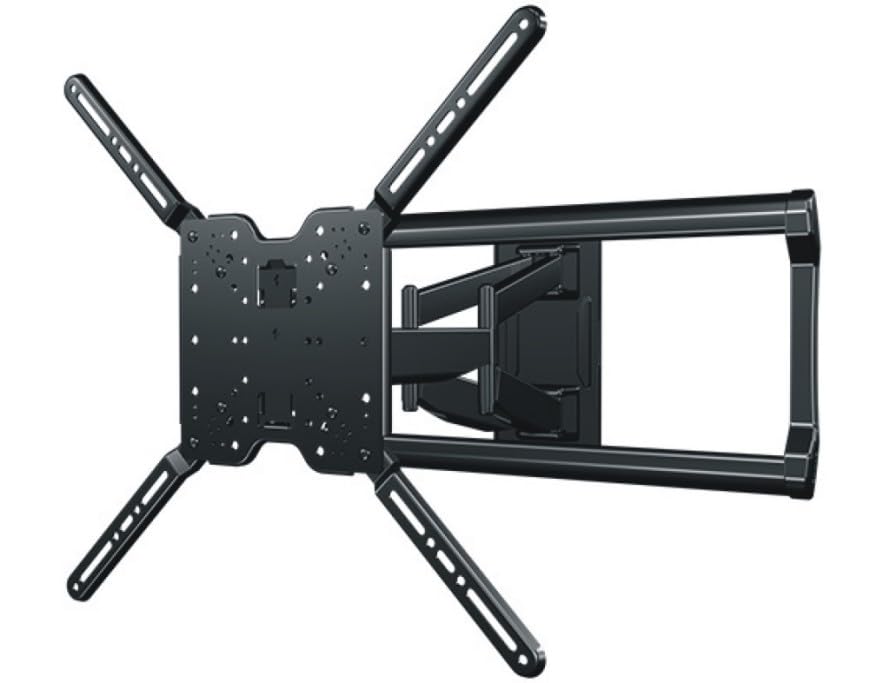
Image: The SANUS Preferred SLF428-B1 Full-Motion TV Mount, showing its articulating arm and wall plate components.
უსაფრთხოების მნიშვნელოვანი ინსტრუქციები
გაფრთხილება: Failure to read and follow these instructions can result in serious personal injury, property damage, or voiding of your warranty. If you do not understand these instructions or have doubts about the safety of the installation, contact SANUS customer support or a qualified installer.
- Do not install this product on walls that are not structurally sound. Ensure the mounting surface can safely support the combined weight of the mount and the TV.
- This mount is intended for use with TVs weighing up to 135 lbs (61.2 kg). Exceeding this weight limit may result in instability and potential injury.
- ტელევიზორის აწევისა და პოზიციონირებისთვის ყოველთვის გამოიყენეთ ასისტენტი.
- ყველა ხრახნი მჭიდროდ მოუჭირეთ, მაგრამ ზედმეტად არ მოუჭიროთ. ზედმეტმა მოჭიდებამ შეიძლება დააზიანოს ხრახნები და კომპონენტები.
- დარწმუნდით, რომ ყველა კაბელი უსაფრთხოდ არის გაყვანილი და ხელს არ უშლის სამაგრის მოძრაობას.
პაკეტის შიგთავსი
Verify that all components are present and undamaged before installation. If any parts are missing or damaged, contact SANUS customer support.
- კედლის ფილის აწყობა
- TV Bracket Set (Left and Right)
- აპარატურის ნაკრები (სხვადასხვა ხრახნები, საყელურები, შუასადებები ტელევიზორისა და კედელზე დასამონტაჟებლად)
- საკაბელო მართვის კლიპები
- ინსტრუქციის სახელმძღვანელო (ეს დოკუმენტი)
საჭირო ინსტრუმენტები (არ შედის)
- Stud Finder
- ფანქარი
- Drill with appropriate drill bits (e.g., 7/32" for wood studs, 1/2" for concrete)
- დონე
- Tape Measure
- ფილიპსის უფროსი ხრახნიანი
- Socket Wrench (typically 1/2" or 13mm)
დაყენება და ინსტალაცია
Follow these steps carefully to ensure a secure and correct installation.
ნაბიჯი 1: წინასწარი ინსტალაციის შემოწმება
- კედლის ტიპის განსაზღვრა: Use a stud finder to locate the center of wood studs. For concrete or brick walls, ensure you have appropriate anchors (sold separately if not included).
- Verify TV Compatibility: Check your TV's VESA mounting pattern and weight against the mount's specifications.
- აირჩიეთ სამონტაჟო ადგილი: განიხილეთ viewing height, glare, and proximity to power outlets and cable access.
ნაბიჯი 2: დააინსტალირეთ კედლის ფირფიტა
This step involves securing the main wall plate to your chosen wall location.

Image: Illustrative image showing the wall plate being mounted to a wall, with drill holes marked and screws being tightened. (Placeholder image)
- Position the wall plate at the desired height and use a pencil to mark the pilot hole locations. Use a level to ensure it is straight.
- Drill pilot holes at the marked locations. For wood studs, use a 7/32" (5.5 mm) drill bit. For concrete/brick, use a 1/2" (13 mm) drill bit and insert concrete anchors (if applicable).
- Attach the wall plate to the wall using the provided lag bolts and washers. Tighten securely with a socket wrench. Do not overtighten.
ნაბიჯი 3: მიამაგრეთ ტელევიზორის ფრჩხილები ტელევიზორს
Prepare your TV by attaching the vertical mounting brackets.

Image: Illustrative image showing the TV brackets being attached to the VESA mounting holes on the back of a television. (Placeholder image)
- ეკრანის დაზიანების თავიდან ასაცილებლად, ფრთხილად მოათავსეთ ტელევიზორი რბილ, სუფთა ზედაპირზე, პირით ქვემოთ.
- Select the correct diameter and length screws from the hardware kit that fit your TV's VESA mounting holes. Use spacers if the TV back is uneven or if cables need clearance.
- Attach the left and right TV brackets to the back of your TV using the selected screws and washers. Ensure the brackets are centered and level. Tighten firmly with a Phillips head screwdriver.
ნაბიჯი 4: ტელევიზორის კედლის ფირფიტაზე დამონტაჟება
With assistance, lift and secure the TV onto the wall plate.

Image: Illustrative image showing two people carefully lifting a television and hooking its attached brackets onto the wall plate. (Placeholder image)
- With an assistant, carefully lift the TV and hook the TV brackets onto the wall plate. Ensure the brackets are fully seated on the wall plate's arms.
- Locate the safety screws or locking mechanisms on the bottom of the TV brackets. Tighten these to secure the TV to the mount and prevent accidental dislodging.
ნაბიჯი 5: საკაბელო მენეჯმენტი
Organize and conceal cables for a clean appearance and safe operation.

Image: Illustrative image showing cables being routed through the integrated cable channels or secured with clips along the mount's articulating arm. (Placeholder image)
- Route all necessary cables (power, HDMI, etc.) through the integrated cable channels on the mount's arm or use the provided cable management clips.
- Ensure cables have enough slack to allow for full range of motion of the TV without being stretched or pinched.
სამაგრის ექსპლუატაცია
The SANUS Preferred SLF428-B1 mount offers various adjustments for optimal viewინგ.
- გაფართოება/დაწევა: Gently pull or push the TV to extend or retract the articulating arm. The mount extends up to 28 inches (71.1 cm) from the wall.
- მბრუნავი: Pivot the TV left or right to achieve your desired viewing კუთხე
- Tilt: Loosen the tilt adjustment knobs (if present, refer to specific mount design) on the TV brackets, adjust the TV to the desired vertical angle, and then retighten the knobs to secure. The mount allows for tilting to reduce glare.
- დონის რეგულირება: Some mounts allow for post-installation leveling. If your TV appears slightly unlevel, consult the specific instructions for minor rotational adjustments.
მოვლა
რეგულარული მოვლა უზრუნველყოფს თქვენი ტელევიზორის სამაგრის ხანგრძლივ მუშაობას და უსაფრთხო მუშაობას.
- პერიოდული შემოწმება: Every few months, check all mounting screws and bolts to ensure they remain tight. Retighten if necessary, but do not overtighten.
- დასუფთავება: Dust the mount with a soft, dry cloth. Avoid using abrasive cleaners or solvents that could damage the finish.
- შეზეთვა: The mount's moving parts are designed for smooth operation and typically do not require lubrication. If movement becomes stiff, contact SANUS customer support.
პრობლემების მოგვარება
- ტელევიზორი არ არის ჰორიზონტალური:
- Ensure the wall plate was installed level. If not, minor adjustments may be possible with the TV brackets (refer to specific bracket design).
- Check if the TV brackets are securely tightened to the TV and the mount. - სამაგრი ფხვიერი ან არასტაბილურია:
- Immediately remove the TV from the mount.
- Recheck all wall mounting bolts and TV bracket screws for tightness. Ensure they are properly seated in the wall studs or anchors.
- Verify that the wall structure is sound and can support the weight. - Difficulty adjusting the TV (tilt, swivel, extension):
- Ensure no cables are snagged or preventing movement.
- Check for any overtightened bolts that might restrict movement. Some joints may have adjustable tension screws.
სპეციფიკაციები
| მოდელის ნომერი | SLF428-B1 |
| ტელევიზორის ზომის დიაპაზონი | 37" - 90" |
| ტელევიზორის მაქსიმალური წონა | 135 ფუნტი (61.2 კგ) |
| სამონტაჟო ტიპი | კედლის სამაგრი |
| მოძრაობის ტიპი | Articulating, Tilt, Swivel |
| კედლიდან გაფართოება | 71.1 სმ-მდე (28 ინჩი) |
| დაბალი პროfile დიზაინი | 2.4" (6.1 cm) from wall when retracted |
| პროდუქტის ზომები | 15 x 6 x 5 ინჩი (შეფუთვა) |
| ნივთის წონა | 31.4 ფუნტი (14.2 კგ) |
| მასალა | Plastic (components), Metal (main structure) |
| ფერი | შავი |
| UPC | 793795535856 |
გარანტია და მომხმარებელთა მხარდაჭერა
For warranty information or technical assistance, please contact SANUS customer support. Details regarding specific warranty periods and terms can typically be found on the official SANUS webადგილზე ან თანდართული გარანტიის ბარათი.
SANUS Customer Support: ეწვიეთ www.sanus.com/support for contact information, FAQs, and additional resources.
ოფიციალური პროდუქტის ვიდეოები
No official seller videos were found for this product in the provided data. Please refer to the written instructions and diagrams for installation and operation guidance.


