შესავალი
Thank you for choosing the ZIPRO Adult Magnetic Fitness Bike. This manual provides essential information for the safe assembly, operation, and maintenance of your new fitness equipment. Please read this manual thoroughly before first use and keep it for future reference.

Figure 1: ZIPRO Adult Magnetic Fitness Bike
უსაფრთხოების ინფორმაცია
თქვენი უსაფრთხოება უმნიშვნელოვანესია. დაიცავით შემდეგი ინსტრუქციები:
- ნებისმიერი ვარჯიშის პროგრამის დაწყებამდე გაიარეთ კონსულტაცია ექიმთან.
- ყოველი გამოყენების წინ დარწმუნდით, რომ ყველა ნაწილი საიმედოდ არის დამაგრებული.
- მოარიდეთ ბავშვებს და შინაურ ცხოველებს მოწყობილობისგან მუშაობის დროს.
- ველოსიპედი მოათავსეთ ბრტყელ, სტაბილურ ზედაპირზე.
- არ გადააჭარბოთ მომხმარებლის მაქსიმალურ წონას, რომელიც 110 კგ-ს (242 ფუნტი) შეადგენს.
- დაუყოვნებლივ შეწყვიტეთ ვარჯიში, თუ გრძნობთ სისუსტეს, თავბრუსხვევას ან ტკივილს.
- ჩაიცვით შესაბამისი სავარჯიშო ტანსაცმელი და ფეხსაცმელი.
პაკეტის შიგთავსი
შეკრების დაწყებამდე დარწმუნდით, რომ ყველა კომპონენტი ხელთ არის:
- მთავარი ჩარჩო (1)
- Handlebar Assembly with Console (1)
- Seat Post and Saddle (1)
- პედლები (მარცხნივ და მარჯვნივ)
- Front and Rear Stabilizers (2)
- Hardware Kit (Bolts, Washers, Nuts, Tools)
- წყლის ბოთლის დამჭერი (1)
- მომხმარებლის სახელმძღვანელო (ეს დოკუმენტი)
შეკრების ინსტრუქციები
მიჰყევით ამ ნაბიჯებს სათანადო შეკრებისთვის:
- სტაბილიზატორების დამაგრება: Secure the front and rear stabilizers to the main frame using the provided bolts and nuts. Ensure they are firmly tightened for stability.
- დააინსტალირეთ პედლები: Identify the Left (L) and Right (R) pedals. The left pedal screws counter-clockwise, and the right pedal screws clockwise. Thread them carefully into the crank arms and tighten securely.

Figure 2: Securely attach pedals.
- სავარძლის საყრდენი და საჯდომი: Insert the seat post into the main frame. Adjust the height to your preference and secure it with the locking knob. Attach the saddle to the seat post.

Figure 3: Adjusting seat height for comfort.
- სახელურის ასამბლეის მიმაგრება: Connect the handlebar assembly to the main frame. Ensure all cables are properly routed and not pinched. Secure with the designated bolts.
- Install Water Bottle Holder: Attach the water bottle holder to the designated location on the main frame.
დაყენება
Before your first workout, ensure the bike is set up correctly for your body:
- სავარძლის სიმაღლე: Adjust the seat height so that your leg is almost fully extended at the bottom of the pedal stroke, with a slight bend in the knee.
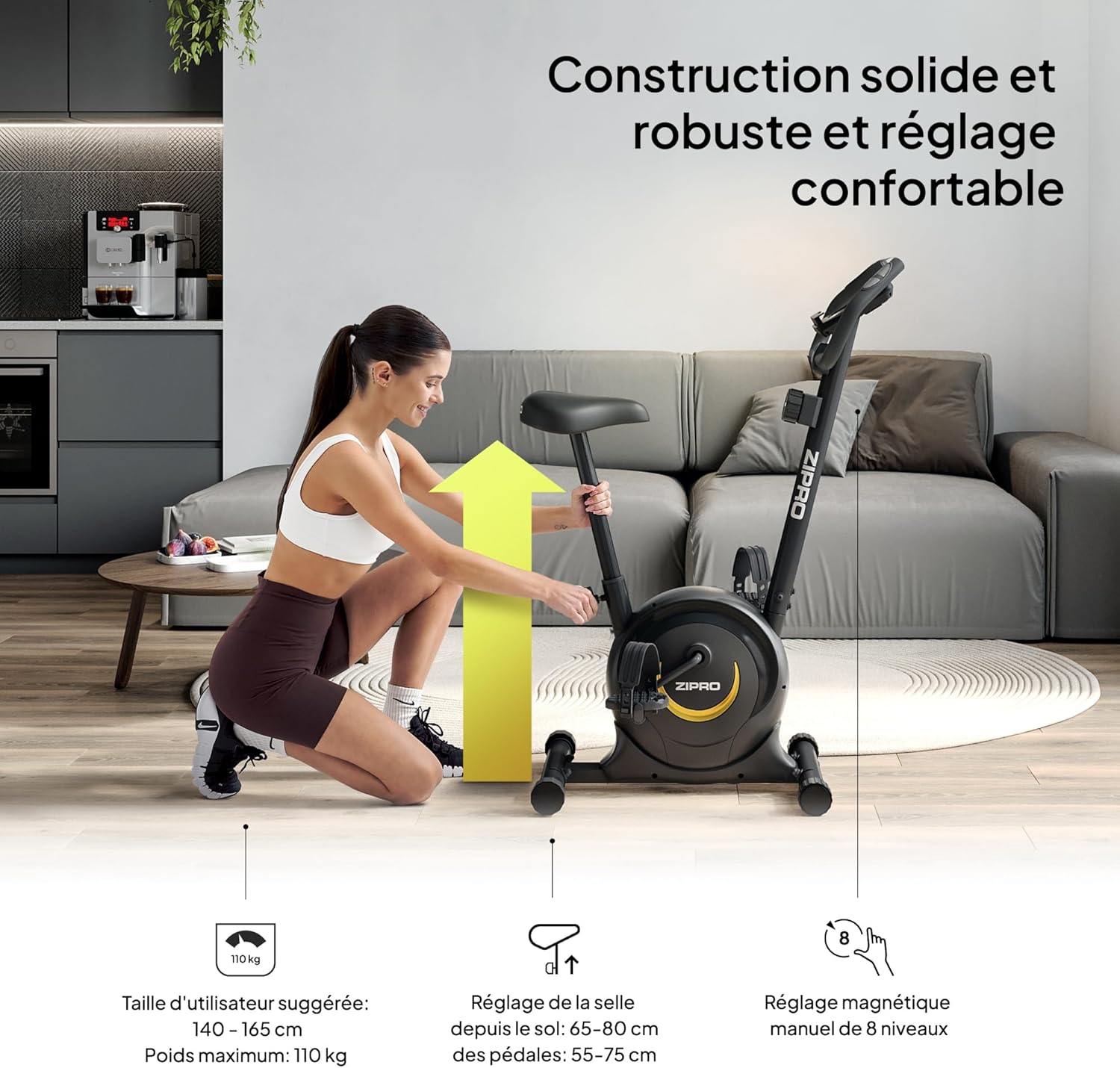
Figure 4: Proper seat height ensures comfort and efficiency.
- სახელურის პოზიცია: The handlebars can be adjusted for height to provide a comfortable riding posture. Ensure you can reach them without straining.
- წინააღმდეგობის დონე: The magnetic resistance system offers 8 levels. Start with a lower level (1-2) and gradually increase as your fitness improves. The resistance knob is located below the console.

Figure 5: Adjusting the 8-level magnetic resistance.
ოპერაციული ინსტრუქციები
Your fitness bike features an intuitive console to track your workout data:
კონსოლის ფუნქციები:

Figure 6: Console display showing Time, Speed, Calories, Pulse, and Distance.
- MODE ღილაკი: Press to cycle through display functions: Time, Speed, Distance, Calories, Pulse, and Odometer (ODO). Hold to reset values.
- SET ღილაკი: Used to set target values for Time, Distance, or Calories.
- გადატვირთვის ღილაკი: Press to clear current workout data.
- სკანირების ფუნქცია: ავტომატურად გადადის ყველა დისპლეის ფუნქციაში ყოველ რამდენიმე წამში.
- პულსის სენსორები: Grip the metal plates on the handlebars to measure your heart rate. Your pulse will be displayed on the console.
ვარჯიშის დაწყება:
- Sit on the saddle and place your feet securely in the pedal straps.
- Adjust the resistance to your desired level using the tension control knob.
- Begin pedaling. The console will automatically activate and start tracking your workout.
- გამოიყენეთ MODE ღილაკი view different metrics or the SCAN function for automatic cycling.
- To measure pulse, firmly grip the pulse sensors on the handlebars.

Figure 7: Integrated mobile device holder for convenience.
მოვლა
Regular maintenance ensures the longevity and safe operation of your fitness bike:
- დასუფთავება: გაასუფთავეთ ველოსიპედი რეკლამითamp ყოველი გამოყენების შემდეგ ნაჭერი ოფლისა და მტვრის მოსაშორებლად. არ გამოიყენოთ აბრაზიული საწმენდი საშუალებები.
- ინსპექტირება: პერიოდულად შეამოწმეთ ყველა ჭანჭიკის, თხილის და მოძრავი ნაწილის სიმტკიცე. მოუჭირეთ ყველა ფხვიერი კომპონენტი.
- შეზეთვა: The magnetic resistance system is generally maintenance-free. However, if you notice any squeaking from moving parts, apply a small amount of silicone-based lubricant.
- შენახვა: Store the bike in a dry, cool place away from direct sunlight and extreme temperatures. The integrated transport wheels allow for easy relocation.

Figure 8: Transport wheels for easy movement and storage.
პრობლემების მოგვარება
| პრობლემა | შესაძლო მიზეზი | გამოსავალი |
|---|---|---|
| კონსოლი მონაცემებს არ აჩვენებს. | Batteries are dead or incorrectly installed. Loose connection. | Replace batteries (2x AAA). Check all cable connections to the console. |
| ჭრიალის ან ღრჭიალის ხმაური. | Loose bolts. Parts need lubrication. | Tighten all visible bolts. Apply silicone lubricant to moving joints if necessary. |
| წინააღმდეგობა არ იცვლება. | წინააღმდეგობის კაბელი გათიშული ან დაზიანებულია. | Check the connection of the resistance cable to the knob and the main unit. Contact support if damaged. |
| არასტაბილურია გამოყენების დროს. | Bike not on a level surface. Stabilizer caps not adjusted. | Ensure the bike is on a flat surface. Adjust the leveling caps on the stabilizers until stable. |
სპეციფიკაციები
| ფუნქცია | დეტალი |
|---|---|
| ბრენდი | ZIPRO |
| მოდელის სახელი | zipro (Model Number: 5941659) |
| წინააღმდეგობის მექანიზმი | მაგნიტური |
| წინააღმდეგობის დონეების რაოდენობა | 8 |
| მაქსიმალური წონის რეკომენდაცია | 110 კგ (242 ფუნტი) |
| პროდუქტის ზომები (D x W x H) | 35.04" x 17.32" x 43.31" (89cm D x 44cm W x 110cm H) |
| ნივთის წონა | 16.5 კგ (36.3 ფუნტი) |
| მასალა | ნახშირბადოვანი ფოლადი |
| დენის წყარო | ბატარეით მუშაობს (კონსოლისთვის) |
| რეკომენდებული გამოყენება | შიდა |
| განსაკუთრებული თვისებები | გავლილი მანძილის მონიტორი |
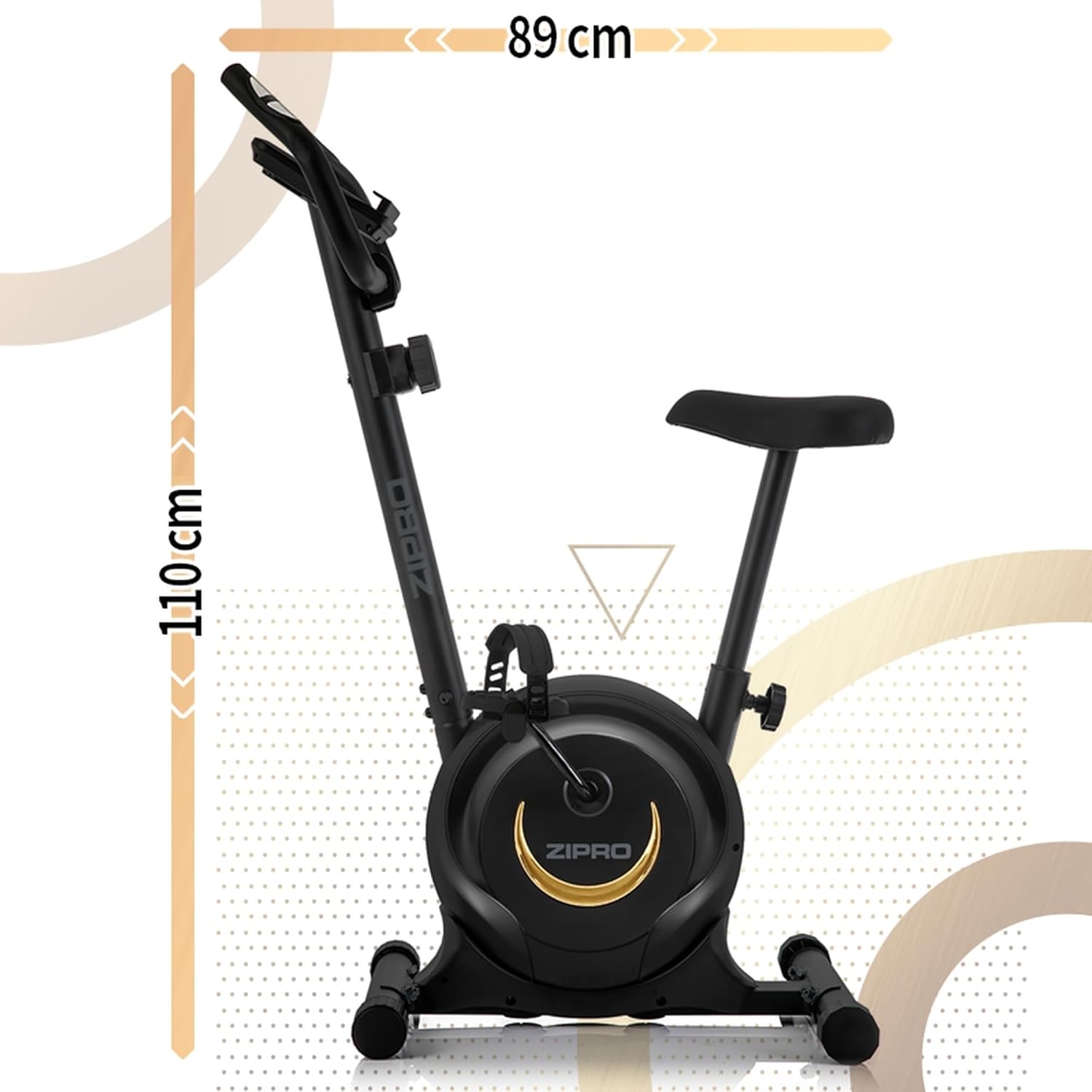
სურათი 9: პროდუქტის ზომები სივრცის დაგეგმარებისთვის.
გარანტია და მხარდაჭერა
For warranty information, technical support, or to order replacement parts, please refer to the warranty card included with your product or visit the official ZIPRO webსაიტი. შეინახეთ თქვენი შესყიდვის ქვითარი შეძენის დასადასტურებლად.


