შესავალი
Thank you for choosing the SUNOL GM20 True Wireless Earbuds. This manual provides detailed instructions on how to set up, operate, and maintain your earbuds to ensure optimal performance and longevity. Please read this manual thoroughly before using the product.
პროდუქტი დასრულდაview

Image: The GM20 True Wireless Earbuds in orange, shown with their matching charging case. The charging case features an LED display indicating battery percentage.
The GM20 True Wireless Earbuds are designed for a superior audio experience with advanced features:
- Bluetooth 5.3 ტექნოლოგია: Ensures faster pairing, more stable connection, and lower power consumption with an effective range of up to 10 meters.
- ინტეგრირებული მიკროფონი: High-quality microphone with environmental noise reduction for clear hands-free calls.
- გაფართოებული დაკვრა: Up to 48 hours of total playback time with the 600mAh charging case, which can recharge the earbuds four times.
- LED ეკრანი: The charging case features an LED display to show the power levels of both the earbuds and the charging case.
- წყალგაუმტარი დიზაინი: IPX8 waterproof nano-coating makes the earbuds suitable for various activities, including sports.
- კომფორტული მორგება: Ergonomic in-ear design with multiple ear tip sizes for prolonged comfortable wear.
რა არის ყუთში
Upon opening your GM20 True Wireless Earbuds package, you should find the following items:
- GM20 True Wireless Earbuds (Left and Right)
- დამუხტვის ქეისი
- დამტენი კაბელი
- Multiple sizes of Ear Tips
- მომხმარებლის სახელმძღვანელო (ეს დოკუმენტი)
დაყენება
1. ყურსასმენებისა და ქეისის დატენვა
პირველი გამოყენების წინ დარწმუნდით, რომ ყურსასმენებიც და დამტენიც სრულად არის დატენილი.
- Place the earbuds into the charging case. Ensure they are correctly seated; the LED display on the case will show charging status.
- Connect the charging cable to the charging port on the case and to a USB power source. The LED display will indicate the charging progress of the case.
- A full charge for the case typically takes a few hours. The earbuds will charge automatically when placed inside the powered case.

Image: The GM20 charging case displaying "100" on its LED screen, indicating a full charge. An earbud is shown next to it, ready for use.
2. თქვენს მოწყობილობასთან დაწყვილება (ერთსაფეხურიანი დაწყვილება)
The GM20 earbuds feature automatic pairing for convenience.
- საწყისი დაწყვილება:
- გახსენით დამტენი ქეისი და ამოიღეთ ორივე ყურსასმენი. ისინი ავტომატურად ჩაირთვება და დაწყვილების რეჟიმში გადავა.
- თქვენს მოწყობილობაზე (სმარტფონი, პლანშეტი და ა.შ.) ჩართეთ Bluetooth.
- ძიება Bluetooth devices and select "GM20 TWS" from the list.
- დაკავშირების შემდეგ, თქვენ გაიგონებთ დადასტურების სიგნალს და ყურსასმენები მზად იქნება გამოსაყენებლად.
- ხელახალი დაწყვილება: The earbuds will automatically connect to the last paired device when taken out of the charging case.
- If the earbuds do not connect automatically, ensure Bluetooth is enabled on your device and select "GM20 TWS" from your Bluetooth settings.
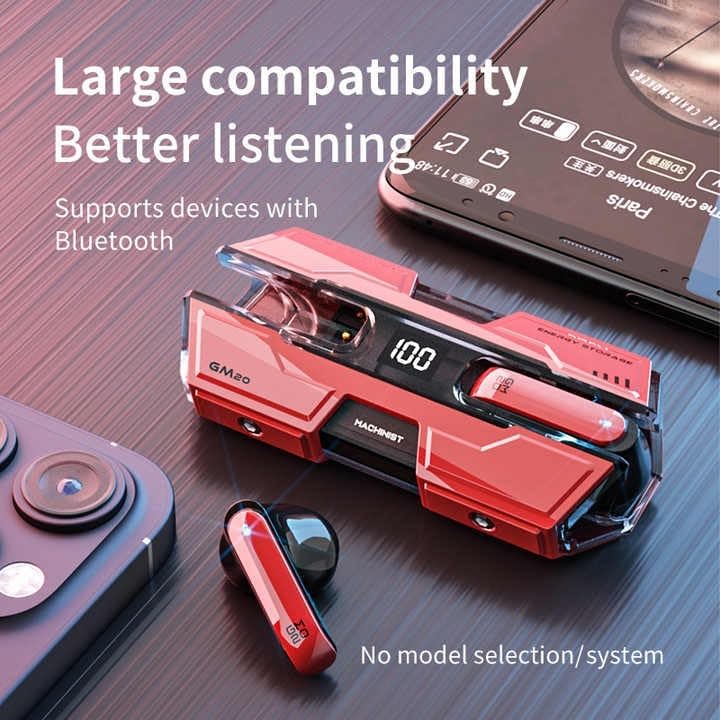
Image: The GM20 earbuds and charging case positioned near a smartphone, emphasizing their broad compatibility with Bluetooth-enabled devices.
ოპერაციული ინსტრუქციები
ყურსასმენის კონტროლი
The GM20 earbuds feature a multifunction button on each earbud for easy control of audio playback and calls.
| მოქმედება | ფუნქცია |
|---|---|
| ერთჯერადი დაჭერით (მარცხენა/მარჯვენა ყურსასმენი) | მუსიკის დაკვრა/პაუზა, ზარის პასუხი/ზარის დასრულება |
| ორმაგი დაჭერა (მარცხენა ყურსასმენი) | წინა სიმღერა |
| ორმაგი დაჭერა (მარჯვენა ყურსასმენი) | შემდეგი სიმღერა |
| გრძელი პრესა (2 წამი) | ზარის უარყოფა, ხმოვანი ასისტენტის გააქტიურება |
| გრძელი პრესა (5 წამი) | ჩართვა/გამორთვა |
ყურსასმენების ტარება
For optimal sound quality and comfort, ensure the earbuds are properly seated in your ears. Experiment with the different sizes of ear tips provided to find the best fit for your ears.

სურათი: აფეთქებული view diagram of an earbud, illustrating its internal components such as the 13mm moving coil and composite diaphragm, which contribute to high-resolution sound.
მოვლა
Proper maintenance will extend the life of your GM20 earbuds.
- დასუფთავება: ყურსასმენები და დამტენი ქეისი რეგულარულად გაწმინდეთ რბილი, მშრალი, ბუსუსების გარეშე ქსოვილით. არ გამოიყენოთ აბრაზიული საწმენდები ან გამხსნელები.
- წყლის წინააღმდეგობა: The earbuds are IPX8 waterproof, meaning they are protected against prolonged immersion in water. However, the charging case is not waterproof. Avoid exposing the charging case to liquids. Always ensure earbuds are dry before placing them back in the charging case.
- შენახვა: როდესაც ყურსასმენები არ იყენებთ, მათი დასაცავად და დამუხტვის შესანარჩუნებლად, ისინი დამტენ ქეისში შეინახეთ. შეინახეთ გრილ, მშრალ ადგილას, ექსტრემალური ტემპერატურისგან მოშორებით.
- ბატარეის მოვლა: To preserve battery life, avoid fully discharging the earbuds and charging case frequently. Charge them regularly, even if not in constant use.
პრობლემების მოგვარება
If you encounter issues with your GM20 earbuds, try the following solutions:
- ყურსასმენები არ წყვილდება:
- დარწმუნდით, რომ ორივე ყურსასმენი სრულად დატენულია.
- გამორთეთ Bluetooth თქვენს მოწყობილობაზე, შემდეგ კი ხელახლა ჩართეთ.
- Forget "GM20 TWS" from your device's Bluetooth settings and attempt to re-pair.
- Place earbuds back in the case, close the lid, wait a few seconds, then open and try again.
- ხმა არ აქვს ან ხმა დაბალია:
- შეამოწმეთ ხმის დონე როგორც თქვენს მოწყობილობაზე, ასევე ყურსასმენებზე.
- დარწმუნდით, რომ ყურსასმენები სწორად არის დაკავშირებული თქვენს მოწყობილობასთან.
- ყურსასმენის დინამიკის ბადედან გაწმინდეთ ნებისმიერი ნარჩენი.
- Sound distortion or crackling:
- დარწმუნდით, რომ ყურსასმენები თქვენი მოწყობილობის Bluetooth-ის 10 მეტრიან დიაპაზონშია.
- Reduce interference by moving away from other wireless devices or strong electromagnetic fields.
- სცადეთ ყურსასმენების ხელახლა დაწყვილება.
- ყურსასმენები არ იტენება:
- დარწმუნდით, რომ დამტენის კაბელი საიმედოდ არის დაკავშირებული როგორც კორპუსთან, ასევე კვების წყაროსთან.
- შეამოწმეთ, ქეისზე დამტენი პორტი სუფთაა თუ არა და ნარჩენებისგან თავისუფალი.
- სცადეთ სხვა დამტენი კაბელი ან კვების ადაპტერი.
სპეციფიკაციები
| ფუნქცია | დეტალი |
|---|---|
| მოდელის სახელი | K8 |
| Bluetooth ვერსია | 5.3 |
| Bluetooth დიაპაზონი | 10 მეტრი |
| ელემენტის ხანგრძლივობა (ყურსასმენები) | Approx. 8-10 hours (single charge) |
| ელემენტის ხანგრძლივობა (დამტენი ქეისით) | 48 საათამდე |
| დამუხტვის კეის ბატარეის ტევადობა | 600 mAh |
| წყლის წინააღმდეგობის დონე | IPX8 (მხოლოდ ყურსასმენები) |
| სიხშირის პასუხი | 20 ჰც - 20 კჰც |
| წინაღობა | 32 Ohm |
| კონტროლის მეთოდი | შეხება/ღილაკზე |
| მასალა | აკრილონიტრილის ბუტადიენ სტირინი (ABS) |
| ნივთის წონა | 14.4 უნცია (სულ შეფუთვა) |
გარანტია და მხარდაჭერა
For warranty information and customer support, please refer to the documentation included with your purchase or visit the official SUNOL website. If you experience any issues not covered in this manual, please contact SUNOL customer service for assistance.
გთხოვთ, შეინახოთ თქვენი შეძენის მტკიცებულება გარანტიის პრეტენზიებისთვის.


