შესავალი
This manual provides instructions for the Richmat HJH55 Remote Control and HJC18 Control Box combination package, designed for adjustable bed bases. This package ensures compatibility between the remote and control box. Please read these instructions carefully before installation and operation to ensure proper functionality and compatibility with your existing adjustable bed system.
It is crucial to verify that the ports and button layout on this new control box and remote match your previous components to ensure proper operation.
პაკეტის შიგთავსი
- 1 x Richmat HJH55 Remote Control
- 1 x Richmat HJC18 Control Box

Image: The Richmat HJH55 remote control and HJC18 control box, shown together as a complete package.
დაყენება და ინსტალაცია
- შეამოწმეთ თავსებადობა: Before installation, carefully compare the ports on the HJC18 Control Box with your existing control box. Ensure all necessary connections (motor cables, power cable) align. Also, confirm the remote control's button layout matches your previous remote if you are replacing an older unit. This product is Model B.
- დენის გათიშვა: Unplug your adjustable bed base from the main power outlet before proceeding with any installation steps.
- Remove Old Components (if applicable): If replacing an existing control box and remote, carefully disconnect all cables from the old control box. Note the position of each cable for easier installation of the new unit.
- Install New Control Box: Connect the motor cables from your bed base to the corresponding ports on the HJC18 Control Box. The ports are typically color-coded or labeled. Ensure a secure connection for each cable.

სურათი: ახლო ხედი view of the HJC18 control box, showing the various color-coded ports for motor connections and a USB port. The "Reset Coding" button is also visible.
- დაკავშირება ძალა: Plug the power cable from your bed base into the HJC18 Control Box.
- ჩადეთ ელემენტები დისტანციურ პულტში: The HJH55 Remote Control requires 2xAA batteries (not included). Open the battery compartment on the back of the remote and insert the batteries, observing the correct polarity (+/-).
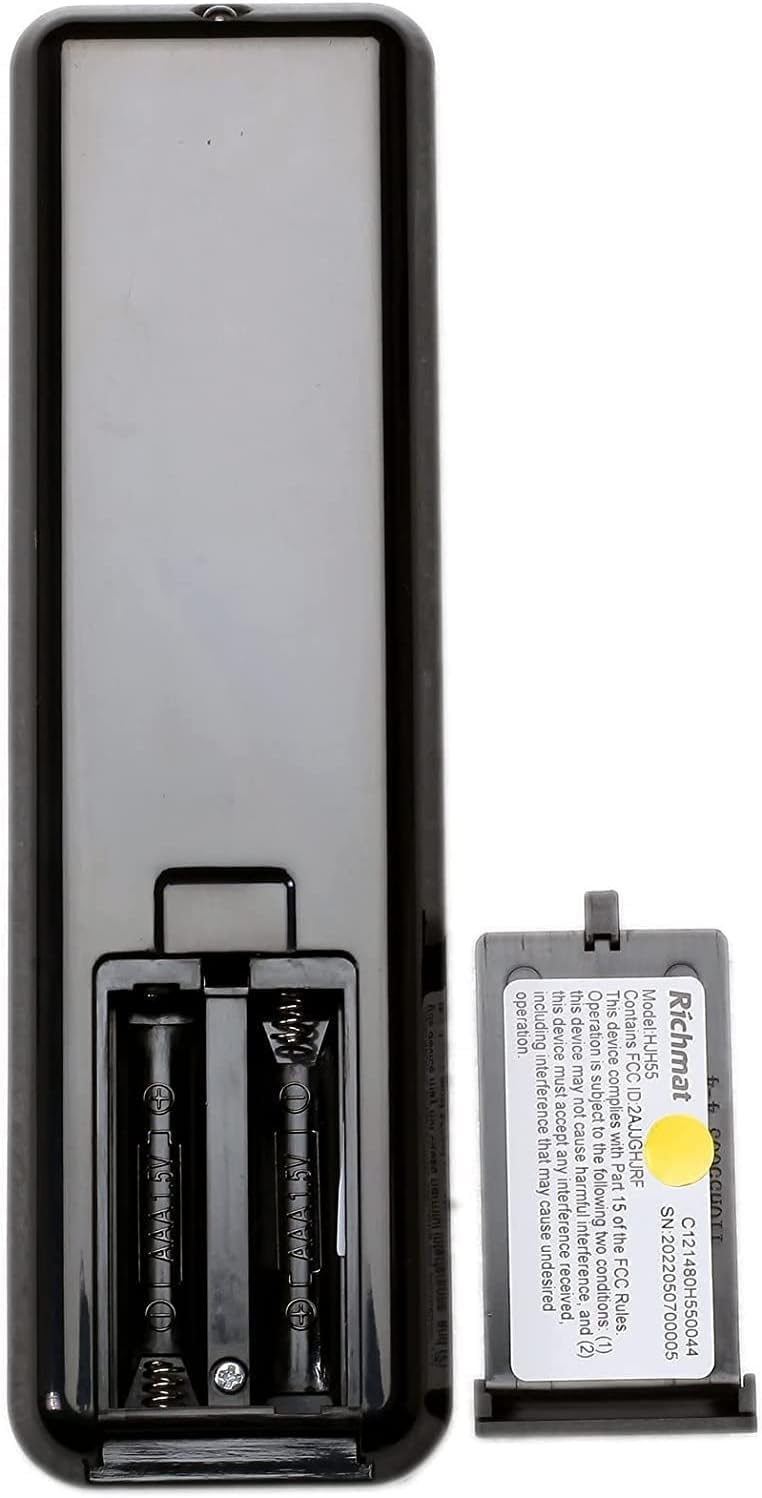
სურათი: უკანა მხარე view of the HJH55 remote control, showing the open battery compartment designed for two AA batteries. A Richmat label with model and serial information is also visible.
- დისტანციური მართვის დაწყვილება: The remote control and control box are guaranteed to pair with each other, but may not come pre-paired. Follow these steps to pair them:
- დარწმუნდით, რომ საკონტროლო ბლოკი ჩართულია.
- Locate the "Reset Coding" button on the HJC18 Control Box (refer to image above).
- Press and hold the "Reset Coding" button on the control box for approximately 3-5 seconds until an indicator light on the control box flashes or a sound is heard.
- Within 10 seconds of the indicator flashing, press and hold any button on the HJH55 Remote Control (e.g., the "FLAT" button or "HEAD" up button) until the indicator light on the control box stops flashing or a confirmation sound is heard.
- Test the remote control by pressing various buttons to ensure the bed base responds correctly.
- დენის კავშირი: Once all connections are secure and pairing is complete, plug the adjustable bed base back into the main power outlet.
ოპერაციული ინსტრუქციები
The HJH55 Remote Control provides intuitive control over your adjustable bed base. Familiarize yourself with the button functions:

სურათი: დეტალური view of the HJH55 remote control, highlighting key buttons such as "ANTI SNORE", "M3" (memory preset), and "FLAT" with red circles.
- HEAD Up/Down Arrows: საწოლის თავის ნაწილის ზევით ან ქვევით რეგულირება ხდება.
- FOOT Up/Down Arrows: საწოლის ფეხების მონაკვეთის ზევით ან ქვევით რეგულირება ხდება.
- ბინა: საწოლს სრულიად ბრტყელ მდგომარეობაში აბრუნებს.
- ხვრინვის საწინააღმდეგო: Activates a pre-programmed position designed to alleviate snoring.
- ტელევიზორი: Moves the bed to a comfortable position for watching TV.
- ZG (ნულოვანი გრავიტაცია): Moves the bed to a zero-gravity position, which can relieve pressure on the back.
- M1, M2, M3: Memory preset buttons. To set a preset, adjust the bed to your desired position, then press and hold the desired memory button (M1, M2, or M3) until the bed slightly moves or a confirmation sound is heard. To recall a preset, simply press the corresponding memory button.
- 10 წთ / 20 წთ: Timer functions, likely for massage or other timed features if supported by your bed base.
- ტაიმერი / ყველა გამორთულია: Turns off any active timer or function.
- ნათურის ხატულა: Activates an under-bed light or other integrated lighting feature if available.
- რეჟიმი: Cycles through different modes or functions, if applicable.
მოვლა
- დასუფთავება: Wipe the remote control and control box with a soft, dry cloth. Do not use liquid cleaners or abrasive materials.
- ბატარეის გამოცვლა: Replace the AA batteries in the remote control when the buttons become unresponsive or the indicator light (if present) dims. Always replace both batteries at the same time.
- საკაბელო მენეჯმენტი: Ensure all cables connected to the control box are not pinched or tangled, which could lead to damage or malfunction.
- გარემო პირობები: Keep the control box and remote away from excessive moisture, heat, and direct sunlight.
პრობლემების მოგვარება
| პრობლემა | შესაძლო მიზეზი | გამოსავალი |
|---|---|---|
| დისტანციური მართვა არ რეაგირებს. |
|
|
| Bed base motors not moving. |
|
|
| Bed moves in wrong direction or erratically. |
|
|
სპეციფიკაციები
| ფუნქცია | დეტალი |
|---|---|
| პროდუქტის მოდელი | B |
| დისტანციური მართვის მოდელი | Richmat HJH55 |
| საკონტროლო ყუთის მოდელი | Richmat HJC18 |
| Input (Control Box) | DC 24V-30V, 8A Max. IP20 |
| Output (Control Box) | DC 24-30V |
| Duty Cycle (Control Box) | 10%, Max. 2min ON/18min OFF |
| დისტანციური ბატარეის ტიპი | 2 x AA ბატარეები (არ შედის) |
| დაკავშირების ტექნოლოგია | ინფრაწითელი |
| თავსებადი მოწყობილობები | რეგულირებადი საწოლის ბაზა |
| მწარმოებელი | რიჩმათი |
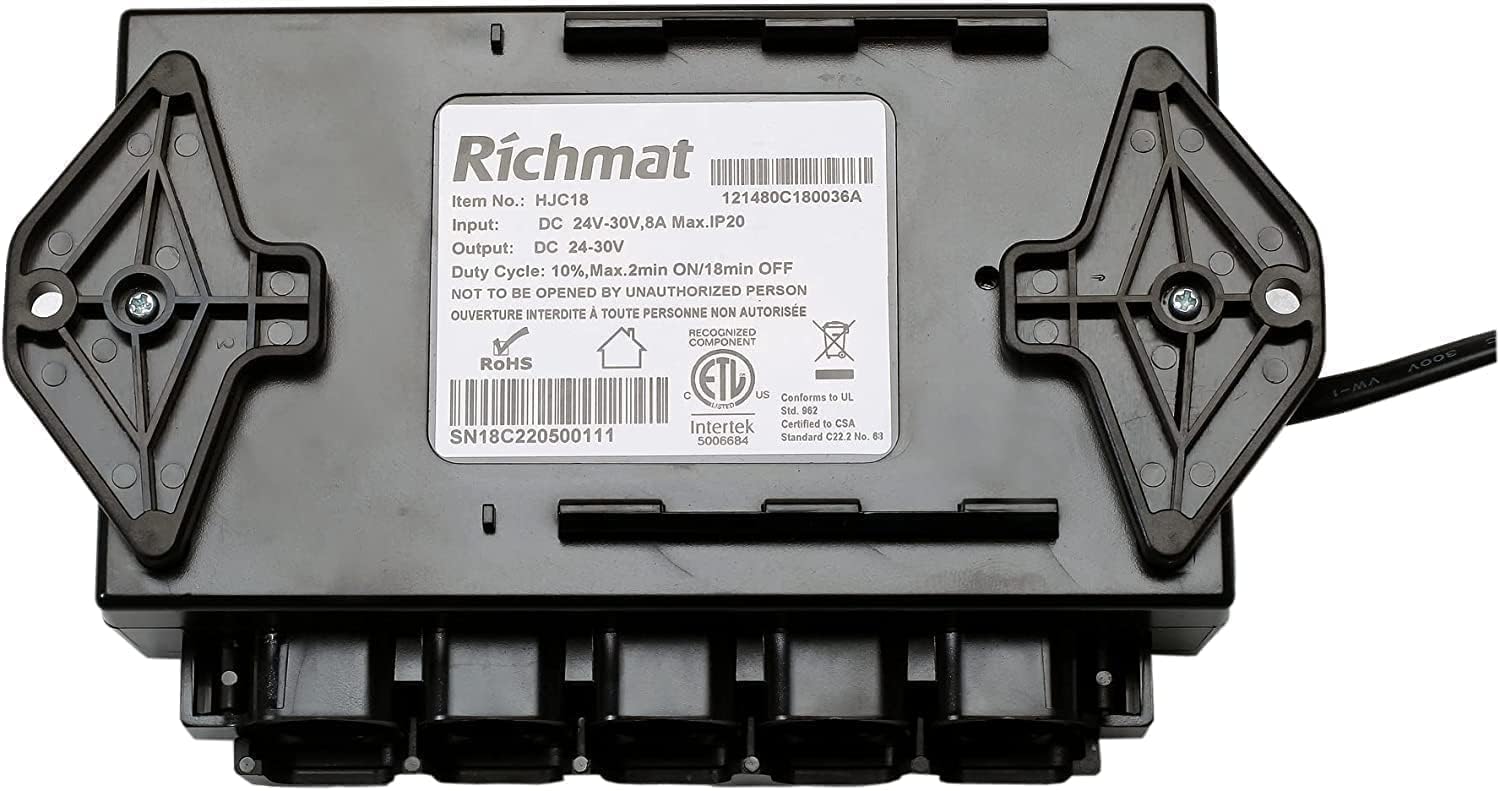
Image: The underside of the HJC18 control box, displaying the Richmat product label with detailed specifications including item number, input/output voltage, current, duty cycle, and certifications.
გარანტია და მხარდაჭერა
For assistance with setup, troubleshooting, or general inquiries regarding your Richmat HJH55 Remote and HJC18 Control Box, please contact the seller or manufacturer directly. Refer to your purchase documentation for specific warranty details.
გარანტიის შემთხვევაში, რეკომენდებულია შეძენის დამადასტურებელი დოკუმენტის შენახვა.


