1. შესავალი
Thank you for choosing the Takstar MS-189 Table Conference Microphone. This manual provides detailed instructions for the proper setup, operation, and maintenance of your microphone. The MS-189 is a unidirectional condenser microphone designed for clear vocal pickup in conference settings, computer use, and other desktop applications. Please read this manual thoroughly before use to ensure optimal performance and longevity of the product.
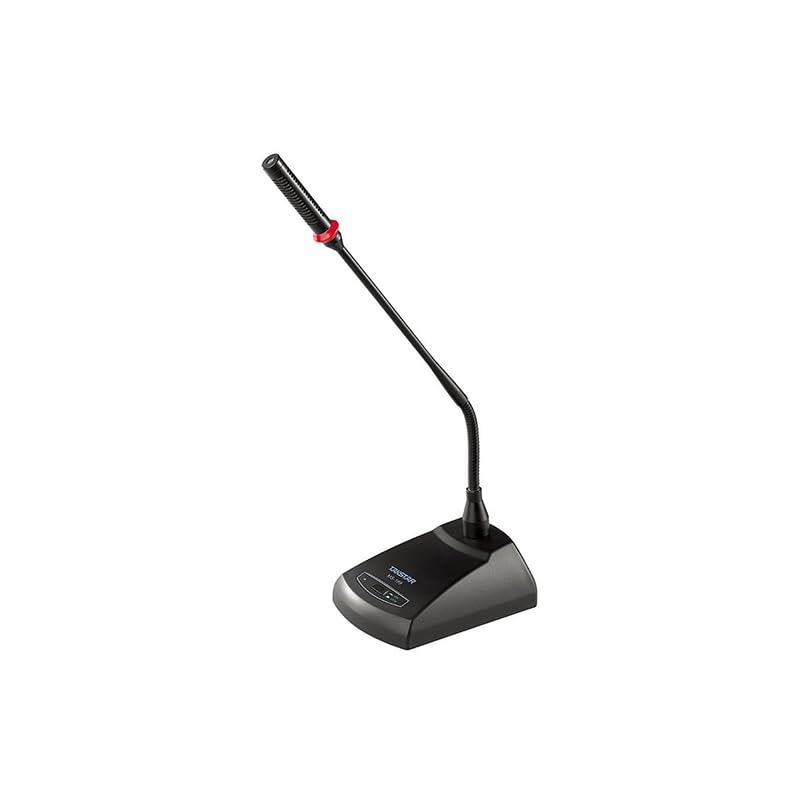
სურათი 1.1: The Takstar MS-189 Table Conference Microphone. This image displays the microphone with its gooseneck design and base unit, ready for desktop placement.
2. პროდუქტის მახასიათებლები
- Back Electret Condenser Transducer: Ensures high-quality audio capture.
- High Sensitivity and Low Noise: Delivers clear and crisp sound reproduction.
- Clear and Bright Vocal Pick-up: Optimized for speech and vocal applications.
- On/Off Button with LED Indicator: Located on both the base and gooseneck for easy control and status indication.
- მოქნილი დენის პარამეტრები: Can be powered by 9-52V phantom power or two 1.5V AA batteries.
- ცალმხრივი პოლარული ნიმუში: ფოკუსირებულია ხმაზე წინა მხრიდან, ამცირებს ფონის ხმაურს.
- Durable Gooseneck Design: Allows for flexible positioning and adjustment.
3. პაკეტის შიგთავსი
ყუთის გახსნისას, გთხოვთ, შეამოწმოთ შეფუთვის შიგთავსი, რათა დარწმუნდეთ, რომ ყველა ნივთი ადგილზეა:
- Takstar MS-189 Table Conference Microphone (Gooseneck and Base Unit)
- მომხმარებლის სახელმძღვანელო (ეს დოკუმენტი)
Note: XLR cable and AA batteries are typically sold separately and may not be included.
4. დაყენების ინსტრუქციები
4.1 მიკროფონის ჩართვა
The MS-189 microphone offers two power options:
- Phantom Power (9-52V): If your audio mixer, interface, or computer sound card provides phantom power, connect the microphone using an XLR cable. The microphone will draw power directly from the connected device. Ensure phantom power is enabled on your device.
- AA Batteries (2 x 1.5V): If phantom power is not available, insert two 1.5V AA batteries into the battery compartment located on the underside of the microphone base. Ensure correct polarity (+/-) when inserting batteries.
Note: Do not use both phantom power and batteries simultaneously. The microphone will prioritize phantom power if both are connected.
4.2 მოწყობილობასთან დაკავშირება
The MS-189 connects via an XLR connector.
- Locate the XLR output port on the microphone base.
- Connect one end of a standard XLR cable (not included) to the microphone's XLR output.
- Connect the other end of the XLR cable to an available XLR input on your audio mixer, audio interface, or computer sound card. Ensure the input is compatible with a condenser microphone.
4.3 მიკროფონის განლაგება
Place the microphone on a stable, flat surface. Position the gooseneck so the microphone head is approximately 15-30 cm (6-12 inches) from the speaker's mouth, pointing directly towards them for optimal sound capture.
5. საოპერაციო ინსტრუქციები
5.1 ჩართვა/გამორთვა
Press the ON/OFF button located on the microphone base. The LED indicator will illuminate when the microphone is active. Press the button again to turn off the microphone.
5.2 Adjusting the Gooseneck
Gently bend the flexible gooseneck to adjust the microphone's position and angle. Avoid excessive force to prevent damage.
5.3 Optimal Usage
- For best results, speak directly into the microphone from a consistent distance.
- Minimize background noise in the environment to enhance clarity.
- Monitor audio levels on your connected device to prevent clipping or distortion.
6. მოვლა
- დასუფთავება: Use a soft, dry cloth to clean the microphone's exterior. Do not use liquid cleaners or solvents.
- შენახვა: When not in use, store the microphone in a dry, dust-free environment. Avoid extreme temperatures and humidity.
- ბატარეის გამოცვლა: If using battery power, replace AA batteries when the LED indicator dims or audio quality degrades. Remove batteries if the microphone will not be used for an extended period to prevent leakage.
7. Დიაგნოსტიკა
| პრობლემა | შესაძლო მიზეზი | გამოსავალი |
|---|---|---|
| ხმის გამომავალი არ არის |
|
|
| Poor sound quality (low volume, distortion) |
|
|
| LED ინდიკატორი არ ანათებს |
|
|
8. სპეციფიკაციები
| მოდელი | MS-189 |
| Transducer პრინციპი | უკანა ელექტრული კონდენსატორი |
| Directivity Characteristic (Polar Pattern) | ცალმხრივი |
| სიხშირის პასუხი | 100Hz-16kHz |
| მგრძნობელობა | -33dB±3dB (0dB=1V/Pa 1kHz) |
| გამომავალი წინაღობა | 340Ω±30% (1kHz-ზე) |
| დენის მოთხოვნები | 9-52V phantom power or 2 x 1.5V AA battery |
| დაკავშირების ტექნოლოგია | XLR |
| კონექტორის ტიპი | XLR |
| თავსებადი მოწყობილობები | ლეპტოპი, პერსონალური კომპიუტერი |
| მიკროფონის ფორმის ფაქტორი | Gooseneck, Table Array |
| ელემენტის ზომები (L x W x H) | 15 x 15 x 15 სმ |
| წმინდა წონა | 500გრ |
| ფერი | შავი |
9. გარანტია და მხარდაჭერა
For warranty information and technical support, please refer to the warranty card included with your product or visit the official Takstar website. You may also contact your local distributor or retailer for assistance.
Visit the Takstar Store on Amazon პროდუქტის შესახებ დამატებითი ინფორმაციისა და მხარდაჭერის რესურსებისთვის.


