1. შესავალი
This manual provides essential information for the proper setup, operation, and maintenance of your Newgen Medicals FBT-115 Fitness Tracker. Please read this manual thoroughly before using the device to ensure optimal performance and safety.
The FBT-115 is a versatile fitness tracker designed to monitor various health and activity metrics, helping you stay informed about your well-being. It features a large color display, Bluetooth connectivity, and a range of sensors for comprehensive data collection.
2. პროდუქტი დასრულდაview
ძირითადი მახასიათებლები:
- Large 1.08-inch IPS color display (128 x 220 px resolution)
- Bluetooth 4.0 for smartphone/tablet connection (up to 10m range)
- Health Monitoring: ECG (PPG), heart rate, blood pressure, blood oxygen saturation, body temperature
- Fitness Tracking: Step count, distance, calories burned, activity reminders, sleep analysis
- 3 adjustable sport modes: Running, Cycling, Fitness
- Mobile Notifications: Calls, SMS, email, social media (Facebook, Twitter)
- Additional Functions: Weather display, remote camera shutter, high temperature/heart rate alerts, smartphone locator
- Water Resistance: IP67 rating
- Battery: 105 mAh Lithium-ion, up to 5 days active use, 10 days standby
- Free companion app for Android and iOS

Image: The FBT-115 fitness tracker displaying its key features through icons, including heart rate, blood oxygen, body temperature, step counting, push notifications, IP67 water resistance, and battery life.
3. დაყენება
3.1 მოწყობილობის დატენვა
- Gently remove the strap from one end of the tracker to reveal the integrated USB charging connector.
- Insert the USB connector into any standard USB-A port (e.g., computer, USB wall adapter, power bank). An AC adapter is not included.
- The tracker's screen will display a charging indicator. A full charge typically takes 1-2 hours.
- Once fully charged, remove the tracker from the USB port and reattach the strap securely.
3.2 Installing the Companion App
The FBT-115 requires a companion application for full functionality and data synchronization. The app is available for both Android and iOS devices.
- Scan the QR code provided in the quick start guide (if available) or search for the official Newgen Medicals fitness app in your device's app store (Google Play Store for Android, Apple App Store for iOS).
- ჩამოტვირთეთ და დააინსტალირეთ აპლიკაცია.
- Follow the on-screen instructions to create an account and set up your personal profile (age, height, weight, gender) for accurate data tracking.
3.3 თქვენს სმარტფონთან დაწყვილება
- დარწმუნდით, რომ თქვენი სმარტფონის Bluetooth ჩართულია.
- Open the Newgen Medicals companion app on your smartphone.
- Navigate to the device pairing section within the app (usually found under 'Device', 'My Device', or 'Settings').
- The app will search for available devices. Select 'FBT-115' or the corresponding device ID when it appears.
- Confirm the pairing request on both your smartphone and the fitness tracker if prompted.
- Once paired, the tracker's time and date will synchronize with your phone, and data will begin to transfer.

Image: The FBT-115 fitness tracker displaying health metrics, positioned next to a smartphone showing the companion application interface with synchronized data.
4. საოპერაციო ინსტრუქციები
4.1 ეკრანის ნავიგაცია
The FBT-115 features a touch-sensitive area or button (depending on specific model revision) at the bottom of the display for navigation:
- მოკლე პრესა: Tap the touch area to cycle through different display screens (e.g., time, steps, heart rate, sport modes).
- გრძელი პრესა: Press and hold the touch area to activate a function or enter a sub-menu (e.g., start a sport mode, confirm a setting).
4.2 ჯანმრთელობის მონიტორინგი
The tracker continuously monitors various health parameters. For accurate readings, ensure the tracker is worn snugly on your wrist, about one finger's width from your wrist bone.
- Heart Rate (HR) / ECG (PPG): Navigate to the heart rate screen. The tracker will automatically begin measuring. The app provides detailed ECG (PPG) data.
- Blood Pressure (BP): Access the blood pressure screen. Remain still during measurement.
- სისხლის ჟანგბადით გაჯერება (SpO2): Select the SpO2 screen. Keep your arm steady.
- Სხეულის ტემპერატურა: The tracker provides continuous body temperature monitoring. Navigate to the temperature screen to view მიმდინარე კითხვა.
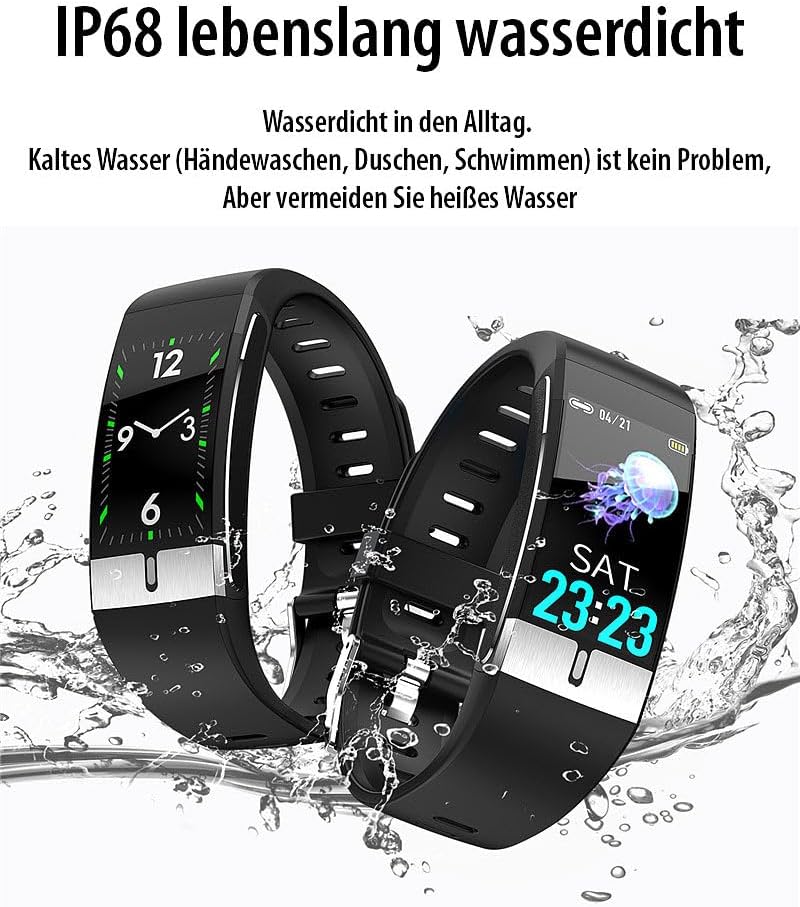
Image: A visual representation of multiple FBT-115 trackers on wrists, showcasing their ability to display various health metrics such as heart rate, blood pressure, and blood oxygen levels.

Image: The FBT-115 tracker displaying a body temperature reading, alongside a smartphone screen illustrating the historical temperature data available within the companion application.
4.3 აქტივობის თვალყურის დევნება
- ნაბიჯები, მანძილი, კალორიები: ეს მაჩვენებლები ავტომატურად კონტროლდება მთელი დღის განმავლობაში. View them by cycling through the main display screens.
- სპორტული რეჟიმები: Navigate to the 'Sport' menu. Long press to enter. Select your desired activity (Running, Cycling, Fitness) and long press again to start tracking. Long press to end the activity.
- ძილის ანალიზი: Wear the tracker to bed. It will automatically monitor your sleep patterns. Detailed analysis is available in the companion app.
- Activity Reminders: Set sedentary reminders in the app to prompt you to move after periods of inactivity.
4.4 ჭკვიანი შეტყობინებები
Once paired with your smartphone, the FBT-115 can display notifications:
- Ensure notification access is granted to the companion app in your phone's settings.
- Configure which app notifications you wish to receive on the tracker via the companion app settings.
- Incoming calls, SMS, emails, and social media alerts will be displayed on the tracker's screen.
4.5 სხვა ფუნქციები
- ამინდი: Syncs weather information from your phone.
- დისტანციური კამერის ჩამკეტი: In the app, activate the remote camera function. Shake your wrist or tap the tracker to take a photo on your phone.
- Smartphone Locator: If your phone is within Bluetooth range, use this function on the tracker to make your phone ring.

სურათი: ყოვლისმომცველი view of the smartphone application interface, showcasing various health data, settings, and diagnostic reports that can be accessed and managed for the FBT-115 tracker.
5. მოვლა
5.1 დასუფთავება
- Regularly clean your tracker and strap to prevent skin irritation and maintain device functionality.
- გაწმინდეთ მოწყობილობა რბილი, დamp, lint-free cloth. Do not use harsh chemicals or abrasive cleaners.
- დატენვამდე დარწმუნდით, რომ დამტენის კონტაქტები სუფთა და მშრალია.
5.2 წყალგამძლეობა (IP67)
The FBT-115 is rated IP67, meaning it is resistant to dust and can withstand immersion in water up to 1 meter for up to 30 minutes. It is suitable for daily use, such as hand washing, showering, and light rain.
მნიშვნელოვანია:
- Do not use the tracker in hot water, saunas, or steam rooms.
- Avoid prolonged immersion or high-pressure water exposure.
- წყალგამძლეობა მუდმივი მდგომარეობა არ არის და დროთა განმავლობაში ნორმალური ცვეთის გამო შეიძლება შემცირდეს.

Image: Two FBT-115 fitness trackers shown partially submerged in water, illustrating the device's water-resistant capabilities for everyday activities.
6. Დიაგნოსტიკა
- Tracker not turning on: Ensure the device is fully charged. Connect it to a USB power source.
- სმარტფონთან დაწყვილება შეუძლებელია:
- დარწმუნდით, რომ Bluetooth ჩართულია თქვენს ტელეფონზე.
- Make sure the tracker is charged and within 10 meters of your phone.
- Restart both the tracker and your smartphone.
- Check if the app has necessary permissions (location, Bluetooth).
- Inaccurate readings (HR, BP, SpO2, Temp):
- Ensure the tracker is worn snugly on your wrist, not too tight or too loose.
- Avoid movement during measurements.
- Clean the sensor on the back of the tracker.
- Note that fitness trackers are not medical devices and readings are for reference only.
- შეტყობინებები არ ჩანს:
- გადაამოწმეთ Bluetooth კავშირი.
- Check app notification settings on your phone and within the companion app.
- Ensure the companion app is running in the background.
- აპლიკაცია არ ახდენს მონაცემების სინქრონიზაციას:
- Ensure the tracker is connected via Bluetooth to the app.
- Check your phone's internet connection for app updates or cloud sync.
- Restart the app and the tracker.
7. სპეციფიკაციები
| ბრენდი | Newgen Medicals |
| მოდელის ნომერი | ZX5436-944 |
| პროდუქტის დასახელება | FBT-115 Fitness Tracker |
| ჩვენება | 1.08-inch IPS Color (128 x 220 px) |
| დაკავშირება | Bluetooth 4.0 (up to 10m range) |
| ბატარეა | 105 mAh ლითიუმ-იონი |
| ბატარეის ხანგრძლივობა | Up to 5 days (active use), up to 10 days (standby) |
| დამუხტვა | Integrated USB connector |
| წყლის წინააღმდეგობა | IP67 |
| წონა | 25 გრამი |
| თავსებადობა | სმარტფონები (Android, iOS) |
| მახასიათებლები | Time display, GPS (via connected smartphone) |
8. გარანტია და მხარდაჭერა
For warranty information and customer support, please refer to the documentation provided with your purchase or visit the official Newgen Medicals webსაიტი. შეინახეთ შეძენის დამადასტურებელი საბუთი გარანტიასთან დაკავშირებული ნებისმიერი პრეტენზიისთვის.
Please note that fitness trackers are designed for general wellness and fitness purposes. They are not medical devices and should not be used to diagnose, treat, cure, or prevent any disease.


