1. შესავალი
Thank you for choosing the Baseus AeQur G10 TWS Earphones. This manual provides detailed instructions on how to set up, operate, maintain, and troubleshoot your new earphones. Please read this manual thoroughly before using the product to ensure optimal performance and longevity.
2. პაკეტის შიგთავსი
Carefully unpack the box and ensure all items listed below are present and in good condition. If any items are missing or damaged, please contact your retailer.
- Baseus AeQur G10 TWS Earphones (Left and Right)
- დამუხტვის ქეისი
- USB-A/USB-C Wireless Dongle
- USB-C დამტენი კაბელი
- ყურის წვერების სხვადასხვა ზომა
- მომხმარებლის სახელმძღვანელო (ეს დოკუმენტი)

Image 2.1: Complete package contents of the Baseus AeQur G10 TWS Earphones.
3. პროდუქტი დასრულდაview
Familiarize yourself with the components of your Baseus AeQur G10 TWS Earphones.
3.1 ყურსასმენები
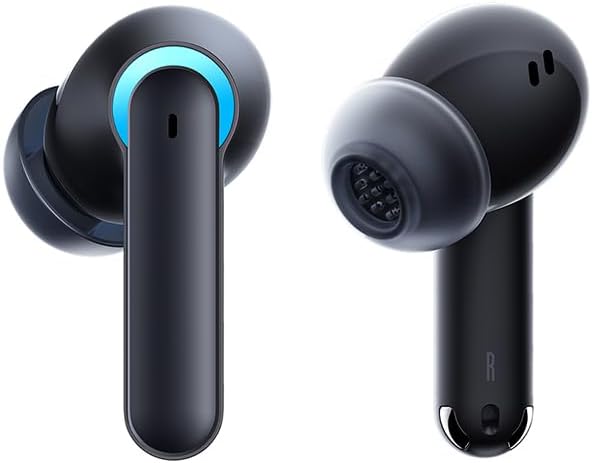
Image 3.1: Left and Right Baseus AeQur G10 Earphones. Each earphone features a touch control area, microphone, and charging contacts.
3.2 დატენვის ქეისი

Image 3.2: Baseus AeQur G10 Earphones in their charging case with the lid open. The case has charging slots for each earphone and an LED indicator for battery status.
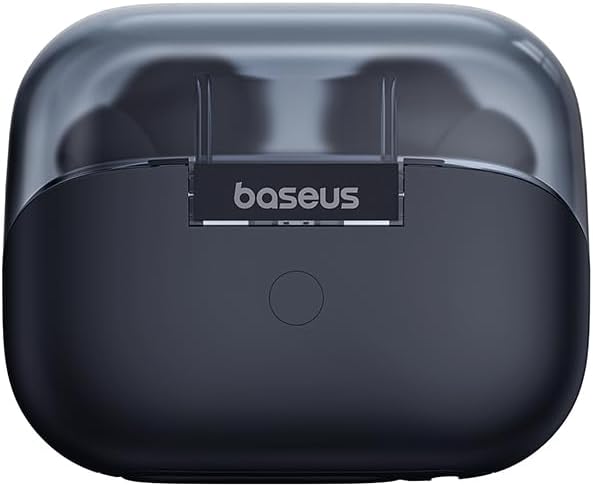
სურათი 3.3: უკანა view of the Baseus AeQur G10 charging case, displaying the Baseus brand logo and a USB-C charging port (not explicitly visible but implied by common design).
3.3 USB-A/USB-C Wireless Dongle
The included wireless dongle allows for low-latency connection to various devices, including PCs, laptops, gaming consoles, and mobile devices.

Image 3.4: Compatibility diagram for the Baseus AeQur G10, illustrating connections to Type-C Androids & Tablets, Type-C/USB-A PCs & Laptops, PS5/PS4/Switch, Steam Deck, and VR devices.
4. დაყენება
4.1 საწყისი დატენვა
- მოათავსეთ ორივე ყურსასმენი დამტენის ყუთში.
- USB-C დამტენი კაბელი შეაერთეთ კორპუსზე არსებულ დამტენ პორტთან, ხოლო მეორე ბოლო - USB კვების წყაროსთან (მაგ., კომპიუტერის USB პორტი, კედლის ადაპტერი).
- The LED indicator on the case will show charging status. A full charge typically takes approximately 1.5 hours for the earphones and 2 hours for the case.
4.2 Bluetooth მოწყობილობებთან დაწყვილება
- Ensure the earphones are in the charging case and the case has sufficient charge.
- Open the charging case lid. The earphones will automatically enter pairing mode (indicated by a flashing LED on the earphones or case).
- თქვენს მოწყობილობაზე (სმარტფონი, პლანშეტი, ლეპტოპი) ჩართეთ Bluetooth და მოძებნეთ ახალი მოწყობილობები.
- Select "Baseus AeQur G10" from the list of available devices.
- დაკავშირების შემდეგ, LED ინდიკატორი შეწყვეტს ციმციმს და გაიგონებთ დადასტურების სიგნალს.
4.3 Connecting via USB Wireless Dongle
- Insert the USB-A or USB-C end of the wireless dongle into the corresponding port on your device (PC, laptop, gaming console).
- Ensure the earphones are in the charging case and the lid is open.
- The earphones will automatically attempt to connect to the dongle. The dongle's LED indicator will show connection status.
- Once connected, the LED on the dongle will become solid, and you will hear a confirmation tone from the earphones.
5. საოპერაციო ინსტრუქციები
5.1 ჩართვა/გამორთვა
- ჩართვა: გახსენით დამტენი ქეისის თავსახური ან ამოიღეთ ყურსასმენები ქეისიდან. ისინი ავტომატურად ჩაირთვება.
- Გამორთვა: Place the earphones back into the charging case and close the lid. They will power off automatically and begin charging.
5.2 ყურსასმენების ტარება
- Identify the 'L' (left) and 'R' (right) markings on each earphone.
- Gently insert the earphones into your ear canals.
- Rotate them slightly to find a comfortable and secure fit. Choose the appropriate ear tip size for optimal sound quality and comfort.
5.3 შეეხეთ კონტროლი
The Baseus AeQur G10 earphones feature touch-sensitive controls on each earbud. The specific functions may vary slightly depending on the device and application.
| მოქმედება | ფუნქცია |
|---|---|
| ერთჯერადი შეხება (მარცხნივ/მარჯვნივ) | დაკვრა/პაუზა მუსიკა, პასუხის გაცემა/ზარის დასრულება |
| ორმაგი შეხება (L) | წინა სიმღერა |
| ორმაგი შეხება (R) | შემდეგი სიმღერა |
| სამმაგი შეხება (მარცხნივ/მარჯვნივ) | გააქტიურეთ ხმოვანი ასისტენტი |
| ხანგრძლივი დაჭერა (მარცხნივ/მარჯვნივ, 2 წმ) | ზარის უარყოფა |
| ხანგრძლივი დაჭერა (მარცხნივ/მარჯვნივ, 3 წმ) | Toggle Gaming/Music Mode (if applicable) |
6. მოვლა
6.1 დასუფთავება
- Use a soft, dry, lint-free cloth to clean the earphones and charging case.
- For earwax or debris in the ear tips, gently remove the ear tips and clean them with a cotton swab lightly dampened with rubbing alcohol. Ensure they are completely dry before reattaching.
- არ გამოიყენოთ აბრაზიული საწმენდები, გამხსნელები ან აეროზოლური სპრეი.
6.2 შენახვა
- ყურსასმენები ყოველთვის შეინახეთ დამტენ ქეისში, როდესაც არ იყენებთ, რათა დაიცვათ ისინი და დატენილი იყოს.
- შეინახეთ გრილ, მშრალ ადგილას, მოარიდეთ ექსტრემალურ ტემპერატურას და მზის პირდაპირ სხივებს.
6.3 ბატარეის მოვლა
- Charge the earphones and case regularly, even if not used frequently, to maintain battery health.
- მოერიდეთ ბატარეის სრულ დაცლას დიდი ხნის განმავლობაში.
7. Დიაგნოსტიკა
If you encounter issues with your Baseus AeQur G10 earphones, refer to the following common solutions:
7.1 ხმა არ არის ან კავშირი წყვეტილია
- Ensure earphones are charged and properly connected to your device (Bluetooth or dongle).
- შეამოწმეთ ხმის დონე როგორც ყურსასმენებზე, ასევე თქვენს დაკავშირებულ მოწყობილობაზე.
- ჩარევის ან დიაპაზონის პრობლემების თავიდან ასაცილებლად, მიუახლოვდით თქვენს მოწყობილობას.
- Try disconnecting and re-connecting the earphones.
- For Bluetooth, forget the device on your phone and re-pair.
- For dongle, unplug and re-plug the dongle.
7.2 ყურსასმენები არ იტენება
- დარწმუნდით, რომ დამტენის კაბელი საიმედოდ არის დაკავშირებული როგორც კორპუსთან, ასევე კვების წყაროსთან.
- დარწმუნდით, რომ კვების წყარო აქტიურია.
- ყურსასმენების დამტენი კონტაქტები და ქეისის შიგნით მშრალი ბამბის ტამპონით გაწმინდეთ.
- სცადეთ სხვა დამტენი კაბელი ან კვების ადაპტერი.
7.3 მხოლოდ ერთი ყურსასმენი მუშაობს
- ორივე ყურსასმენი დააბრუნეთ დამტენ ქეისში, დახურეთ სახურავი, დაელოდეთ რამდენიმე წამი, შემდეგ გახსენით სახურავი და ისევ ამოიღეთ.
- დარწმუნდით, რომ ორივე ყურსასმენი დატენულია.
- Try resetting the earphones (refer to manufacturer's webსაიტზე, საჭიროების შემთხვევაში, კონკრეტული გადატვირთვის ინსტრუქციებისთვის).
8. სპეციფიკაციები
Key technical specifications for the Baseus AeQur G10 TWS Earphones:
| ფუნქცია | სპეციფიკაცია |
|---|---|
| მოდელის სახელი | A00055400111-00 |
| ბრენდი | ბასეუსი |
| ფერი | შავი |
| ყურის განთავსება | ყურში |
| ფორმის ფაქტორი | ყურში |
| დაკავშირების ტექნოლოგია | უსადენო (Bluetooth) |
| უსადენო საკომუნიკაციო ტექნოლოგია | Bluetooth |
| ბატარეები | საჭიროა 1 ლითიუმ-იონის ბატარეა (შედის) |
| პროდუქტის ზომები | 10 x 5 x 1.27 სმ |
| ნივთის წონა | 220 გ |
| მწარმოებელი | ბასეუსი |
| სპეციფიკური გამოყენება | მოგზაურობა |
9. გარანტია და მხარდაჭერა
Baseus products are designed and manufactured to the highest quality standards. For information regarding warranty coverage, technical support, or service, please refer to the warranty card included with your product or visit the official Baseus webსაიტი. შეინახეთ შეძენის დამადასტურებელი საბუთი გარანტიის მოთხოვნისთვის.
For further assistance, you may contact Baseus customer support through their official channels.


