1. შესავალი
This manual provides essential instructions for the safe and efficient operation of your Tera Level 2 J1772 48A Electric Vehicle (EV) Charger. Please read this manual thoroughly before installation and use, and retain it for future reference.
The Tera EV Charger is designed to provide reliable and fast charging for both J1772 compatible electric vehicles and Tesla vehicles (with the included adapter). It features adjustable current settings, scheduling options, and robust safety protections.
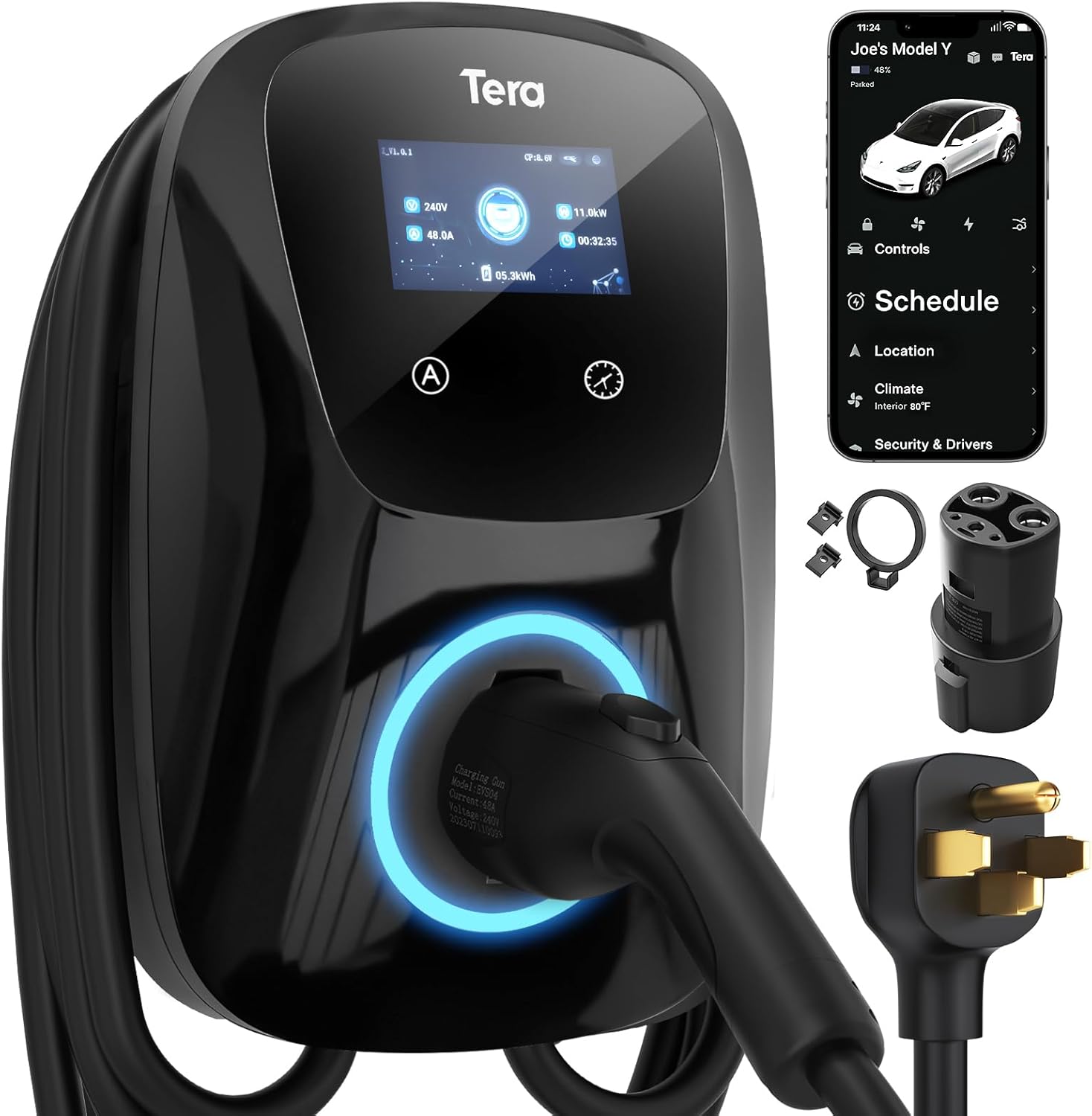
Image 1.1: Tera Level 2 EV Charger with included accessories.
2. უსაფრთხოების ინფორმაცია
დაზიანების ან დაზიანების თავიდან ასაცილებლად, ყოველთვის დაიცავით შემდეგი უსაფრთხოების ინსტრუქციები:
- პროფესიონალური ინსტალაცია: მონტაჟი უნდა განხორციელდეს კვალიფიციური ელექტრიკოსის მიერ ყველა ადგილობრივი და ეროვნული ელექტრო კოდექსის შესაბამისად.
- დამიწება: ელექტროშოკის თავიდან ასაცილებლად, დარწმუნდით, რომ დამტენი სათანადოდ არის დამიწებული.
- წყალი და ტენიანობა: Do not operate the charger if it is visibly damaged or exposed to excessive moisture. While the unit is IP65 rated for outdoor use, avoid submerging it.
- კაბელის მთლიანობა: Regularly inspect the charging cable for any signs of wear, cuts, or damage. Do not use a damaged cable.
- ბავშვები და შინაური ცხოველები: მუშაობის დროს ბავშვები და შინაური ცხოველები დამუხტვის ადგილთან ახლოს არ მოხვდნენ.
- გადაუდებელი გაჩერება: Familiarize yourself with the location of your electrical panel's circuit breaker for the charger in case an emergency shutdown is required.
- ვენტილაცია: მუშაობის დროს, დარწმუნდით, რომ დამტენის გარშემო ადექვატური ვენტილაციაა.
The Tera EV Charger is ETL Certified, indicating compliance with North American safety standards. This certification is equivalent to UL for home insurance requirements, signifying the manufacturer's commitment to high safety standards.

Image 2.1: ETL Certification and integrated safety protections.
3. პაკეტის შიგთავსი
ინსტალაციის დაწყებამდე დარწმუნდით, რომ შეფუთვაში ყველა ნივთია:
- Tera Electric Vehicle Charger Unit
- მომხმარებლის სახელმძღვანელო (ეს დოკუმენტი)
- სამონტაჟო ფირფიტა
- ხრახნების ნაკრები
- Tools (for installation)
- J1772 to Tesla Adapter with Lock
- Cable Holder for Tesla

Image 3.1: Contents of the Tera EV Charger package.
4. დაყენება და ინსტალაცია
The Tera EV Charger is designed for wall-mounted installation. Follow these general steps:
- აირჩიეთ ადგილმდებარეობა: Select a suitable location near your parking area, ensuring it is within reach of your vehicle's charging port and a dedicated 240V outlet (NEMA 14-50). The 25-foot cable provides flexibility.
- Სამონტაჟო დისკო: Unscrew the mounting plate from the charger unit. Position the mounting plate on the wall at the desired height and mark the drilling points.
- უსაფრთხო სამონტაჟო ფირფიტა: Drill pilot holes and securely fasten the mounting plate to the wall using the provided screws and anchors.
- Attach Charger Unit: Carefully align the charger unit with the mounted plate and slide it into place. Secure it with the anti-theft screw.
- დაკავშირება ძალა: Plug the charger's NEMA 14-50 plug into the dedicated 240V outlet.
- საკაბელო მენეჯმენტი: Use the provided cable holder to neatly store the charging cable when not in use.
For detailed electrical wiring and circuit breaker requirements, consult a certified electrician. The unit is IP65 rated, making it suitable for both indoor and outdoor installation, capable of withstanding temperatures from -22°F to 122°F.

Image 4.1: Installation steps for the Tera EV Charger.

Image 4.2: The charger's IP65 rating ensures durable performance in various weather conditions.
5. საოპერაციო ინსტრუქციები
The Tera EV Charger offers both manual and app-based control for charging sessions.
5.1. საწყისი დაყენება და დატენვა
Before plugging the charger into your vehicle, it is recommended to configure the desired current and schedule settings on the unit or via the app. Plugging it in first will activate a plug-and-play mode, which may not utilize scheduled settings.

Image 5.1: Configure settings before connecting to the vehicle.
5.2. Manual Current Adjustment and Scheduling
The charger unit features a touch screen interface for direct control:
- მიმდინარე კორექტირება: Use the 'A' button on the unit to cycle through available current settings (e.g., 24A, 32A, 40A, 48A). Select the appropriate amperage for your vehicle and electrical circuit.
- განრიგის დაყენება: Use the clock icon button to set a charging schedule, allowing you to define charging start times for up to 12 hours in advance.

Image 5.2: Touch screen controls for current and schedule.
5.3. App-Based Control and Scheduling
For enhanced convenience, the Tera EV Charger can be controlled via a dedicated mobile application. This allows for remote management of charging sessions:
- დატენვის დაწყება/შეჩერება: დისტანციურად დაიწყეთ ან შეწყვიტეთ დატენვა.
- დენის რეგულირება: შეცვალეთ დატენვა amperage from your mobile device.
- დატენვის გრაფიკი: Set detailed charging schedules to optimize for off-peak electricity rates or specific departure times.
- მონიტორის დატენვა: View რეალურ დროში დატენვის სტატუსი და ენერგიის მოხმარება.

Image 5.3: App interface for remote charging control.

Image 5.4: Visual representation of scheduled charging for cost efficiency.
5.4. თქვენს ავტომობილთან დაკავშირება
- Ensure the charger is powered on and any desired settings (current, schedule) are configured.
- For Tesla vehicles, attach the J1772 to Tesla adapter to the charger's J1772 connector.
- Insert the charging connector (or adapter) firmly into your vehicle's charging port.
- The charger will begin the charging process according to your settings or immediately if in plug-and-play mode.
შენიშვნა: Hybrid vehicles may automatically reduce charging current based on their maximum allowable current, regardless of the charger's setting.
6. მახასიათებლები
- უნივერსალური თავსებადობა: Fully upgraded for seamless compatibility with all Tesla models (using the included adapter) and J1772 standard electric vehicles.
- სწრაფი დატენვა: Delivers up to 48A output, providing rapid Level 2 charging at approximately 46 miles of range per hour.
- რეგულირებადი დენი: Manually select charging current from 24A, 32A, 40A, or 48A to suit your vehicle's needs and home electrical capacity.
- გაფართოებული კაბელის სიგრძე: A 25-foot premium charging cable offers ampმოსახერხებელი დატენვისთვის სხვადასხვა ადგილას.
- გამძლე და ამინდგამძლე: IP65 rated for water and dust resistance, ensuring reliable operation in diverse environmental conditions, from extreme cold (-22°F) to high heat (122°F).
- ყოვლისმომცველი უსაფრთხოება: ETL certified with multiple protection features including overvoltagე, undervoltage, overload, overtemperature, ground fault, earth leakage, and short circuit protection.

Image 6.1: High-speed Level 2 charging capabilities.

Image 6.2: The 25-foot cable provides extensive reach for charging.
7. სპეციფიკაციები
| სპეციფიკაცია | ღირებულება |
|---|---|
| ბრენდი | ტერა |
| მოდელის ნომერი | ZB04-U011K series |
| Ampგაბრაზება | 48 Amps (რეგულირებადი) |
| გამოყვანის ტომიtage | 240 ვოლტი (AC) |
| ვატtage | 11.5 კვტ.სთ |
| კაბელის სიგრძე | 25 ფუტი |
| კონექტორის ტიპი | J1772 (with Tesla adapter included) |
| დენის შტეფსელი | NEMA 14-50 |
| IP რეიტინგი | IP65 |
| ოპერაციული ტემპერატურა | -22°F-დან 122°F-მდე (-30°C-დან 50°C-მდე) |
| სერთიფიკატები | ETL, CE, TÜV, FCC |
| ნივთის წონა | 20 ფუნტი (დაახლოებით 9.1 კგ) |
| პროდუქტის ზომები | 22 x 16 x 12 ინჩი (დაახლოებით 56 x 41 x 30 სმ) |
8. Დიაგნოსტიკა
If you encounter issues with your Tera EV Charger, consider the following common troubleshooting steps:
- ძალა არ არის: Check the circuit breaker for the outlet. Ensure the NEMA 14-50 plug is fully inserted.
- დატენვა არ იწყება: Verify that the charging connector is securely plugged into the vehicle's port. Check the charger's display for error messages. Ensure the vehicle is ready to accept a charge.
- ნელი დატენვა: Confirm the current setting on the charger or app. Ensure your vehicle is not limiting the charging rate.
- შეცდომის ინდიკატორები: The charger features LED indicators to communicate status and errors. Refer to the table below for common indicator meanings.
| ინდიკატორის სტატუსი | მნიშვნელობა |
|---|---|
| Blue (Always on) | ლოდინის რეჟიმში |
| Green (Always on) | Insert the Charger |
| Green (Flashes every 1S) | დამუხტვა |
| Red (Always on) | CP არანორმალური |
| Red (Flashes every 1S) | Over/Under Voltage |
| Red (Flashes every 2S) | მიწისქვეშა შეცდომა |
| Red (Flashes 3S ON, 3S OFF) | ჭარბი დენის დაცვა |
| Purple (Flashes every 1S) | გაჟონვისგან დაცვა |
| Purple (Flashes every 2S) | ზედმეტი ტემპერატურის დაცვა |
| Purple (Flashes every 4S) | ადჰეზიის დაცვა |

Image 8.1: LED indicator light meanings for troubleshooting.
თუ პრობლემები შენარჩუნებულია, დაუკავშირდით მომხმარებელთა მხარდაჭერას.
9. მოვლა
Regular maintenance helps ensure the longevity and optimal performance of your EV charger:
- დასუფთავება: პერიოდულად გაწმინდეთ დამტენი და კაბელი რბილი ქსოვილით.amp ქსოვილი. მოერიდეთ უხეში ქიმიკატების ან აბრაზიული საწმენდების გამოყენებას.
- საკაბელო შემოწმება: Routinely check the charging cable and connector for any signs of damage, fraying, or discoloration. Replace if damaged.
- შენახვა: When not in use, store the charging cable neatly using the provided cable holder to prevent kinks or damage.
- გარემოს დაცვა: While the unit is weatherproof, ensure it is not continuously exposed to extreme conditions beyond its operating limits.
10. გარანტია და მხარდაჭერა
Tera EV დამტენს მოყვება... 2 წლიანი გარანტია, reflecting the manufacturer's commitment to quality and reliability. For warranty claims or technical assistance, please contact Tera customer support.
საკონტაქტო ინფორმაცია:
- ელფოსტა: cs@tera-innovation.com
- Webსაიტი: https://www.tera-innovation.com
- ტელეფონი: +1 (626)438-1404

Image 10.1: Certifications and 2-year warranty information.


