შესავალი
Welcome to the user manual for your Lamax Street2 Bluetooth Speaker. This guide provides essential information for setting up, operating, maintaining, and troubleshooting your device. Please read this manual carefully before using the speaker and keep it for future reference.
უსაფრთხოების ინფორმაცია
To ensure safe and proper operation, please observe the following safety guidelines:
- არ დაუშვათ მოწყობილობის ექსპრეს ტემპერატურა, მზის პირდაპირი სხივები ან მაღალი ტენიანობა.
- Do not immerse the device in water. It is designed to be splash-resistant, not waterproof.
- Keep the speaker out of reach of children and pets.
- Use only approved charging cables and adapters to prevent damage and ensure safety.
- არ სცადოთ დინამიკის დამოუკიდებლად დაშლა, შეკეთება ან მოდიფიცირება. დახმარებისთვის დაუკავშირდით კვალიფიციურ სერვის პერსონალს.
პროდუქტი დასრულდაview
The Lamax Street2 is a portable Bluetooth speaker designed to deliver powerful sound with convenience. Its compact size, splash resistance, and long battery life make it ideal for various environments.
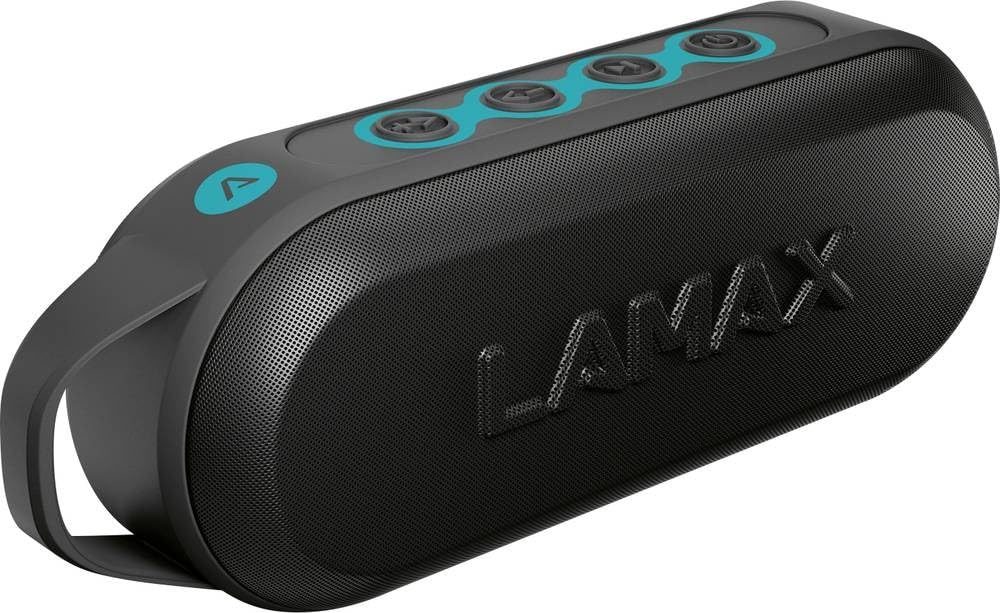
This image displays the front of the Lamax Street2 Bluetooth Speaker, showing its main body, control panel, and a sturdy carrying loop for portability.
Key features of your Lamax Street2 speaker include:
- სუპერ ხმა: Enjoy clear and powerful audio output.
- 15 W სიმძლავრე: Delivers robust sound performance.
- Bluetooth 5.0: სტაბილური და ეფექტური უკაბელო კავშირისთვის.
- ჭეშმარიტი უკაბელო სტერეო (TWS): Pair two Street2 speakers for an immersive stereo experience.
- შხეფებისადმი მდგრადობა: შექმნილია შხეფებისადმი გამძლეობისთვის, რაც მას გარე გამოყენებისთვის შესაფერისს ხდის.
- ბატარეის ხანგრძლივი ხანგრძლივობა: Extended playtime for uninterrupted music.
- პორტატული დიზაინი: Features a fixed eyelet and carabiner for easy transport.
დაყენება
1. სპიკერის დატენვა
Before using your Lamax Street2 speaker for the first time, ensure it is fully charged.
- მოწოდებული დამტენი კაბელი დინამიკის დამტენ პორტს შეაერთეთ.
- კაბელის მეორე ბოლო შეაერთეთ USB კვების ადაპტერთან (არ მოყვება) ან კომპიუტერის USB პორტთან.
- The charging indicator light will illuminate. It will typically turn off or change color once the speaker is fully charged.
2. ჩართვა/გამორთვა
To turn the speaker on or off:
- ჩართვა: Press and hold the power button for approximately 3 seconds until you hear a power-on sound.
- Გამორთვა: Press and hold the power button for approximately 3 seconds until you hear a power-off sound.
3. Bluetooth დაწყვილება
To connect your Lamax Street2 to a Bluetooth-enabled device:
- Ensure the speaker is powered on and in pairing mode. The LED indicator will typically flash rapidly.
- თქვენს სმარტფონზე, პლანშეტზე ან სხვა Bluetooth მოწყობილობაზე ჩართეთ Bluetooth და მოძებნეთ ხელმისაწვდომი მოწყობილობები.
- Select "LAMAX Street2" from the list of found devices.
- Once connected, the speaker will emit a confirmation sound, and the LED indicator will stop flashing and remain solid.
4. True Wireless Stereo (TWS) დაწყვილება
To pair two Lamax Street2 speakers together for a stereo sound experience:
- Ensure both Lamax Street2 speakers are powered on and are not connected to any other Bluetooth device.
- On one of the speakers, press and hold the TWS button (often indicated by a chain-link icon) for 2-3 seconds.
- The speakers will automatically search for and pair with each other. A confirmation sound will indicate successful TWS pairing.
- Now, connect your primary device (smartphone, etc.) to the primary speaker via Bluetooth as described in the "Bluetooth Pairing" section.
სპიკერის ოპერირება
ძირითადი კონტროლი
- დენის ღილაკი: Press and hold for 3 seconds to turn the speaker on or off.
- დაკვრის/პაუზის ღილაკი: დააჭირეთ ერთხელ აუდიო დაკვრის დასაკრავად ან დასაპაუზებლად.
- ხმის გაზრდა (+): ხმის გასაზრდელად დააჭირეთ ერთხელ. ხანგრძლივად დააჭირეთ შემდეგ ტრეკზე გადასასვლელად.
- Ხმის დაწევა (-): Press once to decrease the volume. Press and hold to skip to the previous track.
- Call Button (if available): Press once to answer an incoming call or end an ongoing call. Press and hold to reject an incoming call.
დაკავშირების პარამეტრები
- Bluetooth: The primary method for wireless audio streaming from your devices.
მოვლა
Proper care and maintenance will extend the life of your Lamax Street2 speaker.
- დასუფთავება: Gently wipe the speaker's surface with a soft, dry, lint-free cloth. Do not use abrasive cleaners, solvents, or chemical sprays.
- შენახვა: ხანგრძლივი პერიოდის განმავლობაში არ გამოყენების შემთხვევაში, დინამიკი შეინახეთ გრილ, მშრალ ადგილას, მზის პირდაპირი სხივებისა და ექსტრემალური ტემპერატურისგან მოშორებით.
- ბატარეის მოვლა: To maintain optimal battery performance, avoid fully discharging the battery frequently. Charge the speaker regularly, even if not in active use.
პრობლემების მოგვარება
If you encounter issues with your Lamax Street2 speaker, refer to the following table for common problems and solutions.
| პრობლემა | გამოსავალი |
|---|---|
| დინამიკი არ ირთვება. | დარწმუნდით, რომ ბატარეა დატენილია. შეაერთეთ დინამიკი კვების წყაროსთან და სცადეთ ხელახლა. |
| Bluetooth-ის საშუალებით დაწყვილება შეუძლებელია. | Ensure the speaker is in Bluetooth pairing mode (flashing LED). Turn off and on your device's Bluetooth. Move closer to the speaker and ensure no other devices are connected. |
| ხმა არ ისმის ან ხმა დაბალია. | Check volume levels on both the speaker and your connected device. Ensure the speaker is correctly paired and not muted. |
| ცუდი ხმის ხარისხი ან წყვეტილი კავშირი. | Move your device closer to the speaker to minimize interference. Ensure there are no major obstacles between the devices. Disconnect and re-pair the Bluetooth connection. |
სპეციფიკაციები
Technical specifications for the Lamax Street2 Bluetooth Speaker:
- მოდელის სახელი: ქუჩა 2
- მწარმოებლის მითითება: LMXST2
- ბრენდი: ლამაქსი
- კავშირის ტექნოლოგია: Bluetooth 5.0
- გამომავალი სიმძლავრე: 15 ვატი
- აუდიო გამომავალი რეჟიმი: სტერეო
- სამონტაჟო ტიპი: მაგიდის სამაგრი
- დენის წყარო: იკვებება ბატარეით
- განსაკუთრებული მახასიათებლები: Bluetooth, Splash Resistance
- ASIN: B0CV5TH488
გარანტია და მხარდაჭერა
The Lamax Street2 Bluetooth Speaker is covered by a limited warranty. For detailed information regarding warranty terms, conditions, and duration, please refer to the warranty card included with your product or visit the official Lamax webსაიტი.
For technical assistance, troubleshooting, or to inquire about warranty claims, please contact Lamax customer support. You can typically find contact information on the official Lamax webსაიტზე ან იმ საცალო ვაჭრობის მეშვეობით, სადაც პროდუქტი შეიძინეთ.


