COLBOR W60

COLBOR Wonder W60 LED Video Light User Manual

მოდელი: W60 | ბრენდი: COLBOR

Compact and powerful LED video light with wide color temperature range and APP control.

1. შესავალი

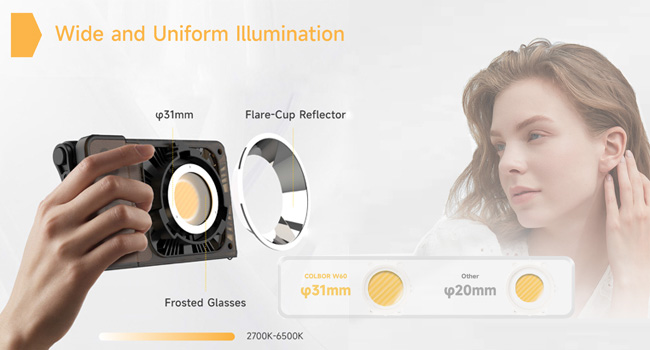
The COLBOR Wonder W60 is a compact and powerful LED video light designed for various photography and videography needs, including YouTube content creation and live streaming. It offers a wide color temperature range from 2700K to 6500K and boasts a high CRI of 97+ for accurate color rendition. Its lightweight and slim design make it highly portable, while multiple power options and APP control enhance its versatility and ease of use.

2. რა არის ყუთში

COLBOR Wonder W60 LED Video Light and included accessories

Image: The COLBOR Wonder W60 LED Video Light shown with its complete set of accessories.

  • COLBOR Wonder W60 Video Light x1
  • კაბელი x1
  • დენის ადაპტერი x1
  • COB საფარი x1
  • Dome x1
  • რეფლექტორი x1

3. პროდუქტი დასრულდაview და დაყენება

Familiarize yourself with the components and initial setup of your COLBOR Wonder W60 LED Video Light.

3.1 პროდუქტის კომპონენტები

მხარე view of COLBOR Wonder W60 showing controls and ports

სურათი: გვერდი view of the COLBOR Wonder W60, highlighting the control buttons and ports.

  • დენის ღილაკი: Used for turning the device on and off.
  • Wireless Control Setting Button: For switching between 2.4GHz remote and APP control modes, and initiating pairing.
  • Brightness Control Wheel: Adjusts the light's brightness.
  • Color Temperature Control Knob: Adjusts the color temperature.
  • NFC-ის აღმოჩენის არეალი: For quick pairing with compatible devices.
  • COLBOR Mount Lock & Mount: Securely attach accessories.
  • DC პორტი: კვების ადაპტერის დასაკავშირებლად.
  • Type-C პორტი: For PD Type-C fast charging.
  • 1/4" Hole Screw: For mounting the light onto stands or grips.

3.2 სინათლის მონტაჟი

Follow these steps to prepare your light for use:

  1. Removal of COB protection cover: Hold the COB cover with the COLBOR Mount tenon and rotate it to remove it.
    Removing the COB protection cover from the COLBOR W60

    Image: Demonstrating the removal of the protective COB cover by rotating it from the mount.

  2. რეფლექტორის მონტაჟი და მოხსნა: გაასწორეთ რეფლექტორი l-ის გარშემო არსებულ ღართანamp head and clip it in, then rotate it to fix it. Follow the instructions for "Removal of COB protection cover" to remove the reflector.
    Attaching a reflector to the COLBOR W60

    Image: A reflector being attached to the front of the COLBOR W60 light.

  3. Installation of stand: Align the 1/4" screw hole on the light's bottom or side with the 1/4" screw on the stand, and rotate it to fix it.
    COLBOR W60 mounted on a stand and with a power grip

    Image: The COLBOR W60 shown mounted on a light stand and also attached to a power grip, demonstrating versatile mounting options.

3.3 მოწყობილობის ჩართვა

The COLBOR Wonder W60 offers flexible powering options:

  • Power with power adapter: შეაერთეთ კვების ადაპტერი, გაასწორეთ l-ის DC დენის ბუდეamp body, and then power on through the cable after stable connection.

    *Do not suspend the power adapter in the air. Use wire rings to hang it on the lamp დგომა.

    Connecting COLBOR W60 to power adapter

    Image: The COLBOR W60 being powered via its included power adapter.

  • Power with COLBOR Power Grip: Align the 1/4" screw hole on the light's bottom or side with the 1/4" screw on the stand. Rotate it to fix it. Connect the light to the Power Grip via the D-Tap to DC cable for powering.

    *Please do not use the Type-C to Type-C cable to power the light.

    Connecting COLBOR W60 to COLBOR Power Grip

    Image: The COLBOR W60 connected to a COLBOR Power Grip for portable power.

4. საოპერაციო ინსტრუქციები

Learn how to operate your COLBOR Wonder W60 LED Video Light.

Video: Official instruction video for the COLBOR Wonder W60/W100 LED Video Light, covering setup, powering, and operation.

4.1 ჩართვა/გამორთვა

  • ჩართვა: დაუკავშირდით დენის წყაროს, შემდეგ დიდხანს დააჭირეთ დენის ღილაკს.
  • Გამორთვა: Long-press the power button to turn it off.

4.2 ფერის ტემპერატურის რეგულირება

  • Rotate the color temperature control knob for continuous color temperature adjustment.
  • Short press the knob to select the preset color temperature: (2700K, 3200K, 4300K, 5600K, 6500K).

4.3 სიკაშკაშის რეგულირება

  • Roll the brightness adjustment wheel for continuous brightness adjustment.
  • Short press the wheel side to select preset brightness: (0%, 25%, 50%, 75%, 100%).

4.4 Wireless Connection (APP Control)

The COLBOR Wonder W60 supports APP control for seamless and efficient lighting adjustments.

  • მოკლედ დააჭირეთ დისტანციური მართვის ღილაკს 2.4 გჰც (CTRL1 დისტანციური) და APP (COLBOR Studio APP) მართვის რეჟიმებს შორის გადასართავად.
  • Long-press the button to start pairing with the APP.
  • დაუკავშირდით APP-ს გულშემატკივართა პარამეტრებისა და EFF პარამეტრებისთვის.
COLBOR W60 controlled via smartphone app

Image: The COLBOR W60 being controlled remotely via the COLBOR Studio APP on a smartphone.

5. მოვლა

To ensure the longevity and optimal performance of your COLBOR Wonder W60 LED Video Light, follow these maintenance guidelines:

Diagram of COLBOR W60's smart cooling system

სურათი: შიდა view highlighting the intelligent air duct and heat pipe cooling system of the COLBOR W60.

6. Დიაგნოსტიკა

If you encounter issues with your COLBOR Wonder W60, refer to the following common problems and solutions:

პრობლემაშესაძლო მიზეზიგამოსავალი
შუქი არ ირთვება.No power, loose connection, or power button not pressed correctly.Ensure power adapter is securely connected and plugged into a working outlet. If using a power grip, ensure it is charged and properly attached. Long-press the power button for 2-3 seconds.
სიკაშკაშის ან ფერის ტემპერატურის რეგულირება შეუძლებელია.Control knob/wheel malfunction or in locked mode.Check the display for any lock indicators. Try restarting the device. If using APP control, ensure the light is properly paired and the APP is functioning correctly.
აპლიკაციის კონტროლი არ მუშაობს.Bluetooth/2.4GHz connection issue, APP not updated, or incorrect mode.Ensure the light is in APP control mode (short press wireless control button). Long-press the button to re-initiate pairing. Check your smartphone's Bluetooth settings. Update the COLBOR Studio APP to the latest version.
სინათლე გადახურდება.Obstructed ventilation or prolonged high-power use in hot environment.Ensure ventilation grilles are clear of obstructions. Reduce brightness or allow the light to cool down. Operate in a well-ventilated area.

If the problem persists after trying these solutions, please contact COLBOR customer support for further assistance.

7. სპეციფიკაციები

ფუნქციადეტალი
ბრენდიCOLBOR
მოდელიW60
პროდუქტის ზომები6.18 x 1.69 x 3.66 ინჩი
ნივთის წონა2.14 pounds (approx. 345g as per feature bullet)
განათება2890Lux@1m (5600K)
ფერის ტემპერატურა (CCT)2700K-დან 6500K-მდე
CRI97+
დაკავშირების ტექნოლოგიაBluetooth (for APP control)
დენის პარამეტრებიCOLBOR Battery Grip, DC adapter, PD Type-C fast charging
გაგრილების სისტემაIntelligent Air Duct and Heat Pipe Cooling System
წყლის წინააღმდეგობის დონეარ არის წყალგამძლე
წარმოშობის ქვეყანაჩინეთი

8. გარანტია და მხარდაჭერა

COLBOR products are manufactured to the highest quality standards. For warranty information and technical support, please refer to the warranty card included with your product or visit the official COLBOR webსაიტი. შეინახეთ თქვენი შესყიდვის ქვითარი, როგორც შეძენის დამადასტურებელი საბუთი გარანტიის მოთხოვნის შემთხვევაში.

For further assistance, you may contact COLBOR customer service through their official channels. Please provide your product model (W60) and any relevant details when seeking support.

დაკავშირებული დოკუმენტები - W60

წინასწარიview COLBOR PB74 Power Base მომხმარებლის სახელმძღვანელო
COLBOR PB74 დენის ბაზის მომხმარებლის სახელმძღვანელო, რომელშიც დეტალურად არის აღწერილი მისი მახასიათებლები, მუშაობა, დატენვა, მონტაჟი, სპეციფიკაციები და გარანტიის ინფორმაცია COLBOR W60 და W100 სერიის ნათურების კვებისათვის.
წინასწარიview Colbor CL60R RGB COB LED მონონათურის მომხმარებლის სახელმძღვანელო
Colbor CL60R RGB COB LED Monolight-ის ყოვლისმომცველი მომხმარებლის სახელმძღვანელო, რომელშიც დეტალურად არის აღწერილი უსაფრთხოების ინსტრუქციები, პროდუქტის კომპონენტები, მონტაჟი, ექსპლუატაცია და სხვადასხვა განათების რეჟიმები, მათ შორის CCT, HSI და სპეციალური ეფექტები.
წინასწარიview COLBOR CL220 COB Video Light User Manual
Comprehensive user manual for the COLBOR CL220 COB Video Light, detailing its features, operation, installation, specifications, and warranty information. Learn how to set up, control, and maintain your lighting equipment.
წინასწარიview COLBOR CL220M ვიდეო ნათურის მომხმარებლის სახელმძღვანელო | გამოყენება, სპეციფიკაციები, გარანტია
COLBOR CL220M ვიდეო განათების ყოვლისმომცველი მომხმარებლის სახელმძღვანელო. გაეცანით პროდუქტის მახასიათებლებს, გამოყენების ინსტრუქციებს, კვების წყაროსთან მიერთებას, პარამეტრებს, აპლიკაციის მართვას, სპეციფიკაციებს, შეფუთვის შიგთავსს და გარანტიის ინფორმაციას.
წინასწარიview COLBOR CL220R ვიდეო სინათლის მომხმარებლის სახელმძღვანელო
COLBOR CL220R ვიდეო განათების ყოვლისმომცველი სახელმძღვანელო, რომელიც დეტალურად აღწერს მის მახასიათებლებს, მუშაობას, რეჟიმებს, აპლიკაციის მართვას, სპეციფიკაციებს და გარანტიის ინფორმაციას.
წინასწარიview COLBOR WB60R Video Light User Manual - Features, Operation, Specifications
Comprehensive user manual for the COLBOR WB60R Video Light. Learn about its features, installation, operation modes (CCT, PRST, HSI, Effects), wireless and NFC connectivity, specifications, packing list, and warranty information.