1. დასრულდაview
1.1 პროდუქტის აღწერა
The PNI GreenHouse SC1800C PRO Solar Inverter is a central component for small off-grid solar systems, suitable for areas with or without grid electricity. It provides a continuous output of 3000W with a pure sine wave, making it suitable for various household lighting installations and other small electronic motors, including refrigerators, pumps, tools, and charging devices for phones, laptops, and TVs.
1.2 ძირითადი მახასიათებლები
- Maximum photovoltaic panel input power: 2000 W.
- DC შეყვანის მაქსიმალური მოცულობაtage from photovoltaic panels: 30 - 120 VDC (Vmp).
- Maximum solar charge current: 30 A input from panels, 60 A output to batteries.
- Solar charging efficiency: 98%.
- MPPT solar charger type.
- რეიტინგული გამომავალი მოცულობაtage: 230 ვ.
- Rated output power: 3000 W (under ideal conditions with proportional battery count and 100% charged batteries).
- Maximum apparent power: 6000 VA (peak, 0.5 seconds under ideal conditions).
- გამოყვანის მოცულობაtage waveform: Pure sine wave.
- Output signal frequency: 50, 60 Hz.
- შეყვანის ტtage: 230 V AC.
- Grid connection for backup.
- Compatible with 24V batteries: AGM, lead-acid, gel, flooded lithium-ion.
- Minimum battery start voltage: 23 V (cold start voltagდა).
- Integrated high-frequency inverter type (switching).
- Inverter efficiency: 90% ~ 93% (100% charged battery).
- Typical transfer time: 10 ms (UPS, VDE) 20 ms (APL).
- Line mode efficiency: > 95% (rated R load, fully charged battery).
- Hybrid operating modes: SBU – Solar/Battery/Utility, Solar Utility (UPS).
- AC charge voltage: 230 ვ.
- Maximum AC charge current: 30 A.
- Automatic switching: Solar - Batteries - Grid.
- ენერგიის დაზოგვის ფუნქცია.
- Multiple protections.
- მრავალფუნქციური დისპლეი.
- Dedicated menu for advanced settings.
- Monitoring with PC software (USB cable included).
- Remote monitoring from mobile/PC (with optional WiFi USB dongle).
1.3 პაკეტის შიგთავსი
- PNI GreenHouse SC1800C PRO Solar Inverter
- USB კაბელი
- მომხმარებლის სახელმძღვანელო
- PNI Smart Dongle-WLAN (for WiFi monitoring)
2. უსაფრთხოების ინფორმაცია
გთხოვთ, ინსტალაციამდე და გამოყენებამდე ყურადღებით წაიკითხოთ ყველა ინსტრუქცია და გაფრთხილება. ამ ინსტრუქციების შეუსრულებლობამ შეიძლება გამოიწვიოს ელექტროშოკი, ხანძარი ან მძიმე დაზიანება.
- კვალიფიციური პერსონალი: ინსტალაცია და მოვლა უნდა შესრულდეს კვალიფიციური პერსონალის მიერ.
- ელექტრული დარტყმის საშიშროება: ეს მოწყობილობა მუშაობს მაღალი სიმძლავრითtages. Do not open the casing unless specifically instructed.
- ბატარეის უსაფრთხოება: Batteries can produce explosive gases. Ensure proper ventilation. Do not smoke or allow sparks or flames near batteries. Wear eye protection.
- სათანადო ვენტილაცია: Install the inverter in a well-ventilated area to prevent overheating.
- გარემო პირობები: Avoid exposure to rain, snow, spray, or any liquids. Operate within the specified temperature range (-26 °C to 80 °C).
- დამიწება: დარწმუნდით, რომ ინვერტორი სათანადოდ არის დამიწებული ადგილობრივი ელექტრო კოდების შესაბამისად.
- გამორთეთ ელექტროენერგია: Always disconnect all power sources (solar, battery, AC grid) before performing any wiring or maintenance.
3. პროდუქტის კომპონენტები
3.1 PNI GreenHouse SC1800C PRO Solar Inverter

სურათი 3.1: წინა view of the PNI GreenHouse SC1800C PRO Solar Inverter, showing the display and control buttons.

სურათი 3.2: უკანა view of the PNI GreenHouse SC1800C PRO Solar Inverter, illustrating the various connection ports for solar panels, batteries, AC input, and AC output.
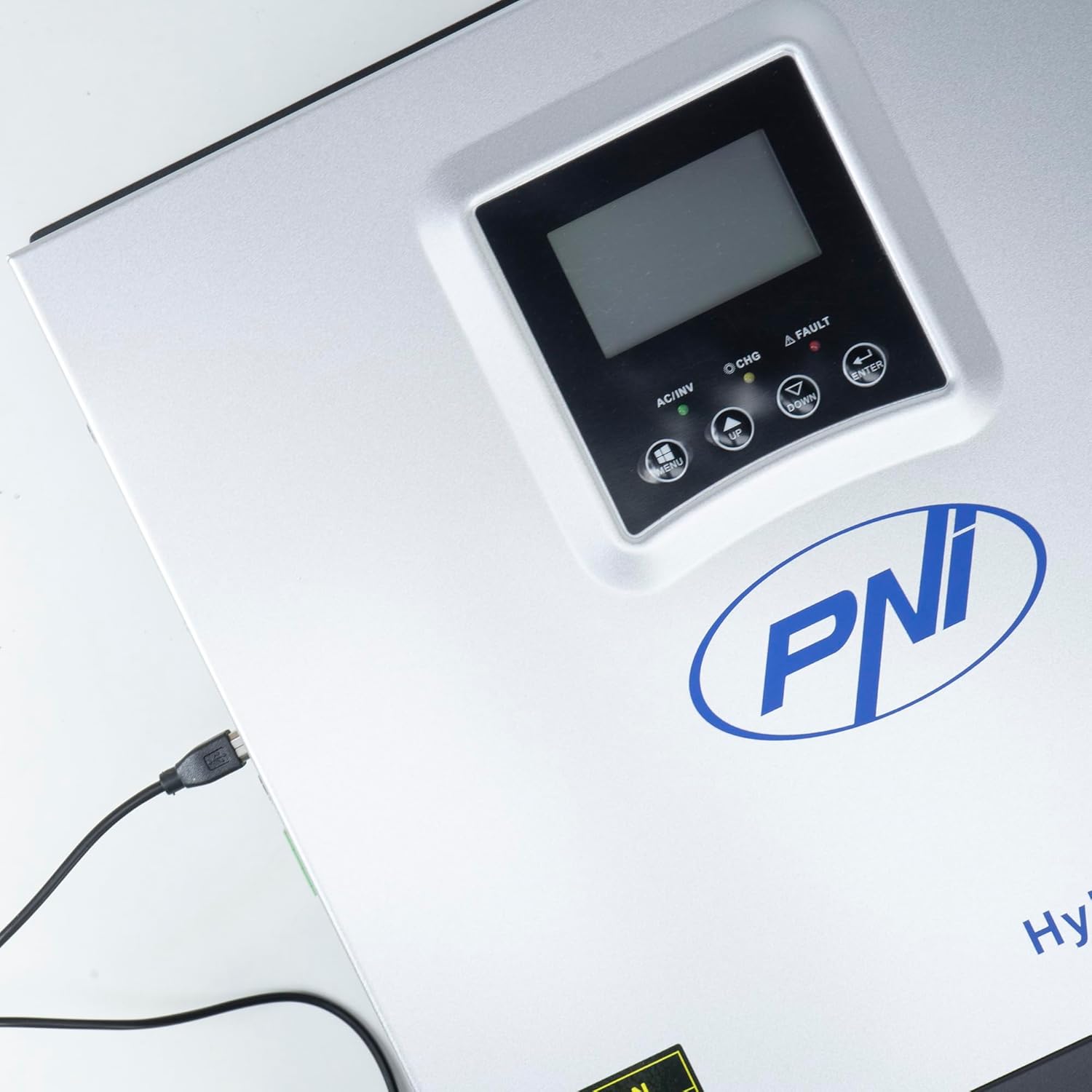
Figure 3.3: Close-up of the USB connection port on the inverter, used for PC monitoring.
3.2 PNI Smart Dongle-WLAN (Optional)

Figure 3.4: The PNI Smart Dongle-WLAN, an optional accessory for remote WiFi monitoring of the inverter.

Figure 3.5: The PNI Smart Dongle-WLAN connected to the inverter's dedicated port for WiFi communication.
4. ინსტალაცია და დაყენება
4.1 კედელზე დამაგრება
The inverter is designed for wall mounting. Choose a location that is dry, well-ventilated, and protected from direct sunlight and moisture. Ensure sufficient clearance around the unit for proper airflow and heat dissipation. Use appropriate mounting hardware for your wall type.
4.2 სისტემური კავშირის დიაგრამა

Figure 4.1: Basic application diagram showing the connections between solar panels, utility grid, generator, inverter, battery, and home loads. Note: Generator, PV modules, WiFi module, and battery are not included with the inverter unless specified.
4.3 გაყვანილობის კავშირები
Follow the diagram above and the labels on the inverter for correct wiring. Ensure all connections are secure and properly insulated. It is highly recommended that a qualified electrician performs all wiring.
- მზის პანელის კავშირი: Connect your solar panels to the designated PV input terminals. Observe correct polarity (positive to positive, negative to negative). The maximum DC input voltage არის 120 VDC.
- ბატარეის კავშირი: Connect the 24V battery bank to the battery terminals. Ensure correct polarity. The inverter supports AGM, lead-acid, gel, and flooded lithium-ion batteries.
- ცვლადი დენის შეყვანა (ქსელი/გენერატორი): Connect the AC utility grid or a generator to the AC input terminals. This provides backup power and can charge batteries.
- ცვლადი დენის გამომავალი დენი (დატვირთვები): Connect your household loads to the AC output terminals.
4.4 საწყისი ჩართვა
After all connections are made and verified:
- Turn on the battery breaker.
- Turn on the solar panel breaker (if applicable).
- Turn on the AC input breaker (if connected to grid/generator).
- Turn on the inverter's power switch.
- Observe the display for status indicators and initial readings.
5. ოპერაციული რეჟიმები
The PNI GreenHouse SC1800C PRO offers intelligent energy management with several configurable operating modes:
- Solar Priority Mode (SBU): In this mode, the inverter prioritizes power consumption from solar energy. If solar power is insufficient, it will draw from batteries. The utility grid acts as a backup.
- ბატარეის პრიორიტეტული რეჟიმი: The inverter prioritizes drawing power from the batteries. Solar energy will charge the batteries. The utility grid is used only when battery voltage დადგენილ ზღვარს ქვემოთ ეცემა.
- Utility Priority Mode (UPS): This mode prioritizes power from the utility grid. Solar energy will charge the batteries. The inverter switches to battery power only when the grid is unavailable, functioning as an Uninterruptible Power Supply (UPS).
These modes can be configured via the inverter's multifunction display and dedicated menu for advanced settings.
5.1 მონიტორინგი
The inverter supports monitoring through:
- PC Software (USB): Connect the inverter to a PC using the provided USB cable and dedicated software for detailed monitoring and analysis of parameters.
- Remote Monitoring (WiFi - Optional): With the optional PNI Smart Dongle-WLAN, you can monitor the inverter remotely via a mobile application or web ინტერფეისი.
6. მოვლა
Regular maintenance ensures optimal performance and longevity of your inverter. Always disconnect all power sources before performing any maintenance.
- დასუფთავება: Periodically clean the exterior of the inverter with a dry cloth. Ensure ventilation openings are free from dust and debris. Do not use liquid cleaners.
- კავშირის შემოწმება: Annually inspect all wiring connections (solar, battery, AC input/output) for tightness and signs of corrosion. Tighten any loose connections.
- ბატარეის შემოწმება: If using lead-acid batteries, check electrolyte levels and terminal condition as per battery manufacturer guidelines.
- გარემოს შემოწმება: დარწმუნდით, რომ ინსტალაციის გარემო რჩება მითითებულ ტემპერატურისა და ტენიანობის დიაპაზონში.
7. Დიაგნოსტიკა
This section provides guidance for common issues. For complex problems, contact qualified service personnel.
| პრობლემა/განგაში | შესაძლო მიზეზი | გამოსავალი |
|---|---|---|
| დაბალი ბატარეის სიგნალიზაცია | ბატარეის მოცულობაtage არის დაბალი მოცულობის ქვემოთtage warning threshold. | Check battery charge level. Ensure solar panels are producing power or AC input is connected for charging. Reduce load. |
| Battery Disconnected Alarm | Battery cables are loose or disconnected. | Safely disconnect all power sources and check battery connections. Reconnect securely. |
| Overvoltage სიგნალიზაცია | შეყვანის ტtage (PV or AC) exceeds safe limits. | Verify solar panel array voltage or AC input voltage. Ensure it is within the inverter's specifications. |
| AC გადატვირთვისაგან დაცვა | Connected loads exceed the inverter's output capacity. | Reduce the total load connected to the inverter. Check individual appliance power consumption. |
| გამომავალი სიმძლავრე არ არის | Inverter off, low battery, overload, or fault. | Check if the inverter is powered on. Verify battery voltage. Check for overload or fault codes on the display. |
8. სპეციფიკაციები
| ფუნქცია | სპეციფიკაცია |
|---|---|
| ბრენდი | PNI |
| მოდელის ნომერი | PNI-SC1800P-DG |
| რეიტინგული სიმძლავრე | 3000 W |
| პიკის სიმძლავრე | 6000 VA (0.5 seconds) |
| ბატარეის მოცულობაtage | 24 ვ |
| მაქს. PV შეყვანის სიმძლავრე | 2000 W |
| მაქს. PV შეყვანის ტtage (Vmp) | 30 - 120 ვოლტი მუდმივი ძაბვა |
| MPPT Solar Charge Current | 60 A (output to batteries) |
| AC შეყვანის მოცულობაtage | 230 ვ |
| AC გამომავალი ტომიtage | 230 ვ |
| გამომავალი ტალღის ფორმა | სუფთა სინათლის ტალღა |
| გამომავალი სიხშირე | 50/60 ჰც |
| მაქს. ცვლადი ცვლადი დამუხტვის დენი | 30 ა |
| ინვერტორული ეფექტურობა | 90% ~ 93% |
| ოპერაციული ტემპერატურა | -26 °C-დან 80 °C-მდე |
| ზომები (L x W x H) | 29 x 12 x 35 სმ |
| წონა | 6.9 კგ |
| ლოდინის მოხმარება | ≈ 25 W (Energy saving mode ≈ 12.5 W) |
| კომუნიკაცია | USB, Optional WiFi Dongle |
9. გარანტია და მხარდაჭერა
გარანტიის შესახებ ინფორმაციისა და ტექნიკური მხარდაჭერისთვის, გთხოვთ, იხილოთ თქვენს შენაძენთან ერთად მოწოდებული დოკუმენტაცია ან დაუკავშირდეთ თქვენს გამყიდველს. შეინახეთ შეძენის დამადასტურებელი საბუთი გარანტიასთან დაკავშირებული პრეტენზიებისთვის.


