1. შესავალი
This manual provides instructions for the Varmilo Koi 73 JIS Keyboard with Sakura Switches (Model: VMMA73A039SAKURA). This keyboard features a unique design inspired by traditional Chinese Koi fish and water elements, combined with a modern aesthetic. It is a compact 65% size keyboard with a Japanese Industrial Standard (JIS) layout, designed for both functionality and portability. The keyboard is equipped with Cherry-style stabilizers for a stable typing experience.
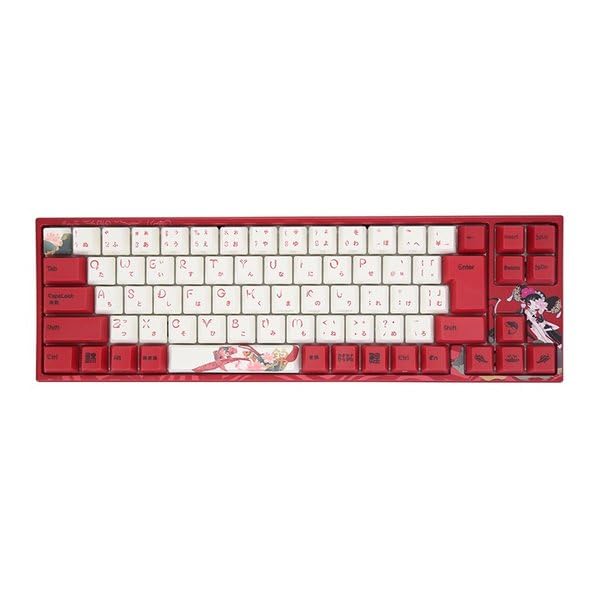
Image: Varmilo Koi 73 JIS Keyboard overview.
2. ძირითადი მახასიათებლები
- Unique Koi Design: Features vibrant koi fish illustrations and a red aesthetic, developed in collaboration with illustrator Li Huan.
- JIS Layout: 73-key Japanese Industrial Standard layout for specific regional input needs.
- Compact 65% Size: Optimizes desk space while retaining essential function and arrow keys.
- Customizable Switches: Offers a choice of Varmilo mechanical electrostatic capacity switches to suit individual typing preferences.
- Cherry-Style Stabilizers: Ensures consistent and stable key presses, especially for larger keys.
- USB კავშირი: Reliable wired connection for stable performance.
3. დაყენების გზამკვლევი
3.1 პაკეტის შიგთავსი
დაწყებამდე, დარწმუნდით, რომ შეფუთვაში ყველა ნივთია:
- Varmilo Koi 73 JIS Keyboard
- USB კაბელი
- მომხმარებლის სახელმძღვანელო (ეს დოკუმენტი)
3.2 კლავიატურის დაკავშირება
To connect your Varmilo Koi 73 keyboard to your computer, follow these steps:
- იპოვეთ USB-C პორტი კლავიატურის უკანა მხარეს.
- Connect one end of the provided USB cable to the keyboard's USB-C port.
- შეაერთეთ USB კაბელის მეორე ბოლო თქვენს კომპიუტერში არსებულ USB პორტთან.
- კლავიატურა ავტომატურად უნდა ამოიცნოს თქვენსმა ოპერაციულმა სისტემამ.
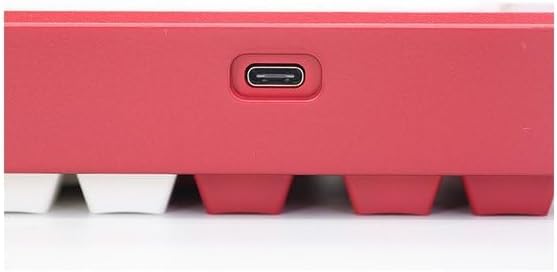
Image: USB-C port for keyboard connection.
3.3 დრაივერის ინსტალაცია (არასავალდებულო)
For advanced customization and optimal performance, it is recommended to install the Varmilo driver software. This software allows you to remap keys, adjust performance settings, and customize lighting effects.
Video: This video demonstrates the driver installation process and software usage for Varmilo keyboards. While it features the Muse65 model, the steps for driver installation and basic software navigation are generally applicable to other Varmilo keyboards like the Koi 73.
Please visit the official Varmilo website for the latest driver downloads specific to your keyboard model. Follow the on-screen instructions during installation.
4. საოპერაციო ინსტრუქციები
4.1 ძირითადი კლავიშების ფუნქციები
The Varmilo Koi 73 keyboard features a standard JIS layout. Most keys function as labeled. For special functions, refer to the combination keys below.
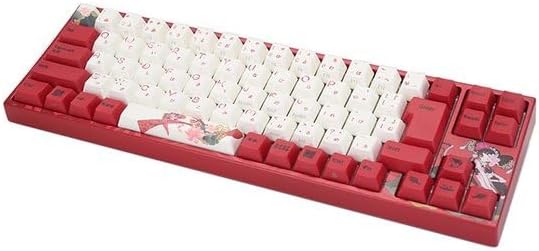
სურათი: მეტიview of the Varmilo Koi 73 JIS Keyboard layout.
4.2 ფუნქციის (Fn) კლავიშების კომბინაციები
Since this is a 73-key layout, some functions are accessed via the Fn key. Hold down the Fn key and press the corresponding key to activate its secondary function. Common Fn combinations include:
- Fn + F1-F12: მულტიმედიური მართვის საშუალებები (მაგ., ხმის სიმძლავრე, დაკვრა/პაუზა).
- Fn + ისრის ღილაკები: Page Up/Down, Home/End (specific to model, refer to keycap legends).
- Fn + Win Key: Windows-ის კლავიშის დაბლოკვა/განბლოკვა.

Image: Left side keys, often used with Fn for additional functions.
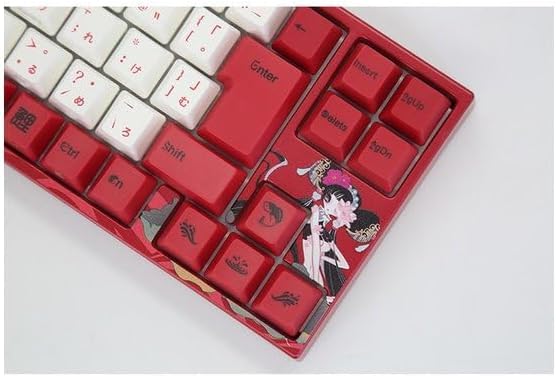
Image: Right side keys, including navigation and utility keys.
4.3 განათების ეფექტები
The Varmilo Koi 73 keyboard supports various RGB lighting effects. You can cycle through different modes and adjust brightness using specific key combinations. Refer to your keyboard's specific keycap legends or the driver software for detailed lighting controls.
Video: This video showcases various RGB lighting effects on a Varmilo keyboard. While the model shown is Muse65, it provides a general idea of the dynamic lighting capabilities available on Varmilo keyboards, including the Koi 73.
5. მოვლა და მოვლა
Proper maintenance ensures the longevity and optimal performance of your Varmilo Koi 73 keyboard.
- კლავიშების გაწმენდა: Gently remove keycaps using a keycap puller. Clean the keycaps with a soft cloth dampგარეცხეთ რბილი საპნითა და წყლით. ხელახლა მიმაგრებამდე დარწმუნდით, რომ ისინი სრულიად მშრალია.
- კლავიატურის კორპუსის გაწმენდა: Use a soft, dry cloth to wipe down the keyboard body. For stubborn dirt, a slightly damp cloth with a small amount of isopropyl alcohol can be used. Avoid excessive moisture.
- მტვრის მოცილება: გასაღებებს შორის მტვრისა და ნარჩენების მოსაშორებლად გამოიყენეთ შეკუმშული ჰაერი.
- მოერიდეთ სითხეებს: დაზიანების თავიდან ასაცილებლად, კლავიატურას სითხეები მოარიდეთ.
- საკაბელო მოვლა: არ მოღუნოთ ან დააჭიროთ USB კაბელს ზედმეტად.
6. Დიაგნოსტიკა
If you encounter issues with your Varmilo Koi 73 keyboard, try the following solutions:
- კლავიატურა არ რეაგირებს:
- დარწმუნდით, რომ USB კაბელი საიმედოდ არის დაკავშირებული როგორც კლავიატურასთან, ასევე კომპიუტერთან.
- სცადეთ კლავიატურის თქვენს კომპიუტერში სხვა USB პორტთან დაკავშირება.
- გადატვირთეთ კომპიუტერი.
- თუ USB ჰაბს იყენებთ, სცადეთ პირდაპირ კომპიუტერთან დაკავშირება.
- გასაღებები არ რეგისტრირდება:
- Check for any debris or foreign objects under the keycaps.
- If specific keys are not working, consider reinstalling the keyboard driver.
- განათების პრობლემები:
- Ensure the keyboard driver is installed and up to date.
- Use the Fn key combinations or driver software to adjust lighting modes and brightness.
- Windows Key Locked:
- დააჭირეთ Fn + Win ღილაკი to toggle the Windows key lock.
If the problem persists, please contact Varmilo customer support for further assistance.
7. სპეციფიკაციები
| ბრენდი | ვარმილო |
| მოდელის ნომერი | VMMA73A039SAKURA |
| კლავიატურის განლაგება | 73-key JIS (Japanese Industrial Standard) |
| დაკავშირება | USB სადენიანი |
| გადამრთველის ტიპი | Mechanical (Linear) |
| თავსებადი მოწყობილობები | ლეპტოპი |
| პროდუქტის ზომები | 34.2 სმ (L) x 34.2 სმ (W) x 5.1 სმ (H) |
| მოყვება კომპონენტები | USB კაბელი |
8. გარანტია და მხარდაჭერა
Varmilo products typically come with a manufacturer's warranty. Please refer to the warranty card included with your product or visit the official Varmilo webსაიტზე დეტალური გარანტიის პირობებისთვის.
For technical support, driver downloads, or further inquiries, please visit the official Varmilo support page or contact their customer service.
Official Varmilo Webსაიტი: www.varmilo.com


