1. შესავალი
This instruction manual provides comprehensive guidance for the DieseRC Smart WiFi Relay Module 1CHx4-TEW. This device allows you to remotely control various electrical appliances and systems via Wi-Fi, Bluetooth, and voice commands. Please read this manual carefully before installation and operation to ensure proper use and safety.
2. პროდუქტი დასრულდაview
The DieseRC Smart WiFi Relay Module is a versatile control unit designed for integration into various smart home and automation projects. It features stable and reliable performance with high reception sensitivity for 2.4 GHz Wi-Fi networks. The module supports multiple control methods, including a dedicated mobile application, voice assistants, and a Bluetooth remote control.
ძირითადი მახასიათებლები:
- უსადენო კავშირი: Supports 2.4 GHz Wi-Fi for remote control via the eWelink app.
- ხმის კონტროლი: თავსებადია Amazon Alexa-სთან და Google Home-თან ხელების გარეშე მუშაობისთვის.
- Bluetooth დისტანციური: Includes a Bluetooth RM2.4G remote control for local operation.
- მოქნილი სიმძლავრის შეყვანა: Operates on DC 5V or DC 7V-48V.
- Passive Output: Features a 10A relay with normally open (NO), common (COM), and normally closed (NC) pins for dry contact output.
- კომპაქტური დიზაინი: Small form factor (55x29x17 mm) for easy integration into electrical boxes.
- მრავალი ოპერაციული რეჟიმი: Configurable for Inching (momentary) or Self-Locking (toggle) modes.
- Scheduling and Timer Functions: Available through the eWelink application.

Image 2.1: The DieseRC Smart WiFi Relay Module (four units shown) alongside its Bluetooth remote control. The remote features four numbered buttons, an 'ALL ON' button, and an 'ALL OFF' button.

Image 2.2: This image illustrates the various control methods for the relay module: APP control via eWelink, voice control with Alexa or Google Assistant, and remote control via 2.4GHz Bluetooth. A detailed view of the module's dimensions (52mm x 30mm x 20mm) is also provided.
3. სპეციფიკაციები
| სპეციფიკაცია | ღირებულება |
|---|---|
| მოდელის ნომერი | EW748 |
| ზომები (L x W x H) | 55 x 29 x 17 მმ (2.2 x 1.1 x 0.7 ინჩი) |
| შეყვანის მოცულობაtage | DC 5V (via USB) or DC 7V-48V |
| სარელეო კონტაქტის რეიტინგი | 10A (AC 250V, DC 30V) |
| ენერგიის მოხმარება | 480 ვატი (მაქს) |
| უკაბელო სტანდარტი | Wi-Fi 2.4 გჰც |
| კონტროლის მეთოდები | eWelink APP, Bluetooth Remote, Voice Control (Alexa/Google Home) |
| ოპერაციული რეჟიმები | Inching (Momentary), Self-Locking (Toggle) |
| მასალა | პლასტიკური |
| სერტიფიცირება | CE |
4. დაყენება და ინსტალაცია
4.1 რელე მოდულის გაყვანილობა
The relay module offers flexible power input options and passive output contacts. Ensure all power is disconnected before performing any wiring.
- დენის შეყვანა: The module can be powered via a Micro USB 5V/0.5A input or directly with DC 7V-48V. Connect the positive (+) and negative (-) terminals accordingly for DC 7V-48V input.
- სარელეო გამომავალი: The module provides dry contact output through three terminals: არა (Normally Open), COM (Common), and NC (Normally Closed). Connect your device's control circuit to these terminals based on your application's requirements.

Image 4.1: This diagram shows the main components and connection points of the relay module. It highlights the Relay Indicator Light, Open Key/Pairing Button, WiFi Network Indicator Light, Input USB 5V/0.5A, and the NO, COM, NC terminals for relay output. Below, an example illustrates connecting the module to a DC 7V-48V power source.

Image 4.2: This image provides wiring examples. The top left shows wiring for a DC device with DC 7V-48V power. The top right shows wiring for a device with 1V-250V AC/DC power. The bottom image illustrates how to make any device an internet device by connecting the module to its control circuit and powering it via USB 5V/0.5A.
4.2 eWelink App Installation
To control the module via Wi-Fi, download and install the eWelink app on your smartphone (Android or iOS).
- დაასკანირეთ ქვემოთ მოცემული QR კოდი ან ეწვიეთ http://app.coolkit.cc/dl.html to download the eWelink app.
- დაარეგისტრირეთ ანგარიში და შედით სისტემაში.

Image 4.3: QR code for downloading the eWelink application.
4.3 Pairing the Module with eWelink
Follow these steps to connect your relay module to the eWelink app:
- Power on the relay module.
- Open the eWelink app and tap the '+' icon to add a device.
- Select the appropriate pairing mode (e.g., Quick Pairing Mode).
- Press and hold the 'Open the key / Pairing button' on the module until the Wi-Fi network indicator light blinks rapidly.
- Follow the on-screen instructions in the eWelink app to complete the pairing process, including entering your Wi-Fi network credentials.
5. ოპერაციული რეჟიმები
The DieseRC Smart WiFi Relay Module supports two primary operating modes: Inching (Momentary) and Self-Locking (Toggle). These modes can be configured within the eWelink app.
5.1 Inching Mode (Momentary)
In Inching mode, the relay will activate for a set duration (e.g., 0.5 to 3600 seconds) after being triggered, and then automatically deactivate. This is suitable for applications like garage door openers or pulse-triggered devices.
5.2 Self-Locking Mode (Toggle)
In Self-Locking mode, the relay acts like a standard on/off switch. One trigger activates the relay, and it remains active until another trigger deactivates it. This is suitable for controlling lights or other devices that require a continuous on/off state.

Image 5.1: This image illustrates the two operation modes: Inching mode, represented by a momentary push button, and Self-Locking mode, represented by a toggle switch.
5.3 Bluetooth დისტანციური მართვა
The included Bluetooth remote control allows for local operation of the relay module. Each button on the remote can be paired to control specific channels or functions (e.g., ALL ON/ALL OFF).
5.4 APP Control (eWelink)
Once paired, you can control the relay module from anywhere using the eWelink app. The app allows you to:
- Turn devices on/off.
- დააყენეთ გრაფიკები და ტაიმერები.
- ოჯახის წევრებთან ერთად კონტროლის გაზიარება.
- Configure operating modes (Inching/Self-Locking).
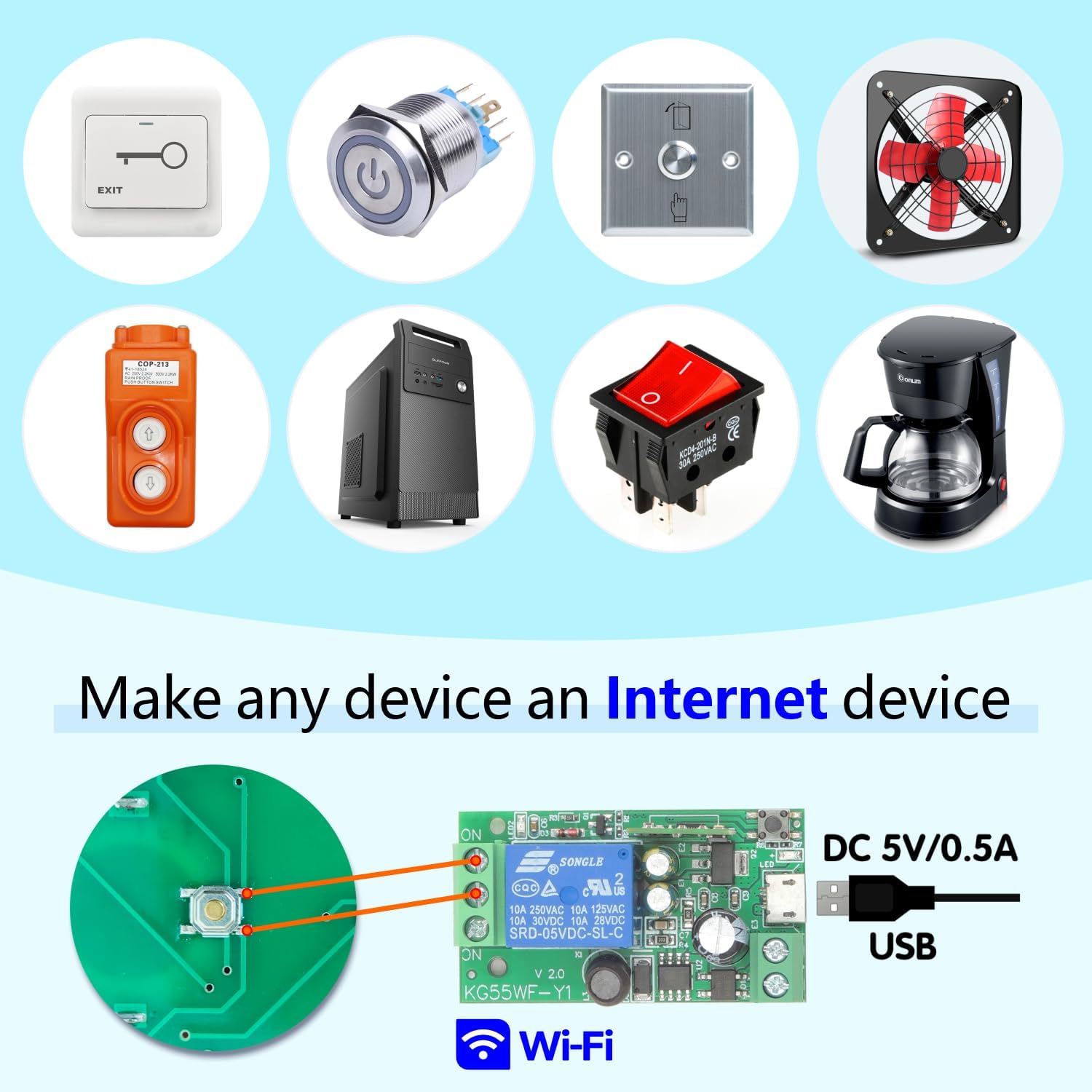
Image 5.2: This image shows a smartphone displaying the eWelink app interface, controlling a device remotely. The text indicates 'No distance limit', emphasizing the global control capability.
5.5 Voice Control (Alexa/Google Home)
Integrate the relay module with Amazon Alexa or Google Home for convenient voice control. After linking your eWelink account to your voice assistant, you can use commands such as:
- „ალექსა, შუქი აანთე.“
- „ჰეი Google, გამორთე ვენტილატორი.“

Image 5.3: This image demonstrates voice control functionality, showing Amazon Alexa and Google Home devices. A speech bubble indicates a command: "Alexa, open the light!"
6. აპლიკაციები
The DieseRC Smart WiFi Relay Module can be used in a variety of settings, including homes, farms, factories, offices, and laboratories. Common applications include:
- Garage door opener systems.
- Electric locks and electromagnetic doors.
- განათების კონტროლი.
- Controlling contactors.
- DIY remote control switches for various devices.
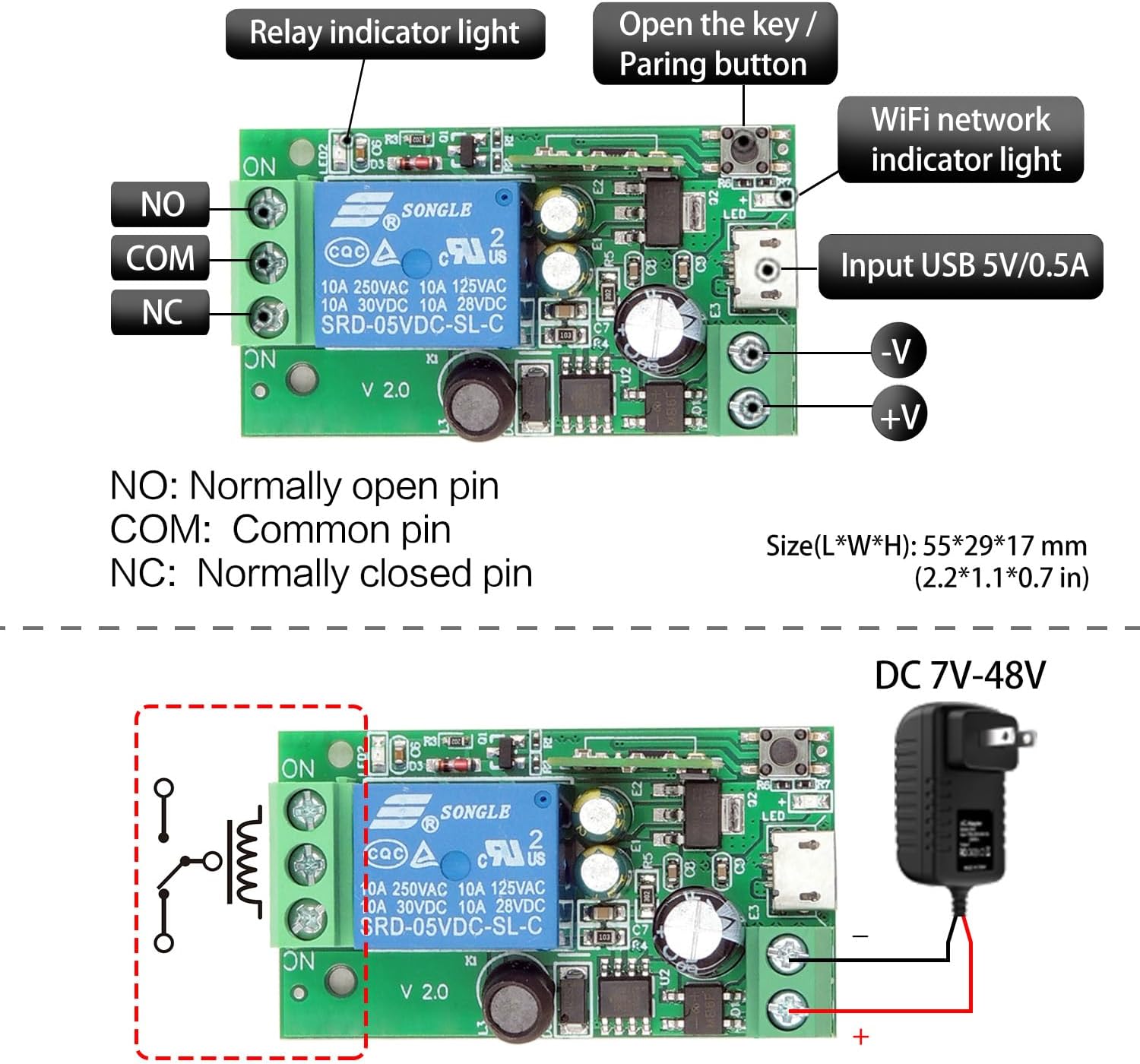
Image 6.1: This image displays various devices that can be controlled by the relay module, including an exit button, a power button, a fan, a coffee maker, and other switches, illustrating its versatility in making any device an internet-connected device.
7. მოვლა
To ensure the longevity and optimal performance of your DieseRC Smart WiFi Relay Module, follow these maintenance guidelines:
- Დაიცავი სისუფთავე: Regularly clean the module and its surroundings to prevent dust accumulation, which can affect performance.
- სათანადო ვენტილაცია: Ensure the module is installed in a location with adequate ventilation to prevent overheating.
- მოერიდეთ ტენიანობას: Protect the module from water and excessive humidity.
- უსაფრთხო კავშირები: პერიოდულად შეამოწმეთ ყველა სადენიანი შეერთება, რათა დარწმუნდეთ, რომ ისინი უსაფრთხოა და კოროზიისგან თავისუფალია.
- Firmware განახლებები: Check the eWelink app for any available firmware updates for the module and install them to benefit from improvements and bug fixes.
8. Დიაგნოსტიკა
If you encounter issues with your DieseRC Smart WiFi Relay Module, refer to the following troubleshooting tips:
- მოდული არ არის ჩართული:
- Verify that the power supply (DC 5V USB or DC 7V-48V) is correctly connected and providing the specified voltage.
- Check for any loose wiring or damaged cables.
- Wi-Fi-თან დაკავშირება შეუძლებელია:
- Ensure your Wi-Fi network is 2.4 GHz. The module does not support 5 GHz networks.
- შეამოწმეთ თქვენი Wi-Fi პაროლის სიზუსტე.
- Make sure the module is within range of your Wi-Fi router.
- Try resetting the module and re-attempting the pairing process.
- App Control Not Responding:
- შეამოწმეთ თქვენი ინტერნეტ კავშირი თქვენს სმარტფონზე.
- Ensure the module's Wi-Fi indicator light is solid, indicating a stable connection.
- Restart the eWelink app.
- ხმოვანი კონტროლი არ მუშაობს:
- Confirm that your eWelink account is correctly linked to Amazon Alexa or Google Home.
- Check the device name in the eWelink app and ensure it matches the name used in voice commands.
- Verify that your voice assistant device is connected to the internet.
- Bluetooth Remote Not Working:
- Ensure the remote's battery is functional.
- Confirm the remote is paired with the module according to the pairing instructions (if applicable, usually automatic for included remotes).
- Ensure the remote is within effective range of the module.
9. გარანტია და მხარდაჭერა
DieseRC is committed to providing quality products and customer satisfaction. For any technical support or warranty inquiries, please contact DieseRC customer service through the platform where you purchased the product or refer to the official DieseRC webსაიტი საკონტაქტო ინფორმაციისთვის.
Please retain your proof of purchase for warranty claims. Specific warranty terms and conditions may vary by region and retailer.


