1. პროდუქტი დასრულდაview
The SJOYBRING Wireless Double Din Carplay & Android Auto Car Stereo is a 7-inch full HD capacitive touchscreen unit designed to enhance your in-car entertainment and connectivity. It features wireless Apple CarPlay and Android Auto, Bluetooth, 4-channel RCA output, high power output, subwoofer support, and includes a backup camera.
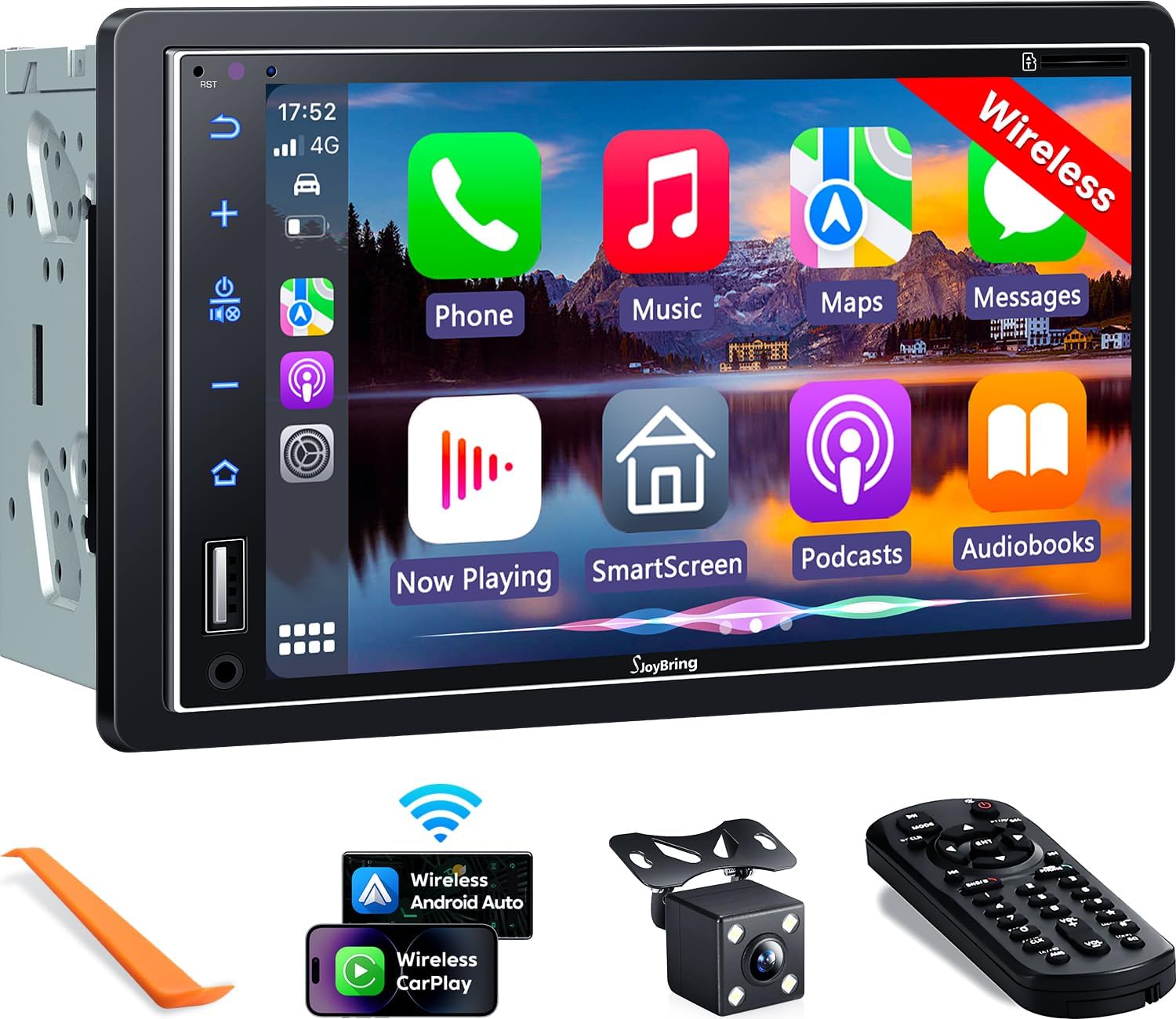
სურათი 1.1: წინა view of the SJOYBRING car stereo displaying the CarPlay interface.
2. პაკეტის შიგთავსი
დარწმუნდით, რომ ქვემოთ ჩამოთვლილი ყველა ნივთი შედის თქვენს პაკეტში:
- Head Unit (Car Stereo)
- ჩარჩო
- უკანა View კამერა
- სარეზერვო კამერის კაბელი
- გაყვანილობა აღკაზმულობა
- დისტანციური მართვა
- მომხმარებლის სახელმძღვანელო (ეს დოკუმენტი)
- სამონტაჟო ფრჩხილები
- დემონტაჟის ინსტრუმენტი
- ხრახნები (სხვადასხვა ზომის)

Image 2.1: Visual representation of the SJOYBRING car stereo package contents.
3. დაყენება და ინსტალაცია
3.1 მნიშვნელოვანი რჩევები ინსტალაციისთვის
- The standard size of this unit is 170mm x 97mm. Ensure your vehicle's dashboard opening matches this size.
- If the stereo size does not fit your dash, an additional suitable dash kit may be required (not included).
- Read this instruction manual thoroughly before beginning installation.
- Some vehicles may require additional accessories for installation, such as a wire harness adapter and a radio antenna adapter specific to your car model (not included).
3.2 გაყვანილობის დიაგრამა
სათანადო გაყვანილობისთვის იხილეთ შემდეგი დიაგრამა. არასწორმა გაყვანილობამ შეიძლება დააზიანოს მოწყობილობა ან თქვენი ავტომობილის ელექტრო სისტემა.

Image 3.1: ISO Standard Double DIN wiring and dimension diagram.
3.3 უკანა View კამერა კავშირი
The included HD night vision rear view camera provides a 170° ultra-wide viewing angle and is waterproof. Connect the camera as shown in the diagram below. The display will automatically switch to the rear view როდესაც მანქანა უკუსვლით გადადის.

Image 3.2: One-step wiring connection for the rear camera.
4. საოპერაციო ინსტრუქციები
4.1 უსადენო Apple CarPlay და Android Auto
Connect your smartphone to the car stereo via Bluetooth and Wi-Fi for wireless Apple CarPlay or Android Auto functionality. This allows access to navigation, music, messages, and other phone features directly on the stereo's screen. Voice control via Siri or Google Assistant is supported for safer operation.
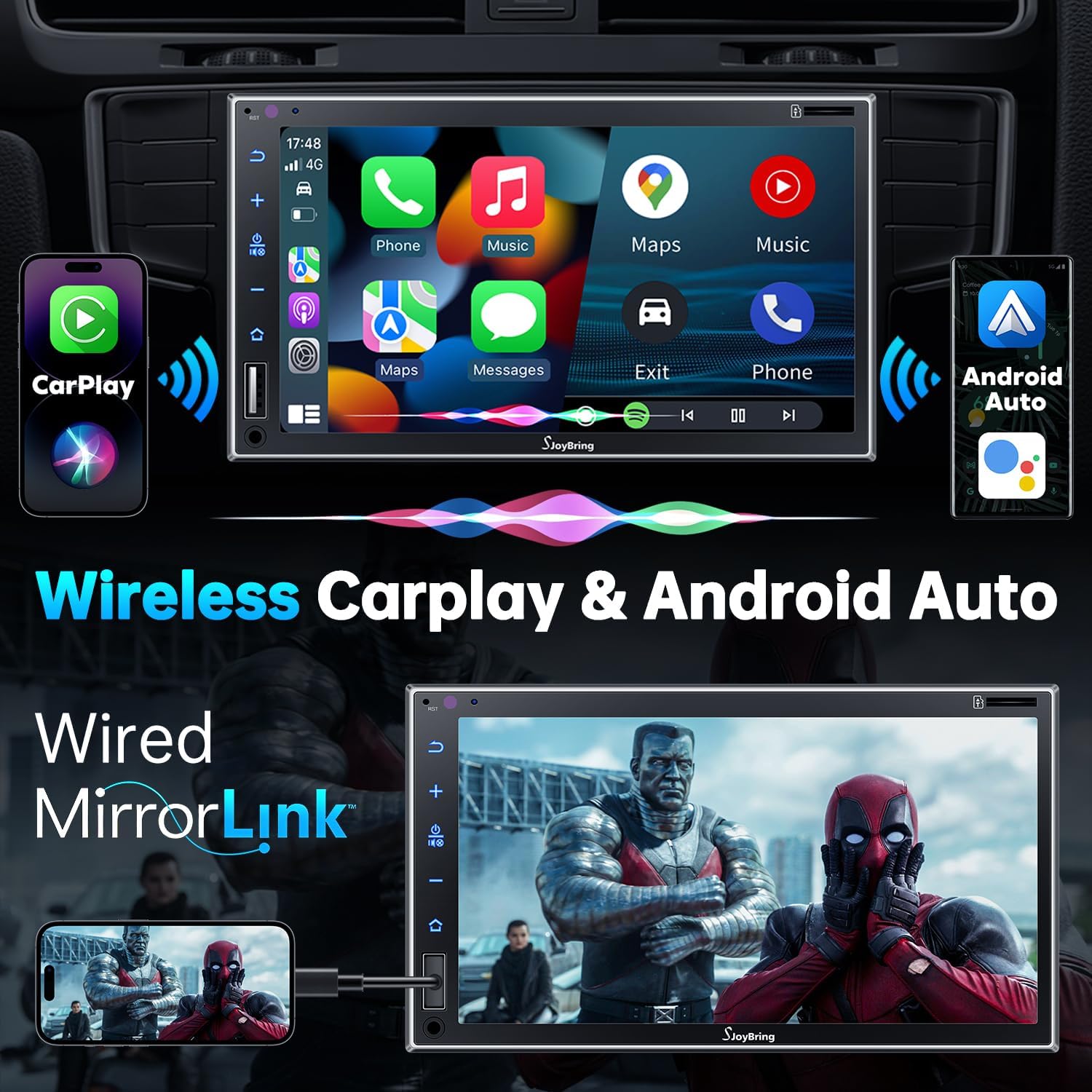
Image 4.1: Wireless Apple CarPlay and Android Auto in operation.
4.2 Wired Mirror Link
The unit supports wired mirror link for both iOS and Android phones (no version limit). Use a USB connection to mirror your smartphone's screen, displaying apps like Google Maps, Spotify, or YouTube on the 7-inch HD touchscreen.

Image 4.2: Wired Mirror Link functionality.
4.3 აუდიო ფუნქციები
- 4.2-Channel Audio Output: Features 4 channels of pre-amplifier (RCA) for front right, front left, rear right, and rear left speakers, allowing for precise sound adjustment.
- საბვუფერის გამომავალი: Includes two high RMS power subwoofer outputs for enhanced bass effects.
- 10-ბენდი EQ: An integrated 10-band audio equalizer allows customization of the music effect.

Image 4.3: 4.2 Channel Audio Output diagram.

Image 4.4: 10-Band Equalizer interface.
4.4 Bluetooth კავშირი
Utilizes the latest Bluetooth technology with an independent Bluetooth module and antenna for a strong and stable connection, ensuring clear calls and uninterrupted music playback.

Image 4.5: Latest Bluetooth technology for stable connection.
4.5 საჭის მართვა (SWC)
The unit supports steering wheel controls, allowing you to manage audio functions without taking your hands off the wheel. Refer to the wiring diagram for SWC connections and the unit's settings for programming.

Image 4.6: Steering Wheel Control setup interface.
4.6 FM & AM Radio
Access FM radio frequencies from 87.5 to 107.9 MHz and AM radio frequencies from 530 to 1710 KHz. The unit allows for station presets and scanning.

Image 4.7: FM & AM Radio interface.
5. მოვლა
To ensure the longevity and optimal performance of your SJOYBRING car stereo, follow these maintenance guidelines:
- ეკრანის წმენდა: სენსორული ეკრანის ნაზად გასაწმენდად გამოიყენეთ რბილი, უბუშტო ქსოვილი. ჯიუტი ლაქების შემთხვევაში, ოდნავ გაწმინდეთ.ampგაწმინდეთ ქსოვილი წყლით ან ეკრანისთვის უსაფრთხო საწმენდი საშუალებით. მოერიდეთ უხეში ქიმიკატების ან აბრაზიული მასალების გამოყენებას.
- მტვრის მოცილება: Regularly clean dust from the unit's vents and buttons using a soft brush or compressed air.
- ტემპერატურის კონტროლი: მოერიდეთ მოწყობილობის ექსტრემალურ ტემპერატურაზე დიდი ხნის განმავლობაში ზემოქმედებას.
- გაყვანილობის შემოწმება: Periodically check all wiring connections to ensure they are secure and free from damage.
6. Დიაგნოსტიკა
If you encounter issues with your SJOYBRING car stereo, refer to the following common troubleshooting steps:
- ძალა არ არის: Check all power connections, including the ACC (accessory) and 12V constant power wires. Ensure the vehicle's fuse for the stereo is not blown.
- ხმა არ არის: Verify speaker connections are correct. Check the volume level and ensure the mute function is not activated. Confirm the audio source is properly selected.
- Bluetooth კავშირის პრობლემები: Ensure Bluetooth is enabled on both the stereo and your smartphone. Delete previous pairings and attempt to re-pair. Move closer to the unit if interference is suspected.
- CarPlay/Android Auto არ უკავშირდება: For wireless connection, ensure both Bluetooth and Wi-Fi are active on your phone and the stereo. For wired mirror link, try a different USB cable or port.
- უკანა ხედვის კამერა არ ჩანს: Check the camera's power and video signal connections. Ensure the reverse gear trigger wire is correctly connected to the vehicle's reversing light circuit.
- სენსორული ეკრანი არ რეაგირებს: სცადეთ მოწყობილობის გადატვირთვა. თუ პრობლემა კვლავ მოგვარდება, დაუკავშირდით მომხმარებელთა მხარდაჭერის სამსახურს.
If these steps do not resolve the issue, please contact SJOYBRING customer support for further assistance.
7. სპეციფიკაციები
| მოდელის ნომერი | 7825d65e-cac9-443c-8d2b-17a564819d91 |
| ჩვენება | 7 Inch Full HD Capacitive Touchscreen (1024 x 600 resolution) |
| დაკავშირება | Wireless Apple CarPlay, Wireless Android Auto, Bluetooth, Wired Mirror Link (USB) |
| აუდიო გამოყვანის რეჟიმი | სტერეო |
| გარემომცველი ხმის არხის კონფიგურაცია | 4 Channel (RCA Pre-amp შედეგები) |
| საბვუფერის გამომავალი | 2 High RMS Power Outputs |
| ექვალაიზერი | 10-ზოლიანი EQ |
| მაქსიმალური სიმძლავრე | 60W x 4 |
| სამუშაო ტომიtage | DC 12V |
| რადიოსიხშირეები | FM: 87.5~107.9MHz, AM: 530~1710KHz |
| ვიდეოს კოდირება | H.264, H.265/HEVC, MPEG-4 |
| ნივთის წონა | 2.7 ფუნტი |
| პაკეტის ზომები | 9.25 x 6.3 x 5.94 ინჩი |
| მწარმოებელი | სჯოიბრინგი |
8. გარანტია და მხარდაჭერა
8.1 ინფორმაცია გარანტიის შესახებ
For specific warranty details regarding your SJOYBRING car stereo, please refer to the warranty card included in your product packaging or contact SJOYBRING customer support directly. Warranty terms typically cover manufacturing defects for a specified period from the date of purchase.
8.2 მომხმარებელთა მხარდაჭერა
If you have any questions, require technical assistance, or need to report an issue, please contact SJOYBRING customer support. Contact information can usually be found on the manufacturer's official webსაიტზე ან პროდუქტის შეფუთვაზე.
Manufacturer: SJOYBRING
For the most up-to-date support information, visit the official SJOYBRING store on Amazon: SJOYBRING Store


