1. შესავალი
This manual provides detailed instructions for the installation, operation, and maintenance of your Kinkeni TYZGTH16A-D1RF Zigbee Smart Temperature Sensor Controller. This device allows for remote monitoring and control of electrical equipment based on ambient temperature, integrating seamlessly with the Tuya Smart Life application.
ძირითადი მახასიათებლები:
- დისტანციური ჩართვა/გამორთვის მართვა: Operate electrical equipment from anywhere, with automatic activation/deactivation based on a preset temperature range.
- Mobile APP Control: Monitor real-time temperature and energy consumption via the Tuya Smart Life application.
- ხმის კონტროლი: Compatible with Amazon Alexa and Google Home Assistant for convenient voice commands.
- მოწყობილობის გაზიარება: Share control of the device with family members.
- Record Monitoring: View historical temperature data and export it via email.
2. უსაფრთხოების ინფორმაცია
გაფრთხილება: ელექტრული დარტყმის საშიშროება
- Always turn off the circuit breaker before performing any wiring or installation.
- დარწმუნდით, რომ ყველა შეერთება უსაფრთხოა და შეესაბამება ადგილობრივ ელექტრო კოდებს.
- Do not exceed the maximum load current of 16A to prevent overload.
- This device requires a Tuya Zigbee Hub for operation.
- Keep the smart device close to your router for a strong Wi-Fi connection.
3. პაკეტის შიგთავსი
- 1 x Kinkeni 16A Zigbee Smart Switch
- 1 x 1m Temperature Sensor Cable (Waterproof Probe)
- 1 x ინსტრუქციის სახელმძღვანელო
4. პროდუქტი დასრულდაview

Figure 1: Kinkeni TYZGTH16A-D1RF Zigbee Smart Temperature Sensor Controller with waterproof probe and Tuya app interface.

Figure 2: The Kinkeni Smart Temperature Sensor Controller can be used in various applications such as controlling warmers, fish tanks, dehumidifiers, lamps, hatcheries, animal feeding systems, farms, storage facilities, greenhouses, and automatic watering systems.
5. სპეციფიკაციები
| პარამეტრი | ღირებულება |
|---|---|
| მოდელის ნომერი | TYZGTH16A-D1RF |
| შეყვანის მოცულობაtage | AC85V-250V 50/60 ჰერცი |
| მაქსიმალური დენი | 16A |
| მაქსიმალური დატვირთვა | 3000 W |
| უკაბელო სტანდარტი | Zigbee (Requires Tuya Zigbee Hub) |
| უსაფრთხოების მექანიზმი | WPA-PSK/WPA2-PSK |
| კონტროლი APP | Tuya Smart/SmartLife (Android, iOS) |
| ოპერაციული ტემპერატურა | -20°C-დან 70°C-მდე |
| საზომი დიაპაზონი | -40°C-დან 125°C-მდე |
| მასალა | აკრილონიტრილის ბუტადიენ სტირინი (ABS) |
| პროდუქტის ზომები | 3.8 x 1.8 x 1.2 ინჩი |
| ნივთის წონა | 1.6 უნცია |
6. დაყენების ინსტრუქციები
6.1. Tools Used for Installation
- გაყვანილობის ტერმინალი
- ელექტრო ლენტი
- Electric Pen (Voltage Tester)
- მავთულის სტრიპტიზიორი
6.2. Wiring the Smart Switch Module
- Გამორთვა: Before starting any wiring, locate your circuit breaker and turn off the power to the circuit you will be working on. Verify power is off using an electric pen or voltage ტესტერი.
- მავთულის დაკავშირება: Connect the Live wire (L), Neutral wire (N), and Earth wire (optional) to the corresponding input terminals on the smart switch module.
- მოწყობილობების დაკავშირება: Connect the Live (L1, L2) and Neutral (N) wires from your electrical equipment (e.g., heater, humidifier) to the output terminals of the smart switch module. The module supports two devices.
- Connect Probe: Plug the temperature sensor probe into the designated port on the module.
- ენერგიის აღდგენა: Once all connections are secure, turn the circuit breaker back on.
Video 1: This video provides a step-by-step guide on the installation and wiring of a temperature and humidity smart switch module, including connecting to the mobile application. It shows the tools required, safety precautions, wiring connections, and the app pairing process.
6.3. App Connection and Pairing
- ჩამოტვირთეთ აპლიკაცია: Download the Tuya Smart or Smart Life app from your smartphone's app store (available for Android and iOS).
- რეგისტრაცია/შესვლა: შექმენით ანგარიში ან შედით თქვენს არსებულ ანგარიშზე.
- მოწყობილობის დამატება: Ensure your phone is connected to a 2.4GHz Wi-Fi network. Open the app, tap '+' or 'Add Device'.
- დაწყვილების რეჟიმი: Long press the reset button on the smart switch module until the blue indicator light flashes rapidly, indicating it's in network configuration mode.
- აღმოაჩინეთ მოწყობილობა: In the app, select 'Gateway & Zigbee Gateway' and then 'Add Device'. The app will search for nearby devices.
- დაადასტურეთ კავშირი: Once the device is found and added, you can rename it and assign it to a room.
- Probe Detection: The app will detect temperature and humidity data only if the probe is correctly plugged in and the switch is enabled in the app.
7. საოპერაციო ინსტრუქციები
7.1. Remote Monitoring and Control
The Tuya Smart Life app allows you to monitor temperature and humidity in real-time and control connected devices remotely.
- რეალურ დროში მონაცემები: View current temperature and humidity readings directly from the app.
- Ისტორიული თარიღი: Access graphs and records of temperature and humidity changes over time (daily, monthly, yearly). This data can be exported.
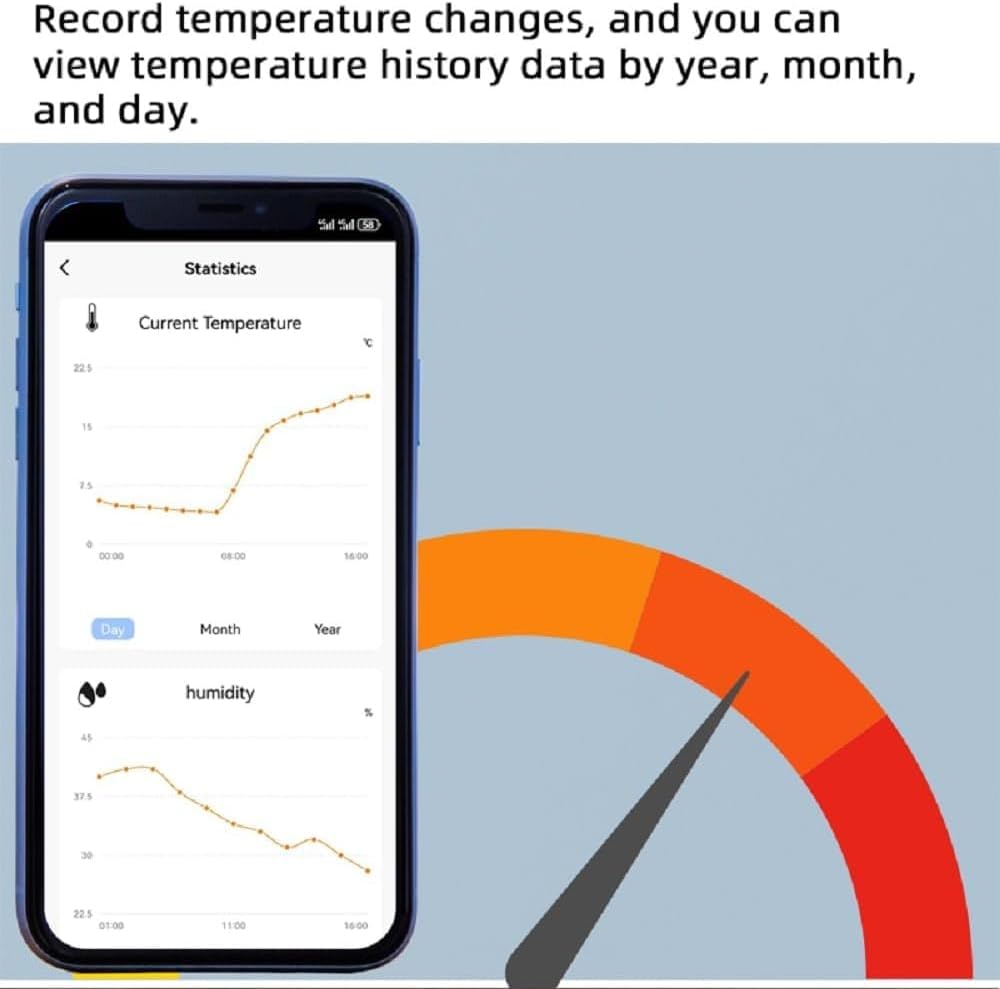
Figure 3: The Tuya Smart Life app displays historical temperature and humidity data, allowing users to track environmental changes over time.

Figure 4: The Tuya Smart Life app enables remote control of devices, allowing users to switch them on or off and monitor conditions from anywhere.
7.2. Temperature and Humidity Control Modes
The controller supports both manual and automatic control modes. You can switch between Centigrade (°C) and Fahrenheit (°F) units.
- მექანიკური რეჟიმი: Manually switch connected devices on or off via the app.
- ავტომატური რეჟიმი: Set temperature or humidity thresholds for automatic operation. For example, you can configure a fan heater to turn on when the temperature drops below a certain point and turn off when it rises above another.

სურათი 5: მაგample of automatic control in a greenhouse, where the smart switch activates heating or cooling based on predefined temperature thresholds.
7.3. Timer and Countdown Functions
Schedule your devices to turn on or off at specific times or after a set duration.
- განრიგი: Set daily or weekly schedules for device operation.
- უკუნთვლა: Use the countdown feature to automatically turn devices off after a specified period.
7.4. ხმის კონტროლი
Integrate your smart switch with voice assistants for hands-free control.
- Amazon Alexa: Use voice commands to control your devices.
- Google Home ასისტენტი: Control devices using Google Assistant voice commands.
7.5. Device Sharing and Group Control
Enhance convenience by sharing access and grouping devices.
- მოწყობილობის გაზიარება: Share control of your smart switch with family members through the Tuya Smart Life app, allowing multiple users to manage the device without re-setup.
- ჯგუფის კონტროლი: Create groups of smart devices to control them simultaneously with a single command or automation.

Figure 6: The Zigbee Smart Switch integrates into a broader smart home ecosystem, enabling control of various appliances and environmental monitoring.
8. Დიაგნოსტიკა
- მოწყობილობა არ უკავშირდება აპს:
- დარწმუნდით, რომ თქვენი ტელეფონი დაკავშირებულია 2.4 GHz Wi-Fi ქსელთან.
- Verify the blue indicator light on the module is flashing rapidly, indicating pairing mode. If not, long press the reset button.
- Keep the smart device close to your Wi-Fi router during the pairing process.
- Check that your Wi-Fi router's name (SSID) uses only English letters and numbers.
- Temperature/Humidity Data Not Displaying:
- Ensure the temperature sensor probe is securely plugged into the module.
- Verify that the switch for the probe is enabled within the Tuya Smart Life app.
- Automatic Control Not Working (e.g., 'Temp Lower Than' action):
- Double-check your automation settings in the Tuya Smart Life app. Ensure that both the condition (e.g., temperature lower than X) and the corresponding action (e.g., turn on device) are correctly configured and enabled.
- Confirm that the temperature probe is accurately reporting data to the app.
- მოწყობილობა არ პასუხობს:
- Check the power supply to the smart switch module.
- Verify your Wi-Fi and Zigbee hub connection.
- Try restarting the module by briefly disconnecting and reconnecting its power.
9. მოვლა
- დასუფთავება: მოწყობილობის გასაწმენდად გამოიყენეთ რბილი, მშრალი ქსოვილი. არ გამოიყენოთ აბრაზიული საწმენდები ან გამხსნელები.
- გარემო: მოერიდეთ მოწყობილობის ექსტრემალურ ტემპერატურას, ტენიანობას ან მზის პირდაპირ სხივებს.
- Firmware განახლებები: Regularly check the Tuya Smart Life app for any available firmware updates to ensure optimal performance and security.
10. გარანტია და მხარდაჭერა
Specific warranty information and customer support details are not available in the provided product data. Please refer to the product packaging or contact the retailer/manufacturer directly for warranty claims and technical assistance.